
Campaigns and audiences
Send an approved WhatsApp template to an audience segment, track delivery, reads and replies, and attribute Shopify orders and revenue to each campaign.
A campaign sends one approved WhatsApp template to many customers at once, such as an order update to everyone affected by a delay, or an offer to customers who opted in to marketing. Robylon tracks each campaign’s delivery, reads, replies, cost and, with Shopify connected, the revenue it brought in.
Open campaigns from Outbound → Campaigns in the left navigation. Audiences are under Outbound → Audiences.
What does the campaigns page show?
The top of the page totals all campaigns:
- Revenue: order value attributed to campaigns, and the number of attributed orders.
- Cost: what the messages cost.
- ROI: revenue divided by total cost.
- Messages Sent: with how many were delivered and read.
Below it, each campaign shows its Start Date, Audience size, Revenue, Cost, ROI, and Sent, Delivered, Read and Replied. Filter the list by Channel and Status.
How do I send a campaign?
Start a campaign
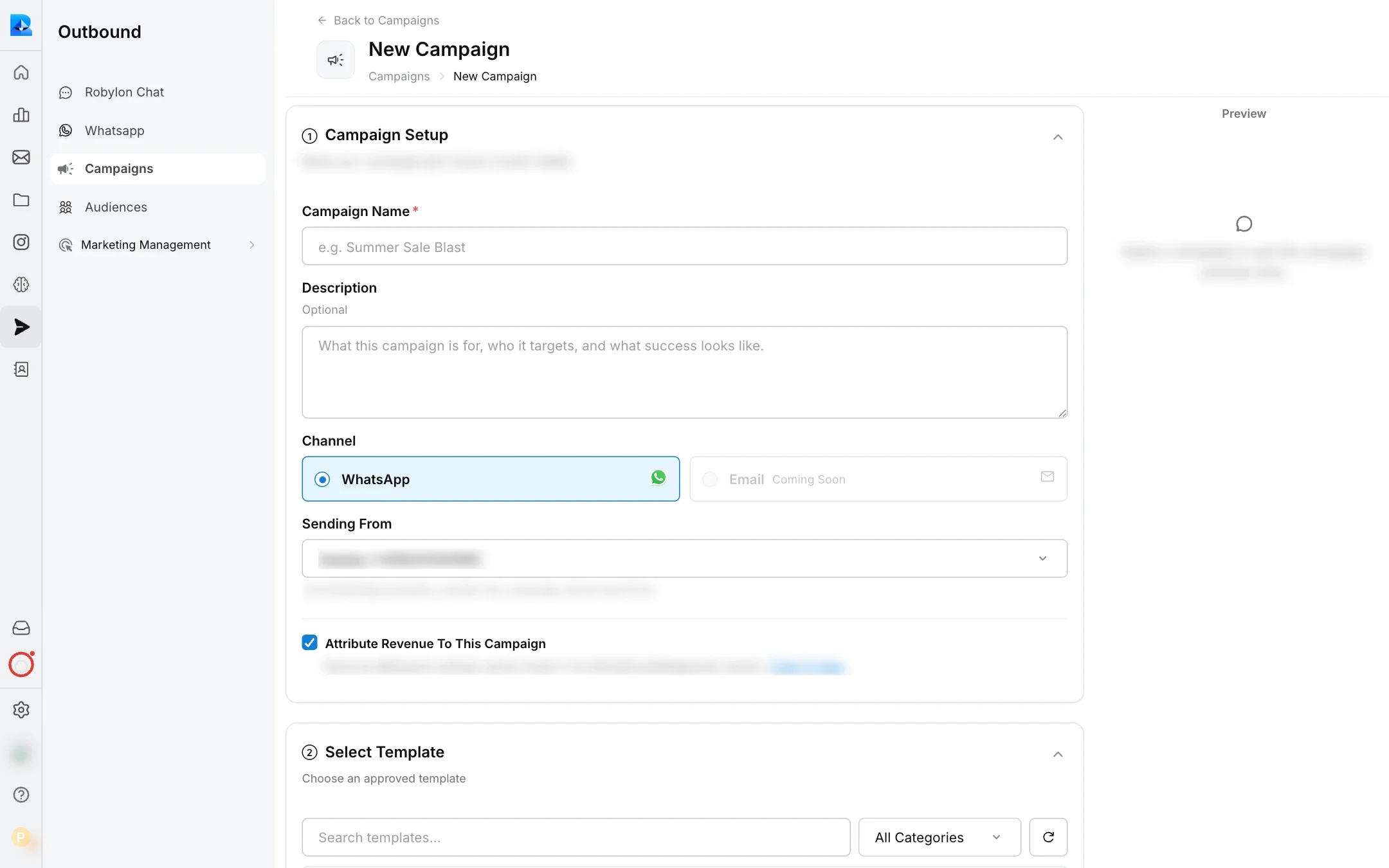
In Outbound → Campaigns, click New Campaign.
Set it up
Enter a Campaign Name and an optional Description. Choose the Channel (WhatsApp; Email is coming soon) and the WhatsApp number to send from in Sending From. Leave Attribute Revenue To This Campaign on to count orders it drives.
Select a template
Choose an approved template. Filter by category if you have many. If the template has a backup, it is used automatically when the main template is rated Red, paused or disabled. Backups are set on the template’s page. See WhatsApp templates.
Select the audience
Choose All marketing-opted customers or one of your saved audience segments.
Map the variables
Under Map Variables, choose the audience field that holds the Recipient Phone Number, then map each template variable to a data field so every message is personalised. If the template has a backup, map the backup’s variables too: map all of them, or leave them all empty. With the backup left empty, the campaign does not fall back to it.
Add UTM tracking (optional)
If the template has link buttons, turn on UTM Tracking. UTM Source and UTM Medium come from your WhatsApp outbound configuration and cannot be edited here. Enter a UTM Campaign name that is not already in use. The Link Preview shows the final link. UTM tags let you trace orders back to the campaign in your analytics.
Choose schedule and delivery
Under Schedule & Delivery, set When To Send: Send Immediately or Schedule For Later with a date and time. Set the Sending Speed: Full Speed sends as fast as your messaging tier allows, and Gradual limits sending to a Rate Per Hour (500, 1000, 2000 or 5000). Turn on Sending Hours to send only within set hours on each day of the week.
Test and launch
Use Send A Test Message to send the template to a phone number with example values. When it looks right, click Launch, or Schedule if you chose a later time.
How do I build an audience?
An audience, or segment, is a reusable list of customers to send campaigns to. Build it from your Shopify store data or a CSV upload.
Start a segment
In Outbound → Audiences, click New Segment.
Name it
Enter a Name and an optional Description.
Choose the source
Under Audience Source, pick a Source type. For External database, choose Shopify as the Database, then the store Account; customers come from that store. For CSV, upload a file of contacts; the form links to a sample CSV that shows the format.
Add conditions
For a Shopify source, add rules to narrow the list, grouped with AND and OR logic (up to 2 groups). Click Match Audience to see the Estimated Audience, the number of customers who match.
Save
Click Save Segment. It appears in the list with its source, number of contacts, the campaigns that used it, and when it was last matched.
What should a CSV audience file contain?
- A
phone_numbercolumn is required. Include the country code, such as+919876543210. Spaces, dashes and brackets are removed, and a+is added if missing. nameandemailcolumns are optional.- Any other columns are kept, so you can use them to fill template variables in a campaign.
Rows with a phone number that is not valid are skipped. If no row is valid, the upload is rejected.
How is revenue attributed to a campaign?
Leave Attribute Revenue To This Campaign on in the campaign setup to credit Shopify orders to it, or turn it off to leave the campaign out of revenue reporting.
To set the lookback period and the engagement that counts, see Revenue attribution.