
Teammates and seat types
Invite teammates to your Robylon workspace, understand roles, seats, channels and assignment limits, and follow an invite from Invite Sent to Active.
Teammates are the people who log in to Robylon: the agents who answer customers, and the supervisors and admins who manage them. Every teammate has a role, a seat, the channels they work on and an assignment limit. This page explains each of those first, then how to invite someone and what happens to the invite afterwards.
Open it from Settings → Team → Teammates.
Team setup order
Set up your team in this order. Each step uses what the one before it created.
- Invite your teammates on this page, with their role, seat and channels.
- Add business hours: the working-hours schedules and holiday calendars your groups will use.
- Create groups: which teammates handle which channels, during which hours, and how conversations are shared out among them.
- Turn on assignment and set assignment limits: how many conversations each agent can hold at once.
- Add queues: which group a conversation goes to when the AI agent hands it over.
- Set up agent statuses: which statuses still receive new work, and which pause it.
- Choose notifications: who is told about new assignments and customer replies.
What you set for each teammate
Role
The role decides what a teammate can see and which settings they can change. There are four roles.
| Role | What they can do |
|---|---|
| Agent | Works on conversations that have been handed to your team: the ones assigned to them and unassigned ones. Cannot change settings or manage teammates. |
| Supervisor | Sees all conversations and tickets, assigns them, and creates shared inbox views. Can invite, resend invites to and deactivate Agents, but no one else. Cannot change settings. |
| Admin | Sees all conversations and tickets and changes settings. Can invite and edit every teammate except Super Admins. Cannot see billing or API keys. |
| Super Admin | Everything, including billing, API keys and the Contacts list. Can invite and edit every teammate. |
New teammates are Agents unless you choose another role. Give each person the smallest role that lets them do their job.
Seat
The seat decides which inbox features a teammate can use. A teammate on a Lite seat can log in and look around but cannot reply to customers. Basic, Advanced and Expert seats are paid, and each adds features to the one before it. See seat types below.
Channels
The channels a teammate works on. Robylon only assigns them conversations from these channels.
Groups
The groups the teammate belongs to. Robylon picks agents from the group a conversation is routed to, so a teammate in no group is only assigned conversations by hand.
Assignment limit
The most conversations Robylon will assign to this teammate at the same time. There are separate limits for chats, emails and reviews. When an agent reaches a limit, new conversations of that kind go to someone else in the group until one of theirs closes. A limit of 0 means Robylon never assigns them that kind of conversation automatically. Set the default for everyone on Assignment limits.
Invite a teammate
Click Invite user, fill in their details, choose their seat, role and channels, and send the invite. The teammate gets an email to activate their account.
Open Teammates
Go to Settings → Team → Teammates and click Invite user in the top right.
Add basic details
Enter the teammate’s Name and Email (both required). You can also add a Phone Number, a short Bio and an avatar (under 100 KB). Click Next.
Configure seat, role and channels
Choose a Seat License and a Role, then pick the channels this teammate can work on in Select Channels. Optionally add them to one or more groups with Add to Group.
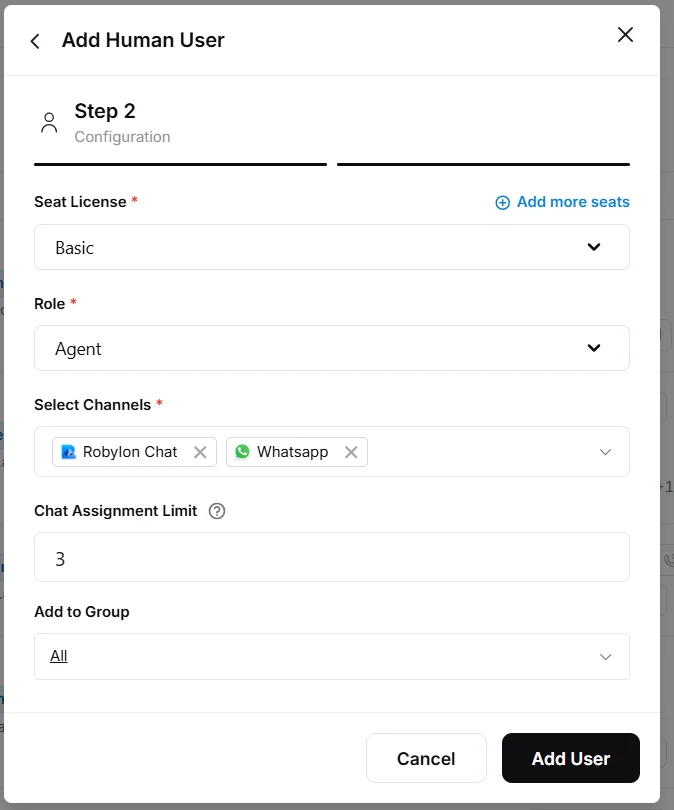
Send the invite
Set the teammate’s Assignment Limit, then click Add User. The teammate appears in the list as Invite Sent.
After you invite
Teammate statuses
Each teammate’s row shows one of five statuses. Filter the list by Status to see everyone in one of them.
| Status | What it means | What you can do |
|---|---|---|
| Invite Sent | The invite email is on its way or waiting to be accepted. | Resend invite, or edit their role, seat, channels and groups. |
| Active | The teammate has accepted and can log in. | Edit their details, or Deactivate them. |
| Needs Review | Someone signed up with your company email domain and is waiting for approval. | Approve them, or reject them. |
| Rejected | A sign-up that was turned down. | Nothing further is needed. |
| Deactivated | A former teammate. Their past conversations stay in the inbox. | Reactivate them. |
Accepting an invite
The invite email names the person who invited them, your workspace and their role. Its link is valid for 3 days. It takes a new teammate to a page where they create their login with Google or an email and password. A teammate who already uses Robylon in another workspace goes straight to your workspace.
The teammate can also accept without the email: signing in at app.robylon.ai with the invited email address accepts the invite and makes them Active.
Resend an invite
Open the three-dot menu on the teammate’s row and choose Resend invite. Each resend emails a new link, valid for another 3 days. Resend when a link has expired or the email cannot be found.
Supervisors can resend invites to Agents only, and Admins can resend to everyone except Super Admins.
If the invite email does not arrive
Ask the teammate to search their inbox, and their spam or junk folder, for “Robylon” or the name of the person who invited them. Company email filters sometimes hold new senders, so their IT team may need to release it. If it still cannot be found, resend the invite, or ask them to sign in at app.robylon.ai with the invited address.
A pending invite cannot be cancelled. If you invited the wrong address, leave it to expire and invite the right one.
Teammates who sign up themselves
A person who signs up at Robylon with an email address on your company’s domain joins your workspace as an Agent with the status Needs Review, instead of creating a new workspace. Your Super Admins get an email asking them to review it. An Admin or Super Admin opens the teammate from the list and clicks Approve, or rejects them. The person is emailed either way.
An approved sign-up starts on a Lite seat. Give them a paid seat before they need to reply to customers.
Seats while an invite is pending
An invite to a paid seat reserves that seat as soon as you send it, so it counts as used until the invite is accepted. If every seat of that type is taken, the invite cannot be sent. Add a seat first, or invite on a Lite seat.
Seat types
Every teammate holds one seat, and different teammates can be on different seats. Pick each teammate’s seat by what they do:
| Seat | Give it to |
|---|---|
| Lite | People who only log in to view. They cannot reply to conversations, and assignment limits do not apply to them. |
| Basic | Agents who handle chat and email in the shared inbox. |
| Advanced | Agents who also need availability statuses, bulk actions, macros and AI Copilot. |
| Expert | Agents who also handle voice calls or need full reporting. |
Compare the paid seats feature by feature
| Feature | Basic | Advanced | Expert |
|---|---|---|---|
| Channels | |||
| Chat: Chatbot (Robylon Chat), WhatsApp, Instagram, Facebook, Twilio Text (SMS), YouTube comments, and chats from a connected Intercom, Freshchat or SalesIQ | Yes | Yes | Yes |
| Email and ticket management | Yes | Yes | Yes |
| Voice: phone calls | No | No | Yes |
| Voice: WhatsApp calls | No | No | Yes |
| Handling conversations | |||
| Shared inbox | Yes | Yes | Yes |
| Full conversation history | Yes | Yes | Yes |
| Canned responses (shared library) | Yes | Yes | Yes |
| Internal notes and @mentions | Yes | Yes | Yes |
| Transfer to other agents | Yes | Yes | Yes |
| Set agent availability | No | Yes | Yes |
| Bulk actions (change status, assign, reply, run a macro) | No | Yes | Yes |
| Macros | No | Yes | Yes |
| AI assistance | |||
| AI Copilot: response suggestions | Not included | Included | Included |
| AI Copilot: conversation summaries | Not included | Included | Included |
| Fix grammar and spelling | No | Yes | Yes |
| Tone and language adjustment | No | Yes | Yes |
| Reporting | |||
| Basic analytics | Yes | Yes | Yes |
| All pre-built reports | No | No | Yes |
| Full reporting and real-time dashboard | No | No | Yes |
AI Copilot availability also depends on your plan and usage. See AI Copilot.
Add seats or change a seat
Click Manage at the top of the Teammates page to see, for each seat type, how many seats are used, how many are available and how many are paid, and to add seats. To move a teammate to another seat, open the three-dot menu on their row, choose Edit, change Seat License and save.
The counter at the top of the page shows Used seats in total and for Basic, Advanced and Expert, so you can see at a glance whether an unused seat is available before you invite someone.
Edit or deactivate a teammate
Open the three-dot menu at the end of the teammate’s row and choose Edit or Deactivate. Edit lets you change their details, seat, role, channels and groups. Deactivating frees their paid seat and marks them Deactivated. Their past conversations stay in the inbox. Reassign their open conversations before you deactivate them.
You can filter the list by Role, Seat, Channels and Status, and search by name or email. The Limit column shows how many chats, emails and reviews each teammate can hold at once.
Related guides
- Put teammates into groups so conversations are routed to the right team.
- Set how many conversations each agent can hold with assignment limits.
- Set up business hours and agent statuses.