
Agent assist
Turn on the AI features that help your human agents in the inbox: AI Copilot, AI Chat Summary, Voice Call Translation, Grammar Checks and Sentiment Analysis.
Agent assist is the set of AI features that help your human agents handle conversations: answers from your Knowledge Base, conversation summaries, voice call translation, grammar checks and sentiment analysis. They support your team in the inbox. None of them change how your AI agents reply to customers.
Open them from Settings → AI Intelligence → AI Behavior.
Which agent assist features can I turn on?
The page has two groups. AI Assist holds the features your human agents use while they work. Conversation Insights holds sentiment analysis.
| Feature | What it does |
|---|---|
| AI Copilot | Lets human agents get answers directly from the Knowledge Base. |
| AI Chat Summary | Writes a concise summary of the conversation so a human agent can pick it up quickly. |
| Voice Call Translation | Translates voice calls in real time, so agents can support customers in other languages. |
| Grammar Checks | Checks grammar in canned responses and agent replies. |
| Sentiment Analysis | Shows a sentiment score, the lowest sentiment point and actionable recommendations for each chat. |
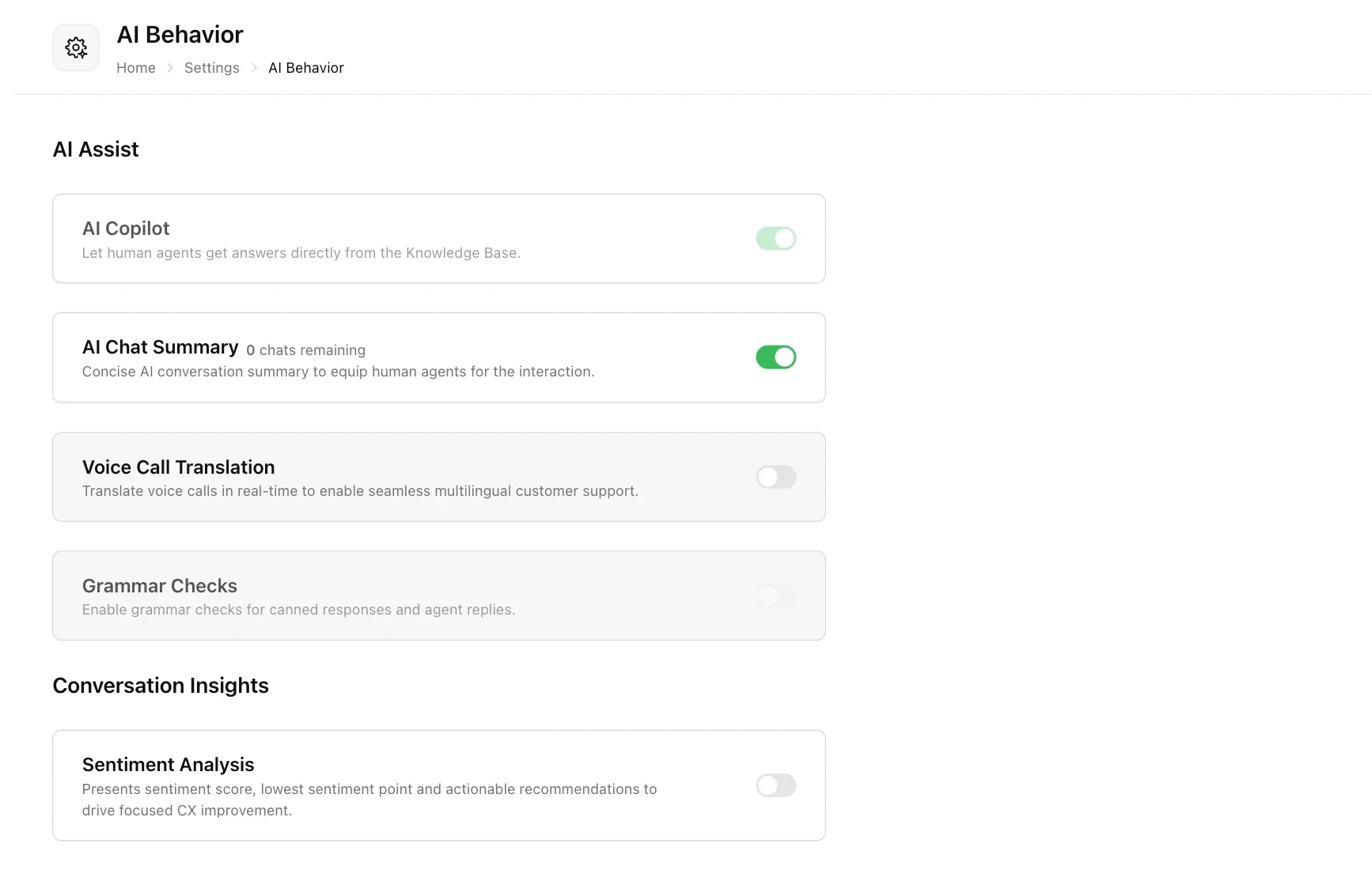
How do I turn a feature on or off?
Click the toggle next to the feature in Settings → AI Intelligence → AI Behavior. A green toggle means the feature is on.
Some toggles are greyed out and cannot be changed from this page:
- AI Copilot and Grammar Checks are available on request: email support@robylon.ai.
- Sentiment Analysis is greyed out when it is not available on your plan. See how sentiment analysis becomes available.
For questions about what your plan includes, contact your account manager or support@robylon.ai.
What does AI Copilot do?
AI Copilot is an assistant for human agents inside the inbox. An agent asks it a question from the conversation’s side panel and it answers from your Knowledge Base. It never replies to the customer.
To use it in a conversation and to see which seats can use it, read AI Copilot.
What does AI Chat Summary do?
AI Chat Summary writes a short summary of a conversation, so a human agent who picks it up can see what has happened without reading the whole transcript. Availability depends on your plan and usage. For details, contact your account manager.
To read a summary inside a conversation, see how to read a quick summary.
How does Voice Call Translation work?
Voice Call Translation translates voice calls in real time so your team can support customers who speak other languages. Availability depends on your plan and usage. For details, contact your account manager.
Once it is on, a Select Language list appears under the toggle. It shows the languages translation is configured for. As its tooltip explains, transcript and call logs translation will be available in the configured languages. When you review a call, you can switch the transcript and call logs between the default language and those configured languages.
The list is read-only on this page. To change the configured languages, email support@robylon.ai.
What do Grammar Checks check?
Grammar Checks check the grammar of what your human agents write: both canned responses and the replies agents type in conversations.
Grammar Checks are available on request: email support@robylon.ai.
What does Sentiment Analysis show?
Sentiment Analysis scores how customers felt in each chat and shows a sentiment score, the lowest sentiment point and actionable recommendations. It sits under Conversation Insights on the same page. For what each score means and when it is available, read Sentiment analysis.
Where do I change how my AI agents talk?
Not here. Tone, languages and standing instructions for your AI agents come from your AI persona. What each agent does comes from its own instructions: see custom agents.