Agent statuses
Understand the default agent statuses, create custom ones like Break or Training, and change your own status so you only receive work when you are ready.
An agent status tells Robylon whether an agent can take new work right now. Only agents in a status that is Available to Reply get chats, tickets and calls assigned to them, so statuses are how agents step away without conversations piling up on them.
Manage statuses from Settings → Team → Agent Statuses. Agents change their own status from their profile menu.
Default statuses
Every workspace has three statuses that you cannot edit or delete:
| Status | Available to reply | Meaning |
|---|---|---|
| Online | Yes | Working and ready to take conversations. |
| Offline | No | Logged out or not working. |
| Unavailable | No | Logged in, but not taking new conversations. |
Add a custom status
Click + Add New Status, give it a name and icon, choose whether agents in it can be assigned work, and save.
Open Agent Statuses
Go to Settings → Team → Agent Statuses and click + Add New Status.
Name it and pick an icon
Under Status Name & Icon, enter a clear name, for example Break, and choose an icon.
Choose availability
Turn Available to Reply on if agents in this status should still be assigned chats, tickets and calls. Leave it off for breaks and meetings.
Save
Click Save. The status appears in every agent’s status picker.
You can edit or delete custom statuses from the pencil and bin icons on their row.
Change your own status
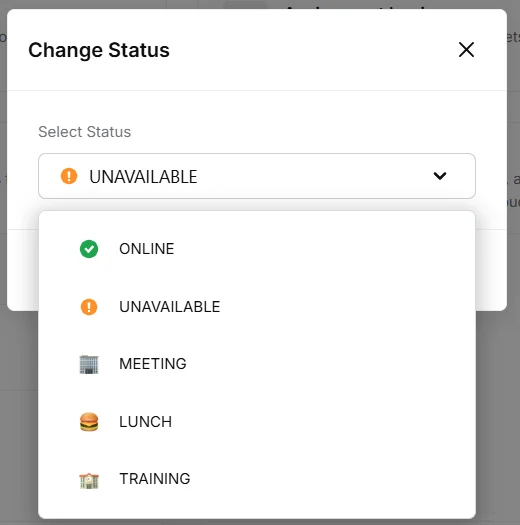
Click your avatar at the bottom of the left sidebar, then click Change next to your current status, and pick a new one.