
Canned responses
Create saved replies with a short command, and insert them into any conversation by typing / and the command in the inbox composer.
Canned responses are saved replies for questions your team answers again and again. An agent types / and a short command in the composer, and the full reply is inserted, ready to edit and send. They keep answers fast and consistent.
Open it from Settings → Inbox & Productivity → Canned Responses.
How do I create a canned response?
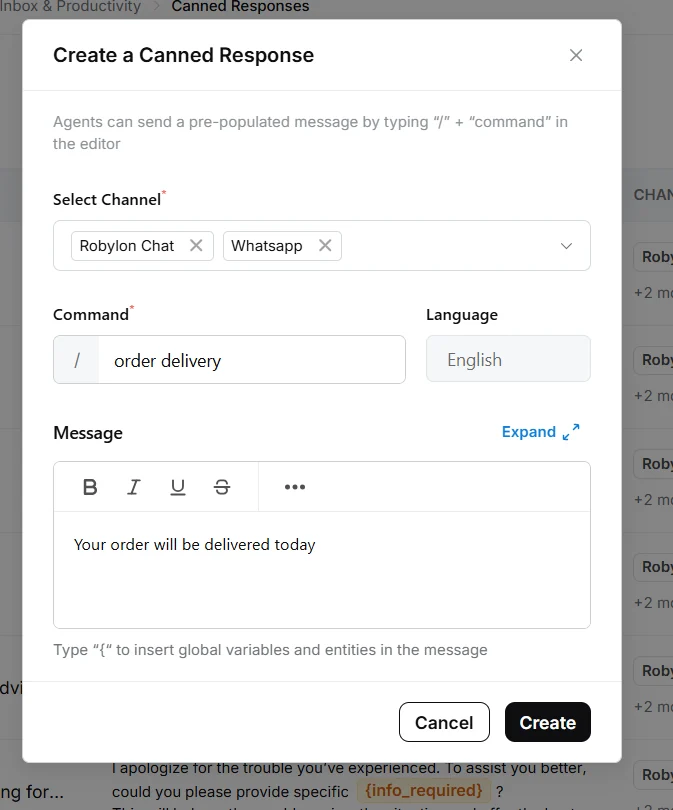
Click Add Canned Response, choose the channels, set a command and write the message, then click Create.
Open Canned Responses
Go to Settings → Inbox & Productivity → Canned Responses and click Add Canned Response.
Choose channels
In Select Channel, choose the channels where agents can use it, for example Robylon Chat and WhatsApp.
Set the command
Enter the Command agents will type after /, for example order delivery. Keep it short and easy to guess.
Write the message
Write the reply under Message. You can format it, and type { to insert variables and entities, such as the customer’s name, that are filled in when the message is sent. Click Expand for a larger editor.
Create it
Click Create. Agents can use it straight away.
How do agents use a canned response?
In the composer, type / followed by the command, for example /order delivery, and pick the response from the list. The message is inserted into the composer, where the agent can edit it before clicking Send.
Only canned responses set up for the conversation’s channel are offered.
Can canned responses be used in other languages?
Yes. When translation is on for your workspace, each agent sees canned responses in their own Conversation language, and the reply is translated into the customer’s language when it is sent.
- Search and insert in your language: when an agent types
/, commands and messages are shown in their conversation language, if the canned response has a version in that language. Otherwise the original is shown. - Send in the customer’s language: with Send messages in Human Agent’s language on, Robylon detects the customer’s language and translates the reply into it before sending. If both languages are the same, it is sent as written.
For example, an agent whose conversation language is Hindi searches and edits the Hindi version of a canned response, and a customer writing in English receives it in English.
Agents set their conversation language from their avatar at the bottom of the left sidebar, then Account Settings → Preferences → Conversation language. See Languages.
How do I keep canned responses tidy?
The Canned Responses list shows each response’s command, message, channels and who last updated it. Filter it by Channels to review one channel at a time.
Review canned responses whenever a policy changes. An out-of-date saved reply spreads the wrong answer quickly. If Grammar Checks is on in Settings → AI Intelligence → AI Behavior, canned responses are checked for grammar too.
Canned responses or macros?
A canned response inserts one message the agent can edit. A macro runs several actions at once, such as sending a message, updating a property and closing the conversation.