
Assignment limits and logic
Turn human assignment on, set how many chats and emails each agent can hold at once, and understand how Robylon picks which agent gets the next conversation.
When an AI agent hands a conversation to your team, Robylon assigns it to a human agent automatically. Assignment limits cap how many open conversations each agent holds at once, so work is spread fairly and nobody is overloaded.
Open limits from Settings → Team → Assignment Limit. The assignment logic itself (manual, round robin or balanced) is set per group in Settings → Team → Groups.
Turn on assignment to humans
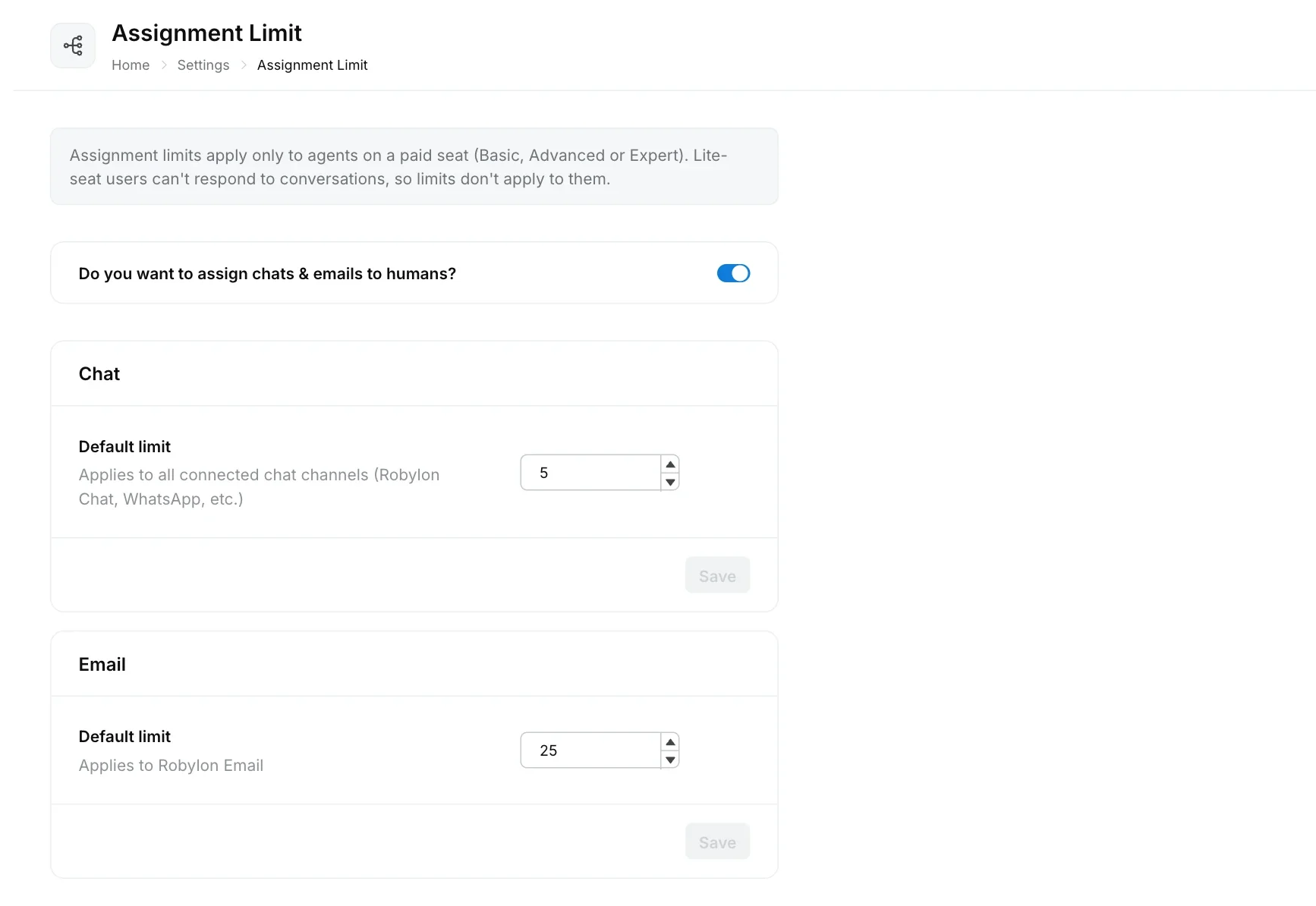
Turn on Do you want to assign chats & emails to humans? at the top of the Assignment Limit page. When it is off, conversations handed over to humans are not assigned automatically. They wait unassigned in the inbox for an agent to pick them up.
Set the default limit
Enter a number in Default limit under Chat and under Email, then click Save in that section.
| Section | Applies to |
|---|---|
| Chat | Chatbot (Robylon Chat), WhatsApp, Instagram, Facebook, Twilio Text (SMS), YouTube comments, and chats from a connected Intercom, Freshchat or SalesIQ |
| Robylon Email |
The limit is the maximum number of conversations an agent can hold at the same time. When an agent reaches it, Robylon stops assigning new conversations to them until one is closed or moved to a status that does not count. Which statuses count is set per group, in Statuses counted toward limit (see Groups).
Limits only apply to agents on a paid seat (Basic, Advanced or Expert). Lite teammates cannot reply to conversations, so they are never assigned any.
Set a different limit for one agent
A limit set on an individual teammate always wins over the default. The Limit column on the Teammates page shows each teammate’s current limits for Chat, Email and Reviews.
To give one teammate a different limit, open their Edit form in Settings → Team → Teammates. When you save a new default here, you can choose to apply it to every agent, which replaces their individual limits with the new default.
How workflows hand conversations to your team
A workflow’s Handover to human step sends the conversation to your team, and the rules on this page decide which agent gets it. See Queues.
How Robylon chooses an agent
For each conversation waiting for a human, Robylon:
- Finds the queue the conversation belongs to, which names the target group.
- Checks the group’s working hours. Outside them, the group’s out-of-office settings decide whether it is assigned.
- Looks at agents in that group whose status is available to reply and who are below their limit.
- Picks one agent using the group’s assignment logic:
- Manual: nobody is picked automatically. Agents or supervisors assign it from the inbox.
- Round Robin: the next agent in turn.
- Balanced: the agent with the fewest active tickets.
Queues with a higher priority are served first, and within a queue, conversations are assigned in the order they arrived.
If no agent is available, the conversation waits in the queue and the customer receives the group’s Agent unavailability message, if you set one.
Voice calls
Voice handovers to a human are set up in the voice agent’s call settings, not here. See call settings.