
Insights
See why AI conversations were handed to a human and why customers gave a low CSAT rating, grouped into reasons and weekly suggestions for what to fix, from Robylon's built-in evaluations.
Insights tells you why conversations went wrong and what to fix. Robylon’s built-in evaluations read every handed-over and low-rated conversation, tag each one with a reason, and once a week group the fixes into short suggestions you can act on.
Open it from Analytics & Insights → Insights.
What Insights shows
Default Insights has four widgets, two for chat and two for email. Chat covers every channel in the Chat group, including WhatsApp.
| Widget | What it explains |
|---|---|
| Chat Human Handover Insights | Why each chat handed over to a human agent left the AI, and the fix that would have kept it automated. |
| Chat CSAT Insights | Why chats were rated 1, 2 or 3, split into chats the AI closed and chats a human closed. |
| Email Human Handover Insights | The same as chat handover, for email tickets. |
| Email CSAT Insights | The same as chat CSAT, for email tickets. |
Each widget shows how many conversations fall under each reason and each fix type for the date range you choose. Open a reason to read the conversations behind it. A share based on fewer than 10 conversations is flagged, so you do not act on a handful of cases.
Voice calls are not covered.
Reasons and fix types
Every conversation is tagged with one reason and one kind of fix.
Handover reasons: Answer not known by the AI, AI was asked to hand over in this scenario, Customer asked for a human, Miscellaneous.
Reasons for a low rating when the AI closed the conversation: AI’s answer did not help the customer, AI passed the task back to the customer, AI did not hand the customer to an agent, AI could not complete the task itself, Nothing went wrong with the AI’s handling, Miscellaneous.
Reasons for a low rating when a human closed the conversation: Agent took too long to respond, Agent did not resolve the issue, Agent resolved it but handled it poorly, Nothing went wrong, Miscellaneous.
| Fixes for the AI | Fixes for your team |
|---|---|
| Knowledge base | Guidance and coaching |
| Prompt and configuration | Agent tooling and context |
| Tools and integrations | Staffing and routing |
| Others | Others |
Weekly suggestions
Once your week ends, Robylon groups similar fixes into suggestions: a short title, a one or two sentence recommendation, and how many conversations it would have helped. Each widget gets up to 25 suggestions a week. Weeks start on Monday in your workspace’s timezone.
Reasons are added every hour as conversations close. Suggestions refresh once a week, after the week ends, so the current week’s suggestions appear the following Monday.
Turn Insights on
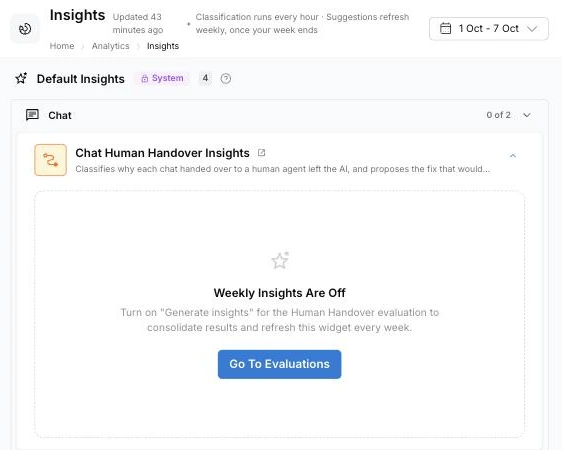
Each widget is fed by a built-in evaluation in Settings → AI Intelligence → Evaluations. A widget that shows Weekly Insights Are Off needs its evaluation switched on: click Go To Evaluations, open the evaluation and turn on both switches.
- Auto-Run This Evaluation tags new conversations with reasons every hour.
- Generate Insights On This Evaluation builds the weekly suggestions.
The built-in evaluations, and so Insights, are available on request: email support@robylon.ai. See System evaluations.