
Tools
Turn your APIs, forms and connected apps into tools your AI agents can call, and control how their inputs are filled.
Tools let an AI agent do things, not just talk: look up an order, update a ticket, add a row to a sheet. An agent decides when to call a tool from the tool’s description, fills in the inputs from the conversation, and uses the result in its reply.
A tool wraps an API, a form, a connector action or a workflow step, and tells the agent when to use it.
Open them from Settings → Data & Developer → Tools.
What a tool is
A tool is an action an AI agent can decide to take. Each tool has:
| Field | What it is for |
|---|---|
| Tool Name | A clear name, for example get_order_status. |
| LLM Description | When the agent should use the tool, written for the AI. This is the most important field: the agent decides whether to call the tool from this description. |
| Tool Inputs | The values the tool needs, each with a description. The agent fills them from the conversation, or you set them to a fixed value or a variable. |
| Capture Response | Fields from the response to save into variables, each with a Path, for example response.username, and a Save to Variable. |
| Tool Timeout in seconds | How long to wait for a response before treating the call as failed, from 2 to 120 seconds. |
| Retry & Timeout | Whether to retry failed requests automatically, and how. See how retries work. |
A good LLM description says when to use the tool and when not to: “Use this when the customer asks where their order is and you have an order ID. Do not use it for returns.”
Create a tool
Open Tools
Go to Settings → Data & Developer → Tools and click Create Tool.
Pick a starting point
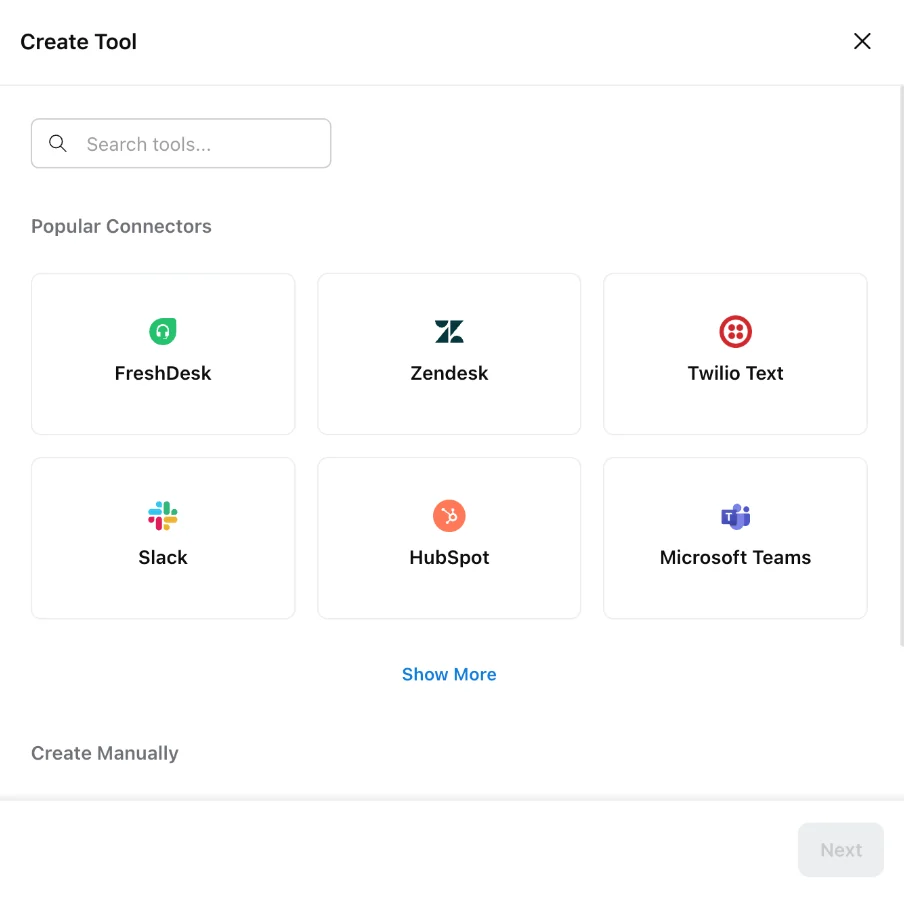
Choose a connector under Popular Connectors, or under Create Manually choose APIs or Forms. Click Next.
Choose what the tool runs
For APIs, select one of your saved APIs. For a connector, connect the account you want the tool to use.
Describe the tool
Enter the Tool Name and LLM Description, describe each of the Tool Inputs, add any Capture Response fields, and set the timeout and Retry & Timeout settings. Then save the tool.
Add it to an agent
Open an AI agent, click Add Tool under Tools Available, and pick the tool. Then publish the agent.
Saving a tool updates it straight away for every agent that already uses it. There is no separate publish step for the tool itself.
Connectors that need no API
Popular Connectors in Create Tool are FreshDesk, Zendesk, Twilio Text, Slack, HubSpot and Microsoft Teams, plus Google Sheets under Show More. When you pick one, Robylon asks you to connect an account (“Connect an account to use with this tool”) and then lets you pick one of that app’s actions under Select Action Template.
Tool types
The Tool Type filter in the Tools list groups tools by where they come from:
- Manual tools: built from your APIs or forms.
- Connector tools: built from a connector (FreshDesk, Zendesk, Twilio Text, Slack, HubSpot, Microsoft Teams or Google Sheets), listed under MCP Server.
- Workflow step tools: created from a workflow step, so an agent can jump into that part of a workflow. See step tools. Robylon also creates one automatically for each sub-agent, named
handover_to_..., which is how the triage agent routes to it.
Step tools
A step tool turns a block in a workflow into a tool. When an AI agent calls it, the workflow runs from that block onwards, so the agent can hand off to steps you have already built, for example creating a return.
Create it from the workflow, not from the Tools page:
Open the block
Open the workflow and click the block you want the agent to start from.
Convert it to a tool
In the block’s details, click the menu at the top right and choose Convert to Tool (“Convert this step into a tool so the AI Agent can begin automation from this point”).
Name and describe it
Give the tool a name and a description of when the agent should use it, set its inputs, and click Save Tool.
The step tool then appears in the Tools list, and you can add it to an agent under Tools Available. To change it, open the same block and edit the Convert to Tool form; the Tools list only links you there with Go to Step.
How inputs get their values
Each input takes its value from one of three places:
- AI agent: the agent extracts the value from the conversation. If the customer writes “Where is order 12345?”, the agent fills
order_idwith12345. - Constant value: a fixed value you set, for example a store ID.
- Global variables: a variable already set in the conversation, for example the customer’s email.
Describe every AI-filled input clearly (“The order number, 6 to 8 digits, without the # sign”), because the agent uses the description to find the right value.