WISMO: meaning, cost and automation on every channel
WISMO ("where is my order?") is about one in five support requests in e-commerce. This guide sizes the problem, shows the notifications that prevent it, maps every tracking status to the right reply, and sets up an AI agent that answers it on chat, email, phone, WhatsApp and social DMs, with October 2026 costs.
Key takeaways
- Stop WISMO before it starts: turn on Shopify's Shipping confirmation, Shipping update, Out for delivery and Delivered emails, and add delay alerts, so customers hear about a late parcel from you before they write in.
- Give an AI agent the real answer: connect your store and your carrier tracking (ClickPost or your own tracking API), so it reads each order's live status instead of sending a tracking FAQ link.
- Write a reply for every tracking status, from in transit and delayed to split shipments, pre-orders and parcels marked delivered that never arrived.
- Run one agent on every channel: Robylon answers WISMO on chat, email, phone, WhatsApp, Instagram and Facebook, on its own or inside the helpdesk your team already uses.
- Send high-value missing parcels, second-time askers and suspicious claims to a person, with the order already checked.
- At 5,000 chat and email WISMO conversations a month, Robylon's credits come to about $1,000, against $3,960 to $7,800 on tools that bill per resolution or per outcome (October 2026 list prices).
WISMO tickets (“Where is my order?”) are the support version of a kid in the back seat asking “are we there yet?” every five minutes. Except you have thousands of them, they all paid you, and they reach you everywhere, like the relative who texts, then calls, then emails to ask if you got the text.
This guide covers seven things:
- Sizing your WISMO problem in five minutes: how many tickets you really get and what they cost you each month.
- Stopping a big share before they’re written, with five notifications most stores only half set up.
- Answering every tracking status the right way, with a reply map that includes split shipments, pre-orders and “delivered but not here”.
- Setting up an AI agent that answers WISMO on chat, email, phone, WhatsApp and social DMs from live order and carrier data, in 10 steps with screenshots.
- Deciding which cases still go to a person, so nothing awkward slips through.
- Pricing automation at normal and peak volume before you talk to a single vendor.
- Getting ready for Black Friday with a six-point checklist.
WISMO meaning and scope
WISMO means “Where is my order?”. Support teams use it as the label for every inbound contact about an order’s status, location or delivery date, whatever words the customer uses.
Customers rarely type the phrase itself. They write “it’s been a week”, “tracking hasn’t moved since Friday”, “it says delivered but nothing’s here” or “when does my pre-order ship?”. Your team, and any AI agent you use, should treat all of these as the same request. So before you count WISMO tickets or automate them, agree with your team on what belongs in the group and what doesn’t:
| Counts as WISMO | Doesn’t count as WISMO |
|---|---|
| “Where is my order?” and “Can I get my tracking number?” | Wrong size, damaged item or missing part (a fulfilment or returns issue) |
| “Tracking hasn’t updated in four days” | “Where is my refund?” (WISMR, below) |
| “It says delivered, but nothing’s here” | Billing, discount codes and payment errors |
| “I only got one of my two parcels” | Product questions before purchase |
| “When will my pre-order ship?” | Address changes after the parcel is delivered |
WISMO and WISMR
WISMR means “Where is my refund?”. It follows the same pattern after a return, so the same agent can often answer both, but it lives in a different system (your returns and payments tools) and has its own policy. Count them separately so you can see which one is growing. For the returns side, see our guide to returns and refunds automation on Shopify.
WISMO calls, tickets and chats
A WISMO call, a WISMO ticket and a WISMO chat are the same question arriving on different channels. The channel changes the cost (a phone call ties up an agent for the whole conversation) and the expectation (a chat customer expects an answer in seconds), so plan for all three. Later in this guide I’ll show how to automate each one, and you can read more about AI customer support in e-commerce.
WISMO volume and cost
WISMO is about one in five support requests, which works out to roughly four contacts for every 100 orders in apparel. Gorgias found that WISMO makes up 18% of incoming requests across its merchants, and its March 2026 data puts apparel and accessories brands at 22 tickets per 100 orders. Your own rate moves with your carriers, your delivery promise and the season, so treat these figures as a starting point and measure your store against them.
WISMO research findings
| Finding | Source |
|---|---|
| WISMO makes up 18% of incoming support requests on average | Gorgias, platform data |
| Apparel and accessories brands receive 22 support tickets per 100 orders | Gorgias Ecom Lab, March 2026 |
| 74% of US online shoppers had a late delivery in the past year, and 86% hit at least one delivery issue | Narvar State of Post-Purchase, 2025, 3,461 shoppers |
| Shoppers check tracking 2.8 times per order on average | Pitney Bowes BOXpoll, 2023 |
| About half of US consumers track their order status to confirm it’s on schedule | McKinsey, 2025 |
| 67% of consumers are ready to hand tasks like order tracking to AI | Zendesk CX Trends, 2025 |
| AI-resolved tickets close in minutes, while tickets handed to a person wait a median of 10 hours | Gorgias Ecom Lab, October 2025 to April 2026 |
The WISMO rate formula
The number to track first is your WISMO rate: the WISMO contacts you get for every 100 orders you ship. I prefer it to WISMO’s share of all tickets. If returns questions double one month, WISMO’s share drops even though nothing improved, while your WISMO rate only moves when the shipping experience gets better or worse.
WISMO rate = (WISMO contacts ÷ orders shipped) × 100
To turn that into money, multiply the WISMO contacts on each channel by what one contact costs you on that channel, then add the channels together.
Worked example: an apparel brand
I’ll follow one illustrative brand, shipping 125,000 orders a month, through the rest of this guide. Gorgias’s March 2026 platform data puts apparel and accessories at 22 tickets per 100 orders. Apply the 18% WISMO share and you get about four WISMO contacts per 100 orders, or about 4,950 WISMO contacts a month.
To price them, start from what an agent’s time costs today. The US median wage for customer service representatives was $21.53 an hour in May 2025, about 36 cents a minute. Gorgias’s handle-time targets are 5 to 7 minutes for a chat and 6 to 8 for a call, and a WISMO lookup is one of the quicker tickets, so I’ve used the low ends: 5 minutes for an email or chat and 6 for a call.
| Channel | WISMO contacts a month | Minutes per contact | Cost per contact | Monthly cost |
|---|---|---|---|---|
| Email (50%) | 2,475 | 5 | $1.79 | $4,430 |
| Chat (30%) | 1,485 | 5 | $1.79 | $2,658 |
| Phone (20%) | 990 | 6 | $2.15 | $2,128 |
| Total | 4,950 | $9,217 |
That’s about $110,000 a year of agent time spent on one question, and it’s a floor. It counts wages only, before benefits, team leads, helpdesk seats and the extra hours peak season brings. Swap in your own wage, handle time and channel mix to get your number.
Causes of WISMO contacts
Customers ask when the wait is uncertain or unexplained. Their order exists and the parcel is usually moving, but nothing they’ve received tells them so in a way they trust. So they fill the silence with worry, and then they write in.
The best explanation I’ve found comes from service research done decades before e-commerce. In “The Psychology of Waiting Lines” (1985), David Maister set out that uncertain waits feel longer than known, finite ones, and that unexplained waits feel longer than explained ones. A WISMO ticket is a customer standing in a queue they can’t see, asking how long it is.
And the worry is often justified, because late deliveries are common. In Narvar’s 2025 survey of 3,461 US online shoppers, 74% had a late delivery in the past year and 86% hit at least one delivery issue. When something went wrong, 45% wanted real-time updates before they had to ask. Retailers often don’t help. When parcelLab placed test orders with 57 of the largest US retailers in 2025, it found that nearly a third didn’t send a delivered notification and two-thirds relied on email alone.
Nine shipping moments behind WISMO
- Label created, no carrier scan. The customer got an order confirmation, but the carrier hasn’t scanned the parcel yet, so tracking shows nothing for a day or two.
- A vague or optimistic delivery estimate. When checkout promises “3 to 7 business days”, many customers start expecting the parcel on day 3 and write in on day 4.
- A carrier delay or exception nobody announced. Bad weather, a missed scan or a backlog at a depot holds the parcel up, and nobody tells the customer.
- A split shipment. The order ships in two boxes, one arrives first, and the customer assumes the rest is lost.
- A pre-order or backorder. The ship date moved, and the customer only found out when nothing arrived.
- “Delivered” but not received. Tracking says delivered, but the parcel went to the wrong door, a neighbour or a locker, or the driver scanned it early.
- A customs hold on international orders, which stops tracking updates for days and can come with unexpected duties.
- A failed delivery attempt with no clear next step, so the customer doesn’t know whether to wait, rebook or collect the parcel.
- Peak season, when you ship more orders than usual and carriers are stretched at the same time.
The decision behind each question
Most WISMO contacts carry a decision the customer is weighing: wait, reroute, reorder or ask for a refund. “Where is my order?” three days before a birthday is a question about whether to buy a backup gift. That’s why a tracking link alone isn’t enough, and why the best automated replies answer the status and the decision together, which the status map further down is built around.
Reduce WISMO before customers ask
Prevention means making the wait known at every step, so the customer has nothing left to ask. Start here: sending a notification costs a fraction of what answering a ticket does. It can’t remove every WISMO ticket, though, and the end of this section shows where it stops working.
- Promise a delivery date you can keep. Show a date, or a narrow range, at checkout and on the product page, based on your real fulfilment and carrier times. An honest “arrives Thursday to Saturday” prevents more tickets than an optimistic “2 to 3 days”.
- Send a notification at every shipping milestone. Shopify ships native templates for Shipping confirmation, Shipping update, Out for delivery and Delivered. Many stores only send the first two, so turn on all four. Shopify notes that tracking event timing varies by carrier, so check what your carriers report.
- Give customers a tracking page on your own site. Shopify’s order status page shows live shipment location for supported carriers. Tracking tools like AfterShip add branding, carrier detection and estimated delivery dates.
- Announce delays before the customer notices. Exception alerts (a stalled scan, a late parcel, a return to sender) let you write first, with an apology and a new date, instead of answering an angry ticket two days later.
- Put order status where customers already ask. The chat widget, the auto-reply on your support inbox and the first option on your phone menu should all answer “where is my order?” with live data. This is where prevention hands over to automation, covered in the next section.
These steps can cut WISMO sharply. The online brand Casely saw 76% fewer WISMO tickets in its first month after it started sending proactive shipping updates, according to a case study published by Loop.
Limits of prevention
Proactive updates can’t make a late parcel early. In December 2025, ShipMatrix measured on-time delivery at 97.2% for UPS, 95.3% for FedEx and 94.1% for USPS. For the 125,000-order example brand, FedEx’s rate still means about 5,900 late parcels a month, and each one is a likely contact even after a perfect delay email. Add split shipments, pre-orders and “delivered but not here”, and some WISMO remains no matter how good your notifications are.
That remainder is what you automate.
Automate WISMO replies with AI
An AI agent resolves WISMO when it can find the order, read the live fulfilment and carrier status, reply in plain words for that exact status, take the follow-up action and hand off with the context attached when it can’t answer with confidence.
What I see across our customers is that a person answering “where is my order?” spends most of the time fetching data from back-end systems, while an agent does that lookup almost instantly.
Requirements for a WISMO agent
- Order lookup. Read access to your commerce platform (Shopify, WooCommerce, BigCommerce or Salesforce Commerce Cloud) for orders, fulfilments and line items.
- Identity match. A way to tie the person writing to an order: the order number, or the email or phone number on the order.
- Carrier status. Tracking number, carrier and the latest scan, from the platform or a tracking provider.
- Policy knowledge. Your shipping, delay, lost-parcel and refund rules, so replies match what your team would say.
- Actions and handoff. The ability to do the next thing (change an address before dispatch, open a lost-parcel claim, issue a replacement within policy) and to pass anything else to a person with the checks already done.
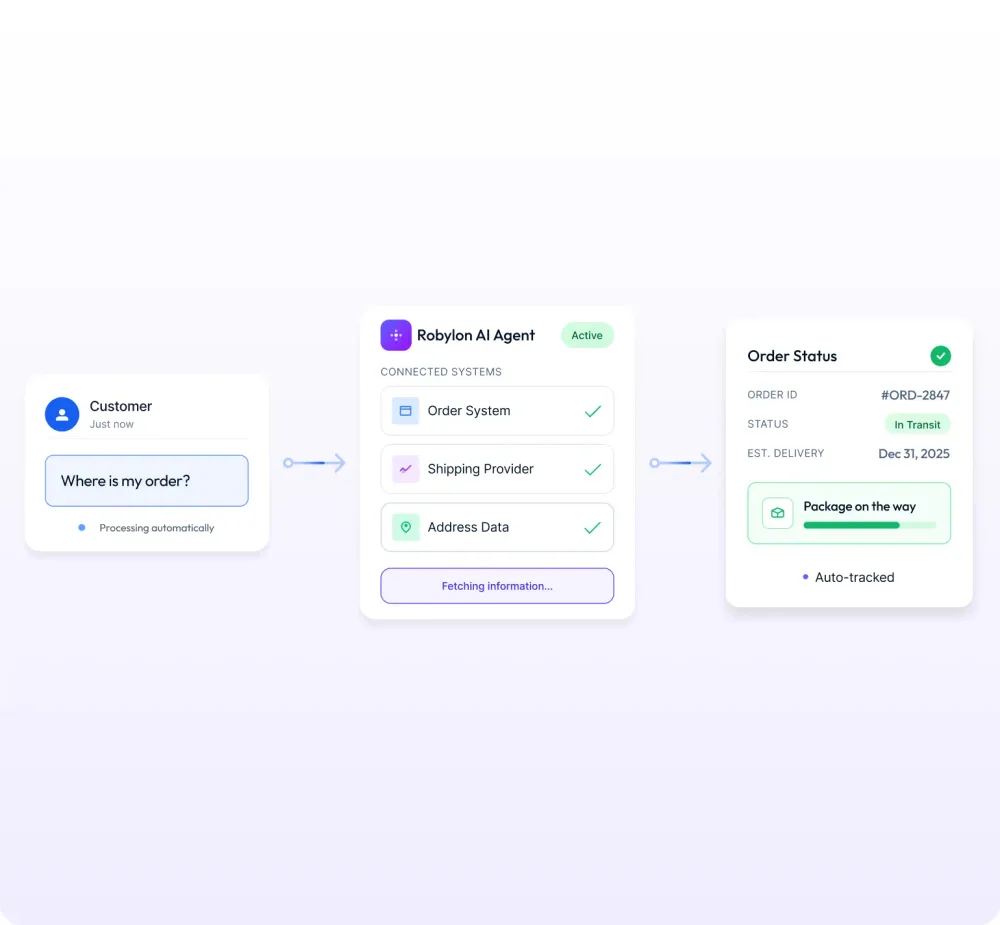
With the order system and the shipping provider connected, the agent answers from live data instead of sending a tracking FAQ link.
The status-to-reply map
Every WISMO reply depends on one thing: the order’s current status. Shopify reports a fulfilment display status on each shipment, and the values a WISMO agent meets most are CONFIRMED, IN_TRANSIT, DELAYED, OUT_FOR_DELIVERY, ATTEMPTED_DELIVERY, DELIVERED and FAILURE (Shopify’s API reference lists the full set). Map each one to what the customer is deciding and what the agent should do. The thresholds below are my suggestions; set your own.
| Status or case | What the customer is deciding | What the agent says and does | Hand to a person when |
|---|---|---|---|
| Confirmed or label printed, no carrier scan | Was my order lost before it shipped? | Confirms the order, gives the dispatch date and says when tracking will start | No scan after 3 business days |
| In transit | Will it arrive in time? | Shares the latest scan, the expected date and the tracking link | The expected date has passed |
| Delayed | Do I wait, or buy elsewhere? | Says the parcel is delayed, gives the new date, offers the options your policy allows | The customer asks for a refund or reship above your limit |
| Out for delivery | Should I stay home? | Confirms it arrives today and links live tracking | Never, unless the customer reports a problem |
| Attempted delivery | How do I get it now? | Explains the carrier’s redelivery or pickup options with the link | The parcel is heading back to you |
| Delivered, customer says not received | Was it stolen? Will you replace it? | Shares the delivery scan time and location, suggests neighbours or the locker, sets a 24-hour check | Order value above your threshold, or a second claim on the account |
| Ready for pickup | Where and until when? | Gives the pickup point, hours and hold deadline | Hold deadline passes |
| Failure or returned to sender | Is my order gone? | Apologises and starts the reship or refund flow your policy allows | Always for refunds above your limit |
| Split shipment | Is the rest lost? | Lists each parcel with its own status and link | One part is missing past its expected date |
| Pre-order or backorder | When will it ship now? | Gives the current ship date and offers to keep or cancel | The date has moved twice |
| Customs hold | Do I owe anything? | Explains the hold, typical timing and any duties | The hold passes your threshold |
| No order number given | (nothing yet) | Finds orders by the email or phone on the conversation, confirms which one | Several open orders and the customer can’t say which |
Cases that need a person
Some WISMO conversations should reach a person every time. Writing those rules down is what makes leadership comfortable with automation:
- High-value “delivered but not received” claims, above an order value you set.
- Repeat contacts on the same order within 48 hours, a sign the first answer didn’t land.
- Fraud signals: several missing-parcel claims on one account.
- Compensation beyond policy: a refund above your limit, or a goodwill credit.
- Data you don’t trust. If a carrier feed or warehouse system is often stale, route those orders to a person instead of letting the agent guess. At Robylon, we scope which data sources are reliable during onboarding for exactly this reason. For more on keeping answers grounded, see how to prevent AI hallucinations in support.
Set up WISMO automation in Robylon
Robylon is an AI customer support platform that resolves tickets across email, chat, voice and WhatsApp. It works standalone or alongside an existing helpdesk. Its agents read the systems an answer lives in and act through tools built from your APIs and connected apps.
Here is the setup I’d use. Our team does the first three steps with you during onboarding, or you can do them yourself.
-
Connect Shopify. Ask the Robylon team for a custom app URL for your store, open it and install the app from your Shopify admin. The store then appears under Settings → Integrations → Shopify as a connected store. The read_orders, read_customers and read_products permissions cover order tracking; add write permissions only for the actions you want agents to take (Connect Shopify to Robylon). The Shopify app starts on the Pro plan.
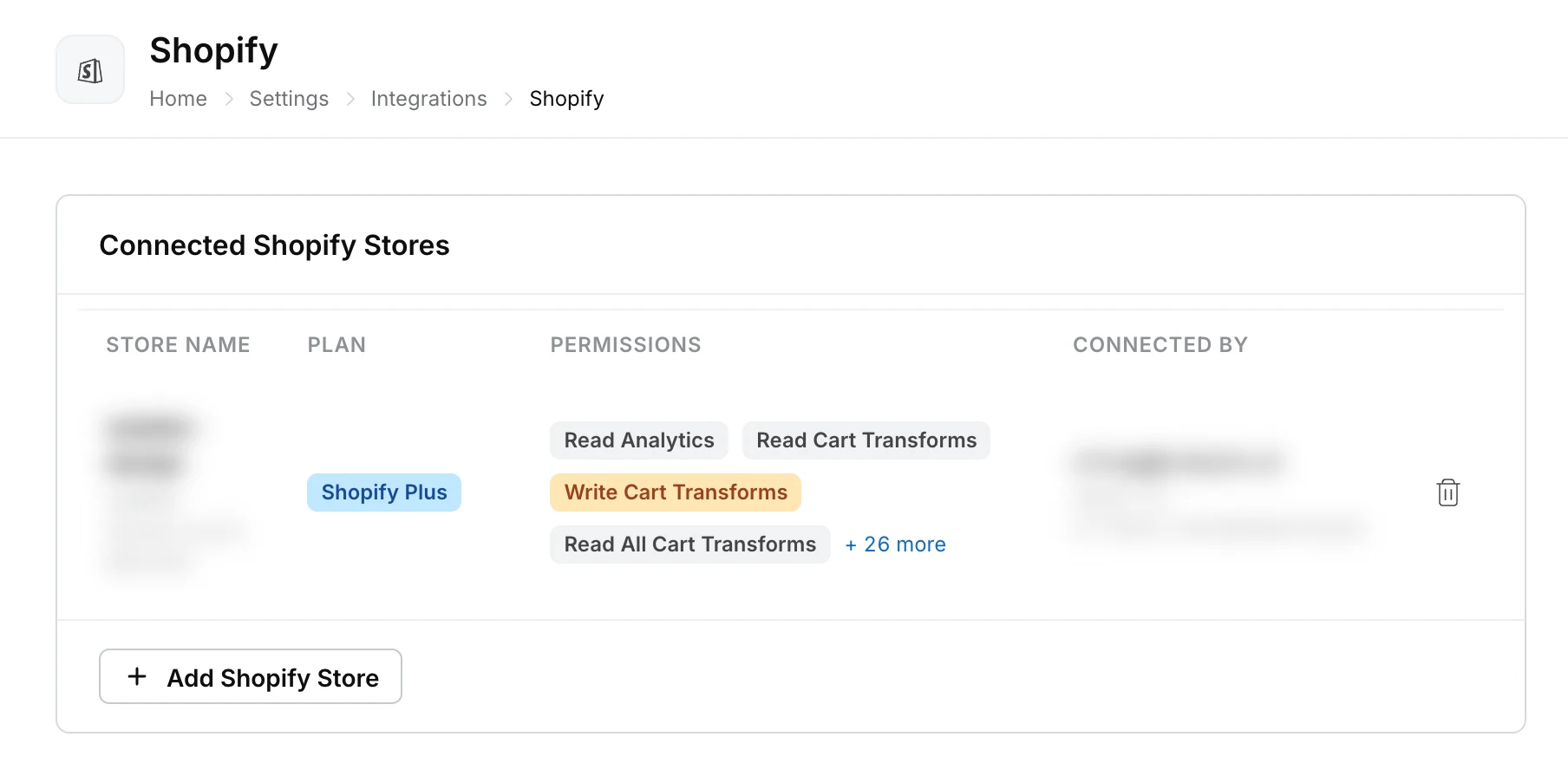
A connected Shopify store in Robylon, with the plan and the permissions you granted.
-
Add live carrier tracking. Use the ClickPost integration, which pulls live tracking and delivery exceptions, or save your own tracking API under Settings → Data & Developer → APIs with Create API. Robylon’s docs use a “Get order status” API as their own example (APIs).
-
Turn the lookup into a tool. Under Settings → Data & Developer → Tools, click Create Tool, give it a name and write its LLM Description: “Look up an order’s fulfilment and tracking status by order number or customer email”. The description decides when the agent calls it (Tools).
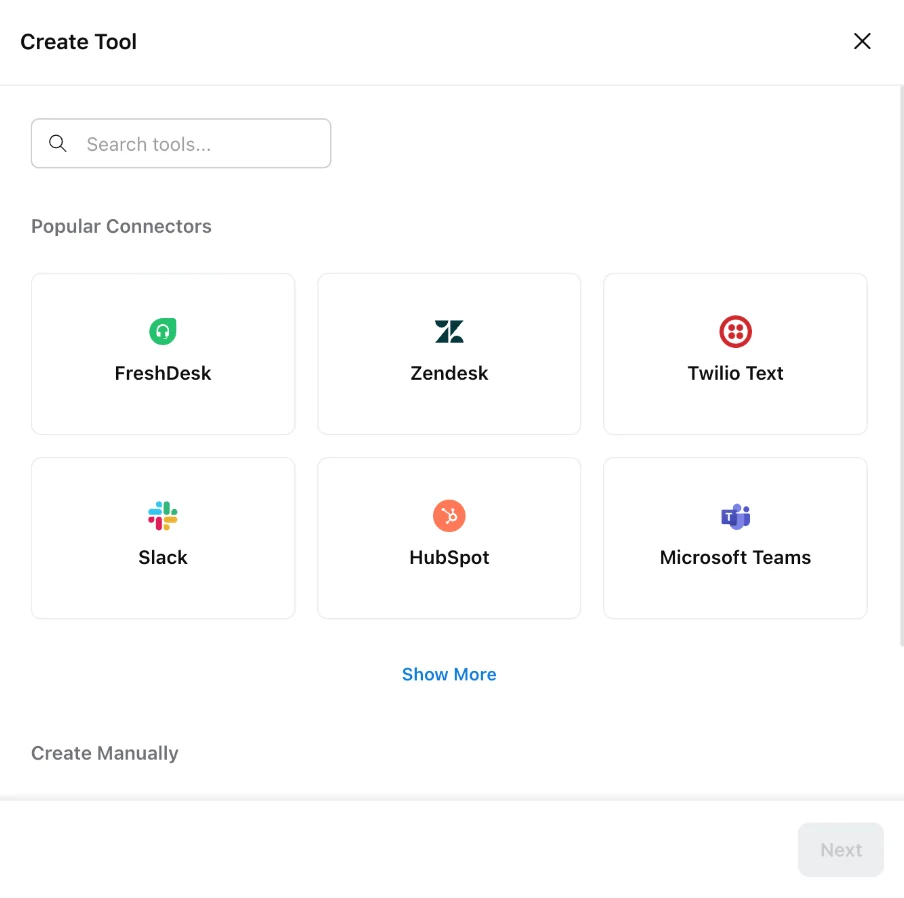
Creating a tool in Robylon: pick a ready-made connector, or choose Create Manually to wrap your own order lookup API.
-
Load your shipping policy. In Knowledge → Source, click Add Source, choose Sync webpage(s) and add your shipping, delivery and returns pages, so the agent quotes your actual rules.
-
Create an Orders agent and route WISMO to it. Under Settings → Workflows & AI Agents → AI Agents, click Create AI Agent, create the agent and add the lookup under Tools Available. Then open the Master Agent, the agent Robylon uses to decide who handles each new conversation, and in its Custom Instructions tell it to send order tracking, delivery delays, cancellations before dispatch and address changes to the Orders agent. Robylon’s docs use this exact setup as their e-commerce example (triage agent).
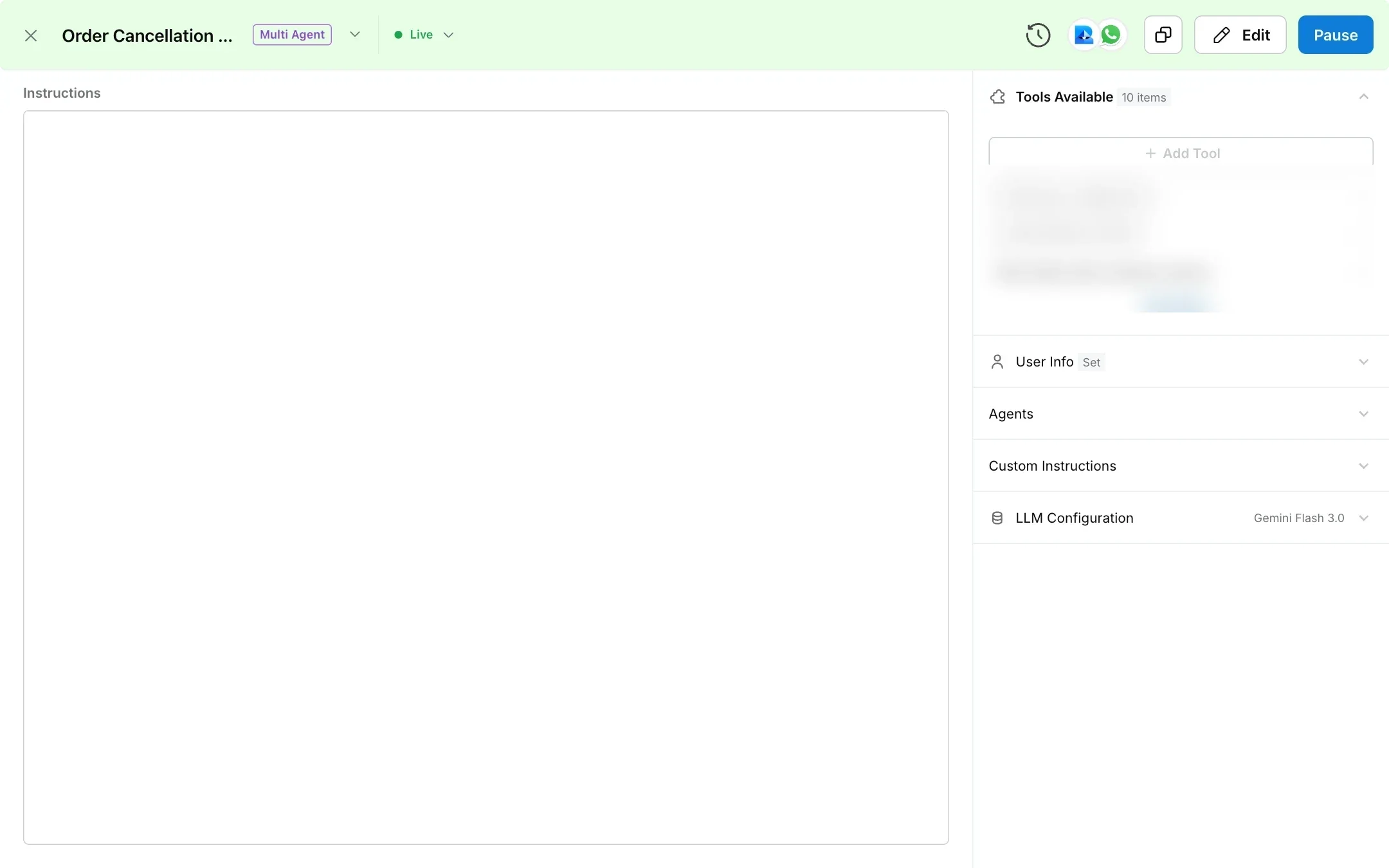
A sub-agent in Robylon: the instructions on the left, and the tools it can call under Tools Available.
-
Match the customer to the order on each channel. Under Settings → Data & Developer → User Attributes, configure a lookup that finds the customer by the chat email, the sender’s email address or the caller’s phone number.
-
Set handoff rules. Add the human handover tool to the Orders agent so it can pass a conversation to your team. If the order lookup itself fails, send the conversation to a person automatically: in the workflow builder under Settings → Workflows & AI Agents → Workflows, connect the lookup’s failure path to Handover to human. Route these escalations to the right queue, and your team receives the full conversation along with the order details the agent already checked.
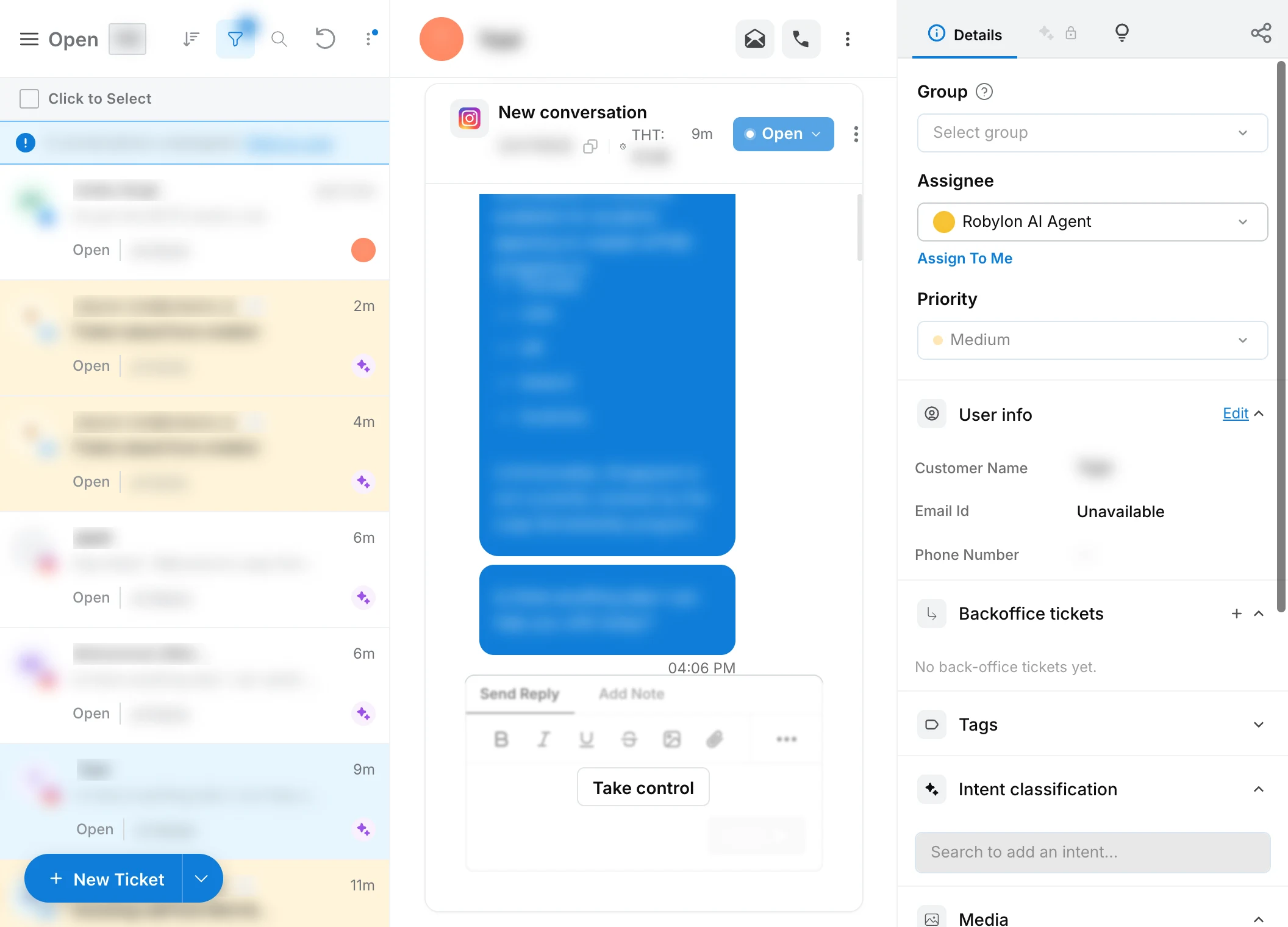
A conversation in Robylon’s inbox: the AI agent is the assignee, and a teammate can take control at any point with the customer’s details beside the thread.
-
Test before go-live. Run last month’s WISMO questions through the agent. The Runs page under Settings → Workflows & AI Agents → Runs lists every workflow run; click an API step to see the request it sent and the response that came back, so you can see exactly why the agent gave each answer. For the voice agent, you can also place a test call.
-
Go live one channel at a time. Start with chat or email, check a week of conversations, then add the next channel (below).
-
Measure. Intent Analytics under Analytics & Insights → Analytics shows the deflection rate and CSAT for the order-tracking intent, so you can see WISMO apart from everything else (more in the measurement section).
Example: a split shipment
A customer writes in chat: “Where’s my order? It’s been a week.” There’s no order number, so the agent finds the most recent order by the email on the chat. It sees two parcels: one delivered on Tuesday, one in transit and due Thursday. It replies with both statuses and both tracking links, then offers to message the customer when the second parcel is out for delivery. No person touched it, and the customer never had to work out that “delivered” meant half the order.
In our published case study with a D2C fashion brand handling 100,000+ queries a month, automated chat resolution rose from 50% to about 85% and ticket automation from 0% to about 60%. “Order not received” messages were mapped to the “Where is my order?” intent and answered by calling the brand’s delivery-partner APIs.
See it on your own orders. Robylon’s Orders agent answers WISMO on chat, email, phone, WhatsApp, Instagram and Facebook from one knowledge base and one order lookup. Book a demo, or get started free on the Starter plan for chat.
Automate WISMO on every channel
Run one AI agent, with one knowledge base and one order lookup, across every channel. That way a customer who emails on Monday and calls on Tuesday gets the same answer both times, and nobody on your team has to piece the story together.
WISMO on chat
Chat is usually the place to start, because answers are instant and you can read every conversation the AI chat agent has. Once your Orders agent is built, Robylon’s chat installation guide gets it onto your store in four steps:
- Copy your install snippet. Go to Settings → Channels → Chatbot, open your chatbot and click the Install tab. Choose Web, then JavaScript, and copy the snippet. It already carries your Chatbot ID.
- Add it to every page of your store. Paste the snippet before the closing
</head>tag in a template that loads on every page. On Shopify, that’s the theme.liquid file under Online Store → Themes → Edit code. Then open your store and check that the chat launcher appears. - Send new chats to your agents. In Settings → Workflows & AI Agents → Workflows, add a “When a new chat is created” trigger for this chatbot and choose the Master Agent as its Default Agent, so WISMO questions reach the Orders agent. Then publish the workflow, because a trigger only starts a published workflow.
- Show the chat where order questions start. Under Display Conditions on the Widget tab, set the chat window to open automatically on your order tracking page. On the Behaviour tab, switch on User Feedback so customers can rate each reply. Thumbs-down ratings show you quickly which order answers miss.
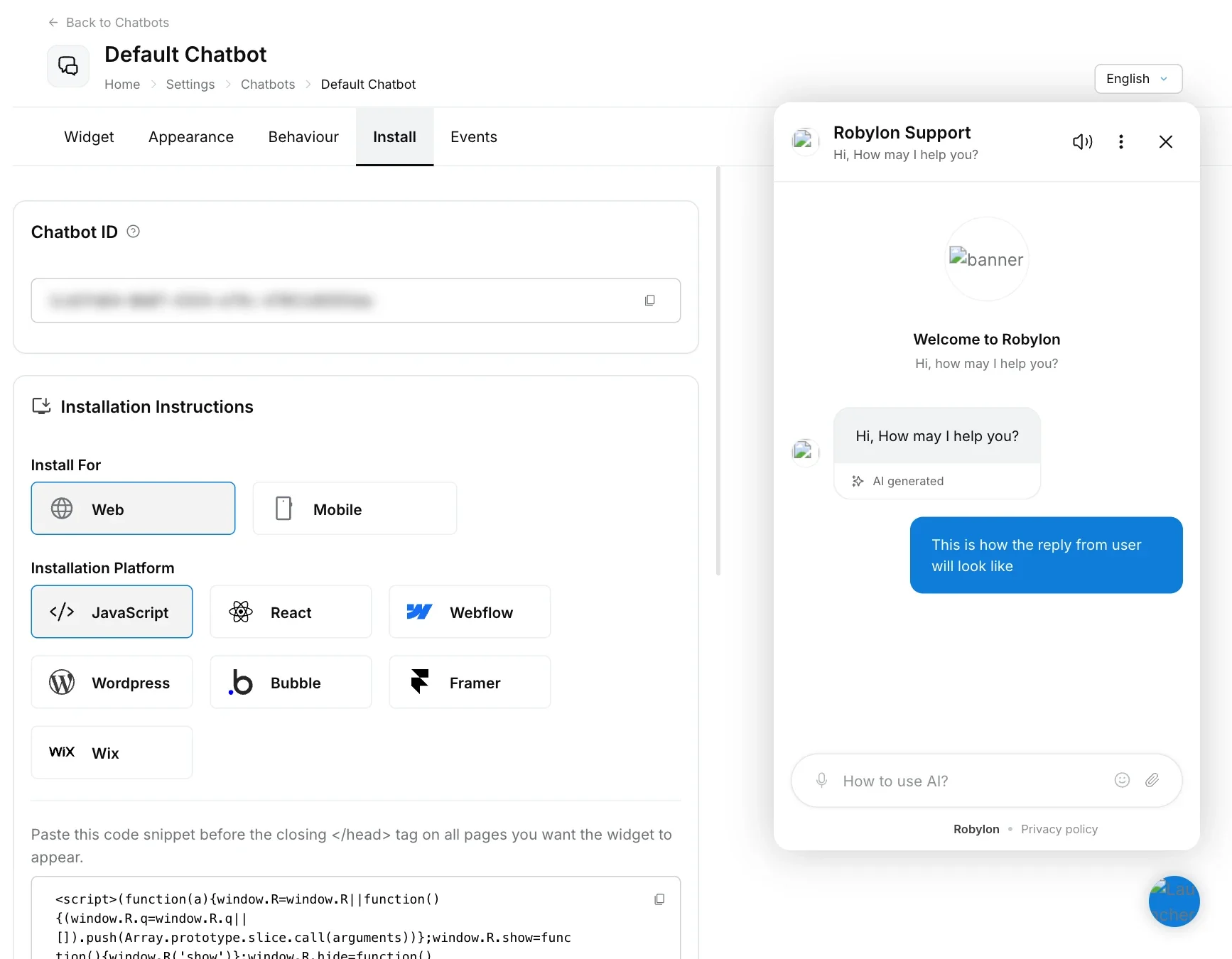
The Install tab in Robylon: pick your platform, copy the snippet, and preview the widget on the right.
If your customers log in to your store, install the chat with Robylon’s React SDK instead and pass the customer’s email with it. The JavaScript snippet on its own sends only your Chatbot ID, so the agent has to ask who the customer is. With the email passed in, it can find their orders straight away.
WISMO on email and helpdesks
Email WISMO is slower for customers and costlier for you, so automating it often saves the most hours. You can set it up in one of two ways: connect your support inbox to Robylon directly, or keep your helpdesk and let the agent answer inside it. Our deep dive on automating order status emails covers the email flow in detail, and the walkthrough of AI email support for Shopify order emails shows it end to end on Shopify.
Option 1: Connect your support inbox to Robylon
- Connect your domain. Go to Settings → Channels → Email, click Connect Domain and enter your domain (yourstore.com).
- Sign in or verify. If your support inbox runs on Google Workspace or Microsoft 365, sign in with that mailbox and approve access. For any other email host, Robylon gives you DKIM, SPF and DMARC records to add at your DNS provider, then verifies the domain. If your domain already has an SPF record, add include:amazonses.com to that record, because a domain with two SPF records fails both.
- Hand new tickets to your agents. Robylon checks the mailbox about every minute and turns each new email into a ticket. In a workflow, add a “When a new ticket is created” trigger on Robylon Email and hand the ticket to the Master Agent, so WISMO emails reach the Orders agent.
- Catch the follow-ups. Add a “When a ticket receives a reply” trigger as well. When a customer writes back with “it still hasn’t arrived”, Robylon adds the reply to the same ticket, reopens it if it was resolved, and the agent answers with the whole thread in view.
- Name the sender. In the address’s View Settings, set the Automated & AI Reply Name (“Acme Support”) and an AI reply signature, so the agent’s answers look like they come from your support team.
Option 2: Keep your helpdesk and let the agent answer inside it
Robylon answers inside Zendesk, Freshdesk, Zoho Desk, Salesforce, Vtiger and Gorgias tickets, and inside Intercom, Freshchat, SalesIQ and Zendesk messaging chats. The agent replies inside that tool, so your team keeps working where it already is. Answering inside Freshdesk, Zendesk, Zoho Desk, Intercom, Freshchat or Gorgias starts on the Business plan. If you’re on Zendesk, our guide to running AI agents on Zendesk goes deeper on that setup.
- Connect the helpdesk. Go to Settings → Channels → All Channels and click your helpdesk under Other Channels. Fill in the Allow Access form with the credentials it asks for from your helpdesk account. The helpdesk then moves to Connected Channels.
- Turn the AI on for it. In a workflow, add the helpdesk as a trigger (“When a new ticket is created” for Zendesk or Freshdesk, “When a new chat is created” for Intercom) and hand the conversation to the Master Agent. Until you add this trigger, the AI answers nothing on that channel.
- Keep escalations in the helpdesk. When the agent hands over a late or lost parcel, the ticket or Intercom conversation goes to your team with the full thread attached. Workflows can also update the Zendesk or Freshdesk ticket through ready-made actions in the MCP block.
Your helpdesk’s own AI can answer order questions too, with limits worth knowing before you choose. Zendesk’s AI agents can look up orders, but Zendesk’s help center says that lookup is a custom API script, with third-party technologies like Shopify outside its support. Gorgias’s AI Agent answers order-tracking questions from Shopify data, and its Order Management feature lets customers track orders after a one-time code. Both are supported on Shopify stores only, and Gorgias retired its old WISMO autoresponder rule on 30 January 2026 in favour of AI Agent.
WISMO on phone calls
An AI voice agent can answer “where is my order?” calls. It matches the caller’s phone number to the order, reads out the status and expected date in plain speech, and hands the call to a person when the parcel is late or lost.
Phone WISMO is expensive because a call ties up an agent for the whole conversation. ContactBabel puts the average inbound call at $7.20 in its 2026 US guide, 47% more than an email. Customers also tend to call when they’re most anxious, so in my experience phone is often where automation pays back fastest.
Robylon’s AI voice agents run on the Business plan. Setting one up for WISMO calls takes five steps:
- Connect a phone number. In Settings → Channels → Voice, click Add Phone Number and pick Twilio or Exotel. With Twilio, you enter the number, Account SID and Auth Token, set “Use this number for” to AI, and Robylon configures the call handling for you. Adding a number replaces whatever call handling it had in Twilio, so use one no other system answers.
- Create a voice agent. Go to Settings → Workflows & AI Agents → AI Agents, click Create AI Agent and choose Voice. Give it one narrow purpose: “Answers calls about where an order is and when it will arrive.” Voice agents run as a single agent, so they don’t pass through the Master Agent you set up for chat and email.
- Give it the order lookup and a script. Under Tools Available, add the same order lookup tool you built earlier, with “Speak during tool call” on, so the caller hears “let me check that for you” instead of silence. In the System Prompt, say exactly when to use it: “Once the caller confirms their order number, call the order lookup and read out the delivery date.” Short replies work best on the phone.
- Add the functions WISMO calls need. Under Functions, add the Human agent handover tool for late or lost parcels, the Knowledge Base function for shipping-policy questions, and the WhatsApp Outbound Message Tool, so the agent can text the tracking link instead of spelling it out loud.
- Attach the number and test. Click Add a Calling Number, choose Inbound and pick your number. The Robylon team switches on inbound answering on request. Before you publish, use Test Call in the builder with a few real orders.
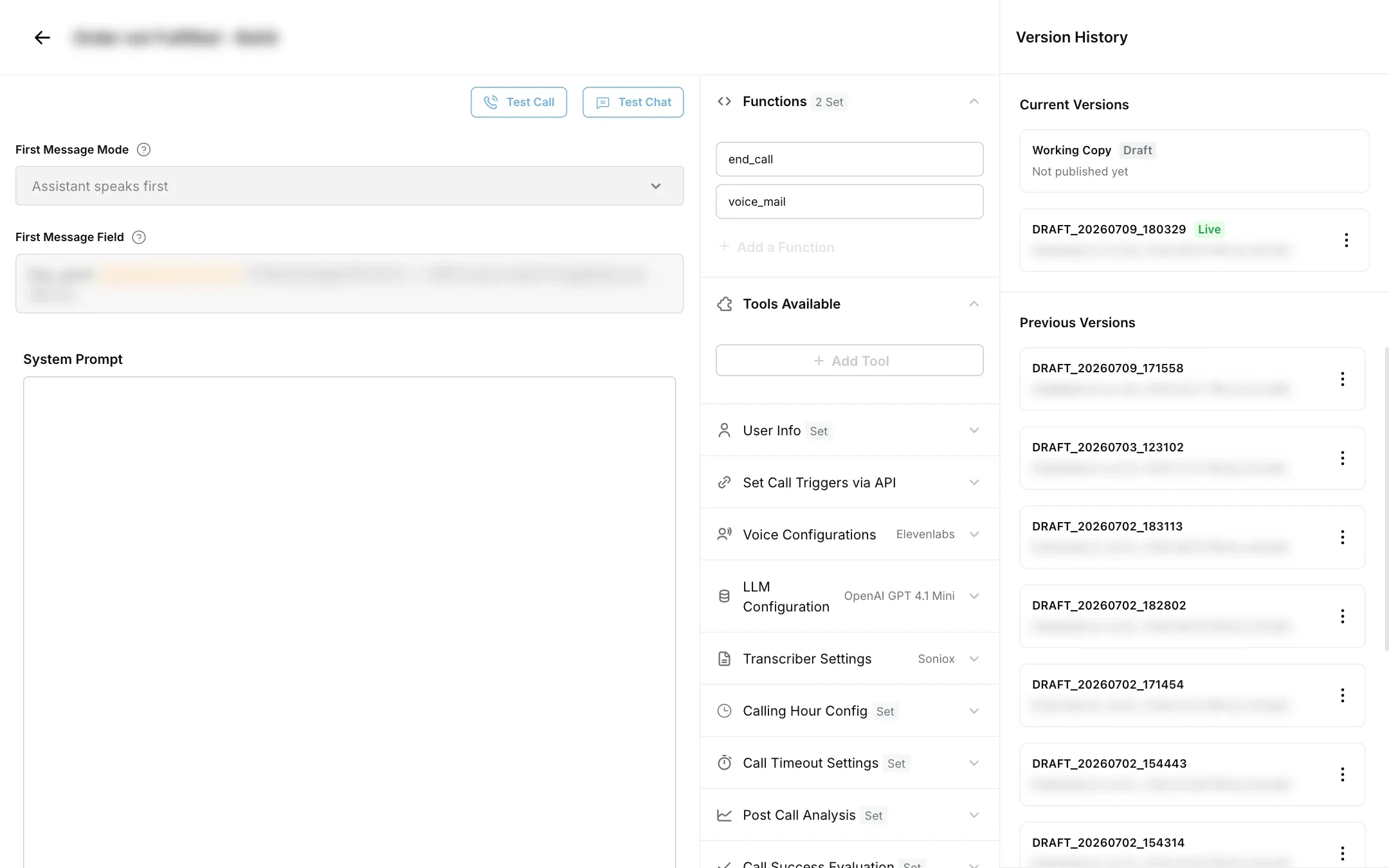
The voice agent builder in Robylon: functions and tools on the right, Test Call at the top.
WISMO on WhatsApp and social DMs
In Spain, Germany, the Netherlands and much of Latin America, WhatsApp is the default way to talk to a brand, so customers there ask “where is my order?” on WhatsApp. Automating WISMO on WhatsApp has two parts: send shipping updates before customers ask, and answer the questions they still send.
Part 1: Send shipping updates as WhatsApp templates
- Connect your number. In Settings → Channels → WhatsApp, click Add WhatsApp Number and finish Meta’s sign-up in the window that opens. You need a Meta Business account and a number that isn’t registered in the WhatsApp or WhatsApp Business app.
- Create a Utility template for each shipping moment. In Outbound → WhatsApp, click Create template and choose Utility, the category WhatsApp uses for order updates. Write the message with variables: “Hi {{customer_name}}, your order {{order_number}} has shipped. Track it here: {{tracking_link}}.” Add a “Track order” button and a “Talk to a person” quick reply, then submit it to Meta for approval.
- Fire it from your store. On the template’s Integrations tab, copy the Webhook URL and point the Shopify webhook for fulfilled orders at it. Under Payload Mapping, map the phone number (order.customer.phone) and each template variable. For cancellations and refunds, you can instead start a Robylon workflow from the Shopify event and send the template from there.
- Set a backup template. If Meta rates your main template Red, pauses it or disables it, Robylon sends the backup instead, so updates keep going out during a peak.
Utility templates also cost little. Meta’s pricing makes utility templates sent inside an open 24-hour customer service window free.
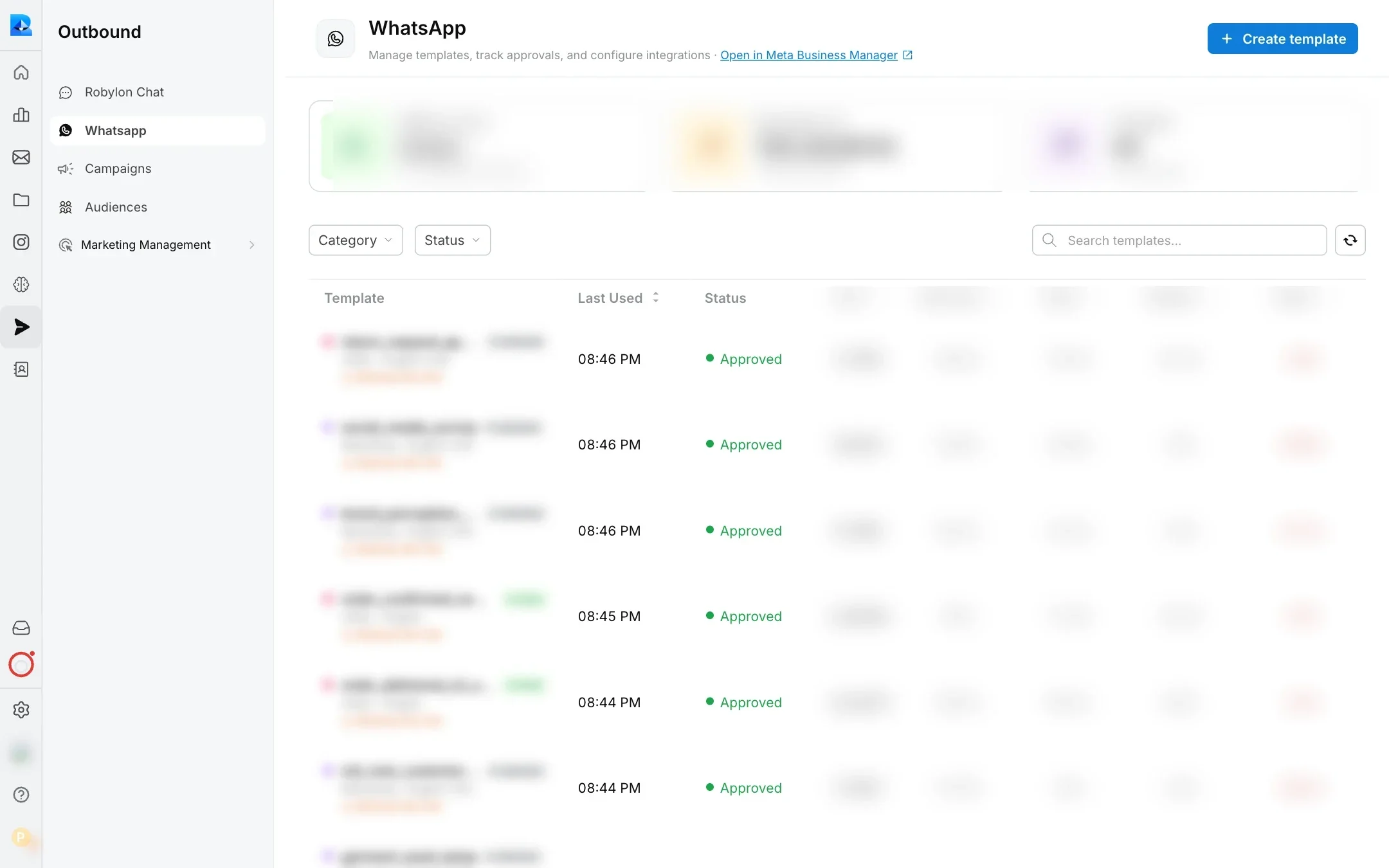
WhatsApp templates in Robylon, with each template’s Meta approval status.
Part 2: Answer the WISMO questions customers send on WhatsApp
- Turn the AI on for the number. Add a WhatsApp trigger for the number to the workflow that hands conversations to your Master Agent, then publish it. Connecting a number doesn’t make the AI reply on its own, and each new number needs its own trigger.
- Let the agent read screenshots and voice notes. On the number’s Behavior tab, switch on Process images and documents and Process voice notes. Some customers will send a screenshot of the tracking page or a voice note instead of typing.
- Plan for the 24-hour window. Within 24 hours of the customer’s last message, the agent can reply freely. After that, WhatsApp only allows approved templates, so keep a utility template ready for later follow-ups (“your replacement has shipped”).
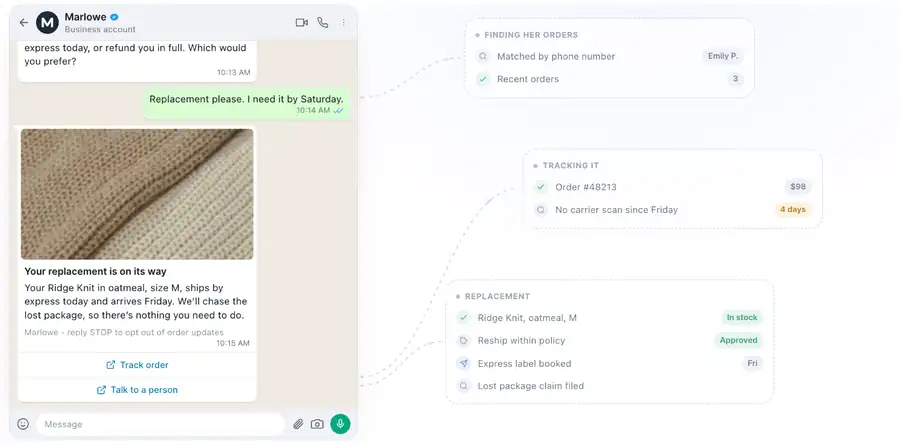
A late-package conversation on WhatsApp: the agent finds the order, sees no carrier scan since Friday, and ships a replacement within policy.
Template wording and timing get their own treatment in our guide to WhatsApp order status automation.
Instagram and Facebook DMs
Customers who bought through a social ad may ask about their order in your DMs. Robylon handles those as chat conversations, in three steps:
- Connect the account. In Settings → Channels → All Channels, click Instagram or Facebook under Other Channels and sign in with Facebook.
- Add the DM trigger. In a workflow, add a Channel Trigger for the account with “When a DM is received”, add an AI agent block, and publish. Selecting Instagram or Facebook on an AI agent isn’t enough on its own. Keep one DM trigger per Facebook Page, because a tie between two means no workflow runs.
- Ask for the order number or email. A DM doesn’t tell the agent who the customer is in your store, so instruct the agent to ask for the order number or email before it looks up the order. Meta only delivers replies inside its messaging window, usually 24 hours after the customer’s last message.
Which channel should you automate first? Start where most of your WISMO arrives and where each contact costs you most. Our comparison of email vs chat vs voice walks through that decision.
WISMO automation cost
Automating WISMO costs far less than answering it with people, whichever AI tool you pick. On list prices checked 9 October 2026, 5,000 chat and email WISMO conversations a month cost about $1,000 in AI on Robylon’s credits, and $3,960 to $7,800 on tools that bill per resolution or per outcome. Vendors bill in different units, so treat these as estimates and confirm them against your own quote.
The tables in this section price chat and email only. Robylon’s voice calls use credits at a different rate, which isn’t published, so get a quote for phone volume.
People versus an AI agent
The table compares answering 5,000 chat and email WISMO conversations a month, about the example brand’s total WISMO volume, with a support team alone and with Robylon’s AI agent, which resolves most conversations and hands the rest to the team.
| Support team only | Robylon’s AI agent + team for escalations | |
|---|---|---|
| Normal month (5,000 conversations) | about $8,950 in agent time | about $1,000 in credits + about $1,790 for 1,000 escalations = about $2,790 |
| Peak month (20,000 conversations) | about $35,800 | about $3,800 + about $7,160 = about $10,960 |
| A year of normal months | about $107,400 | about $33,500 |
| Agent hours a month (normal) | about 417 | about 83 |
The team column uses the cost model from earlier in this article: US support wages from the BLS and Gorgias handle-time targets, which works out to $1.79 per chat or email contact. The AI column assumes the agent resolves 80% of conversations and your team handles the other 20% at the same cost per contact.
On those numbers, automation frees about 330 agent hours a month, roughly two full-time agents, for the lost parcels and refunds that need a person.
To run the same comparison for your own store:
- Count your WISMO contacts. Use the WISMO rate formula from earlier, on your last full month of orders.
- Price them with people. Multiply by your cost per contact: your hourly support cost times the handle time on each channel.
- Estimate what the agent will resolve. Start conservatively, then replace your guess with the real resolution rate from the first weeks.
- Price the AI under each billing model below, for a normal month and for your peak. If you don’t have peak data, test a month four times normal, as I do here.
- Add the escalations back in. The AI bill plus the people cost of escalated conversations is the number to compare, not the AI bill alone.
Three AI billing models
AI agents for support bill in one of three units, and for WISMO the unit matters more than the headline rate:
- Per resolution. You pay each time the AI closes a ticket on its own. Zendesk AI agents charge $1.50 committed or $2.00 pay-as-you-go for each automated resolution beyond the plan’s allowance.
- Per outcome or per interaction. Close cousins of per resolution. Intercom Fin charges $0.99 per outcome, which in practice means each conversation it resolves. Gorgias charges $0.90 to $1.00 per AI interaction, and each one also counts as a helpdesk ticket.
- Per conversation, in credits. Robylon charges 7.5 credits for each chat or email conversation the AI handles, whether the agent resolves it or hands it to your team. On list plan prices that’s $0.20 to $0.38 a conversation; at WISMO volume most credits are extra credits at $25 per 1,000, about $0.19 a conversation.
I understand the appeal of paying only when the AI succeeds. If the agent fails, you pay nothing, and the vendor carries the risk. For complex tickets with uneven success rates, that logic holds up.
Why success-based pricing fits WISMO badly
WISMO is the simplest, most repetitive question you get, and a well-connected agent resolves most of it. Under per-resolution pricing, that success is exactly what you pay for, at the same rate as a complex refund. And WISMO peaks when everything else peaks, so the bill climbs fastest in the month you’re already busiest. Buyers tell us the same story: per-resolution quotas burned out after a volume spike, mostly on simple single-turn questions, and one team on Zendesk AI concluded that people would have been cheaper at the rate they were paying.
Credits work the other way round. You pay the same small amount for every WISMO conversation, so each resolution gets cheaper as your agent gets better. At an 80% resolution rate on 5,000 chat and email conversations, each resolved WISMO conversation costs:
| Billing model | Cost per resolved WISMO conversation |
|---|---|
| Robylon, credits per conversation | about $0.25 ($1,000 for about 4,000 resolutions) |
| Intercom Fin, per outcome | $0.99 |
| Gorgias AI Agent, per interaction | $0.90 to $1.00, plus the helpdesk ticket |
| Zendesk AI agents, per resolution | $1.50 to $2.00 |
At a 90% resolution rate, Robylon’s figure drops to about $0.22, while the success-based rates stay where they are.
The table below prices 5,000 chat and email WISMO conversations a month, a 20,000-conversation peak month as a stress test, and 80% of conversations resolved by AI. AI cost only; helpdesk seats are extra.
| Tool and billing unit | Normal month (5,000 conversations) | Peak month (20,000) |
|---|---|---|
| Robylon: credits, 7.5 per conversation, Business plan plus $25 per 1,000 extra credits (pricing) | about $1,000 | about $3,800 |
| Intercom Fin: $0.99 per outcome (pricing) | $3,960 to $4,950 | $15,840 to $19,800 |
| Gorgias AI Agent: Advanced tier, 530 interactions included, then $1.50 each (pricing) | about $5,735 | about $23,735 |
| Zendesk AI agents: $1.50 committed or $2.00 pay-as-you-go per extra automated resolution, 10 Suite Professional agents (pricing) | $5,850 to $7,800 | $23,850 to $31,800 |
How to read it: Robylon’s figure uses 7.5 credits per conversation and charges every conversation the AI touches, escalated ones included. Fin’s range depends on whether handoffs count as billable outcomes. Gorgias lists $1.00 per interaction on monthly plans and moves volume above 5,000 conversations to a custom plan, so a negotiated rate could land nearer $4,000. Since 18 May 2026, Zendesk counts only “verified” resolutions, which can lower the billable number.
Where per-outcome pricing wins
Credits charge for every conversation the agent touches; per-outcome pricing charges only for the ones it resolves. At about $0.20 per conversation on Robylon’s credits against Fin’s $0.99 per outcome, Fin works out cheaper whenever fewer than about one in five conversations gets resolved. A WISMO agent with live order data should clear that bar easily. If your team can’t connect its order system yet, pay per outcome until you can.
Prevention tools price differently again: AfterShip Tracking bills per shipment (from $29 a month on annual billing), so budget for both layers. Prices change often; re-check every vendor’s page before you buy. For how Zendesk’s per-resolution charges add up, see our breakdown of Zendesk AI per-resolution pricing.
WISMO automation tools by layer
Fixing WISMO usually takes two tools working together. The first prevents tickets by keeping customers informed, through a tracking page and shipping notifications. The second resolves the tickets that still come in, using an AI agent that reads your order data. Choose the prevention tool by your store platform, and choose the AI agent by your helpdesk, your commerce platform and the channels your customers use.
I judged each tool on five things: which layer it covers, whether it reads live order data and takes actions, which channels it answers on, which helpdesks and commerce platforms it works with, and how it bills. Everything comes from each vendor’s own pages, checked 9 October 2026, with no hands-on testing. I run Robylon, which publishes this guide and appears in it, so judge its entry against the same criteria.
| Tool | Layer | Channels for WISMO | Works with | Billing unit |
|---|---|---|---|---|
| Robylon | Resolve | Chat, email, phone, WhatsApp, Instagram, Facebook, SMS | Zendesk, Freshdesk, Zoho Desk, Salesforce, Vtiger, Gorgias, Intercom, Freshchat, SalesIQ; Shopify, WooCommerce, BigCommerce, Salesforce Commerce Cloud | Credits per conversation |
| Gorgias AI Agent | Resolve | Chat, email, SMS, social | Gorgias helpdesk; Shopify | Per AI interaction |
| Intercom Fin | Resolve | Chat, email (voice on custom pricing) | Many helpdesks; Shopify | Per outcome |
| Yuma AI | Resolve | Chat, email, social, voice | Gorgias, Zendesk and 8 more helpdesks; Shopify, WooCommerce | Prepaid resolution bundles |
| Zendesk AI agents | Resolve | Messaging, email, voice | Zendesk; order data through a custom API | Per automated resolution |
| Ringly | Resolve (phone) | Phone | Shopify; Gorgias | Per phone conversation |
| AfterShip Tracking | Prevent | Tracking page, email, SMS | Shopify and other stores | Per shipment |
| Loop Tracking | Prevent | Delay alerts through your email or SMS tool | Shopify | Not published |
Robylon
- Best for: mid-market brands that want one AI agent answering WISMO on chat, email, phone, WhatsApp and social DMs, on its own or inside the helpdesk they already use, on Shopify or another commerce platform.
- What it does for WISMO: It looks up the order and its carrier status, replies with the right answer for that status, takes the next action in Shopify (cancelling an unfulfilled order or creating a return, each gated by the write permission you grant), and hands anything it can’t solve to your team with the order details already checked.
- Strengths: You pay with credits rather than a fee per resolution, so a busy peak month doesn’t multiply the bill. It integrates with Shopify, WooCommerce, BigCommerce and Salesforce Commerce Cloud, and with ClickPost for live tracking and delivery exceptions. Robylon’s stated setup time is 7 days, with our team configuring the agent alongside yours.
- Limits: There’s no AfterShip, ShipStation or Narvar integration listed yet, so those connect through their APIs as tools. Voice starts on the Business plan, and the credit rate for voice isn’t published. The Shopify app starts on the Pro plan and installs as a custom app, not from the Shopify App Store.
- Pricing: There’s a free Starter plan for chat with 300 credits a month. Pro starts at $25 a month, and Business, which adds voice, starts at $180 a month (pricing).
Gorgias AI Agent
- Best for: Shopify brands that run support in the Gorgias helpdesk.
- What it does for WISMO: It answers order-tracking questions from your Shopify data, and its Order Management feature lets customers check an order’s timeline themselves after entering a one-time code.
- Strengths: Your human team and the AI agent work in the same inbox, with Shopify order data and actions built in.
- Limits: Both AI Agent and Order Management are supported on Shopify stores only, and the agent works inside Gorgias’s own helpdesk, so you need to run your support there.
- Pricing: AI interactions cost $0.90 each on annual plans or $1.00 on monthly plans, and each one also counts as a helpdesk ticket. Helpdesk plans start at $10 a month (pricing).
Intercom Fin
- Best for: teams that want the lowest published per-outcome price and plan to keep their current helpdesk.
- What it does for WISMO: It reads order status and fulfilment details through its Shopify connector and uses them to answer customers.
- Strengths: It works on top of many helpdesks, including Zendesk, Salesforce, HubSpot, Freshworks and Gorgias, so you can keep the one you have.
- Limits: The Shopify data connector is available for US-hosted Intercom workspaces only, and Fin’s voice agent is priced on request.
- Pricing: Fin charges $0.99 per outcome (in practice, each conversation it resolves), with a minimum of 50 outcomes a month when you run it on another helpdesk (pricing).
Yuma AI
- Best for: brands on Gorgias or Zendesk that want an AI agent with the widest shipping-tool coverage.
- What it does for WISMO: It resolves where-is-my-order tickets from start to finish inside your existing helpdesk.
- Strengths: Its integrations page lists AfterShip, ShipStation, parcelLab and ShipBob among its shipping tools, and ten helpdesks.
- Limits: The smallest annual plan costs $14,400, paid upfront (pricing).
- Pricing: You prepay for a yearly bundle of resolutions, from about $1.20 per resolution on the smallest plan down toward $0.55 at high volume.
Zendesk AI agents
- Best for: teams standardised on Zendesk across messaging, email and voice.
- What it does for WISMO: It answers order questions once you connect it to your order data.
- Strengths: Its AI agents work across messaging, email and voice, inside the helpdesk your team already uses.
- Limits: Looking up orders needs a custom API script Zendesk support doesn’t cover.
- Pricing: Each agent seat includes 5 to 10 automated resolutions, and extra resolutions cost $1.50 if you commit upfront or $2.00 pay-as-you-go (pricing).
Ringly
- Best for: Shopify brands whose WISMO mostly comes by phone.
- What it does for WISMO: It answers order-status phone calls using ready-made WISMO skills.
- Strengths: You get phone automation without building a voice setup yourself, and according to its pricing page you don’t pay for a month in which it resolves less than 65% of your support calls.
- Limits: It’s built for Shopify stores and phone only.
- Pricing: It costs $1.99 per phone conversation, with a $99 monthly minimum.
AfterShip Tracking
- Best for: almost any store that wants to stop WISMO tickets before they start.
- What it does for WISMO: It gives you a branded tracking page on your own site, detects the carrier automatically and sends email or SMS updates at each shipping milestone.
- Strengths: Customers get updates before they think to ask, so many WISMO tickets never get written.
- Limits: It doesn’t answer customers who do write in, and AI-based delivery estimates are on the Premium plan only (pricing).
- Pricing: Plans start at $29 a month on annual billing and scale with the number of shipments you track.
Loop Tracking (formerly Wonderment)
- Best for: Shopify brands that want delay alerts before customers notice.
- What it does for WISMO: It spots stalled, late and returned-to-sender shipments and alerts customers through the email or SMS tool you already use.
- Strengths: It warns customers about problems before they notice them, and the Casely case study mentioned earlier shows the effect.
- Limits: Pricing isn’t published, and the product is built for Shopify.
- Pricing: Available on request.
I hear the same split on our sales calls: brands on Shopify often compare us with Gorgias, while brands on Salesforce Commerce Cloud or Magento usually aren’t Gorgias users at all, so the shortlist starts from your platform. For a wider list, see our Gorgias alternatives guide and the full integrations list.
Measure WISMO automation
Track five numbers, starting from a baseline month before you automate: WISMO contacts per 100 orders, the AI’s resolution rate on the WISMO intent, repeat contacts on the same order within 48 hours, escalation reasons and CSAT on WISMO conversations. There’s no neutral industry benchmark for any of them, so your own pre-automation month is the comparison that counts.
| Metric | What it tells you | Which way you want it to move |
|---|---|---|
| WISMO contacts per 100 orders | Whether prevention is working | Down |
| AI resolution rate on WISMO | Whether the agent has the data and rules it needs | Up |
| Repeat contacts within 48 hours | Whether the first answer settled it | Down |
| Top escalation reasons | Which status or data gap to fix next | Shifting from data gaps to genuine exceptions |
| CSAT on WISMO conversations | Whether customers trust the answers | Up, or flat while volume falls |
In Robylon, Intent Analytics under Analytics & Insights → Analytics shows conversation volume, deflection rate and CSAT for each intent, so the order-tracking intent sits apart from everything else (analytics docs). The Chat Human Handover Insights under Analytics & Insights → Insights list why each chat that reached your team left the AI, and the fix that would have kept it automated.
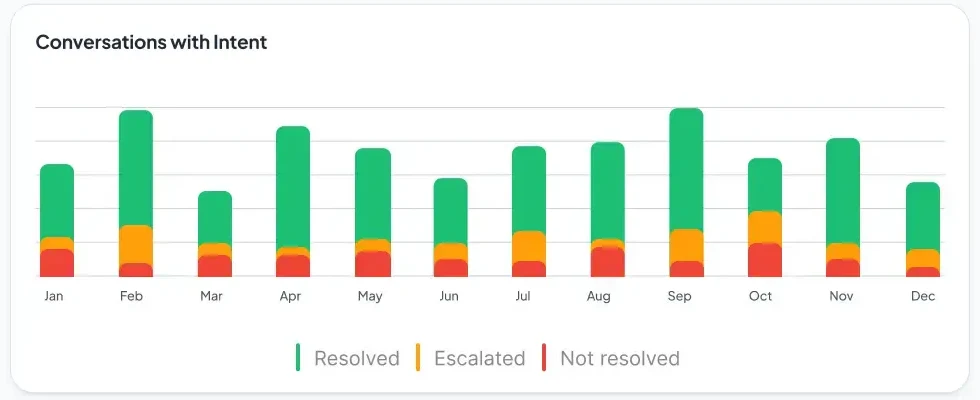
Conversations for an intent, split each month into resolved, escalated and not resolved.
Prepare WISMO for Black Friday
Peak season raises order volume and carrier strain at the same time, so have prevention and automation both live before November, with rules written for the delays you know are coming. ShipMatrix counted about 2.3 billion parcels in the 2025 peak, up 5% on 2024. Even with carriers delivering on time more often than the year before, that volume still means a lot of late parcels.
- Publish holiday order cut-off dates on the site and in the checkout.
- Pre-write delay messages for each carrier you use, and switch on delay alerts.
- Test the agent on last November’s WISMO tickets before the sale starts.
- Set peak handoff rules: lower the value threshold for “delivered but not received”, and staff the escalation queue for it.
- Agree an AI usage cap for the month. In Robylon, a conversation limit in the Usage Settings tab of Settings → Account → Usage caps the AI in any single conversation.
- Brief the team on what the agent now answers, so they spend peak on the exceptions.
For the rest of peak-season support, see our Black Friday AI chatbot guide.
A four-step WISMO plan
WISMO is about customers waiting without information, so the stores that handle it best keep customers informed twice: once in the notifications they send, and once in the answer a customer gets the moment they ask. Automation works for WISMO because the answer already sits in your order and carrier data. Where that data is missing or wrong, no agent will fix it, and that’s the first thing to check.
- This week: count your WISMO contacts per 100 orders and split them by channel.
- This month: switch on every milestone notification, add delay alerts, and set an honest delivery date at checkout.
- Next: put an AI agent on the remainder that reads live order data and answers on chat, email, phone, WhatsApp and social DMs, with written rules for what goes to a person.
- Before peak: price it on your November volume. If the bill multiplies with every resolution, credits are the safer model.
If you want to see an agent answer your own orders on every channel your customers use, book a demo with Robylon.
Frequently asked questions
What is a WISMO call?
A WISMO call is a phone call from a customer asking where their order is or when it will arrive. It is the same question as a WISMO email or chat, but it ties up an agent for the whole call, and ContactBabel puts the average US inbound call at $7.20 in its 2026 guide. An AI voice agent answers it by matching the caller's number to the order and reading out the status.
Can AI answer WISMO without an order number?
Yes. The agent looks up orders by the email address or phone number on the conversation, picks the most recent undelivered order and confirms it with the customer before sharing details. When the customer has several open orders, it asks which one they mean, or hands the conversation to a person.
What happens if the tracking data is wrong or out of date?
The agent should route the conversation to a person instead of guessing. Decide during setup which data sources you trust, and write a rule like "no carrier scan for three business days goes to the team". Stale carrier data is a reason to escalate, never a reason to improvise an answer.
Can I automate WISMO without replacing Gorgias or Zendesk?
Yes. Robylon answers WISMO inside Zendesk, Freshdesk, Zoho Desk, Salesforce, Vtiger and Gorgias tickets, and inside Intercom, Freshchat, SalesIQ and Zendesk messaging chats, so your team keeps the helpdesk it already uses. On Gorgias with a Shopify store, Gorgias's own AI Agent also handles order tracking.
How long does it take to automate WISMO?
Robylon's stated setup time is 7 days, starting with one channel. Most of that week goes into connecting order and carrier data and writing down your escalation rules, so have your shipping policy and a month of WISMO tickets ready on day one.
Related reading
- Email Support
AI Email Support with Shopify: Automate Order Emails End-to-End
Shopify merchants receive hundreds of order-related emails daily — where is my order, I want to return this, my refund hasn't arrived. This guide shows how AI connected to Shopify's API resolves these emails end-to-end, from detecting the intent to processing the action in Shopify and confirming to the customer.
- Email Support
Automating Order Status Emails: The AI Approach to WISMO Tickets
"Where is my order?" accounts for 35–45% of e-commerce email tickets. This deep dive shows how AI auto-resolves WISMO emails by parsing 50+ phrasings, extracting order IDs, querying your OMS, and delivering real-time tracking data — with a 90–95% resolution rate.
- WhatsApp
How AI Agents Handle Order Status Queries on WhatsApp
"Where is my order?" is the single most common message any support team gets on WhatsApp. This walks through how an AI agent actually resolves it end to end, from reading a vague message to pulling live tracking, and where it should stop and escalate.