
AI Email Support with Shopify: Automate Order Emails End-to-End
Shopify merchants receive hundreds of order-related emails daily — where is my order, I want to return this, my refund hasn't arrived. This guide shows how AI connected to Shopify's API resolves these emails end-to-end, from detecting the intent to processing the action in Shopify and confirming to the customer.
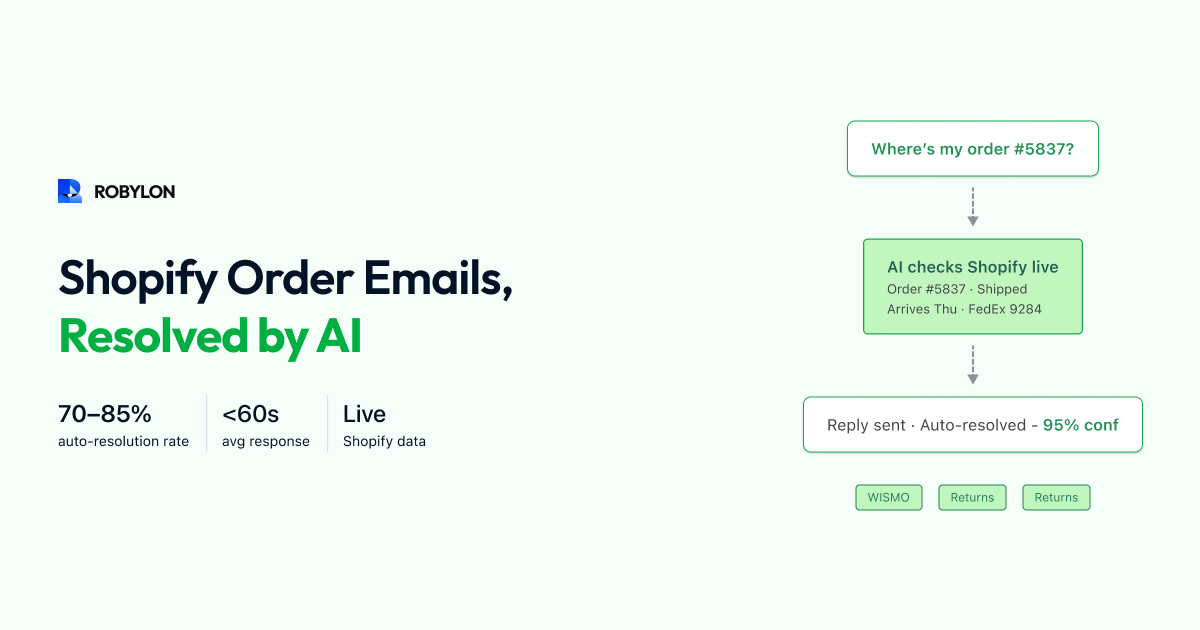
If you run a Shopify store, you know the pattern: 40–60% of your support emails are about orders. “Where is my order?” “I want to return the blue jacket.” “My refund hasn’t arrived.” “Can I change my shipping address?” These emails are predictable, data-driven, and follow consistent patterns — which makes them ideal for AI automation.
The key is connecting the AI to Shopify’s API so it can not only answer questions about orders but actually take actions: look up order status, check return eligibility, process returns, initiate refunds, and update customer information. Without this connection, the AI can only quote your return policy. With it, the AI can process the return.
The Shopify Email Landscape
A typical Shopify merchant receiving 3,000 support emails per month sees a distribution like this: WISMO/order tracking at 35–40% (1,050–1,200 emails), return and exchange requests at 15–20% (450–600), refund status inquiries at 10–15% (300–450), product questions at 10–15% (300–450), shipping and delivery issues at 5–10% (150–300), and other at 10–15% (300–450).
The first four categories — WISMO, returns, refunds, and product questions — represent 70–85% of email volume and are all automatable with the right Shopify integration. This is where AI email support delivers the biggest impact for Shopify merchants.
How AI Resolves Shopify Order Emails
WISMO (Where Is My Order)
Customer emails: “Can you check on my order? I placed it last week and haven’t received it yet. Order #1089.”
AI workflow: detect WISMO intent → extract order number (#1089) or look up by customer email → query Shopify Orders API for fulfillment status → retrieve tracking number and carrier from Shopify → query carrier API for current tracking status → generate response with current location, expected delivery, and tracking link.
Response: “Hi Sarah, your order #1089 shipped on March 22 via FedEx (tracking: 789456123). It’s currently in transit at the Portland distribution center and is expected to arrive by March 27. You can track it here: [tracking link]. Let me know if you have any questions!”
Resolution time: under 60 seconds. Accuracy: 95%+ (data comes directly from Shopify and the carrier).
Return Requests
Customer emails: “I want to return the blue hoodie from my last order. It doesn’t fit.”
AI workflow: detect return intent → identify the product (blue hoodie) → look up the order via Shopify API → check return eligibility (within return window? item eligible per policy?) → if eligible, initiate the return in Shopify (or your returns system like Loop Returns) → generate a return shipping label → respond with instructions and label.
Response: “Hi Sarah, I’ve initiated a return for the Premium Cotton Hoodie (Navy) from order #1089. Your return shipping label is attached. Please ship within 14 days. Once we receive the item, your refund of $49.99 will be processed within 3–5 business days. Would you like to exchange for a different size instead?”
Without the Shopify integration, the AI would have said: “Our return policy allows returns within 30 days. Please visit [returns page] to initiate your return.” Helpful, but it does not actually process the return. With the integration, the return is initiated, the label is generated, and the email is resolved — no human needed.
Refund Status
Customer emails: “When am I getting my refund? I returned the item 2 weeks ago.”
AI workflow: detect refund inquiry intent → identify the customer → query Shopify for recent returns → find the matching return → check refund status (pending, processed, failed) → if processed, retrieve the refund date and amount → generate response.
Response: “Hi Sarah, your refund of $49.99 for the returned hoodie was processed on March 20 and sent to the Visa ending in 4521. Most banks reflect refunds within 5–10 business days, so you should see it by March 30. If it hasn’t appeared by then, please let me know.”
Product Questions
Customer emails: “Does the oversized tee come in black? What’s the fabric composition?”
AI workflow: detect product inquiry → identify the product → query Shopify Products API for variant availability, description, metafields → retrieve product details → generate response with specific information.
The Shopify Products API provides real-time inventory, variant details, descriptions, and metafields — so the AI’s answer reflects current availability, not cached catalog data.
Setting Up AI Email Support for Shopify
Step 1: Connect Shopify (30 Minutes)
Install the Robylon AI app from the Shopify App Store (or connect via API with a custom app). Grant permissions for orders, customers, products, and fulfillments. This gives the AI read access to look up order data and write access to initiate returns and process refunds.
Step 2: Connect Your Email Channel (15 Minutes)
Connect your support email (support@yourstore.com) — either directly via Gmail/Outlook API, or through your helpdesk (Gorgias, Freshdesk, Zendesk). The AI intercepts incoming emails from this channel.
Step 3: Upload Your Knowledge Base (1–2 Hours)
Upload your store policies (return policy, shipping policy, warranty terms), FAQ content, and any product-specific information not captured in Shopify’s product data. This enables the AI to handle policy questions and product inquiries alongside transactional queries.
Step 4: Configure and Test (1–2 Days)
Set confidence thresholds, brand voice, and escalation rules. Test with sample emails across each category. Run shadow mode for 1 week to validate accuracy on live email traffic.
Step 5: Go Live
Enable auto-resolution for WISMO first (highest volume, highest accuracy). Add returns and refunds in week 2. Add product questions in week 3. Target: 65–80% auto-resolution within 4 weeks.
Gorgias vs Robylon for Shopify Email
Gorgias is the most popular helpdesk for Shopify merchants — and its Shopify integration is excellent. But Gorgias’s automation is macro-based: predefined rules and templates that match keywords and insert order data. This approach achieves 20–30% auto-resolution — helpful for common queries but limited by the rigidity of rules.
Robylon’s AI is LLM-based: it understands intent from natural language, handles paraphrasing and ambiguity, processes multi-issue emails, and generates contextual responses — achieving 60–80% auto-resolution. The difference is not incremental; it is a generational leap in automation capability. For Shopify merchants who have hit the ceiling of macro-based automation, Robylon is the natural upgrade.
Bottom Line
Shopify merchants sit on a goldmine of automatable email. Order-related queries are data-driven, predictable, and high-volume — exactly what AI handles best. The key is connecting the AI to Shopify’s API so it can take actions, not just answer questions. When the AI can look up orders, process returns, check refund status, and pull product data in real time, email resolution rates reach 65–80% — transforming email support from a cost center into an automated operation.
Automate your Shopify order emails. Robylon AI connects to Shopify’s API to resolve WISMO, returns, refunds, and product emails end-to-end — no macros, no rules, just AI. Start free at robylon.ai
Frequently asked questions
How does AI look up Shopify order data for email responses?
The AI connects to Shopify's Orders API and queries by order number (extracted from the email) or customer email address. It retrieves: order status, fulfillment status, tracking number and carrier, line items and quantities, shipping address, payment method, and refund history. This data is used to generate personalized responses — "Your order #1089 shipped March 22 via FedEx, tracking: 789456123, expected delivery March 27" — not generic "check your tracking page" replies.
What percentage of Shopify support emails can AI resolve?
65–80% with proper Shopify API integration. The automatable categories: WISMO/order tracking (35–40% of volume, 90–95% auto-resolution), return/exchange requests (15–20%, 80–90% with returns system integration), refund status (10–15%, 90%+ when connected to payment processor), and product questions (10–15%, 85%+ from Shopify product data + KB). The remaining 20–35% — complex complaints, custom order modifications, multi-system issues — route to human agents with AI-provided context.
How does Robylon compare to Gorgias for Shopify email automation?
Gorgias uses macro-based automation: predefined rules and templates that match keywords and insert order data. Auto-resolution: 20–30%. Robylon uses LLM-based AI: understands intent from natural language, handles paraphrasing and ambiguity, processes multi-issue emails. Auto-resolution: 60–80%. The difference is generational — macros handle exact-match patterns, AI handles the full range of how customers actually write emails. Pricing: Gorgias charges per ticket volume; Robylon uses credits-based pricing with better economics at scale.
How long does it take to set up AI email support for Shopify?
2–3 weeks from start to live auto-resolution. Day 1: Connect Shopify (30 minutes via app or API). Day 1: Connect email channel (15 minutes). Day 1–2: Upload KB — store policies, FAQs, product info (1–2 hours). Day 2–3: Configure AI — thresholds, brand voice, escalation rules. Day 3–10: Shadow mode — AI drafts responses, team reviews. Day 10–14: Enable auto-resolution for WISMO first, then expand to returns, refunds, and product questions weekly. Target: 65–80% auto-resolution by week 4.
Can AI process Shopify returns and refunds through email?
Yes — with the right integrations. For returns: AI detects return intent → looks up the order via Shopify API → checks return eligibility (window, item condition, policy) → initiates the return in your returns system (Loop Returns, Shopify native, or custom) → generates a return shipping label → responds with instructions and label attached. For refunds: AI verifies the return was received → processes the refund via Shopify's payment API → confirms the amount and timeline to the customer. The AI handles the full workflow, not just the response.