
Change Management for AI Email Support
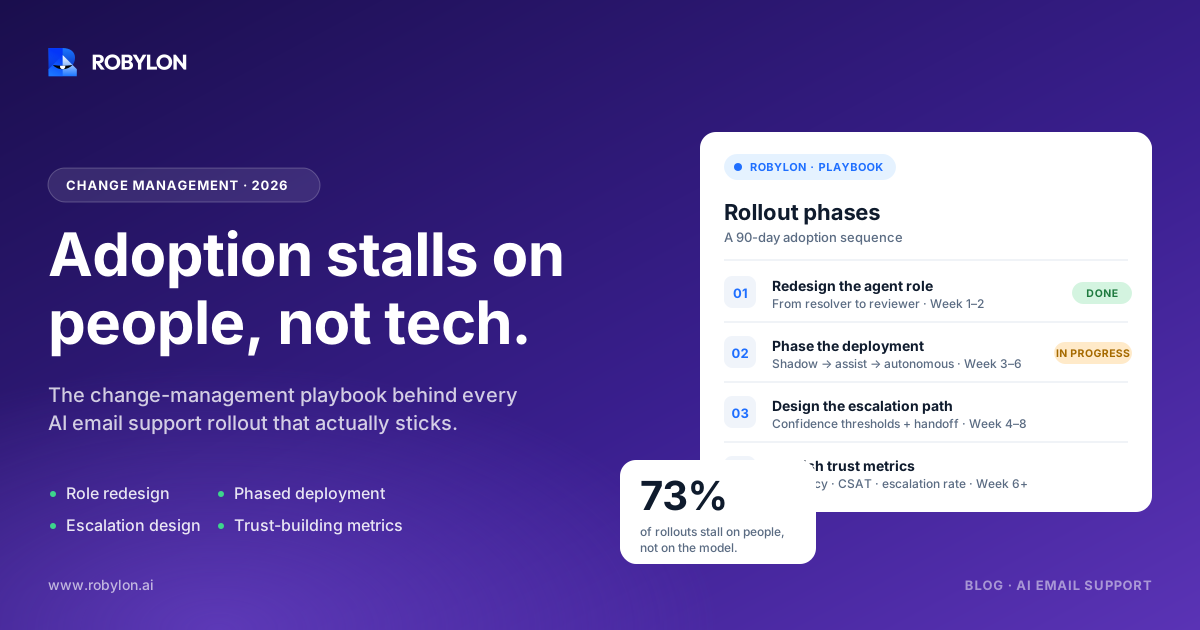
Most AI email support rollouts stall on people, not technology. This guide covers the change management work that actually decides adoption: role redesign, phased deployment, escalation design, and the metrics that build trust.
The software goes live on a Tuesday. By Friday, two of your senior agents have quietly gone back to answering everything by hand, the AI is sitting at a 22% resolution rate that should be 70%, and someone in the team Slack has started a thread titled “is this thing replacing us.” None of that is a technology problem.
This is the part of an AI email support rollout that the vendor demo never shows you. The model works. The integrations connect. What breaks is the handoff between a tool and the people who are supposed to trust it, feed it, and let it do its job. Research from Prosci found that 63% of organizations cite human factors as the primary challenge in AI implementation, not the technology. That number tracks with what we see during onboarding.
So this is a guide to the human side: how to roll out AI email support without losing your team, your data quality, or your CSAT in the first month.
Why these rollouts fail in the first 30 days
The failure pattern is predictable, which is good news, because predictable problems are preventable.
It usually starts with how the project gets announced. Leadership frames it as an efficiency win, the team hears “headcount risk,” and from that moment every interaction with the new tool is colored by self-preservation. People don’t sabotage on purpose. They just stop reporting the AI’s mistakes, stop correcting its drafts, and stop feeding it the edge cases it needs to learn from. The flywheel never spins.
The second failure is scope. Teams flip on automation across every inbox, every topic, and every customer segment on day one, then spend three weeks firefighting edge cases instead of building confidence on the easy wins. BCG’s workforce research makes the point bluntly: when employees associate automation with displacement, engagement drops and they resist even the changes designed to help them.
The third is silence. No baseline metrics, no go/no-go criteria, no weekly readout. When nobody can see whether the rollout is working, rumor fills the gap. And rumor is almost always worse than the data.
Start with the story you tell the team
Before a single integration is connected, decide what this rollout means for the people doing the work. This is not a comms nicety. It’s the single biggest predictor of whether adoption sticks.
The honest, defensible framing is augmentation. AI email support handles the repetitive, high-volume tickets that burn agents out, which frees the team for the work that actually needs a human: the angry escalation, the ambiguous refund, the account that’s about to churn. That’s not spin if you mean it. The teams that get this right redesign roles so that agents move up the value chain rather than out the door.
We wrote more about what those roles look like in our piece on how AI reshapes support team roles, but the short version is this: the agent of next year spends less time typing the same shipping-delay reply forty times and more time as a reviewer, an escalation specialist, and a trainer of the AI itself.
A few things make this credible instead of hollow:
- Name the new roles early. If “AI reviewer” or “escalation lead” is going to be a real position, say so in week one, not after the layoff rumor has already spread.
- Involve agents in the design. The people who answer these emails every day know the edge cases better than any product manager. Pull them into the use-case selection and escalation rules. Participation kills resistance faster than any town hall.
- Be honest about what changes. Some tasks go away. Pretending otherwise insults people who can see the writing on the wall. Respect the intelligence in the room.
One enterprise software CEO put it well at Davos: if you’ve only hired strong people, the answer to automation is retooling them, not firing them. ServiceNow moved affected staff into roles managing the AI agents themselves. That’s the narrative that earns trust.
Pick a small, boring first use case
The instinct is to point AI at your worst, highest-volume pain. Resist it. The first use case should be narrow, common, and low-risk, because the goal of phase one is not coverage. It’s proof.
Order-status and “where is my order” emails are a good starting point for most e-commerce and DTC teams. So are password resets, address changes, and basic returns eligibility. These share three traits: they’re high-volume, they have a clear correct answer, and a mistake is cheap to recover from. Win here and you’ve got a reference point everyone in the building can see.
One thing teams get wrong here is automating the visible pain instead of the common ticket. A company once automated password resets when their real bottleneck was onboarding troubleshooting, and the rollout looked like a flop because it solved the wrong problem. Pick by volume and clarity, not by how loud the complaints are.
Phase the deployment, gate each step on data
A controlled rollout runs in stages, and each stage has to earn its way into the next. The shape that works looks roughly like this over a 60 to 90 day window:
- Weeks 1 to 2, foundation. Clean the knowledge base, catalog your top intents, wire up CSAT and resolution-rate tracking, and lock the escalation rules. Skipping the knowledge audit is the most common reason a rollout produces wrong answers later.
- Weeks 3 to 4, shadow mode. The AI drafts replies but a human approves every one before it sends. This is where you calibrate tone and catch failure modes with zero customer risk. Set an accuracy gate, around 90% agent-approved, before anything goes autonomous.
- Weeks 5 to 6, autonomous on tier-1. Turn on hands-off resolution for your proven, narrow use case in one or two channels. Watch resolution rate, CSAT, and escalation accuracy daily.
- Weeks 7 onward, expand carefully. Add adjacent topics and segments only after the previous tier holds steady. Multi-language, voice, and complex workflows belong after the day-90 stability check, not alongside it.
The rule underneath all of this: a phase only advances when the metrics are flat or better than your human baseline. If CSAT dips, you slow down. This is also why getting tier-1 resolution right without creating new problems matters more than raw speed. A bot that hits a high resolution number by deflecting everyone into a dead end is worse than no bot at all.
Escalation design is where trust is won or lost
Agents stop fearing the AI the moment they trust it to hand off cleanly. Get the escalation rules wrong and every edge case becomes an argument for ripping the whole thing out.
Vague rules are the enemy. “Escalate complex issues” means nothing and gets interpreted forty different ways. Specific rules work: escalate anything mentioning legal, billing disputes, refunds above a set threshold, cancellations, or detectable customer frustration. The decision of whether the AI should resolve or route to a human deserves real thought, which we go deep on in our breakdown of when AI should resolve versus route to a human.
Two design choices make escalation feel safe to the team:
- Tone-shift detection. When a customer’s language turns frustrated, the email should route to a person automatically, even if the AI technically could have answered. Sentiment is a hard stop, not a suggestion.
- Context-rich handoffs. When the AI escalates, the human should get the full thread, the customer history, and what the AI already tried. A handoff that forces the agent to start cold is the fastest way to lose their support.
Robylon keeps a human in the loop by design, with tone-shift escalation built into the workflow rather than bolted on. The point isn’t to escalate as little as possible. It’s to escalate at exactly the right moment, with everything the agent needs to finish the job.
Feed the system, or it stays mediocre
An AI email support tool is only as good as the knowledge behind it, and that knowledge decays the moment your refund policy changes and nobody updates the docs.
The teams that succeed treat this as an ongoing job, not a launch task. They assign an owner for the knowledge base, review escalation transcripts weekly to find the gaps, and feed corrections back in. A well-organized 50-article knowledge base beats a chaotic 500-article one every time. Quality of source content sets your ceiling on resolution rate, which is why a solid AI knowledge base setup is worth the effort before you scale.
There’s a quiet risk here too. When you automate manual work, the institutional knowledge that lived in your senior agents’ heads can vanish if nobody captures it. Interview your power users before the rollout. Document how the tricky cases got handled. That knowledge is the raw material the AI learns from.
Make the numbers visible to everyone
Nothing kills rumor like a shared dashboard. Track metrics at three levels and put them somewhere the whole team can see, not just the executive sponsor.
- Agent-level: resolution rate, escalation rate, and response accuracy. This tells you whether the AI itself is working.
- Operational: first response time, first-contact resolution, and average handle time on the tickets humans still own.
- Business: CSAT, cost per resolution, and the agent hours freed up for higher-value work.
Set baselines before you start. You can’t prove improvement against a number you never recorded. And watch out for vanity metrics. A high deflection rate looks great until you realize it counts customers who gave up rather than customers who got helped. CSAT is the honest constraint that keeps the rest honest. If you want to put real numbers behind the case, our guide on how to calculate AI email support ROI walks through the math.
Report the trendlines weekly during rollout. When CSAT holds steady and resolution climbs, the Slack thread titled “is this thing replacing us” tends to go quiet on its own.
What good looks like by day 90
A rollout that worked has a few visible signs. The AI is resolving a meaningful share of email volume autonomously, with CSAT flat or up against your pre-launch baseline. Escalations land cleanly, with agents picking up full context instead of starting from scratch. The team has stopped asking whether the tool is safe and started asking what else it can take off their plate.
Most of all, the agents who were nervous in week one are now the ones suggesting the next use case to automate. That shift, from resistance to ownership, is the real deliverable of change management. The technology was never the hard part.
If you’re building the integration side of this, connecting your help desk, CRM, and order systems so the AI can actually take action, our integrations overview and the email support platform pages cover what’s possible. But the playbook above is what decides the outcome. Buy the best tool on the market and skip the change management, and you’ll still be at 22% resolution on Friday.
Ready to roll out AI email support without losing your team? Robylon AI resolves 60–80% of customer emails autonomously, with human-in-the-loop escalation and write-access integrations across Shopify, Zendesk, Salesforce, and 60+ other tools. Start free at robylon.ai
Frequently asked questions
How long does it take to roll out AI email support?
A controlled rollout typically runs 60 to 90 days, even though initial setup can take days. The early weeks go to a knowledge-base audit, intent cataloging, and metric instrumentation. Then come two weeks of shadow mode where humans approve every draft, followed by autonomous tier-1 resolution on a narrow use case. Expansion to more topics and channels happens only after the core deployment holds steady. With Robylon, technical deployment lands in 3 to 7 days, but the change management work around it sets the real pace.
How do I reduce my support team's fear of being replaced?
Frame the rollout as augmentation, not replacement, and back it with concrete role changes. Name new positions like AI reviewer or escalation lead in week one, before rumor fills the gap. Involve agents directly in choosing use cases and writing escalation rules, since participation kills resistance faster than any announcement. Be honest that some repetitive tasks go away, because people can already see that coming. The teams that retain trust move agents up the value chain into review, escalation, and AI-training work.
Which email tickets should I automate first?
Start with a narrow, high-volume, low-risk use case, not your worst pain point. Order-status emails, password resets, address changes, and basic returns eligibility work well because they have clear correct answers and cheap recovery from mistakes. The goal of phase one is proof, not coverage. A common error is automating the loudest complaint instead of the most common ticket, which makes a good rollout look like a failure because it solved the wrong problem.
How do I set good escalation rules for AI email support?
Make escalation rules specific, not vague. “Escalate complex issues” gets interpreted dozens of ways, while “escalate anything mentioning legal, billing disputes, refunds above a threshold, or cancellations” gives a clear line. Add tone-shift detection so frustrated customers route to a human automatically, even when the AI could technically answer. Make every handoff context-rich: the agent should receive the full thread, customer history, and what the AI already tried, so they never start cold.
What metrics prove an AI email support rollout is working?
Track three levels and record baselines before launch. Agent-level metrics like resolution rate, escalation rate, and accuracy show whether the AI works. Operational metrics like first response time and average handle time show the impact on your team. Business metrics like CSAT and cost per resolution show whether it's worth it. Avoid vanity numbers like raw deflection rate, which can count customers who gave up rather than got helped. Gate each rollout phase on CSAT staying flat or improving.