
AI Email Escalation: When to Resolve vs When to Route to a Human
Knowing when NOT to auto-resolve is just as important as knowing when to. This guide provides a complete escalation framework for AI email support — confidence gates, sentiment triggers, topic-based rules, and the context handoff that makes escalation seamless.
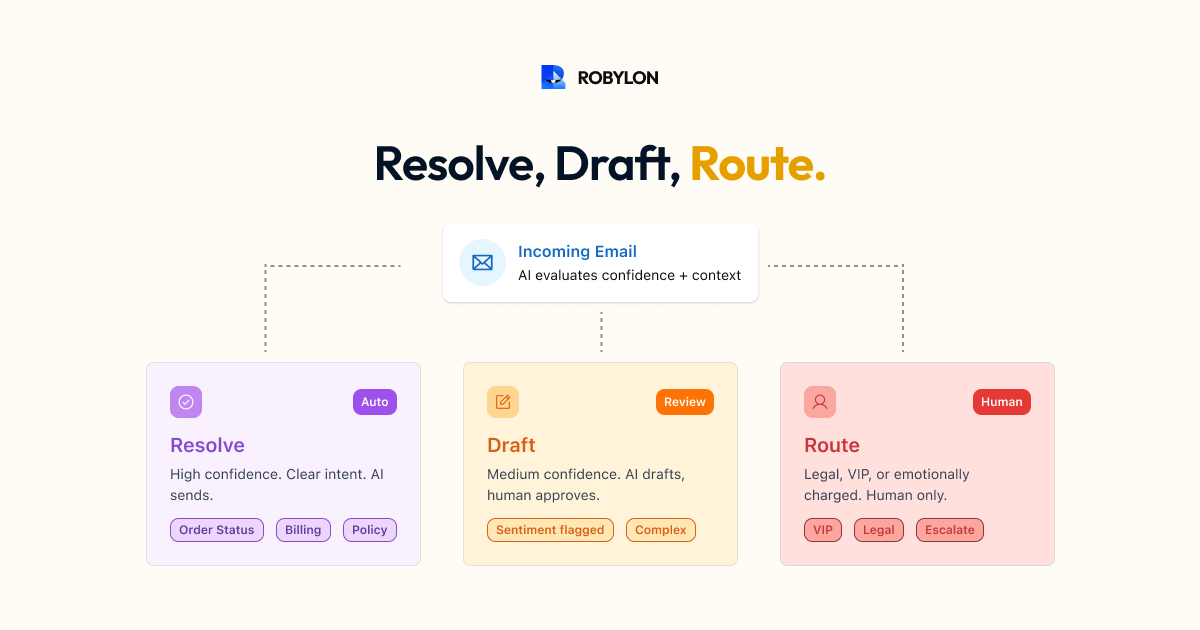
Key takeaways
- Knowing when not to auto-resolve matters as much as knowing when to. Escalation is a design decision, not a failure state.
- Three mechanisms do the work: confidence gates, sentiment triggers, and topic-based hard rules that escalate regardless of confidence.
- Set the auto-send threshold at 85-92%. Above it the AI sends directly; below it a human sees the draft first.
- An escalation rate above 40% means the thresholds are too conservative and the AI is being underused.
- If agents approve 95%+ of drafts without editing, raise the auto-send threshold - those responses were already good enough to send.
The best AI email support systems are not the ones that try to resolve everything — they are the ones that know exactly when to stop and hand off. An AI that sends a wrong answer is worse than an AI that escalates and lets a human handle it correctly. The escalation framework is not a limitation of your AI — it is a safety mechanism that protects customer experience and builds trust in the system over time.
This guide provides a complete framework for email escalation: what triggers it, how to configure it, how to hand off context so the customer never has to repeat themselves, and how to tune the balance between automation and human involvement.
The Three Escalation Mechanisms
1. Confidence-Based Escalation
Every AI response comes with a confidence score — a measure of how certain the system is about its answer. Confidence-based escalation is your primary defense against wrong answers.
Configure two thresholds:
- Auto-send threshold (85–92%): Above this, the AI sends the response directly. You are confident the answer is correct.
- Draft threshold (65–80%): Between the draft and auto-send thresholds, the AI generates a draft for an agent to review with one click. The agent sees the draft and either approves or edits — cutting handle time by 50–70% compared to writing from scratch.
- Below the draft threshold: Full escalation — the email routes to a human agent with the AI’s analysis attached (detected intents, relevant KB articles, customer context) but no draft. The AI helps the agent understand the situation even though it could not resolve it.
How to calibrate: Start conservative (auto-send at 90%, draft at 75%). Monitor for two weeks. If agents are approving 95%+ of drafts without edits, lower your auto-send threshold by 5 points. If wrong answers are reaching customers, raise it. The right thresholds are specific to your business and evolve as the AI improves.
2. Sentiment-Based Escalation
Certain emotional states should always trigger human involvement, regardless of the AI’s confidence in its answer. Email is longer-form than chat, which means sentiment signals are richer — but also more nuanced to interpret.
Escalate when the AI detects:
- High frustration with repeated contact: “This is the THIRD time I’m writing about this and nobody has helped.” The customer has lost trust in automated responses — they need a human to demonstrate personal accountability.
- Threats of public action: Mentions of social media complaints, review sites, or “going viral.” These need careful, measured human responses.
- Personal distress: Situations where the customer’s problem is causing genuine hardship — a late delivery for a birthday gift, a billing error causing financial strain, a product failure causing safety concerns.
- Legal language: Any mention of lawyers, lawsuits, regulatory complaints, consumer protection, or similar. Always escalate, always route to your legal-adjacent support team.
A subtlety: mild frustration does not require escalation. “This is a bit annoying” is different from “I’m absolutely furious.” The AI should handle mild frustration by adjusting its tone (more empathetic) while still resolving the issue. Reserve escalation for genuinely elevated emotional states.
3. Topic-Based Escalation (Hard Rules)
Certain email topics should always route to humans regardless of confidence or sentiment. These are non-negotiable rules based on business policy, compliance requirements, or strategic decisions.
Common hard-rule escalation triggers:
- Fraud and unauthorized access reports: “Someone made a purchase on my account that I didn’t authorize.” Always human — requires investigation and potential financial liability.
- Data deletion / GDPR / privacy requests: Compliance-sensitive with regulatory timelines. Human review ensures proper documentation.
- Physical safety issues: Product causing harm, allergic reactions, electrical hazards. Immediate human escalation with urgent priority.
- Media and press inquiries: Route to communications team, not support.
- VIP / enterprise customers: Some businesses prefer human-first treatment for their highest-value accounts. The AI still triages and prepares context, but the response comes from a dedicated account team.
- Escalation from a previous AI interaction: If the customer replies to an AI-resolved email saying “this didn’t help” or “you misunderstood,” always escalate to a human. The AI had its chance.
The Context Handoff: Making Escalation Seamless
The biggest failure point in escalation is not the decision to escalate — it is what happens next. If the customer has to repeat their entire problem to the human agent, the escalation has failed. The handoff must include everything the agent needs to pick up where the AI left off.
What to Include in the Handoff Package
- Full email thread: Every message in the conversation, including any previous AI responses.
- Detected intents: What the AI believes the customer is asking for.
- Customer profile: Name, account type, order history, loyalty status, previous support interactions, lifetime value.
- Relevant data: Order details, payment status, return history — whatever the AI already retrieved.
- Relevant KB articles: The knowledge base content the AI identified as relevant (even if it could not generate a confident response from it).
- Escalation reason: Why the AI escalated — low confidence, negative sentiment, hard-rule trigger, or customer request.
- AI’s draft (if available): Even if the AI was not confident enough to send the response, its draft can serve as a starting point for the agent.
When agents receive this context package, they can resolve the email in 2–3 minutes instead of 10–15. The customer never knows (or needs to know) that AI triaged their email first. They just experience a fast, informed, human response.
Tuning the Resolution vs Escalation Balance
Signs You Are Escalating Too Much
- Escalation rate above 40% — you are underusing the AI. Review the escalation reasons: are simple emails being escalated due to overly conservative thresholds?
- Agent draft approval rate is 95%+ — the AI is generating good drafts that agents barely edit. Raise the auto-send threshold to send more of these automatically.
- Agents report “AI escalated this but I would have said the same thing” — the AI knows the answer but lacks the confidence to send it. Adjust thresholds or add more training data for those categories.
Signs You Are Not Escalating Enough
- CSAT for AI-resolved emails is declining — the AI is sending wrong or unhelpful answers. Tighten thresholds or add more escalation triggers.
- Customers replying “that didn’t help” or “you misunderstood” to AI responses — these are implicit escalation signals. Add a rule: if the customer replies negatively to an AI response, always escalate.
- Complaints about “talking to a bot” — customers feel they are not getting human attention when they need it. Review your sentiment triggers and ensure genuinely frustrated customers reach humans.
The Healthy Balance
For a well-tuned AI email system: 60–80% of emails auto-resolved, 10–20% resolved as AI drafts with agent one-click approval, 10–20% fully escalated to human agents. If your numbers are in this range and CSAT is steady or improving, the balance is right.
Weekly Escalation Review
Add this to your weekly optimization routine (10 minutes):
- Review the top 5 escalation reasons this week. Are they legitimate (complex issues, high emotion) or avoidable (KB gaps, misconfigured rules)?
- Check for repeat escalations on the same topic. If the AI escalates “proration questions” every time, your KB is missing proration content — add it.
- Spot-check 5 auto-resolved emails. Were they actually correct? Any quality issues?
- Review any “customer replied negatively” signals. What went wrong? Update KB or thresholds accordingly.
Bottom Line
Escalation is not a failure of AI — it is a feature. The value of AI email support comes from resolving the right emails automatically and routing the rest to humans with full context. A system that resolves 70% correctly and escalates 30% with rich context is infinitely more valuable than one that tries to resolve 95% and gets 15% of them wrong. Get the escalation framework right, and your AI becomes an asset that agents trust rather than a liability they work around.
Smart escalation, rich context. Robylon AI escalates email tickets with full conversation history, detected intents, customer data, and draft recommendations — so your agents resolve in minutes, not hours. Start free at robylon.ai
Frequently asked questions
What are the three types of AI email escalation?
1) Confidence-based: Below auto-send threshold (85–90%) → draft for agent review. Below draft threshold (65–80%) → full escalation with AI analysis attached. 2) Sentiment-based: High frustration, legal threats, personal distress, or repeated contact → human regardless of AI confidence. 3) Topic-based (hard rules): Fraud reports, data deletion requests, safety issues, media inquiries, VIP accounts → always human. These three mechanisms work together to ensure the right emails reach the right handler.
What is a healthy escalation rate for AI email support?
A well-tuned system: 60–80% auto-resolved, 10–20% AI drafts with one-click agent approval, 10–20% fully escalated to human agents. If escalation is above 40%, you are underusing the AI — check for overly conservative thresholds or KB gaps. If CSAT is declining on AI-resolved emails, you are not escalating enough — tighten thresholds. The weekly escalation review (10 minutes) keeps this balance tuned.
What should be included in an AI-to-human escalation handoff?
Seven elements: 1) Full email thread. 2) Detected intents — what the AI believes the customer wants. 3) Customer profile — name, account type, LTV, history. 4) Relevant data already retrieved (order details, payment status). 5) Relevant KB articles identified as potentially useful. 6) Escalation reason — low confidence, sentiment trigger, or hard rule. 7) AI's draft response (if available) as a starting point. With this context, agents resolve in 2–3 minutes instead of 10–15.
How do I know if I'm escalating too much or too little?
Too much: Escalation rate above 40%, agent draft approval rate 95%+ without edits, agents saying "AI escalated this but I would have said the same thing." Too little: CSAT for AI-resolved emails is declining, customers replying "that didn't help" to AI responses, complaints about "talking to a bot." Monitor both signals weekly and adjust confidence thresholds incrementally (5 points at a time).
Should frustrated customers always be escalated to humans?
No — only genuinely elevated emotional states. Mild frustration ("this is a bit annoying") does not require escalation — the AI adjusts its tone to be more empathetic while still resolving the issue. Reserve escalation for: repeated contact with unresolved issues, threats of public/legal action, personal distress, and explicit requests for a human. An AI that can handle mild frustration empathetically resolves 10–15% more emails than one that escalates at the first sign of displeasure.