
How to Train Your AI Email Agent on Historical Ticket Data
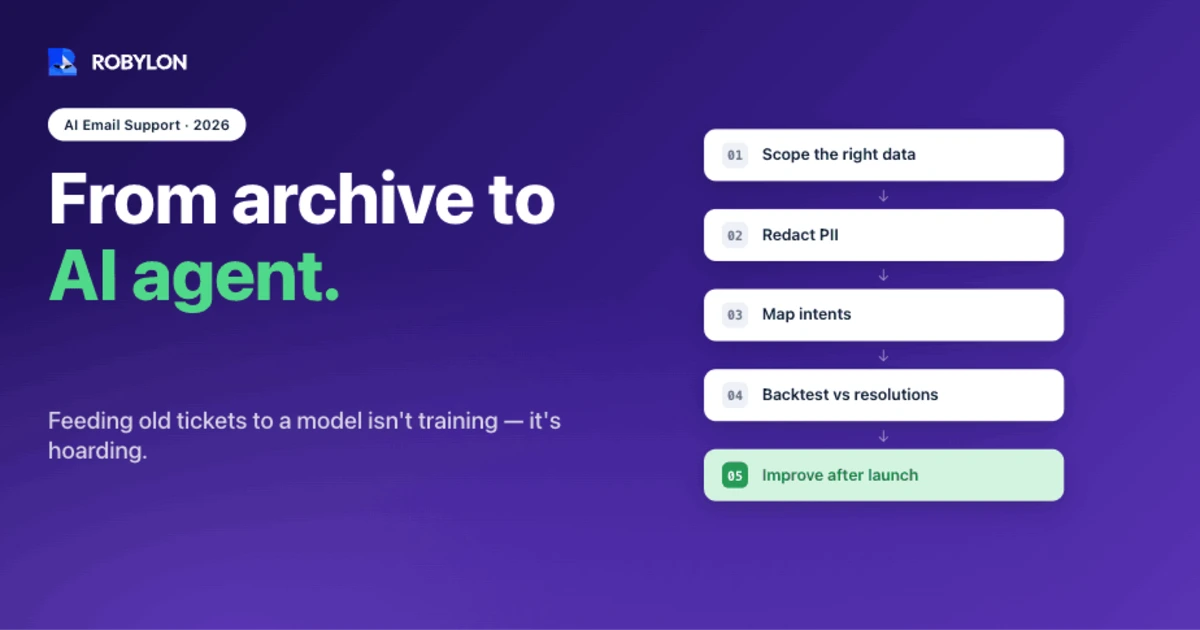
Feeding old tickets to a model isn't training, it's hoarding. This is the practitioner's process for turning historical ticket data into an AI email agent that resolves real cases: scoping the right data, redacting PII, mapping intents, backtesting against past resolutions, and getting better after launch.
A mid-sized e-commerce brand has 38,000 resolved support emails sitting in its help desk. Two years of answers to “where’s my order,” refund requests, sizing questions, billing disputes, the lot. The team assumes that history is a goldmine an AI agent can just learn from, and they’re half right.
The goldmine is real. The “just learn from it” part is where most projects go sideways. Raw ticket history is messy, full of dead threads and retired policies, and a lot of it teaches the wrong lesson. So before you point any AI email agent at your archive, it pays to be clear about what training actually does and what your data is really worth.
What “training on historical tickets” actually means
Here’s the part most vendors gloss over. When you “train” an AI email agent on past tickets, you’re usually not retraining a large language model from scratch. For most teams in 2026, the model’s weights never change at all.
Two mechanisms do the heavy lifting. The first is retrieval: the agent looks up relevant past answers, help articles, and policies the moment a new email arrives, then writes a grounded reply. The second is example selection and tone calibration, where the agent studies how your team phrased good resolutions and matches that voice. A smaller slice of work, classification (is this billing, a refund, a how-to?), sometimes uses light fine-tuning. If you want the full breakdown, we wrote a separate piece on RAG and fine-tuning for support.
The short version: retrieval handles facts, fine-tuning handles form.
That distinction matters because it changes what you do with your data. You’re not building a training set for a research lab. You’re assembling a reference library and a stack of worked examples, the kind an apprentice could read over your shoulder and copy.
What your ticket history actually contains
A resolved ticket is a labeled example whether you meant it to be or not. Someone asked a question, your team replied, the thread closed. That closing reply is, in effect, the “right answer.” It’s why historical tickets are worth more than a knowledge base alone: they show the question in the customer’s own words and the answer in yours.
But not every ticket is a good teacher. Your archive is full of noise:
- One-line threads. “Thanks!” and “Got it” close tickets without teaching anything.
- Duplicates. The same customer emailing three times about one issue turns a single problem into three records.
- Resolutions that weren’t really explanations. A ticket closed by issuing a refund teaches the agent to refund, not to answer.
- Stale policy. A 2023 reply quoting a 30-day return window you quietly cut to 14 days is actively harmful.
- Agent shortcuts and typos. Internal jargon and half-sentences that made sense to a teammate won’t make sense to a customer.
The dataset you actually want isn’t “all tickets.” It’s the subset that represents resolutions you’d be happy to send again.
Step 1: Pull the right slice, not the whole archive
Start narrow. Pull resolved tickets from the last 6–12 months so the answers reflect current products and policy. Then look at volume by category and find your top 20 question types from the past quarter. Those few intents usually cover most of your inbox.
There’s a reason to resist the urge to feed everything in. More data does help, but the gains are smaller than people expect. Adding historical ticket volume tends to improve accuracy in the 10–20% range, while the quality of what you feed in moves the needle far more. A focused set of 5,000 clean, representative resolutions beats 50,000 raw threads.
Decide up front what’s in scope. “Where’s my order” and “how do I reset my password” are obvious automation candidates. Chargeback disputes and account deletions probably aren’t, at least not on day one.
Step 2: Clean and redact before anything else
Garbage in, garbage out is a cliché because it keeps being true. Before a single ticket reaches the agent, dedupe the threads, fix broken encoding, and drop the dead “thanks” tickets that carry no answer.
Then redact personal data, and treat this as non-negotiable if you operate under GDPR, HIPAA, or CCPA. The approach that works is layered:
- Pattern matching first. Regular expressions catch the unambiguous stuff: email addresses, phone numbers, card numbers, IP addresses.
- Named-entity recognition next. A model tuned on support language tells a customer named “John” apart from a “John Deere” product, which generic tools get wrong.
- Keep the meaning. Redaction should strip identifiers, not sentiment. Words like “furious,” “still broken,” and “third time asking” carry signal the agent needs.
One detail saves you grief later: redact with consistent tokens rather than blanket removal. If the same email address becomes the same hashed token everywhere it appears, you can still deduplicate and trace a customer’s thread across records. Strip every address to a generic “[EMAIL]” and you lose the ability to tell two tickets about one person from two separate problems.
Step 3: Map intents and mark what good looks like
Now tag the data. Group tickets by intent (order status, refund, exchange, login issue, billing question) and by the entities that matter, like order ID, product, and plan tier. This is what lets the agent recognize a new email as “the refund pattern” instead of guessing word by word.
You don’t have to label thousands of tickets by hand. Active learning and weak supervision let you label a few hundred well, then have the system propose labels for the rest and flag only the uncertain ones for review. It cuts the manual load sharply.
The step teams skip, and shouldn’t, is marking the gold. Pick the replies that resolved cleanly, in the right tone, with the correct policy, and tag them as the examples to emulate. Just as usefully, flag the bad ones. The curt reply that triggered an angry follow-up teaches the agent what to avoid.
Step 4: Connect the knowledge, not just the transcripts
Tickets tell the agent what was asked and how your team answered, but they don’t tell it what’s true today. For that, the agent needs your current sources: the help center, internal runbooks, product docs, and the macros your team actually uses. A structured knowledge base tends to lift resolution rates by 15–25% on its own.
This is where retrieval earns its keep. When the agent grounds every reply in current documentation instead of a two-year-old ticket, it stops repeating policies you’ve retired. The cautionary tale here is Air Canada, whose chatbot invented a bereavement-refund policy and a tribunal held the airline to it. Grounding the agent in real, current sources is how you avoid your own version of that.
Historical tickets also reveal which actions matter. If a third of your refund emails end with someone manually issuing the refund in Shopify, the agent should be able to do that too. That’s the difference between answering and resolving, and it depends on your write-access integrations reaching the systems where the work actually happens.
Step 5: Backtest against tickets you’ve already resolved
This is the most useful step in the whole process, and the one that separates a real deployment from a hopeful one.
Before the agent emails a single customer, run it in shadow mode against historical tickets it has never seen. For each one, compare the reply it would have sent to the reply that actually closed the case. You get a resolution-rate estimate grounded in your own data, not a vendor’s marketing slide.
Set expectations from that number, not from a brochure. Industry benchmarks land around 20–40% autonomous resolution for fresh deployments and 60–80% for well-tuned ones. Teams routinely start in the high 20s and climb past 50% as they fix the gaps the backtest exposes. If your simulation says 35%, that’s your honest starting point, and it will rise.
The backtest doubles as a to-do list. Where the agent’s reply missed, the cause is usually one of three things: a knowledge gap (the answer simply wasn’t in any source it could reach), a missing action (it knew the answer but couldn’t issue the refund or pull the order), or a tone mismatch on a sensitive case. Each kind of failure points at a specific fix. Tune the highest-volume gaps first, re-run the simulation, and watch the projected number move before you ever go live.
Backtesting also calibrates confidence. The agent should send on its own when it’s sure and hand off when it isn’t, and a shadow run shows you where to draw that line per intent.
Step 6: Decide what to automate and what to escalate
Not everything in your archive should be automated, even when the agent technically could handle it. High-stakes intents like billing disputes, legal questions, and anything touching an angry or high-value customer are usually worth keeping in human hands. A clear policy on when the agent escalates to a person protects both your customers and your brand.
A useful red flag while you’re scoping: if a “resolution” really means the agent drafts a reply for a human to send, that’s a copilot, not autonomous resolution. Drafting is a perfectly good first phase, but be honest with yourself about which number you’re reporting.
Build in tone-shift detection too. When a customer’s language turns frustrated across a thread, the agent should escalate rather than push another templated reply.
Step 7: Keep training after launch
Training isn’t a one-time import. It’s a habit.
The best setups keep learning from every new resolved ticket and, just as importantly, from agent corrections. When a human edits the agent’s draft before sending, that edit is a fresh gold example. Feed it back, and the agent’s next reply on that intent gets a little better.
Review the misses weekly, not quarterly. Watch resolution rate rather than deflection, since deflection only means the customer went away, not that they got help. And keep an eye on satisfaction: AI-handled tickets currently score about 4.1 out of 5 on CSAT against roughly 4.3 for human agents. That gap is small enough to close on routine intents and worth watching on the rest.
How Robylon trains on your ticket history
This is the part Robylon was built around. During a typical 3–7 day deployment, Robylon ingests your historical tickets and runs exactly the backtest described above, validating against your real resolutions to project the 60–80% of emails it can handle autonomously before it ever replies to a customer.
From there it grounds answers in your live documentation, takes action through 60+ integrations (issuing the refund, updating the order, resetting the access), and routes anything outside its confidence to your team with full context. It’s email-first by design, with human-in-the-loop review and tone-shift detection built in. Pricing runs on usage-based credits, so you’re not paying per seat or per agent as you scale. You can see how the AI email support side fits together on the platform page.
Ready to put your ticket history to work? Robylon AI resolves 60–80% of customer emails autonomously, with AI agents that take action across Shopify, Zendesk, Stripe, and 60+ other integrations. Start free at robylon.ai
Frequently asked questions
How many historical tickets do you need to train an AI email agent?
Quality matters more than volume. A few thousand clean, correctly tagged resolutions covering your top question types will outperform tens of thousands of raw threads. Adding more historical volume tends to lift accuracy by only about 10–20%, while the cleanliness and relevance of the data moves the needle far more. Pull resolved tickets from the last 6–12 months so the answers still reflect current products and policy, then focus on the intents that fill most of your inbox.
Does training an AI email agent mean fine-tuning a language model?
Usually not. For most teams the model's weights never change. Training an AI email agent mostly means retrieval (looking up your past answers and current docs at reply time) plus tone and example selection from your best resolutions. Fine-tuning gets used for narrow jobs like intent classification, not for teaching the agent facts. The simplest way to hold the two apart: retrieval handles facts, fine-tuning handles form.
How do you handle customer PII in support tickets used for training?
Redact it before the data ever reaches the agent, and treat that as non-negotiable under GDPR, HIPAA, or CCPA. The reliable approach is layered: regular expressions catch emails, phone numbers, and card numbers; named-entity recognition catches names and addresses in free text; and the redaction preserves sentiment so signal isn't lost. Use consistent tokens rather than blanket removal, so the same address maps to the same hashed value and you can still deduplicate and trace a customer's thread.
How can you predict an AI email agent's resolution rate before launch?
Run the agent in shadow mode against historical tickets it has never seen, then compare the reply it would have sent to the reply that actually closed each case. That gives you a resolution-rate estimate grounded in your own data instead of a vendor's slide. Fresh deployments usually land around 20–40%, while well-tuned ones reach 60–80%. The backtest also shows which intents miss and why, so you know what to fix before going live.
How long does it take to train an AI email agent on past tickets?
Days, not months. The model isn't retrained from scratch, so the slow parts are deciding which intents to automate and cleaning the data, not waiting on a training run. Robylon typically ingests your tickets, backtests against past resolutions, and goes live within 3–7 days. Training then continues after launch: every newly resolved ticket and every human edit to a draft becomes a fresh example the agent learns from.