
How to Automate Customer Support: Step-by-Step Guide (2026)
Automate 80% of repetitive support queries across chat, email, voice, and WhatsApp without sacrificing CSAT. This step-by-step guide covers ticket auditing, knowledge base setup, AI platform selection, phased deployment, and ongoing optimization.
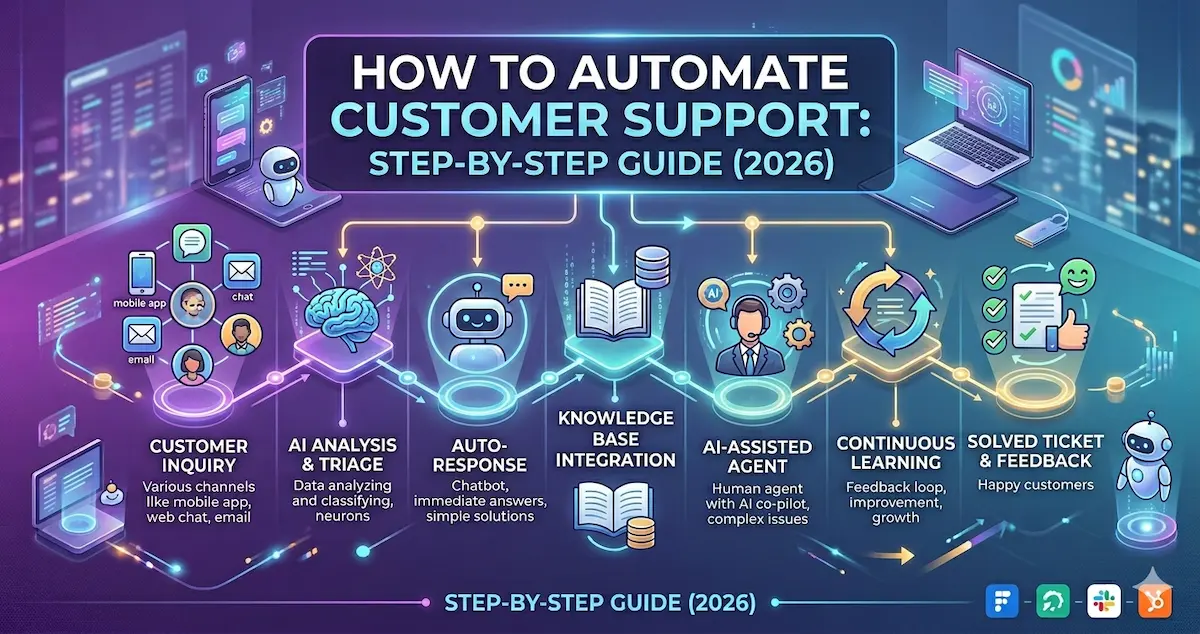
How to Automate Customer Support: Step-by-Step Guide (2026)
Automate 80% of repetitive support queries across chat, email, voice, and WhatsApp — without sacrificing customer satisfaction. This guide walks you through the entire process, from auditing your ticket volume to measuring ROI after launch.
Customer support teams are under more pressure than ever. Ticket volumes are rising, customers expect instant answers around the clock, and hiring more agents is not a scalable solution. According to recent industry data, support teams using AI-powered automation resolve tickets 90% faster while reducing per-ticket costs by 40–60%.
But automation is not about replacing humans. The best-performing support teams in 2026 use a hybrid model — AI handles the repetitive, high-volume queries (order status, refund policies, password resets) while human agents focus on complex, high-empathy situations that require judgment and creativity.
This guide gives you a practical, step-by-step framework to automate customer support the right way. Whether you are a startup handling 500 tickets a month or an enterprise processing 50,000, the principles are the same. Let’s get into it.
1. Audit Your Current Support Operations
Before you automate anything, you need a clear picture of where your time and money are going. Skip this step and you risk automating the wrong things — or building AI agents that sound impressive in a demo but do not move the needle on the metrics that matter.
Map Your Ticket Categories
Export the last 90 days of support tickets from your helpdesk (Zendesk, Freshdesk, Zoho Desk, Intercom — whatever you use). Categorize every ticket by intent. Most support teams find that 60–80% of their total volume falls into a surprisingly small number of categories:
- Order status and tracking (WISMO — “Where Is My Order?”)
- Returns, exchanges, and refund requests
- Account access and password resets
- Product availability, sizing, and specifications
- Billing questions and payment failures
- Policy questions (shipping times, warranty, cancellation)
Identify Your Automation Candidates
Not every ticket should be automated. The best candidates share three characteristics: they are high volume (appearing frequently enough to justify the setup effort), low complexity (resolvable with structured data lookups or policy-based responses), and well-documented (your team already has SOPs or canned responses for them).
Score each ticket category on these three dimensions. The categories that score high on all three are your Phase 1 automation targets. A good rule of thumb: if a new agent can be trained to handle a query type in under 10 minutes using existing documentation, an AI agent can almost certainly handle it.
Benchmark Your Current Metrics
Before making any changes, record your baseline numbers. You will need these to measure the impact of automation later. The key metrics to capture:
- First Response Time (FRT): Median time from ticket creation to first reply. Shows how fast customers get acknowledged.
- Average Handle Time (AHT): Total time spent per ticket, including research and follow-ups. Directly drives cost per ticket.
- First Contact Resolution (FCR): Percentage of tickets resolved without follow-up or escalation. Higher FCR means happier customers and lower cost.
- CSAT Score: Post-resolution satisfaction rating. Your north-star quality metric.
- Ticket Volume per Agent: Monthly tickets divided by full-time agents. Measures team capacity and workload.
- Cost per Ticket: Total support cost divided by tickets resolved. The metric your CFO cares about most.
2. Build Your Knowledge Base
Your AI agent is only as good as the information it has access to. A well-structured knowledge base is the foundation of effective automation. Think of it as the training manual your AI reads before every conversation.
Organize Content by Intent
Structure your knowledge base around the ticket categories you identified in Step 1. For each category, create content that covers the most common questions, the resolution steps, and the edge cases that require escalation. Group related articles into clusters so your AI can retrieve the right context quickly.
Write for AI, Not Just for Humans
Most help center articles are written for customers browsing your website. AI agents need something slightly different. Keep these principles in mind:
- Be explicit about policies. Instead of “we offer flexible returns,” write “return requests are accepted within 30 days of delivery for unused items in original packaging.”
- Include decision logic. Document the if-then rules your agents follow. “If the order is within 24 hours of placement, cancel directly. If shipped, initiate return instead.”
- Specify escalation triggers. Clearly state when a query should be handed off to a human agent: legal requests, complaints involving injury, VIP customers, or situations the AI is not confident about.
- Use structured formats. Tables, numbered steps, and clear headers help AI systems retrieve and present information accurately.
Connect Your Data Sources
A knowledge base of static articles is only the starting point. For truly useful automation, your AI agent needs access to live data — order management systems, CRM records, billing platforms, and inventory databases. This is what allows the AI to give a customer their actual order status instead of a generic “please check your email” response.
Map out which systems each ticket category requires. WISMO queries need your OMS or shipping API. Billing questions need your payment processor. Account issues need your identity/auth system. The more data you connect, the more tickets your AI can fully resolve without human help.
3. Choose the Right Automation Platform
The market for AI customer support tools has exploded. There are hundreds of options, from basic chatbot builders to full-stack AI agent platforms. Choosing the wrong one costs you months of migration time and missed expectations. Here is what to look for.
Key Evaluation Criteria
- Channel coverage: Does it support your channels — chat, email, voice, WhatsApp, social? Omnichannel from day one beats stitching tools together later.
- AI resolution depth: Can it take actions (cancel orders, issue refunds, update records), or does it only answer questions? Action-taking agents deliver 3–5x more automation than answer-only bots.
- Knowledge ingestion: How easily can you feed it your docs, FAQs, SOPs, and past tickets? Look for URL scraping, PDF upload, and auto-sync from your helpdesk.
- Integration ecosystem: Pre-built connectors to Zendesk, Freshdesk, Shopify, Salesforce, and your order/billing systems. Every missing integration is weeks of custom dev work.
- Human handoff: How does it transfer to a live agent? The best platforms pass full context — conversation history, customer data, intent detected — so the agent does not start from scratch.
- Analytics and QA: Dashboards for bot resolution rate, confidence scores, CSAT, handle time. Without visibility, you are flying blind.
- Security and compliance: SOC 2 Type II, GDPR, data residency options, PII redaction. Non-negotiable for fintech, healthcare, or enterprise buyers.
- Deployment speed: How quickly can you go live? The best platforms offer same-day deployment with iterative improvement, not months-long implementation projects.
💡 Robylon Tip: Robylon AI agents deploy across chat, email, voice, and WhatsApp from a single platform — with pre-built integrations for Zendesk, Freshdesk, Shopify, Zoho, and 40+ tools. Most teams go live within a day, not weeks. Start free at robylon.ai
4. Design Your AI Agent Workflows
This is where automation moves from concept to reality. A well-designed AI agent workflow handles the full lifecycle of a customer interaction: greeting, intent detection, data retrieval, resolution, and handoff if needed.
Start with Your Top 5 Intents
Do not try to automate everything at once. Pick the five highest-volume ticket categories from your audit and build dedicated workflows for each. For a typical e-commerce brand, these might be:
- Order tracking — Customer provides order ID or email → AI queries OMS → returns real-time shipment status with tracking link.
- Return initiation — AI checks return eligibility (within window, item condition) → generates return label → sends via email/WhatsApp.
- Refund status — AI queries payment system for refund processing state → provides ETA and transaction reference.
- Product inquiry — AI searches product catalog for availability, specs, sizing → recommends alternatives if out of stock.
- Account/password help — AI verifies identity through email/phone → triggers password reset link → guides user through recovery.
Define Escalation Rules Clearly
Every AI workflow needs a clear escalation path. Define the specific conditions under which the AI should stop trying to resolve and hand off to a human agent:
- Low confidence: If the AI is less than 80% confident in its intent classification, escalate rather than guess.
- Negative sentiment: If the customer expresses frustration, anger, or distress, route to a human who can empathize.
- Explicit request: If the customer asks to speak with a person, honor the request immediately. No dead ends.
- Repeat loops: If the same question has been asked three times, the AI has failed to resolve — hand off with full context.
- High-value accounts: For VIP or enterprise customers, you may want human-first routing with AI as copilot assistance.
Set the Tone and Persona
Your AI agent represents your brand in every conversation. Define a clear persona: what is its name? How formal or casual should it be? Does it use emojis? Should it match the customer’s language (critical for multilingual teams)? The best AI agents adapt their tone to context — a refund complaint requires more empathy than an order tracking query.
5. Deploy in Phases, Not All at Once
The most common automation failure is trying to launch everything simultaneously. A phased rollout lets you catch issues early, build internal confidence, and iterate based on real customer interactions.
Phase 1: Shadow Mode (Week 1–2)
Deploy your AI agent alongside your human team, but do not let it respond to customers directly. Instead, it monitors incoming tickets and suggests responses that human agents can review. This lets you evaluate accuracy and identify gaps in your knowledge base without any customer-facing risk.
During shadow mode, track how often the AI’s suggested response would have been correct. Aim for 85%+ accuracy before moving to the next phase.
Phase 2: Assisted Automation (Week 3–4)
Enable the AI to handle your highest-confidence ticket categories — the ones where it demonstrated 90%+ accuracy in shadow mode. Start with a single channel (chat is usually the safest). Keep human agents on standby to take over if the AI struggles.
Monitor CSAT closely during this phase. If satisfaction dips, tighten your escalation thresholds. If it stays flat or improves (which is common, because AI responds instantly), you are ready to expand.
Phase 3: Full Deployment (Week 5–8)
Expand to additional channels (email, WhatsApp, voice) and additional ticket categories. By this point, your knowledge base has been refined by weeks of real interactions, and your escalation rules have been tuned. Most teams reach 60–80% automation rates within two months of their initial deployment.
📈 Real Results: Robylon customers typically see these results within 60 days: 80–85% chat automation, 60% email automation, response times dropping from minutes to 3–6 seconds, and support costs reduced by 30% or more. One D2C fashion brand automated 85% of chat queries and 60% of tickets, cutting average handle time by 95%.
6. Measure, Optimize, Repeat
Automation is not a “set it and forget it” project. The best teams treat their AI agent as a living system that improves continuously.
Track Your Automation Metrics Weekly
- Bot Resolution Rate: Percentage of tickets fully resolved by AI without human involvement. Target 70–85%.
- Escalation Rate: Percentage of conversations handed off to humans. Investigate spikes — they often reveal knowledge base gaps.
- Confidence Score Distribution: Review how many responses fall above vs. below your confidence threshold.
- CSAT by Channel: Compare satisfaction for AI-resolved vs. human-resolved tickets. Healthy systems show parity or AI ahead.
- KB Gap Analysis: Track queries where the AI could not find relevant information. These are your content priorities for next week.
Run a Weekly Optimization Cycle
Set aside 30 minutes every week to review escalated conversations and low-confidence responses. Look for patterns: are customers asking about a new product that is not in your KB? Is there a policy change that has not been updated? Did a seasonal promotion introduce edge cases? Each fix compounds — teams that do this consistently see their automation rate climb 2–5 percentage points every month.
7. Common Mistakes to Avoid
After working with hundreds of support teams, here are the pitfalls we see most often:
- Automating everything on day one. Start narrow, prove value, expand. Trying to cover 100% of intents at launch leads to poor quality across the board.
- Ignoring the knowledge base. AI is only as smart as the data you give it. Outdated or incomplete documentation is the number one cause of bad answers.
- No escalation path. Customers trapped in a loop with an AI that cannot help and cannot hand off is the fastest way to tank your CSAT.
- Measuring the wrong things. Deflection rate alone is meaningless if customers are not getting resolved. Track resolution, not just deflection.
- Treating it as a one-time project. Customer support evolves. Products change, policies update, seasonal patterns shift. Your AI needs ongoing attention to stay effective.
8. Your Customer Support Automation Checklist
Here is a quick-reference checklist to keep your automation project on track:
Audit Phase:
- Export and categorize 90 days of tickets → Top 5 intents identified
- Benchmark FRT, AHT, FCR, CSAT, cost per ticket → Baseline numbers documented
Build Phase:
- Create/update knowledge base for top 5 intents → All decision logic documented
- Connect live data sources (OMS, CRM, billing) → AI can pull real-time customer data
- Select and configure AI platform → Channels, integrations, and security confirmed
Design Phase:
- Build workflows for top 5 intents with escalation rules → Each workflow tested end-to-end
- Define AI persona, tone, and multilingual settings → Brand guidelines reflected
Launch Phase:
- Deploy in shadow mode for 1–2 weeks → 85%+ suggested-response accuracy
- Enable assisted automation on chat → CSAT maintained or improved
Scale Phase:
- Expand to email, WhatsApp, voice → 60–80% automation rate achieved
- Weekly review of escalations and KB gaps → Automation rate climbing monthly
Bottom Line
Automating customer support is not about removing humans from the equation — it is about letting AI handle the work that does not require human judgment, so your team can focus on the interactions that do. The companies winning at support in 2026 are the ones that deploy AI agents for speed and consistency, keep humans for empathy and complexity, and use data to continuously improve both.
The step-by-step framework in this guide works whether you are automating for the first time or upgrading from a basic chatbot to a full AI agent platform. The key is to start with a clear audit, build a strong knowledge base, deploy in phases, and commit to a weekly optimization cadence.
Ready to Automate Your Customer Support? Robylon AI agents resolve 80%+ of support queries across chat, email, voice, and WhatsApp — with 97% accuracy and 3–6 second response times. Most teams go live in under a day. → Get started free at robylon.ai | → Book a demo
Frequently asked questions
How long does it take to deploy AI customer support automation?
With modern AI platforms, initial deployment takes 1–7 days depending on the complexity of your setup. A basic chatbot trained on your help center can go live within hours. Adding system integrations (OMS, CRM, billing) for action-taking capabilities typically adds a few more days. Full optimization with phased rollout takes 4–8 weeks.
What is the difference between a chatbot and AI customer support automation?
A chatbot is a single channel interface (usually web chat) that answers questions. AI customer support automation is broader — it includes AI agents that work across chat, email, voice, and WhatsApp, take actions (process refunds, update orders, create tickets), integrate with your helpdesk and CRM, and include analytics, QA, and human handoff workflows. Think of a chatbot as one component of a full automation strategy.
Will automating support hurt my CSAT scores?
Not when done correctly. In most cases, CSAT stays the same or improves after automation — because AI responds instantly (no wait times), gives consistent answers, and is available 24/7. The key is setting clear escalation rules so complex or emotional issues are always routed to human agents. A phased rollout with shadow mode lets you validate quality before going fully live.
How much does it cost to automate customer support with AI?
Costs vary by platform and volume. Credits-based platforms like Robylon AI start with a free tier, with paid plans scaling based on conversations resolved. Most businesses see 40–60% cost reduction per ticket compared to fully human-staffed support, with break-even typically achieved within 30–60 days of deployment.
What percentage of support tickets can AI actually automate?
Well-configured AI agents typically automate 60–85% of support tickets, depending on the complexity of your queries and the quality of your knowledge base. High-volume, repetitive categories like order tracking, refund status, and policy questions see the highest automation rates. Complex issues requiring empathy or judgment are best kept with human agents.
Related reading
 Customer Support
11 SaaS Help Desk Tools Ranked for 2026 (3 Are Completely Free)
The 11 best SaaS support tools for 2026, ranked with real pricing and an honest take on which charging model (per-agent, per-resolution, or credits) actually fits your team.
 Customer Support
11 Customer Service Trends in 2026 Every Support Leader Must Know
Top 11 customer service trends for 2026: from AI copilots to autonomous agents, voice AI, omnichannel, GenAI, and human+AI partnerships.
 Customer Support
9 Free Help Desk Tools in 2026 That Don't Feel Free (Full Breakdown)
From lightweight tools for startups to advanced systems with AI and automation, explore the top free and freemium help desk software of 2026.