
Shopify WhatsApp AI Customer Service: What Actually Works in 2026
WhatsApp is now the channel where Shopify shoppers expect a reply within minutes. This guide covers what you can automate, how the Business Platform pricing actually works, where AI should hand off to a human, and how to set it up without getting your number flagged.
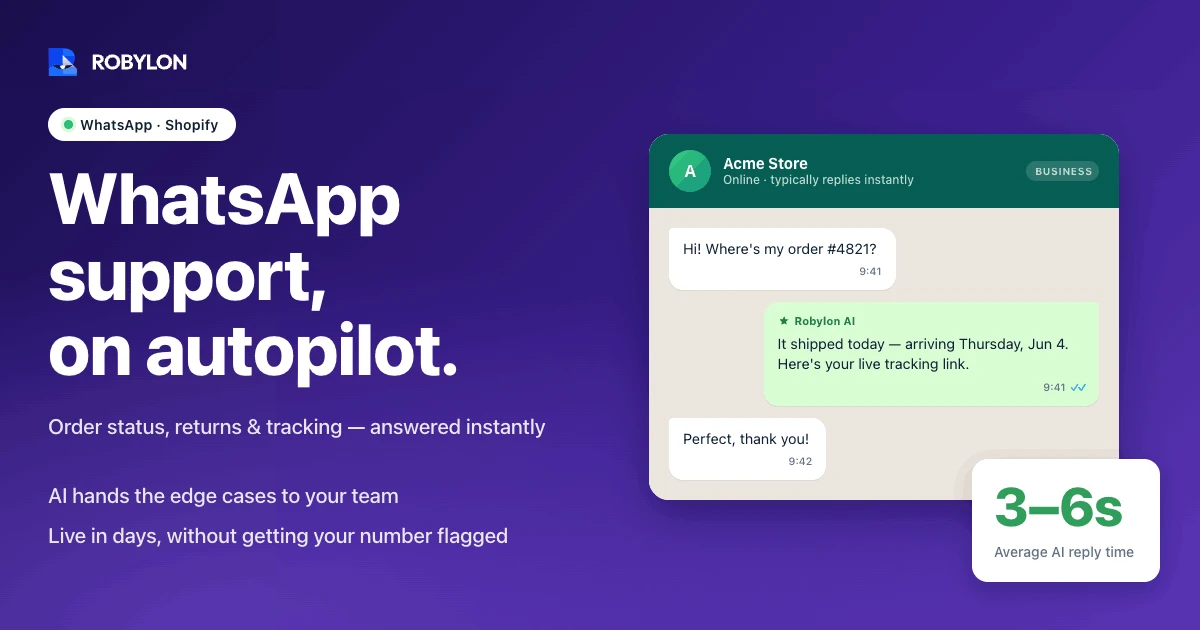
It’s the Monday after a flash sale. By 9 a.m., a mid-size Shopify store has 340 unread WhatsApp messages, and roughly two-thirds of them say some version of the same four words: where is my order?
That single question is the most expensive habit in ecommerce support. Industry estimates put WISMO (“where is my order”) at 40 to 60 percent of all support tickets for the average merchant, and each contact runs somewhere around four to seven dollars once you load in agent time. None of that work improves the product. It’s pure friction tax, and it lands hardest on WhatsApp, where shoppers expect a reply in minutes, not hours.
So the real question for a Shopify brand isn’t whether to be on WhatsApp. It’s whether a human should be answering the 200th identical tracking question of the morning. This is where WhatsApp AI customer service earns its keep, and also where a lot of teams set it up wrong.
Why Shopify shoppers keep moving to WhatsApp
The channel math is hard to argue with. More than 2 billion people use WhatsApp, and around 175 million of them message a business account every single day. When a brand sends a message there, it tends to get read: open rates sit north of 90 percent, usually within minutes, against the roughly 20 percent an email marketing send manages on a good day.
Shoppers have also made their preference clear. Across surveyed markets, close to three-quarters of consumers say they’d rather message a business than call it or email it. For a D2C brand, that’s not a marketing channel preference. It’s where your support queue already lives, whether you’ve staffed it or not.
The catch is volume. A channel people actually read is a channel people actually use, and a Shopify store doing a few thousand orders a month can field hundreds of inbound messages a week without a single campaign going out. Speed expectations don’t scale with your headcount. That gap is exactly what automation is for.
What the WhatsApp Business Platform actually lets you automate
First, a distinction that trips up most teams. The green WhatsApp Business app on someone’s phone is not the same thing as the WhatsApp Business Platform (the API). The app is fine for a founder answering messages by hand. Automation, Shopify order data, and AI agents all run on the API, accessed through a Business Solution Provider. If you want a fuller walkthrough of the channel mechanics, our WhatsApp chatbot for business guide goes deeper than this section will.
On the API, there are two ways a conversation can start, and the difference decides both what you can say and what you pay.
When a customer messages you first, a 24-hour customer service window opens. Inside that window you can reply with free-form messages, and those replies are free. This is the core of support automation: a shopper asks about their order, your AI agent answers, and as long as the back-and-forth happens inside the window, Meta charges nothing for the conversation.
When your store messages a customer first (an order confirmation, a shipping update, a “your return was received” note), that’s a business-initiated message. It has to use a pre-approved template, and it’s billed.
The pricing model changed in 2025, and it matters
On July 1, 2025, Meta scrapped conversation-based pricing and switched to per-message pricing. Under the old model, one fee covered a 24-hour window no matter how many template messages you sent. Now each delivered template message is billed on its own, priced by category (marketing, utility, authentication, service) and by the recipient’s country.
Two parts of that change work in your favor for support specifically. Service replies inside the customer service window stay free, so a high-resolution AI agent that handles inbound questions costs you very little in Meta fees. And shoppers who arrive through a Click-to-WhatsApp ad open a 72-hour free messaging window, which is generous for a first conversation. The expensive category is marketing templates, so the discipline is simple: automate support inside the free window, and be deliberate about every outbound template you fire.
The four message types every Shopify store ends up automating
Most WhatsApp automation for a Shopify brand collapses into four buckets. They’re worth naming, because the easy wins and the traps are different in each.
- Order confirmations and shipping updates: the highest-ROI automation, because these are transactional templates customers expect and welcome. A confirmation when the order is placed, then triggered updates as it ships, goes out for delivery, and arrives. Done well, these prevent the WISMO message from ever being sent.
- Where-is-my-order replies: when a customer does ask, an AI agent connected to your order and carrier data can answer in one turn with the real status, not a generic “please check your tracking link.” This is the bucket that drains your queue fastest.
- Returns and refunds: the second wave of anxiety, sometimes called WISMR (“where is my refund”). A customer who’s already shipped an item back wants to know it arrived and when the money lands. You can automate Shopify returns end to end, from initiating the return to confirming each stage.
- Pre-sale and product questions: sizing, stock, compatibility, “does this ship to my country.” These convert browsers into buyers when answered fast, and they’re a natural fit for an agent that can read your catalog.
Notice what all four have in common: the answer already exists somewhere in your stack. The customer just can’t see it. That’s the whole game.
From scripted bot to an agent that takes action
Here’s the line that separates a useful WhatsApp setup from a frustrating one. A scripted bot recognizes a keyword and hands back a canned reply or a link. An AI agent reads the actual intent, pulls live data, and does the thing.
The difference shows up the moment a shopper asks something a script didn’t anticipate. “I ordered the blue one but I think I need the medium, can you swap it before it ships?” A keyword bot returns a returns-policy link and a dead end. An agent wired into your store can check whether the order has shipped, confirm the variant is in stock, and modify the order, the kind of workflow covered in our piece on Shopify chatbot automation.
This only works if the AI can touch your systems. Reading data answers questions; writing data resolves them. An agent with write access into your tools (Shopify, your shipping platform, your payment processor) can issue a refund, update a shipping address, or reschedule a delivery without a human ever opening a ticket. Without that write access, you’ve built a faster way to say “let me check with the team,” which isn’t really automation at all.
Where WhatsApp AI should hand off, even when it could answer
Any vendor who tells you to automate everything is selling you a future complaint. The teams that get this right are picky about what stays with the AI and what routes to a person, and that line is about judgment, not capability.
Some conversations should escalate on contact, regardless of whether the model could technically generate a reply:
- Anger and complaints: a customer who’s already upset doesn’t want a correct answer delivered by a bot. Tone-shift detection should catch the frustration and pull in a human before the brand takes the blame.
- Money disputes and possible fraud: chargebacks, suspected fraudulent orders, and anything touching a payment dispute carry real liability. These need a person and a paper trail.
- Edge-case returns: a refund request that sits outside policy, or a “the box arrived empty” claim, involves a judgment call about goodwill and risk that you don’t want a model making unsupervised.
- High-value or VIP customers: the shopper who’s spent four figures with you this year is exactly the person a human should be talking to.
The goal isn’t a bot that never escalates. It’s a system that resolves the repetitive 60 to 80 percent on its own and hands off the rest cleanly, with the full conversation history attached so the customer never has to repeat themselves. A clean handoff beats a clever bot every time.
Setting it up without getting your number flagged
WhatsApp guards its channel hard, and a careless launch can get a number restricted. The setup order that keeps you safe looks like this:
- Get the API through a provider. Apply for the WhatsApp Business Platform via a Business Solution Provider rather than going direct. They handle approval, hosting, and the technical plumbing.
- Collect real opt-in. Customers must agree to hear from you before you send a business-initiated message. A checkout checkbox or an explicit opt-in keeps you compliant and your quality rating healthy.
- Submit your templates. Every outbound message (confirmations, shipping updates, return notices) needs a pre-approved template. Meta usually reviews these within hours. Keep them transactional and useful, not promotional.
- Connect your Shopify data. Wire order, fulfillment, and customer records into the platform so the AI answers from live data instead of guessing.
- Layer the AI agent on top. Train it on your policies and products, set your escalation rules, and watch the first weeks of transcripts closely before widening what it handles.
That last step is where the value compounds. The brands that win treat the first month as a tuning period, reading real conversations and tightening the escalation logic, rather than flipping a switch and walking away.
How Robylon handles Shopify support on WhatsApp
Robylon is an AI customer support agent that resolves 60 to 80 percent of customer queries autonomously, validated against your own historical tickets during onboarding rather than promised from a slide. On WhatsApp specifically, that means tracking questions, returns, order changes, and product queries get answered in one turn, with the messy cases routed to your team.
The part that matters for a Shopify store is action. Robylon ships with 60+ write-access integrations, so the agent doesn’t just look up an order, it can issue the refund, change the address, or trigger the replacement inside Shopify and your shipping and payment tools. It runs omnichannel across WhatsApp, chat, email, and voice, with an email-first heritage, so a shopper who starts on WhatsApp and follows up by email meets the same agent with the same context. It speaks 40+ languages, keeps a human in the loop with tone-shift detection and escalation, and typically goes live in three to seven days.
Pricing is usage-based credits, not per seat and not per agent, which suits the spiky volume a flash sale or a holiday rush throws at a Shopify brand. You can see how this fits the wider picture in our overview of AI support for ecommerce brands, or look at the dedicated WhatsApp support channel to see the setup in context.
WhatsApp rewards brands that answer fast and punishes the ones that don’t. The merchants pulling ahead aren’t the ones with the biggest support teams. They’re the ones who stopped paying humans to answer the same tracking question 300 times a morning.
Ready to turn your WhatsApp queue into resolved conversations? Robylon AI resolves 60 to 80 percent of customer messages autonomously with agents that take action across Shopify, your shipping platform, your payment processor, and 60+ other integrations. Start free at robylon.ai
Frequently asked questions
Do I need the WhatsApp Business API to automate Shopify support?
Yes. The free WhatsApp Business app on a phone can't connect to your Shopify orders or run an AI agent. Automation, order lookups, and triggered notifications all require the WhatsApp Business Platform (the API), which you access through a Business Solution Provider that handles approval and hosting. The regular app is fine for a founder replying by hand, but it has no way to fire messages from store events or resolve tickets at scale. Your AI layer plugs into the API, not the app.
How much does WhatsApp customer service cost for a Shopify store?
Since July 2025, Meta bills per message rather than per conversation, and the rate depends on message category and the customer's country. The helpful part for support: when a customer messages you first, replies inside the 24-hour service window are free. So an inbound-heavy support setup costs very little in Meta fees. Your real spend is outbound templates like order and shipping notifications, plus whatever your automation platform charges. Robylon prices on usage-based credits, with no per-seat fees.
Can AI on WhatsApp actually process refunds and order changes?
It can, but only if it has write access to your systems. A read-only bot can report an order status; an agent with write-access integrations into Shopify, your shipping platform, and your payment processor can issue the refund, swap a variant, or update a delivery address directly. That gap separates real resolution from a faster way to say the team will check. Robylon ships with 60+ integrations built for exactly this kind of action-taking on WhatsApp.
Will automating WhatsApp get my business number banned?
Not if you follow Meta's rules. The two things that protect your number are genuine opt-in, where customers agree to hear from you (usually at checkout), and keeping outbound templates transactional rather than spammy. Unsolicited marketing blasts are what tank your quality rating and risk restrictions. Inbound support replies are low-risk because the customer started the conversation. Go through an approved Business Solution Provider, get templates pre-approved, and respect the opt-in, and automation stays safe.
What WhatsApp conversations should still go to a human?
Automate the repetitive, factual questions and escalate anything that needs judgment. Angry or emotional messages, payment disputes and suspected fraud, returns that fall outside policy, and high-value customers should route to a person, ideally with the full chat history attached so nothing gets repeated. A well-designed system resolves the bulk of order, shipping, and product questions on its own while handing off the cases where a wrong answer is expensive. Aim for a clean handoff, not zero humans.