
Shopify Chatbot: Automate E-commerce Support & Sales (2026)
Shopify stores lose revenue to slow support and abandoned carts every day. This guide shows you how to deploy an AI chatbot that handles WISMO, returns, product discovery, and checkout nudges - with step-by-step Shopify installation.
If you run a Shopify store, you already know the math. A significant share of your support tickets are the same questions repeated hundreds of times — “Where is my order?”, “How do I return this?”, “Is this available in my size?”, “When will this be back in stock?” Meanwhile, potential buyers land on your product pages, hesitate, and leave without purchasing because nobody is there to answer their objection at 11 PM on a Sunday.
An AI chatbot solves both problems at once. It automates the repetitive support queries that eat up your team’s time, and it engages visitors in real time to guide them toward a purchase — 24 hours a day, every day of the year.
This guide is specifically for Shopify merchants. We cover the use cases that matter most for e-commerce, how to install and configure a chatbot on Shopify, integration with Shopify’s APIs and order system, and the metrics you should track to measure ROI.
Why Shopify Stores Need a Chatbot in 2026
E-commerce support is uniquely suited for AI automation because the queries are highly repetitive and data-driven. Consider what a typical Shopify store’s support volume looks like:
- 35–45% of tickets are WISMO (“Where Is My Order?”) — customers asking about order status, shipping updates, and delivery timelines.
- 15–20% are returns and refunds — return eligibility checks, label requests, refund status, exchange processing.
- 10–15% are product questions — sizing, availability, compatibility, materials, comparisons.
- 10% are payment and billing issues — failed transactions, discount codes, invoice requests.
- The remainder — account issues, cancellations, complaints, and one-off requests.
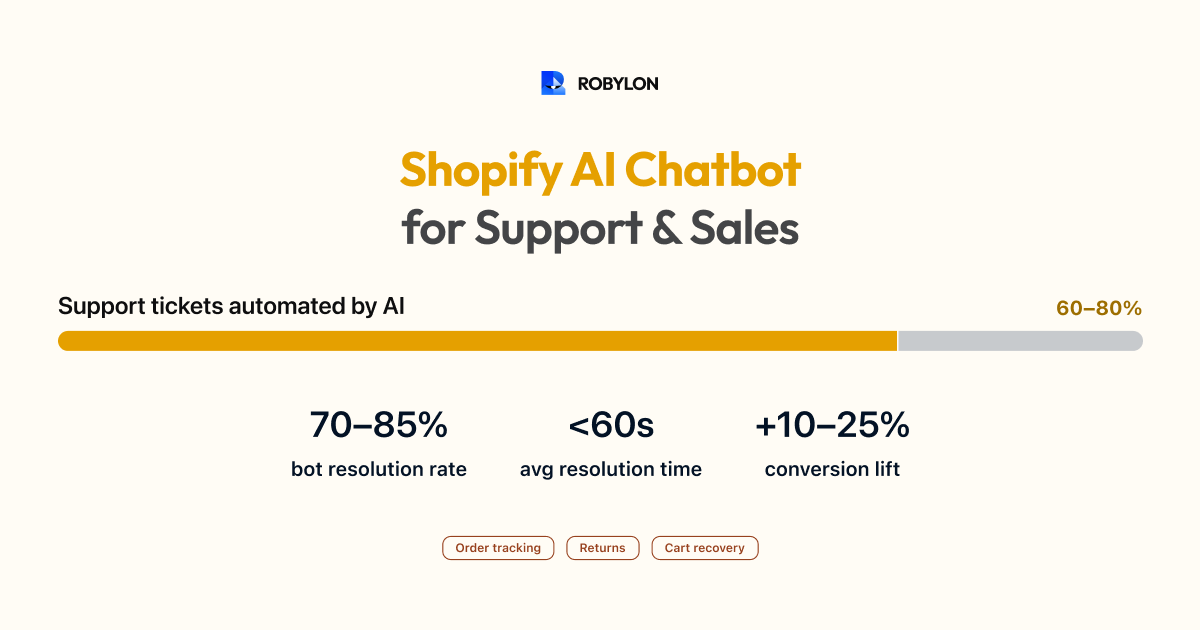
That means 60–80% of your total support volume is addressable by an AI chatbot connected to your Shopify data. These are not ambiguous, judgment-heavy issues — they are straightforward lookups and policy-based responses that AI handles extremely well.
On the sales side, the numbers are equally compelling. Average Shopify store conversion rates hover around 1.5–2%. That means 98 out of 100 visitors leave without buying. A chatbot that proactively engages visitors, answers product questions, and recovers abandoned carts can lift conversion by 10–25% — which for a store doing $50K/month translates to $5K–$12.5K in additional monthly revenue.
Top Use Cases for Shopify Chatbots
1. Order Tracking (WISMO)
This is the single highest-volume use case. The chatbot asks the customer for their order number or email address, queries the Shopify Orders API (or your shipping provider’s API), and returns the real-time status — carrier name, tracking number, current location, and estimated delivery date. No human agent needed.
The key to getting this right: the chatbot must return actual live data, not a generic “check your email for tracking information.” Customers who contact support about their order have already checked their email. They want a real answer, right now.
2. Returns and Exchanges
The chatbot walks the customer through the return process step by step: verifies the order exists, checks whether the item is within the return window, confirms the return reason, and either generates a return label or initiates the process in your returns system (Loop Returns, Returnly, or Shopify’s native returns). For exchanges, it can check stock for the replacement item and create the exchange order automatically.
3. Product Discovery and Recommendations
Visitors often land on a Shopify store knowing they want something but unsure which exact product to buy. A chatbot can act as a virtual shopping assistant: “I’m looking for running shoes for flat feet” or “Which moisturizer is best for oily skin?” The chatbot queries your product catalog, filters by attributes, and recommends the best matches — with images, pricing, and direct links to the product page.
This is especially powerful for stores with large catalogs where browsing is overwhelming. The chatbot cuts through hundreds of options and surfaces the right 2–3 products in seconds.
4. Abandoned Cart Recovery
When a visitor adds items to their cart but does not complete checkout, the chatbot can trigger a gentle nudge: “Still thinking about the Navy Blue Hoodie? It’s selling fast — want me to hold it for you?” or “Need help with anything before you checkout? I can answer sizing questions or check if there’s a discount available.”
This works even better on WhatsApp, where the chatbot sends a follow-up message after the customer leaves the site. WhatsApp abandoned cart messages see 45–60% open rates compared to 15–20% for email.
5. Pre-Purchase Objection Handling
Visitors who are close to purchasing often have last-minute questions that determine whether they buy or bounce: “Is this true to size?”, “What’s your return policy?”, “Do you ship to Malaysia?”, “Is this product vegan?” A chatbot trained on your product data and policies answers these instantly — converting hesitation into a sale.
6. Post-Purchase Communication
The chatbot handles the entire post-purchase journey: order confirmation, shipping updates, delivery notifications, review requests, and cross-sell recommendations. This replaces a chain of transactional emails that customers rarely open with conversational messages they actually read and respond to.
How to Set Up a Chatbot on Shopify: Step by Step
Step 1: Choose Your Platform
For Shopify stores, look for a chatbot platform that offers:
- Shopify integration — direct access to Orders, Products, and Customers APIs.
- Omnichannel support — web chat on your storefront plus WhatsApp, email, and Instagram DMs.
- Action-taking capabilities — not just answering questions, but actually processing returns, cancellations, and order modifications.
- E-commerce templates — pre-built flows for WISMO, returns, product recommendations, and cart recovery.
- Multilingual support — critical if you sell internationally.
Robylon Tip: Robylon AI offers pre-built Shopify integrations with connectors for order lookup, product catalog search, return initiation, and customer verification. The same AI agent deploys across your Shopify storefront chat widget, WhatsApp, and email — unified analytics, single knowledge base. Try it free
Step 2: Install the Chat Widget
Most AI chatbot platforms give you a JavaScript snippet to embed. For Shopify, you have two options:
Option A: Theme Code (Recommended)
- In your Shopify admin, go to Online Store → Themes.
- Click the three-dot menu on your active theme and select Edit code.
- Open the theme.liquid file (or layout/theme.liquid).
- Paste the chatbot script just before the closing
</body>tag. - Click Save. The widget appears on all pages immediately.
Option B: Shopify App
Some chatbot platforms offer a dedicated Shopify app in the App Store. Install it, authenticate, and the widget is added automatically. This is simpler but gives you less control over placement and loading behavior.
Step 3: Connect Your Shopify Data
This is what transforms a generic chatbot into a Shopify-powered assistant. Connect the platform to your Shopify store via API so the chatbot can:
- Look up orders by order number, email address, or phone number.
- Check product availability including variant-level stock (size, color).
- Search your catalog by category, attribute, or keyword.
- Access customer data — order history, loyalty status, past interactions.
Most platforms handle this through an OAuth connection. You authorize the chatbot platform to access your Shopify store, select the data scopes needed, and the integration is live in minutes.
Step 4: Train on Your Content
Upload your store-specific content to the chatbot’s knowledge base:
- FAQ and help pages — shipping times, return policy, payment methods, sizing guides.
- Product descriptions — the chatbot can reference these when answering product questions. If your descriptions are detailed (materials, care instructions, compatibility), the chatbot will give detailed answers.
- Policy documents — explicit rules for returns, exchanges, refunds, cancellations, and warranty claims.
Step 5: Configure Flows and Escalation
Set up the core e-commerce workflows:
- WISMO flow: Customer asks about order → bot asks for order ID or email → queries Shopify → returns tracking info.
- Return flow: Customer wants to return → bot checks eligibility → collects reason → initiates return → sends label or instructions.
- Product recommendation flow: Customer describes what they want → bot searches catalog → presents top matches with images and links.
- Escalation: Customer is frustrated, issue is complex, or bot is not confident → seamless handoff to human agent with full context.
Step 6: Test and Launch
Before going live, test every flow with real order data:
- Look up an actual recent order. Does the tracking info match?
- Try to return an item outside the return window. Does the bot correctly decline?
- Ask for a product recommendation in a category you carry. Are the results relevant?
- Trigger an escalation. Does the human agent receive full conversation context?
Deploy on your live store and monitor closely for the first 48 hours.
Shopify Chatbot on WhatsApp: The Multiplier
Web chat on your storefront is just the starting point. The real multiplier for Shopify stores is deploying the same chatbot on WhatsApp. Here is why:
- Abandoned cart recovery on WhatsApp converts at 3–5x the rate of email. Customers actually see and respond to WhatsApp messages.
- Post-purchase updates on WhatsApp (shipping confirmation, delivery notification) get 98% open rates versus 20% for email.
- Customer support on WhatsApp is preferred by customers in India, Southeast Asia, Latin America, and the Middle East. If you ship to these regions, WhatsApp is not optional — it is your primary support channel.
- Reorder and cross-sell on WhatsApp lets you reach customers in a channel they check dozens of times a day.
The best part: if you use an omnichannel platform, the WhatsApp chatbot uses the same knowledge base, the same Shopify integration, and the same escalation rules as your website chatbot. No separate setup required.
Measuring ROI: Metrics for Shopify Chatbots
Track these metrics to quantify the impact of your chatbot:
Support Metrics
- Bot resolution rate: Percentage of conversations fully resolved without human involvement. Target: 70–85% for e-commerce.
- Average handle time: How long it takes to resolve a query. AI should resolve in under 60 seconds; human agents average 8–12 minutes.
- CSAT score: Customer satisfaction for chatbot interactions. Compare against human agent CSAT.
- Cost per resolution: Total chatbot cost divided by conversations resolved. Compare to your cost per human-handled ticket.
Sales Metrics
- Chatbot-influenced revenue: Revenue from orders where the customer interacted with the chatbot before purchasing.
- Cart recovery rate: Percentage of abandoned carts recovered through chatbot nudges (web and WhatsApp).
- Conversion rate lift: Compare store conversion rate before and after chatbot deployment.
- Average order value (AOV): Does the chatbot’s cross-sell and upsell increase AOV?
Common Mistakes with Shopify Chatbots
- Using a generic chatbot without Shopify integration. A chatbot that cannot look up orders or check product availability is just a fancy FAQ page. Make sure it connects to your Shopify data.
- Ignoring WhatsApp. If your customers are in India, MENA, LATAM, or SEA, WhatsApp is likely their preferred channel. A website-only chatbot misses half the opportunity.
- Aggressive sales popups. A chatbot that interrupts browsing with “BUY NOW” messages within 5 seconds of landing on a page drives visitors away. Let them browse. Trigger engagement based on behavior — time on product page, cart abandonment, exit intent.
- Not updating for promotions. If you run a 20% off sale but do not update your chatbot, it will tell customers the wrong price. Sync your knowledge base with every promotional change.
- No human fallback during peak periods. Black Friday, product launches, and flash sales generate edge cases AI has never seen. Have human agents ready to handle overflow during peak events.
Bottom Line
A well-deployed Shopify chatbot pays for itself within weeks — by automating the repetitive support work that bogs down your team and by converting visitors who would otherwise leave empty-handed. The combination of Shopify data integration (real-time order lookups, catalog search) with AI-powered conversation makes it possible to deliver instant, personalized experiences at a fraction of the cost of a human-staffed operation.
Start with your highest-volume use case (usually WISMO), connect your Shopify store data, deploy on both web chat and WhatsApp, and expand from there. The best Shopify chatbots are not separate tools bolted onto your store — they are deeply integrated extensions of your customer experience.
Automate your Shopify store’s support and sales. Robylon AI connects directly to Shopify with pre-built order lookup, product search, and return flows — across web chat, WhatsApp, and email. Start free at robylon.ai
Frequently asked questions
Can a Shopify chatbot recover abandoned carts?
Yes. The chatbot can detect when a visitor adds items to cart but does not check out, then trigger a gentle nudge — offering help with sizing, answering last-minute questions, or surfacing a discount code. This is especially effective on WhatsApp, where abandoned cart messages see 45–60% open rates compared to 15–20% for email, driving 3–5x better recovery rates.
Can a Shopify chatbot check real-time order status?
Yes — if the chatbot platform integrates with Shopify's Orders API. When a customer asks "where is my order?", the chatbot collects their order number or email, queries Shopify in real time, and returns the carrier name, tracking number, current status, and estimated delivery date. Platforms like Robylon AI include pre-built Shopify connectors for this out of the box.
Should I deploy my Shopify chatbot on WhatsApp too?
Strongly recommended — especially if your customers are in India, Southeast Asia, Latin America, or the Middle East. WhatsApp delivers 98% open rates for order updates (vs. 20% for email), higher abandoned cart recovery, and is the preferred support channel for billions of users. With an omnichannel platform like Robylon, the same AI agent and knowledge base work across your Shopify storefront chat and WhatsApp — no separate setup needed.
How do I install an AI chatbot on my Shopify store?
Go to Online Store → Themes → Edit Code in your Shopify admin. Open the theme.liquid file and paste the chatbot platform's JavaScript snippet just before the closing </body> tag. Click Save, and the chat widget will appear on all pages within seconds. Some platforms also offer dedicated Shopify apps for one-click installation.
What percentage of Shopify support tickets can a chatbot automate?
For a typical Shopify store, 60–80% of support tickets are automatable — primarily WISMO (order tracking), returns/refunds, product availability questions, and policy inquiries. These are high-volume, data-driven queries that AI handles well. Complex issues like damaged-item claims or custom order requests are best routed to human agents.
Related reading
 Chatbots
10 Best AI Chatbots for Customer Support in 2026
This article reviews the top 10 AI chatbots for customer support in 2025, including Zendesk, Freshworks, Intercom, Drift, and more. It highlights their strengths, limitations, and best-fit use cases. The clear winner is Robylon AI, which delivers autonomous agents with 97% accuracy, 85–95% query automation, and 30% cost savings: making it the best overall choice for enterprises seeking scalable, reliable, and cost-efficient customer support.
 Chatbots
10 Best AI Chatbots for E-Commerce in 2026
Explore the 10 best AI chatbots for E-Commerce in 2025. Compare platforms like Robylon, Tidio, Intercom, Gorgias, and Ada to see how chatbots improve customer support, reduce costs, and boost sales.
 Chatbots
10 Best AI Chatbots for Ecommerce Customer Support in 2026
Discover the best AI chatbots for ecommerce in 2025. Compare top platforms like Robylon, Tidio, Zendesk, and more - automating order tracking, returns, refunds, and customer support to boost conversions and cut costs.