Pre-Purchase PDP Question Automation for Shopify: Variants, Sizing, and Stock
The variant, sizing, and stock questions shoppers ask on Shopify product pages decide whether a sale closes. Here is how to automate accurate answers in real time, across chat and email.
Most AI support tools are built to clean up after a sale. They answer “where is my order,” process returns, and chase down refund status. Useful work, all of it. But it misses the moment that actually decides whether you make money: the thirty seconds a shopper spends staring at a product page, finger hovering over the buy button, with one unanswered question holding them back.
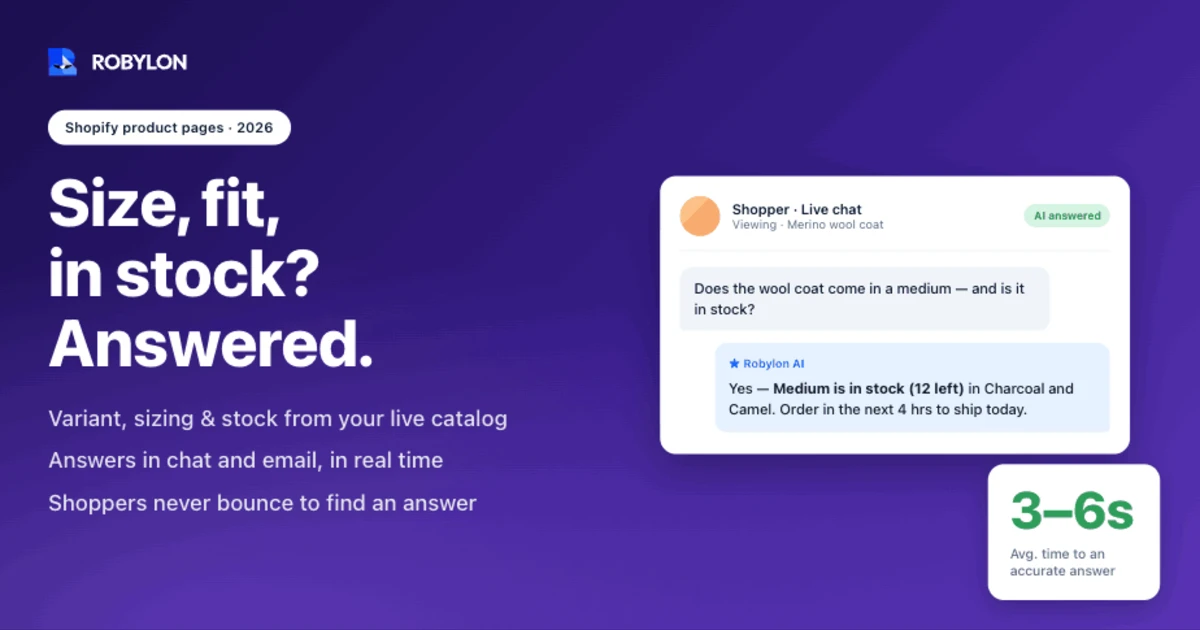
On a Shopify product page, that question is almost always one of three things. Which variant do I actually want? Will it fit me? Is it in stock right now? Get the answer fast and the shopper checks out. Leave them guessing and they bounce, often straight to a competitor who answered first. Research from ConvertCart found that 53% of US online shoppers abandon a purchase when they can’t quickly find the answer to a question. The cost of that silence has only gone up: customer acquisition costs have climbed more than 60% over the past decade, so every visitor you lose at the product page was expensive to bring there in the first place.
This guide is about automating the pre-purchase layer specifically. Not deflecting tickets after the order ships, but answering the variant, sizing, and stock questions that stall a sale while the shopper is still on the page. We will cover why these questions behave differently from post-purchase support, what each of the three buckets actually looks like, and what it takes to answer them accurately on Shopify without inventing things that aren’t true.
Pre-purchase questions are a revenue problem, not a support problem
The instinct in most support teams is to treat every inbound question the same way: it’s a ticket, you resolve it, you move on. That framing works for post-purchase volume. A shopper asking about a tracking number has already paid you. Even if the answer is slow, the revenue is banked. That is why so much e-commerce automation focuses on WISMO and order status emails, where the goal is cost reduction and ticket deflection.
Pre-purchase questions invert that math. The shopper hasn’t paid yet. A slow or missing answer doesn’t just create a support cost, it erases a sale that was seconds away from closing. And these shoppers do not wait. Someone with a sizing question at 11 PM on a Sunday is not going to open their email client and wait until Tuesday for a reply. They close the tab. Baymard Institute data shows that 39% of shoppers who hit an out-of-stock product page go directly to a competitor. The window to capture the answer is the window the shopper is on your page, and it closes fast.
So the right way to score a pre-purchase question is not “did we resolve the ticket” but “did we keep the sale alive.” That reframing changes which questions matter, how fast they need answering, and why automation here pays back differently than it does on the support side. Three categories carry most of the weight.
Variant questions: which one do I actually want?
Shopify’s data model makes variants deceptively complex. A single product like a jacket might come in five colors and six sizes, which is thirty separate variants, each one its own database record with its own SKU and its own inventory count. Shoppers do not think in SKUs. They think in questions like “is the navy the same waxed cotton as the black, or is that only the dark colors?” or “does the 128GB model include the charging cable, or just the 256GB?”
These are not edge cases. They are the questions that separate a confident add-to-cart from a closed tab. And they are hard for a static FAQ to handle because the answer depends on which combination of options the shopper is looking at. The fabric note might apply to three colors but not the other two. The bundled accessory might ship with the higher-capacity variant only.
Good automation reads the actual product structure: the option sets, the variant-level descriptions, the metafields where merchants stash material, dimensions, and compatibility notes. When a shopper asks “what’s the difference between the Pro and the Standard,” the AI should pull the real spec differences rather than guess, and ideally point the shopper to the exact variant they want so they don’t have to hunt for it. The goal is to collapse the gap between “I think this is the one” and “yes, this is the one.” That confidence is what moves a hesitant browser into the cart.
Sizing: the highest-stakes question on the page
If variant questions cause hesitation, sizing questions cause both hesitation and expensive mistakes. This is the bucket where getting it wrong costs you twice, once when the shopper abandons and again when they buy the wrong size and send it back.
The numbers are stark. Roughly 43% of shoppers abandon their cart because they’re unsure about fit. In fashion specifically, sizing-related questions make up an estimated 25-40% of all customer service inquiries, and fit or size issues drive the majority of apparel returns, in a category where return rates routinely sit around 26%. The behavior compounds: 58% of shoppers aged 18 to 24 admit to buying multiple sizes of the same item with the intention of returning the ones that don’t fit. That practice, called bracketing, looks like a sale at checkout and a margin leak two weeks later.
The flip side is the opportunity. Invoca research found that 81% of consumers feel more confident buying, including higher-value items, when they have information that resolves their doubts. A separate study found that 49% of shoppers will add one or two more items to their basket when they’re confident they’ve picked the right size. Confidence at the size selector does not just save a sale, it grows the order.
Here is the honest boundary, because practitioner credibility depends on it. Conversational AI is not a body-measurement engine. It will not scan a shopper’s frame and predict a fit the way a dedicated tool like True Fit or Fit Analytics does. What it does well is make the fit knowledge you already have instantly accessible and consistent. It surfaces your size chart inside the conversation instead of behind a tab nobody clicks. It interprets “I’m usually a medium in J.Crew, what should I get here” against your own fit notes. It relays the “runs small, size up” guidance your best agents give by instinct, and it shares model measurements when a shopper asks “how tall is the model and what are they wearing.” For the large share of shoppers who just need reassurance rather than a measurement, that is enough to close the sale.
And because accurate sizing answers prevent wrong-size orders, this layer feeds directly into your returns problem. Every shopper who buys the right size the first time is a return you never have to process. If you are already working on Shopify returns automation, answering sizing well at the product page is the upstream half of the same project.
Stock: is it actually available, and when?
Stock questions sound simple and are technically the trickiest, because the only acceptable answer is a live one. Shopify decrements inventory at the order level and tracks availability per variant per location, which means a shopper asking “do you have the medium in navy” needs an answer pulled from the current inventory state, not a cached snapshot from this morning. Tell someone an item is available when it sold out an hour ago and you have created a worse experience than saying nothing.
The real questions in this bucket go beyond a yes or no: “how many are left,” “when will the navy be back,” “do you ship this to Canada,” “is it available to pick up at the Austin store.” Each one needs live data, and some need the AI to take an action rather than just report a fact.
The scale of the missed opportunity here is large. The average Shopify catalog has 8-15% of its products out of stock at any given moment, and stockouts quietly drain an estimated 15-25% of potential quarterly revenue. Most of that leaks away silently because a sold-out page is a dead end with a greyed-out button and nothing else.
This is where action-taking matters more than answering. When a variant is out of stock, the AI should not just confirm the bad news. It should turn the dead end into a recoverable lead by capturing the shopper for a back-in-stock alert, and it should offer in-stock alternatives in the same size or style so the visit doesn’t end empty. Back-in-stock notification emails convert at 25-35% according to Klaviyo, among the highest-converting automated emails in e-commerce, which means the shopper you capture at a sold-out page is worth far more than the silence that usually fills that moment. Handling this well requires AI that can take action, not a bot that only retrieves text.
What good automation actually requires
The thread running through all three buckets is that none of them can be solved by a knowledge base alone. Pre-purchase answers are tied to the live state of your catalog, so the automation has to reach into it. A few things separate tooling that works from tooling that frustrates.
- Live data, not static FAQs. The AI has to read current product, variant, and inventory data from Shopify at the moment of the question. Anything cached or exported will eventually tell a shopper the wrong thing about stock or price.
- Variant-level precision. The answer has to reflect the specific option combination the shopper selected, not the parent product. “In stock” for the product is meaningless if their size and color sold out.
- Honesty over guessing. When the AI doesn’t know, it has to say so and route to a human rather than invent a fit note or a stock figure. A confident wrong answer about availability is more damaging than an escalation. This is why preventing hallucinations is not optional in commerce.
- Consistency across channels. The same shopper might ask in the product-page chat, then follow up by email an hour later. The answer should match. A pre-purchase question does not respect channel boundaries, and neither should the system answering it.
Get those four right and the automation earns trust. Miss them and you have built a faster way to give shoppers wrong information, which is worse than no automation at all.
How Robylon handles pre-purchase PDP questions
Robylon connects directly to Shopify and reads live product, variant, and inventory data, so an answer about stock or specs reflects the catalog as it actually is in that moment, not a stale export from last week. When a shopper asks whether the medium in navy is available, the response comes from the same inventory state Shopify uses to decide whether the order can be fulfilled.
Across email and on-site chat, Robylon resolves 60-80% of these questions on its own and escalates the rest to a human with the full conversation and context attached, so nothing gets re-asked. The pre-purchase work leans heavily on action-taking: through its 60-plus write-access integrations, Robylon can register a shopper for a back-in-stock alert when a variant has sold out, surface in-stock alternatives in the size they wanted, and point them to the exact variant they were asking about rather than leaving them to dig.
Deployment runs 3 to 7 days, and pricing is usage-based credits, so you pay for the work the AI actually does rather than a fixed per-seat license or a charge that scales with every resolution. If you want the broader picture of how this fits a Shopify stack, the guides on AI customer service for Shopify and Shopify chatbot automation cover the post-purchase side that pairs with this.
One practitioner note worth more than any feature list: do not try to automate every product page at once. Start with your top 20 PDPs by traffic. That is where the recovered conversions concentrate, and it is the fastest way to prove the model before you scale it across the catalog.
Getting started and measuring what matters
Before you automate anything, mine your existing chat transcripts and support inbox for pre-purchase intent. Search for sizing keywords, “in stock,” “difference between,” “does this come in,” and “when will.” The volume of those queries is a direct measurement of the confidence gap your shoppers are walking around with, and it usually turns out to be larger than teams expect.
Then track the metrics that reflect revenue, not just deflection. Pre-purchase question volume and how much of it the AI resolves without a human. Assisted-conversion rate, meaning sales where the shopper interacted with the AI before buying. Back-in-stock signups captured from sold-out pages. And the wrong-size return rate, which should fall as sizing answers improve. For more patterns across the funnel, the rundown of conversational AI e-commerce use cases and the case for proactive customer service are good next reads.
The product page is where intent is highest and patience is shortest. Answering the variant, sizing, and stock questions in that narrow window is one of the highest-impact things an e-commerce team can automate, because here a good answer is not a saved ticket. It is a sale that would otherwise have walked.
Frequently asked questions
Can AI answer product questions before a customer buys on Shopify?
Yes. AI can answer the variant, sizing, and stock questions shoppers ask while they are still deciding, both in the product-page chat and over email. The difference from a static FAQ is that it reads your live Shopify catalog, so the answer reflects your real options, specs, and current availability. Robylon resolves 60-80% of these questions on its own and routes the rest to a human with the full context attached.
How does AI know if a Shopify product variant is in stock?
It reads inventory directly from Shopify at the moment of the question. Shopify tracks availability for each variant at each location, so a tool connected to that data can confirm whether the specific size and color a shopper wants is actually available, not just whether the product exists. A cached or exported snapshot will eventually give a wrong answer, which is why live access is essential for anything involving stock.
Can pre-purchase AI reduce returns caused by the wrong size?
Indirectly, yes. Most apparel returns come down to fit, and many wrong-size orders start with a shopper guessing because the size chart was hard to find or interpret. AI makes that fit information instant and consistent: it surfaces the chart, relays guidance like runs small or size up, and answers questions such as I am usually a medium, what should I get here. Fewer guesses at checkout means fewer wrong-size orders to process later.
What can AI do when a Shopify product is out of stock?
More than show a greyed-out button. Good automation turns a sold-out page into a recoverable lead: it captures the shopper for a back-in-stock alert and offers in-stock alternatives in the same size or style. Because back-in-stock emails convert at 25-35%, that captured shopper is worth far more than silence. Robylon can register the alert and surface alternatives through its write-access integrations rather than leaving the visitor at a dead end.
Does pre-purchase AI work on both the product page and email?
It should. The same shopper often asks in the product-page chat and then follows up by email, and the answer needs to match in both places. Robylon handles pre-purchase questions across on-site chat and email from a single connection to your Shopify data, so a stock or sizing answer stays consistent no matter where the shopper asks it.
Related reading
- Chatbots
10 Best AI Chatbots for Customer Support in 2026
This article reviews the top 10 AI chatbots for customer support in 2025, including Zendesk, Freshworks, Intercom, Drift, and more. It highlights their strengths, limitations, and best-fit use cases. The clear winner is Robylon AI, which delivers autonomous agents with 97% accuracy, 85–95% query automation, and 30% cost savings: making it the best overall choice for enterprises seeking scalable, reliable, and cost-efficient customer support.
- Chatbots
10 Best AI Chatbots for E-Commerce in 2026
Explore the 10 best AI chatbots for E-Commerce in 2025. Compare platforms like Robylon, Tidio, Intercom, Gorgias, and Ada to see how chatbots improve customer support, reduce costs, and boost sales.
- Chatbots
AI Customer Service Chatbots in 2026: 5 Features That Separate Good from Great
Discover the best AI customer service chatbots for 2025. Compare top platforms like Robylon, Zendesk, Intercom, and more to automate support, cut costs, and deliver 24/7 customer experiences.