
How to Reduce Email Backlog by 80% with AI Automation
If you are searching for this article, you have an email backlog problem right now. This is the tactical guide — no theory, no fluff. Five phases to go from a growing backlog to an 80% reduction within 30 days using AI automation, with specific actions, timelines, and benchmarks for each phase.
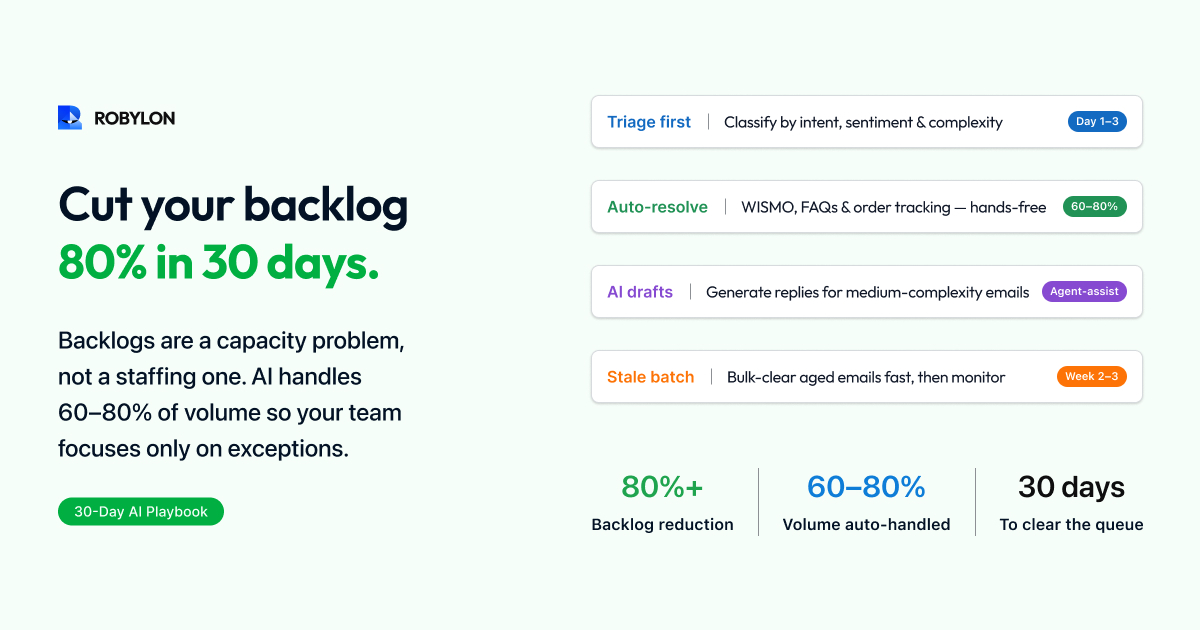
If you are reading this, your email backlog is probably growing. Every Monday morning brings a pile of weekend emails. Every product launch or outage adds hundreds more. Your team works through the queue, but incoming volume exceeds resolution capacity — and the gap widens every week. SLAs are breaching, response times are climbing, and customer complaints about “no response” are becoming routine.
The standard advice — “hire more agents” or “create more macros” — does not work. Hiring takes 4–8 weeks and increases costs linearly. Macros save a few minutes per email but do not reduce the fundamental volume-to-capacity imbalance. You need a structural solution that processes email faster than it arrives.
This guide provides the step-by-step approach to reduce your email backlog by 80% within 30 days using AI automation. It is organized into five phases, each with specific actions, timelines, and benchmarks.
Before You Start: Diagnose Your Backlog
Not all backlogs are the same. Before deploying AI, spend 30 minutes understanding what is in your backlog.
Backlog Composition Analysis
Pull your last 200–500 unresolved emails and categorize them by topic. Most teams discover a pattern like this: 30–40% are order status or tracking questions (WISMO). 15–20% are return or refund requests. 10–15% are policy or FAQ questions. 10–15% are billing or subscription queries. 5–10% are complaints or escalations. 10–15% are complex or unique issues.
The first four categories — WISMO, returns, FAQs, and billing — represent 65–85% of the backlog and are the easiest to automate. These are the emails where the customer asks a predictable question, the answer exists in a system (OMS, CRM, knowledge base), and the response follows a consistent pattern. This is where AI has the highest impact.
Backlog Age Analysis
Sort your backlog by age: emails less than 24 hours old, 24–48 hours, 48–72 hours, and 72+ hours. Emails older than 72 hours have a different dynamic — the customer may have already found a solution, called instead, or churned. These stale emails still need responses, but the AI should address them differently (acknowledging the delay, checking if the issue is still open).
Phase 1: Triage First (Days 1–3)
The fastest way to reduce a backlog is not to answer everything — it is to sort everything, then answer what AI can handle immediately.
Deploy AI Classification
Connect your inbox (Gmail, Outlook, or helpdesk) to an AI email agent like Robylon. On day 1, the AI processes your entire backlog and classifies every email by intent (WISMO, refund, billing, FAQ, complaint, technical), sentiment (positive, neutral, negative, urgent), and complexity (simple, medium, complex). This classification happens in minutes, not days.
Prioritize the Queue
Use the AI classification to re-order your backlog: urgent and negative-sentiment emails go to the top of the human queue. Simple, high-confidence emails (WISMO, FAQs) go to the AI auto-resolution queue. Medium-complexity emails go to the AI draft queue (AI generates a response, agent approves with one click). Complex and sensitive emails go to the specialist queue with AI-generated context summaries.
This triage alone reduces the effective backlog for your human team by 50–60% — because the AI queue handles the simple half, and agents focus only on the complex half.
Phase 2: Auto-Resolve the Easy Wins (Days 3–7)
With triage in place, turn on AI auto-resolution for the categories with the highest volume and confidence.
Start with WISMO
Order status and tracking queries are the ideal first category for AI auto-resolution. The pattern is predictable: customer asks where their order is → AI extracts the order number (or looks it up by customer email) → queries the OMS for tracking status → responds with the current status and tracking link. This handles 30–40% of most backlogs at 90–95% accuracy.
Add FAQ and Policy Questions
If your knowledge base is populated — return policy, shipping times, warranty terms, account FAQs — enable AI auto-resolution for knowledge-based queries. The AI retrieves the relevant article, personalizes the response to the customer’s specific question, and sends it. This handles another 10–15% of the backlog.
Enable Drafts for Medium-Complexity Emails
For refund requests, billing questions, and subscription changes — categories where the AI can generate an accurate response but you want human approval during the initial rollout — enable draft mode. The AI generates the response, populates it with customer-specific data (order details, account status, refund eligibility), and queues it for agent review. The agent clicks “approve” or makes minor edits and sends. This reduces handle time for these emails from 8–12 minutes to 1–2 minutes per email.
Day 7 Benchmark
By end of day 7, your AI should be auto-resolving 30–40% of incoming emails and generating drafts for another 20–30%. Your human team is handling 30–40% of volume — down from 100%. The backlog should be shrinking daily, not growing.
Phase 3: Attack the Stale Backlog (Days 7–14)
Phases 1 and 2 address incoming email flow. Phase 3 targets the accumulated backlog — the hundreds or thousands of emails that have been sitting unresolved.
Batch-Process the Backlog with AI
Feed your existing backlog (all unresolved emails older than 24 hours) through the AI for classification and draft generation. The AI processes the entire backlog in hours, not weeks, producing a draft response for every email it can handle.
Apply the Stale Email Protocol
For emails older than 72 hours, the AI should apply a different response template that acknowledges the delay: “We apologize for the delayed response. [Resolution]. If this issue has already been resolved, please disregard this message.” This prevents the awkwardness of responding to a 5-day-old email as if it just arrived.
Close Dead Emails
Some backlog emails are “dead” — the customer already solved the issue, contacted you through another channel, or the question is no longer relevant (a time-sensitive promotion expired, a temporary outage was resolved). AI can identify these by cross-referencing against your CRM (did the customer already receive a refund?), checking for duplicate tickets (did they also call or chat?), and detecting self-resolving intents (“Will you be open tomorrow?” from 2 weeks ago). Auto-closing dead emails can eliminate 10–20% of the backlog immediately.
Day 14 Benchmark
By day 14, your accumulated backlog should be down 60–70% from its peak. Incoming email flow should be in equilibrium or surplus — meaning you resolve more emails per day than you receive, so the backlog continues shrinking even without dedicated “backlog clearing” effort.
Phase 4: Expand and Optimize (Days 14–25)
Add More Integration-Backed Categories
By week 3, expand AI auto-resolution to include refund processing (connected to your payment gateway), subscription management (connected to your billing system), and account updates (connected to your CRM). Each new integration adds another 5–10% to your auto-resolution rate.
Lower Confidence Thresholds Gradually
During the first 2 weeks, you ran conservative confidence thresholds (90%+ for auto-send). With 2 weeks of accuracy data, identify categories where the AI is consistently accurate at 85% or even 80% confidence levels. Lowering thresholds by 5 points typically increases auto-resolution by 8–12% with minimal accuracy impact — because most responses in the 80–90% range are still correct; they were just held for human review unnecessarily.
Close Knowledge Gaps
The AI will surface a list of email topics it could not resolve due to missing knowledge base content. Each week, add the top 5 missing topics to your knowledge base. This is the fastest way to increase BRR — each gap closed adds 1–3 percentage points to your auto-resolution rate.
Day 25 Benchmark
Auto-resolution rate should be 55–70%. Backlog should be 75–85% below its peak. Incoming email flow should be firmly in surplus — your team is resolving more daily than arrives.
Phase 5: Sustain the Gains (Days 25–30 and Ongoing)
Prevent Future Backlogs
A backlog recurs when incoming volume exceeds resolution capacity. AI prevents this structurally — because the AI’s capacity scales instantly with volume. A Monday morning with 300 emails takes the AI the same time as a Friday with 100. But AI alone is not a complete solution. You need monitoring.
Set Up Backlog Alerts
Configure alerts for: backlog exceeding 1x daily incoming volume (early warning), auto-resolution rate dropping below 55% (indicates a new email type the AI is not handling), and any single email category growing faster than the AI can resolve it. These alerts give you 24–48 hours of lead time to take corrective action before a backlog forms.
Weekly Optimization Routine
Spend 30 minutes per week on three activities: review the top 5 knowledge gaps surfaced by the AI and add the missing content. Review the escalation log for emails the AI routed to humans — are any of these automatable? Check CSAT for AI-resolved emails versus human-resolved emails — if AI CSAT drops below human CSAT, investigate and correct.
Day 30 Benchmark
Auto-resolution rate: 60–80%. Backlog reduction from peak: 80%+. Daily email flow: surplus (resolving more than incoming). FRT for AI-resolved emails: under 5 minutes. Blended FRT: under 1 hour. Zero-backlog Mondays: achieved.
What If Your Backlog Is Already 5,000+ Emails?
Large backlogs (5,000–20,000 unresolved emails) require the same five phases but with an aggressive Phase 3. Feed the entire backlog through AI classification and draft generation in a single batch. Auto-close dead emails (typically 15–25% of a large, stale backlog). Auto-resolve WISMO and FAQ emails from the backlog (another 30–40%). Queue refund and billing emails as one-click drafts for agents. Assign the remaining complex emails to specialists with AI-generated context summaries.
Even a 10,000-email backlog can be reduced to under 2,000 within 2 weeks using this approach — because the AI processes the classification and draft generation in hours, not weeks, and agents spend 1–2 minutes per draft review instead of 8–12 minutes per email.
Bottom Line
Email backlogs grow when incoming volume exceeds human resolution capacity. Adding more agents solves the problem temporarily — until volume grows again. AI solves the problem structurally by handling 60–80% of email volume without human involvement, ensuring your team always has surplus capacity.
The playbook is straightforward: triage first, auto-resolve the easy wins, batch-process the stale backlog, expand coverage, and sustain with weekly optimization. Most teams achieve an 80% backlog reduction within 30 days and maintain zero-backlog operations from that point forward.
Clear your email backlog in 30 days. Robylon AI auto-resolves 60–80% of email tickets — processing your entire backlog in hours, not weeks. Start free at robylon.ai
Frequently asked questions
What types of backlog emails should AI resolve first?
Start with the categories that have the highest volume and simplest resolution pattern: 1) WISMO/order status (30–40% of most backlogs, 90–95% accuracy). 2) FAQ and policy questions (10–15%, fully answered from knowledge base). 3) Return/refund requests (15–20%, automated with OMS integration). 4) Billing/subscription queries (10–15%, automated with payment system integration). These four categories represent 65–85% of a typical backlog and are where AI has the highest confidence and accuracy.
What should I do about stale emails that are 3+ days old?
Apply a stale email protocol: AI responses to emails older than 72 hours should acknowledge the delay — "We apologize for the delayed response. [Resolution]. If this issue has already been resolved, please disregard this message." Additionally, AI can auto-close "dead" emails (10–20% of stale backlogs) by cross-referencing your CRM to check if the issue was already resolved through another channel, detecting duplicate tickets, and identifying self-resolving intents ("Will you be open tomorrow?" from 2 weeks ago).
How fast can AI clear my existing email backlog?
AI can classify your entire backlog in hours, regardless of size — even 10,000+ emails. The AI categorizes every email by intent, sentiment, and complexity, then generates draft responses for all automatable tickets. Phase 1 (triage): 1–3 days. Phase 2 (auto-resolve easy wins): days 3–7, targeting 30–40% of backlog. Phase 3 (batch-process stale emails): days 7–14, targeting another 30% including auto-closing dead emails. Most teams achieve 60–70% backlog reduction by day 14 and 80%+ by day 30.
How do I prevent the email backlog from coming back?
Three structural measures: 1) Keep AI auto-resolution live 24/7 — the AI processes emails in real-time, so overnight and weekend backlogs disappear completely. 2) Set up backlog alerts — trigger warnings when unresolved emails exceed 1x daily incoming volume, when BRR drops below 55%, or when any email category is growing faster than resolution capacity. 3) Weekly optimization routine (30 minutes): close the top 5 knowledge gaps, review escalation patterns for new automation opportunities, and monitor AI CSAT versus human CSAT.
Can AI handle a backlog of 5,000 or 10,000 unresolved emails?
Yes. Large backlogs (5,000–20,000 emails) follow the same five-phase approach with an aggressive Phase 3. The AI batch-processes the entire backlog — classifying, drafting responses, and identifying dead emails — in hours, not weeks. A typical 10,000-email backlog breaks down as: 15–25% dead emails (auto-closed), 30–40% WISMO and FAQ (auto-resolved), 15–20% refund/billing (one-click agent approval on AI drafts), and 20–30% complex (routed to specialists with AI context summaries). Result: reduced to under 2,000 within 2 weeks.