
AI for Multi-Brand Email Support: A Practical Guide
Multi-brand support teams fight tone leakage, knowledge bleed, and misrouted email every day. This guide breaks down how AI email agents keep each brand distinct while one team runs all of them, and where you still need a human.
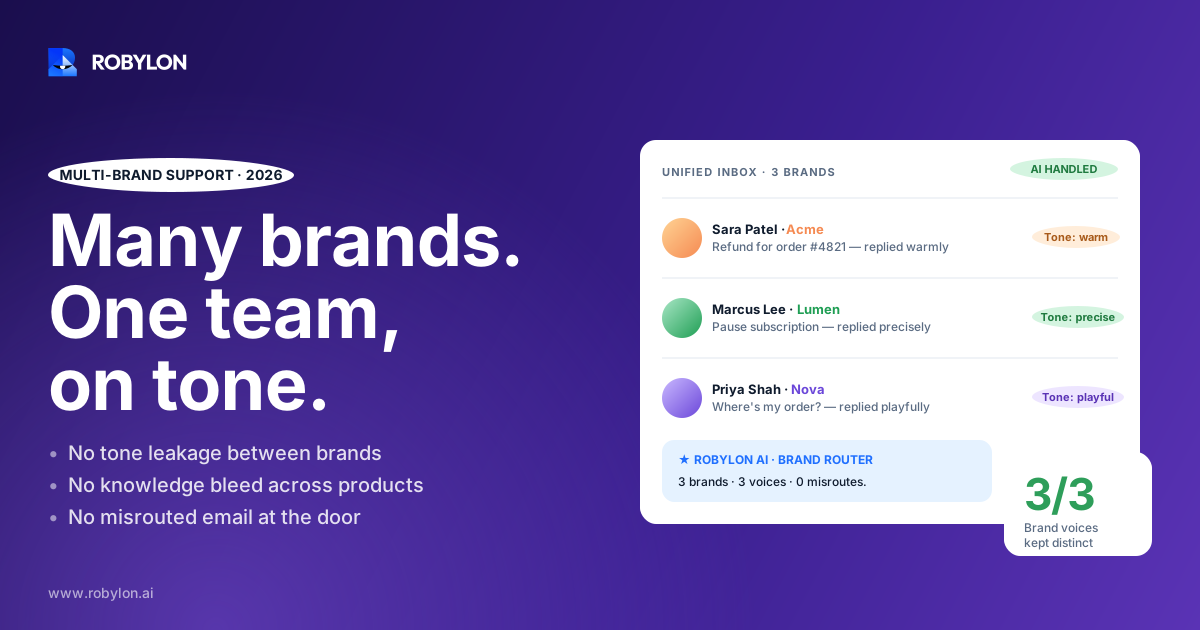
One support rep opens the shared queue on a Monday and sees 60 unread emails sitting under three different brand names. A refund question for the premium label. A shipping delay for the budget line. A wholesale inquiry that belongs to a third brand entirely. The reply that goes out has to sound like whichever brand the customer wrote to, pull from that brand’s policy, and never mention the other two exist.
That is the daily reality of multi-brand support, and it breaks most automation. A single canned macro that works for one brand reads as wrong for another. In May 2026, HubSpot shipped a feature that let companies give each brand its own AI agent with a separate voice and knowledge base, and the reason they gave was blunt: when the wrong brand voice shows up, the customer blames the brand, not the bot. That problem is exactly what this guide is about.
Why one team running many brands is harder than it looks
Multi-brand operations show up everywhere. A holding company with four D2C labels. An agency running support for a dozen clients. A retailer that acquired two competitors and never merged the help desks. A SaaS parent with a flagship product and three spin-offs. On paper it’s efficiency: one team, shared tooling, lower cost per ticket. In the inbox it’s a coordination problem that compounds with every brand you add.
The pain isn’t volume alone. It’s that each brand carries its own context, and that context has to stay separate even though the work is pooled. Three things break first.
- Tone leakage: A reply written in the playful voice of one brand goes out under the formal, enterprise voice of another. The customer notices instantly, even if they can’t say why.
- Knowledge bleed: An agent quotes the 30-day return window from Brand A on a Brand B ticket, where the policy is 14 days. Now you have a wrong promise in writing.
- Misrouting: An email lands in the pooled queue with no clear owner. Research on shared inboxes found that a large share of customers report getting either duplicate replies or no reply at all when ownership is unclear.
Add a fourth, quieter one: context switching. A human agent jumping between three brands every few minutes loses time reloading each brand’s rules in their head. That tax doesn’t show up on a dashboard, but it shows up in handle time.
What ‘multi-brand’ actually requires from an AI agent
It’s tempting to think the fix is one smart model that’s been told about all your brands. That’s the version that fails. A single shared agent will, sooner or later, blend the brands together, because it has no hard wall between them. What multi-brand support needs is separation by design, not separation by good intentions.
Here’s the practical checklist of what has to be brand-specific versus what can be shared.
What must stay separate per brand
- Knowledge source: Each brand points at its own help docs, policy pages, and macros. The agent answering a Brand A email should not be able to see Brand B’s return policy at all, not just be told to ignore it.
- Voice and tone: Greeting style, formality, sign-off, how apologies are phrased. A luxury skincare brand and a budget supplement brand under the same parent should not sound alike.
- Escalation rules: One brand may auto-escalate any refund over $200; another sets that line at $50. The thresholds live with the brand.
- Reporting: Resolution rate, CSAT, and volume have to be sliced per brand, or you can’t tell which one is bleeding tickets.
What can be shared across brands
- The underlying platform and team: One login, one queue view, one set of human agents who can cover any brand when they’re escalated to.
- Cross-brand integrations: If all brands run on the same Shopify org or the same payment processor, the action layer can be common even when the answers aren’t.
- Operational metrics roll-up: A parent-level view across all brands is useful, as long as you can still drill into each one.
The design principle is simple to state and easy to get wrong: isolate the brain, pool the body. Each brand gets its own knowledge and voice. The infrastructure underneath stays shared.
Routing: getting the email to the right brain before it’s answered
Before an AI agent can answer in the right voice, it has to know which brand the email belongs to. With dedicated inboxes per brand, this is trivial: support@brandA.com routes to the Brand A agent, full stop. The harder cases are real, though.
Some companies run a single catch-all address. Some customers reply to an old thread from a brand they no longer remember. Some emails reference two brands in one message because the customer bought from both. Good routing handles all three.
The reliable signals an agent should use to assign a brand, in rough priority order:
- Inbound address: The to-address or alias the email hit. Most accurate when it’s clean.
- Customer record: If the sender’s email matches an order or account tied to a specific brand, use that.
- Order or reference numbers: Brand-specific ID formats in the body are a strong tell.
- Content classification: Product names, SKUs, or domain mentions, used as a fallback, not a first resort.
When the signals conflict or none is strong enough, the right move is to escalate to a human rather than guess the brand. A wrong-brand reply is worse than a slightly slower one. This is the same discipline that good single-brand systems already apply to triage. If you want the deeper version, our breakdown of how AI classifies, routes, and prioritizes email covers the classification mechanics that brand routing sits on top of.
Keeping each brand’s knowledge walled off
Knowledge bleed is the failure that does the most damage, because it produces confident, wrong answers in writing. The fix is structural. Each brand needs its own knowledge base, and the agent answering for that brand should only have access to that base.
This is where the ‘one agent told about everything’ approach falls apart. If a single model holds every brand’s policies in the same context, nothing stops it from reaching for the wrong one when the phrasing of a question is ambiguous. Hard isolation means the Brand B agent literally cannot retrieve Brand A’s 30-day return window, so it can’t quote it by mistake.
Setting this up well takes some upfront work per brand:
- Separate the sources: Point each brand’s agent at that brand’s help center, policy docs, and past resolved tickets only.
- Tag shared facts carefully: If two brands genuinely share a policy (same warehouse, same shipping carrier), make that explicit rather than letting the agent infer it.
- Validate against real tickets: Run the agent against historical email for each brand before go-live and check that answers match that brand’s actual policy.
The quality of each brand’s answers rises and falls with the quality of its knowledge base. A well-structured one is the single biggest lever on resolution rate. Our guide to building an AI knowledge base goes into how to structure sources so an agent can actually use them.
Tone: sounding like the brand, not like a template
Voice is the part customers feel even when they can’t name it. The premium brand opens with ‘Hello Sarah,’ and closes with a full signature. The streetwear brand opens with ‘Hey!’ and keeps it loose. Both are correct for their brand and wrong for the other.
An AI agent handles this by carrying a per-brand voice profile: greeting conventions, formality level, how much empathy to lead with, sign-off, and any phrases the brand bans. The agent applies the right profile based on which brand the email was routed to. The customer gets a reply that reads like the brand they wrote to, every time, without a human remembering to switch hats.
There’s a guardrail worth building in here. When a customer’s email turns frustrated or angry, the right response often isn’t a perfectly on-brand cheerful reply. It’s a tone shift toward more directness and a faster path to a human. Detecting that shift and escalating is a brand-agnostic skill, even though the voice underneath it is brand-specific.
Where the AI should stop and hand off
No part of this guide argues for full automation across every brand. The honest version of multi-brand AI is that it should resolve the high-volume, well-understood email and route the rest to people, and that line is where trust is won or lost.
Escalate, don’t guess, when:
- Brand assignment is ambiguous: Conflicting signals about which brand owns the ticket. Never answer in a guessed voice.
- The request crosses brands: A customer asking about orders from two of your labels in one email needs a human who can see both.
- Sentiment turns sharp: Anger, legal language, or a churn threat should reach a person quickly, in any brand.
- The action is high-stakes: A large refund, an account closure, or anything above that brand’s automation threshold.
This resolve-or-route decision is the core design question of any AI email setup, multi-brand or not. We wrote a full piece on when an AI agent should resolve versus route to a human that applies directly here, with the brand-ambiguity case layered on top.
Actions, not just answers, across every brand
Answering ‘where’s my order’ is useful. Actually pulling the tracking, issuing the refund, or updating the shipping address is what closes the ticket. In a multi-brand setup, the action layer is where shared infrastructure pays off, because several brands often sit on the same backend systems.
If your four D2C labels all run on one Shopify organization and one payment processor, an AI agent with write access can take action for any of them through the same connections, while still answering in each brand’s separate voice. The brain stays separate; the hands are shared. This is the difference between a system that drafts replies for a human to send and one that resolves the ticket end to end. Robylon connects to 60+ systems with write access, so the agent can look up an order, process a return, or update a record rather than just suggesting the human do it. The mechanics of that action layer are in our overview of the integrations that let agents take action.
A realistic rollout for a multi-brand team
Trying to switch on every brand at once is the most common way these projects stall. The teams that get it right start narrow and widen.
- Pick the brand with the cleanest knowledge base first. Whichever brand has the best-documented policies and the highest email volume is your proving ground.
- Validate against that brand’s historical tickets. Run the agent over past email and confirm its answers match real policy before it touches a live customer.
- Go live on that brand with conservative escalation. Let it handle the obvious tickets, route everything borderline, and watch the resolution and CSAT numbers for that brand alone.
- Add the next brand once the first is stable. Repeat the knowledge setup and voice profile per brand. Each one is faster than the last because the platform work is already done.
- Roll up reporting at the parent level. Once two or more brands are live, build the cross-brand view so you can compare them and spot the laggard.
Most teams reach a working state in days, not quarters, because the per-brand work is configuration rather than custom engineering. The thing that takes time is judgment: deciding each brand’s escalation thresholds and validating its knowledge, not wiring up software.
What good looks like after a few months
A multi-brand setup that’s working has a few visible signs. Each brand’s email gets answered in its own voice without a human switching context. The high-volume, repetitive tickets resolve on their own across all brands, in the 60–80% range once the knowledge bases are solid. The tickets that reach humans are the ones that genuinely need them: cross-brand cases, angry customers, high-value decisions. And reporting tells you, per brand, which one is healthy and which one needs work.
The team stops being a switchboard frantically sorting which email belongs to which label, and becomes a smaller group handling the hard, interesting cases across a portfolio. That’s the actual promise of multi-brand AI: not fewer brands, but the same team running more of them well.
Ready to run all your brands from one team without the tone leakage and misrouting? Robylon AI resolves 60–80% of customer emails autonomously, keeping each brand’s voice and knowledge separate while taking action across Shopify, Stripe, your help desk, and 60+ other integrations. Start free at robylon.ai
Frequently asked questions
Can one AI agent really handle multiple brands without mixing them up?
Yes, but only if the brands are isolated by design rather than handled by one shared model told about all of them. The reliable approach gives each brand its own knowledge base and voice profile, so the agent answering a Brand A email cannot retrieve Brand B's policies at all. Pooling everything into a single context is what causes knowledge bleed. Separation has to be structural, not just an instruction in a prompt.
How does an AI agent know which brand an email belongs to?
It uses signals in priority order: the inbound address or alias the email hit, a customer record matching an order or account, brand-specific order numbers in the body, and content classification as a fallback. Dedicated per-brand inboxes make this trivial. When signals conflict or none is strong enough, the agent should escalate to a human rather than guess, because a reply in the wrong brand voice is worse than a slightly slower one.
What happens when a customer asks about two of our brands in one email?
This is a case where the AI should hand off rather than try to resolve it alone. A cross-brand request needs a human who can see records from both labels, since each brand's agent is walled off from the other's data by design. The agent recognizes the multi-brand reference, flags it, and routes the email to a person with broader access. Trying to auto-resolve these is where mistakes and tone errors creep in.
Will each brand keep its own tone and writing style?
Yes. Each brand carries a separate voice profile covering greeting style, formality, empathy level, sign-off, and banned phrases. The agent applies the right profile based on which brand the email was routed to, so a premium label and a budget label under the same parent read completely differently. The system also detects when a customer's tone turns frustrated and shifts toward directness and a faster human handoff, regardless of brand.
How long does it take to set up AI email support across several brands?
Most teams reach a working state in 3 to 7 days per brand, and each additional brand is faster than the last because the platform work is already done. The time goes into configuration and judgment: building each brand's knowledge base, validating answers against that brand's historical tickets, and setting escalation thresholds. Starting with one well-documented, high-volume brand and widening from there is the rollout that consistently works.