
AI Email Triage: Automatically Classify, Route, and Prioritize Tickets
Manual email triage wastes 15–30 minutes per agent per day on sorting, tagging, and routing. AI does it in milliseconds - with higher accuracy. This guide covers how AI email triage works, how to set it up, and what it unlocks.
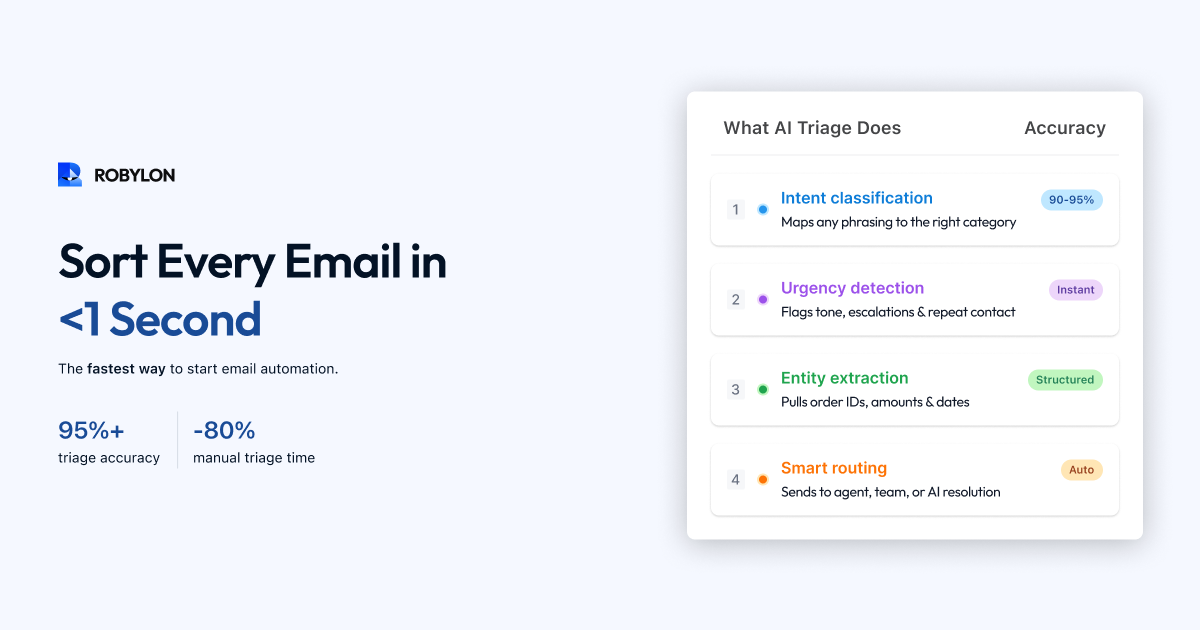
Before an email ticket can be resolved, someone has to figure out what it is about, how urgent it is, and who should handle it. In most support teams, that “someone” is either a dedicated triage agent — a person whose entire job is reading, tagging, and routing emails — or every agent on the team, each spending the first minute of every ticket figuring out what they are looking at.
This is the most wasteful step in the email support pipeline. Triage is pure overhead — it does not solve the customer’s problem, it just gets the ticket to the right place. And for most teams, it is done manually, inconsistently, and slowly.
AI email triage eliminates this overhead entirely. The moment an email arrives, AI reads it, classifies the intent, detects the urgency and sentiment, assigns the appropriate tags, and routes it to the right team or agent — all in milliseconds. The email lands in the right queue, correctly prioritized, before any human has even seen it.
This guide covers how AI email triage works, what it enables, how to implement it, and why it is the gateway to full email automation.
What AI Email Triage Actually Does
AI triage performs four functions simultaneously on every incoming email:
1. Intent Classification
The AI reads the email and determines what the customer wants. Not which keyword appears in the subject line — what the customer actually intends. “I haven’t received my package” and “where’s my stuff” and “order 45721 delivery update please” all map to the same intent: order tracking.
Modern AI classifiers handle ambiguity far better than rule-based systems. If a customer writes “I want to cancel,” the AI looks at context — did they mention an order number (order cancellation) or a subscription (subscription cancellation)? Rule-based systems break on this kind of ambiguity. LLM-powered classifiers get it right 90–95% of the time.
Typical intent categories for email triage include order tracking, return/exchange requests, refund inquiries, billing and payment issues, product questions, account management, complaints, feedback, and partnership or sales inquiries. Most businesses find that 10–15 intents cover 95% of their email volume.
2. Sentiment and Urgency Detection
Beyond what the customer wants, the AI detects how they feel. Sentiment analysis examines the tone, word choice, and patterns in the email to classify it as positive, neutral, negative, or urgent.
“I’ve been waiting three weeks and nobody has responded to my last two emails” triggers high-urgency, negative-sentiment flags. “Just wondering if you have an ETA on my order, no rush” triggers low-urgency, neutral sentiment. The difference in how these emails should be handled — priority, routing, and response tone — is significant.
Urgency detection goes beyond sentiment. It also considers situational factors: is the customer referencing a time-sensitive event (“I need this before my flight on Friday”)? Have they contacted support multiple times about the same issue? Are they mentioning legal action or regulatory complaints? Each of these signals affects how the email is prioritized.
3. Entity Extraction
While classifying intent and sentiment, the AI simultaneously extracts structured data from the unstructured email text: order numbers, product names, account IDs, dates, monetary amounts, tracking numbers, and other entities specific to your business. This extracted data is attached to the ticket metadata, so whoever — or whatever — handles the ticket next does not have to parse the email again.
This is especially valuable for multi-issue emails. The AI extracts all entities across all intents and maps them correctly: “Order #45721 needs an exchange, and order #45698 needs a delivery update” — two orders, two intents, correctly linked.
4. Routing and Assignment
Based on the classification, the AI routes the email to the right destination. Routing rules are configurable and can factor in:
- Intent-based routing: Billing questions go to the billing team. Technical issues go to product support. Returns go to the fulfillment team.
- Skill-based routing: Complex technical issues go to senior agents. Simple policy questions go to tier-1 agents.
- Workload-based routing: New tickets are assigned to the agent with the lightest current queue.
- Language-based routing: Hindi emails route to Hindi-speaking agents. Spanish emails to Spanish speakers.
- Priority-based routing: High-urgency or VIP customer emails skip the queue and go to the top.
- AI resolution routing: Emails that the AI can resolve autonomously are routed directly to the AI agent — no human queue at all.
Why Triage Is the Gateway to Full Email Automation
Many teams think of triage as a standalone improvement — “we’ll save 15 minutes per agent per day on sorting.” That is true, but it understates the value. Triage is actually the gateway to everything else because it creates the structured data that makes downstream automation possible.
Triage Enables Auto-Resolution
Once the AI has classified an email as “order tracking” and extracted the order number, auto-resolution becomes straightforward: query the OMS with the extracted order number, retrieve the tracking status, generate a response. Without accurate triage, the AI does not know what kind of response to generate or what data to look up.
Triage Enables Smart Escalation
When the AI classifies an email as “complaint + high urgency + repeat contact,” it can route directly to a senior agent with the full context attached — rather than the email sitting in a general queue for an hour before someone reads it and realizes it is urgent.
Triage Enables Analytics
When every email is classified by intent, sentiment, and urgency, you suddenly have data that was previously invisible: which topics generate the most volume, which have the lowest CSAT, where sentiment trends negative over time, which product launches drive the most support email. This data informs product decisions, documentation improvements, and staffing plans.
Triage Enables SLA Compliance
When emails are prioritized by urgency at the moment of arrival, SLA breaches decrease dramatically. High-priority emails are surfaced immediately instead of being discovered when an agent happens to open them. Teams that implement AI triage typically see SLA compliance improve by 20–30%.
How to Implement AI Email Triage
Step 1: Define Your Intent Taxonomy
Start by listing the categories you want the AI to classify into. Pull your last 90 days of email tickets, sample 300+, and group them by intent. Most businesses arrive at 10–15 categories. Be specific enough to be useful, but not so granular that categories overlap.
Good intent taxonomy for an e-commerce brand: order tracking, return request, exchange request, refund status, cancellation, product question, shipping policy, payment issue, account access, complaint, feedback, and partnership inquiry.
Step 2: Define Your Priority Matrix
Map combinations of intent, sentiment, and customer attributes to priority levels. For example:
- Critical: Complaint + negative sentiment + VIP customer. Or: any email mentioning legal action.
- High: Refund dispute + negative sentiment. Or: repeat contact (3+ emails on same issue).
- Normal: Standard order tracking, policy questions, product inquiries with neutral sentiment.
- Low: Feedback, feature requests, partnership inquiries.
Step 3: Configure Routing Rules
Set up routing logic in your AI platform or helpdesk. Map each intent to a team or agent group. Layer in skill-based and workload-based routing if your team structure supports it. Define the AI resolution path: which intents should the AI attempt to resolve autonomously?
Step 4: Train and Test
If your platform supports it, feed it historical email data to calibrate the classifier. Then test with 100+ real emails: check intent accuracy, sentiment accuracy, entity extraction, and routing correctness. Target 90%+ accuracy on intent classification before going live.
Step 5: Deploy and Monitor
Enable AI triage on your live email flow. Monitor classification accuracy daily for the first two weeks. Review any misclassified tickets, identify patterns, and refine your intent taxonomy or training data. Most teams reach 95%+ triage accuracy within 2–3 weeks of deployment.
AI Triage vs Rule-Based Triage
Many helpdesks offer rule-based triage: “If the subject line contains ‘refund,’ tag as refund and route to billing team.” Here is why AI triage is fundamentally different:
- Language understanding: Rules match keywords. AI understands meaning. “I want my money back,” “this charge is wrong,” and “please reverse the transaction” all map to the same intent without needing a separate rule for each phrasing.
- Context awareness: Rules see individual fields (subject line, sender). AI reads the entire email body, thread history, and metadata — understanding context that keywords cannot capture.
- Multi-intent handling: Rules can only match one pattern at a time. AI detects multiple intents in a single email and routes accordingly.
- Self-improvement: Rules are static — they only change when a human updates them. AI classifiers improve as they process more emails, getting more accurate over time without manual intervention.
- Sentiment detection: Rules cannot detect frustration, urgency, or satisfaction. AI detects emotional tone and factors it into priority and routing decisions.
Teams that switch from rule-based to AI triage typically see a 25–40% improvement in routing accuracy and a 60–80% reduction in the time spent on manual triage.
Measuring Triage Performance
Track these metrics to evaluate your AI triage system:
- Classification accuracy: Percentage of emails where the AI’s intent classification matches the actual intent. Target: 93–97%.
- Routing accuracy: Percentage of emails that land in the correct team or agent queue on the first assignment. Target: 90–95%.
- Triage time: Time from email arrival to classification and routing. AI achieves this in under 1 second. Compare to your previous manual average.
- SLA compliance rate: Has triage improved your ability to meet response time commitments? Track the before/after delta.
- Manual override rate: How often do agents reclassify or reroute tickets the AI triaged? High override rates indicate classification gaps to fix.
Bottom Line
AI email triage is the highest-ROI, lowest-risk starting point for email automation. It is fast to deploy (days, not weeks), immediately measurable (classification accuracy, routing accuracy, triage time), and it unlocks everything else — auto-resolution, smart escalation, SLA compliance, and data-driven analytics. If you are not sure where to start with AI email support, start with triage.
Triage is just the beginning. Robylon AI classifies, routes, and prioritizes email tickets in milliseconds — then goes further by resolving 70% of them end-to-end. Start free at robylon.ai
Frequently asked questions
What is AI email triage?
AI email triage is the automated process of classifying incoming emails by intent (what the customer wants), detecting urgency and sentiment, extracting structured data (order numbers, account IDs), and routing the email to the right team, agent, or AI resolution path — all within milliseconds of arrival. It replaces manual reading, tagging, and sorting that typically costs support teams 15–30 minutes per agent per day.
How is AI triage different from rule-based email routing?
Rule-based routing matches keywords ("refund" → billing team). AI triage understands meaning — "I want my money back," "reverse the charge," and "this was a mistake on your end" all route correctly without separate rules for each phrasing. AI also detects sentiment (frustrated vs neutral), handles multi-intent emails (two questions, two routings), and improves over time without manual rule updates. Teams switching from rules to AI typically see 25–40% improvement in routing accuracy.
What accuracy should I expect from AI email triage?
Target 93–97% intent classification accuracy and 90–95% routing accuracy within 2–3 weeks of deployment. Most AI platforms achieve 90%+ accuracy on day one with pre-trained models, then improve as they process your specific email patterns. Monitor the manual override rate (how often agents reclassify or reroute AI-triaged tickets) — high override rates indicate classification gaps to fix with additional training data or intent refinement.
Why is triage considered the gateway to full email automation?
Because triage creates the structured data that everything else depends on. Once AI knows an email is an "order tracking" request for order #45721, auto-resolution is straightforward — query the OMS, return the status. Without accurate triage, the AI does not know what kind of response to generate or what data to look up. Triage also enables smart escalation (routing urgent complaints to senior agents), SLA compliance (prioritizing time-sensitive emails), and analytics (understanding topic and sentiment trends).
How quickly can I deploy AI email triage?
Days, not weeks. Define your intent taxonomy (10–15 categories based on your ticket history), configure routing rules (intent → team mapping), and enable the AI on your email flow. Most platforms, including Robylon, come with pre-trained intent models that work out of the box for common support categories. Fine-tuning to your specific business takes 1–2 weeks of live monitoring and adjustment. Triage is the fastest, lowest-risk entry point for AI email automation.