
Shared Inbox vs AI Email Agent: When to Upgrade Your Email Support
Every support team starts with a shared inbox. Most outgrow it within months. This guide identifies the 7 tipping points that signal it's time to upgrade — and makes the case that in 2026, the right upgrade skips the traditional helpdesk and goes straight to AI email resolution.
The shared inbox — support@company.com managed through Gmail, Outlook, or Google Groups — is where every support team begins. It is free, familiar, and works perfectly when you handle 20 emails a day with 2–3 people. No tools to learn, no configuration to maintain, no vendor to pay.
Then volume grows. And the shared inbox starts breaking in predictable, painful ways.
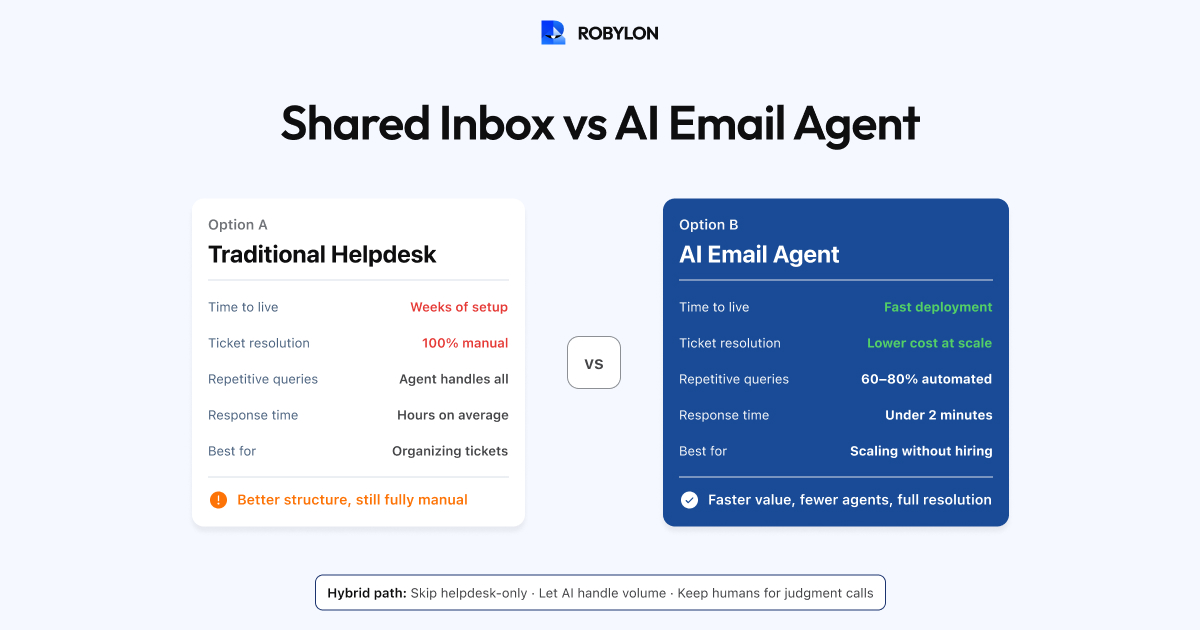
The traditional advice at this point is to move to a helpdesk — Zendesk, Freshdesk, or similar. That was good advice in 2020. In 2026, there is a better path: skip the helpdesk-only phase and go directly to an AI email agent that resolves most tickets automatically — while still giving your team a structured workspace for the emails that need human attention.
This guide helps you recognize when you have outgrown your shared inbox and shows why the AI email agent is the right next step.
The 7 Tipping Points: Signs You Have Outgrown Your Shared Inbox
1. Duplicate Responses
Two agents reply to the same email because neither knew the other was handling it. Shared inboxes have no collision detection — there is no way to see that another agent is currently drafting a reply. Once this happens more than once a week, you have a structural problem that no amount of “please check before you reply” discipline will fix.
2. Dropped Emails
Emails sit in the inbox unanswered because everyone assumes someone else will handle them. There is no assignment, no ownership, no accountability. A customer writes in on Monday, nobody claims it, and by Wednesday you discover it buried under 50 newer emails. The customer, meanwhile, has already written a negative review.
3. No Response Time Visibility
You cannot answer the question “What is our average first response time?” because there is no tracking. Was it 2 hours? 8 hours? 3 days? You have no idea — and neither does your team. Without data, you cannot improve, set SLAs, or report to leadership.
4. Repeat Questions Consuming Agent Time
Agents spend 50%+ of their time answering the same questions they answered yesterday — order status, return policy, shipping timelines, password resets. Each agent types or copy-pastes the same response dozens of times per week. There is no shared knowledge base, no templates, and no way to automate the repetitive majority.
5. Volume Exceeds 500 Emails per Month
At 500+ emails per month, even a well-organized shared inbox becomes unmanageable. The inbox scrolls endlessly, old threads get buried, and the mental overhead of tracking what is open versus resolved versus waiting-for-customer becomes a full-time job in itself. If you are in this range, our roundup of the best AI email support agents compares the options on price at a stated volume and on where each runs, including a pick for teams under 1,000 emails a month.
6. More Than 3 People Handling Email
Coordination among 2–3 people is manageable with informal communication (“I’ll take the next 10”). At 4+ people, informal coordination breaks down. You need formal assignment, workload balancing, and visibility into who is handling what — none of which a shared inbox provides.
7. Customer Complaints About Response Time or Consistency
When customers start saying “I emailed 3 days ago and never heard back” or “I got different answers from two different people,” the shared inbox has become a customer experience liability, not just an internal inconvenience.
The Traditional Upgrade: Move to a Helpdesk
The standard advice when you hit these tipping points is to deploy a helpdesk — Freshdesk, Zendesk, Help Scout, or similar. This gives you ticketing (every email becomes a tracked ticket), assignment (tickets have owners), SLA management (response time targets with alerts), collision detection (see when someone else is replying), macros and templates (reuse common responses), and basic reporting (response times, resolution rates, agent performance).
This is a meaningful upgrade. It solves the organization problem — emails are no longer lost, duplicated, or untracked. But it does not solve the volume problem. Agents still read, classify, and respond to every email manually. You have organized the work; you have not reduced it. As volume grows, you need more agents, linearly.
The 2026 Upgrade: AI Email Agent
An AI email agent does what a helpdesk does — plus it resolves the majority of emails without human involvement. Instead of organizing manual work, it eliminates it for the 60–80% of emails that are repetitive, data-driven, and follow predictable patterns.
What Changes with an AI Email Agent
- Duplicate responses → eliminated. The AI handles high-confidence emails immediately. There is nothing for two agents to accidentally duplicate.
- Dropped emails → eliminated. Every email is processed by the AI within seconds of arrival. Nothing sits unclaimed.
- Response time → transformed. AI-resolved emails get responses in under 5 minutes. Average response times drop from hours to minutes.
- Repeat questions → automated. The top 60–80% of repetitive queries are resolved by AI. Agents only see the emails that genuinely need their expertise.
- Volume scaling → decoupled from headcount. Going from 1,000 to 5,000 emails per month does not require 5x agents — it requires tuning the AI to handle the increased volume.
- Consistency → guaranteed. AI gives the same accurate answer every time. No variation between agents, no Monday-morning-grogginess affecting response quality.
You Still Get Agent Workspace
An AI email agent does not mean your team loses their workspace. Platforms like Robylon integrate with helpdesks (Freshdesk, Zendesk) and email clients (Gmail). The AI resolves what it can and routes everything else to agents in the tool they already use — with context, customer data, and a suggested draft attached. The agent experience is better, not worse, because they only see the interesting, complex emails — not the hundredth “where is my order?” of the day.
Cost Comparison: Shared Inbox → Helpdesk → AI Email Agent
At 3,000 emails per month with a $3,000/month fully-loaded agent cost:
Shared inbox (3–4 agents): $9,000–$12,000/month. No tool cost, but agents handle everything manually. Response time: 12–24 hours. No SLA tracking. Dropped emails and duplicates are regular occurrences.
Helpdesk — Freshdesk Pro (3 agents): $9,000/month (agents) + $147/month (3 seats × $49). Response time: 4–8 hours. Better organized but agents still write every response. Macros save some time but email volume still requires 3 full-time people.
AI email agent — Robylon (1 agent for escalations): $3,000/month (1 agent) + $1,500–$2,500/month (AI platform). Total: $4,500–$5,500/month. AI resolves 70% of emails in under 5 minutes. One agent handles the 900 escalated emails with AI copilot assistance. Response time: under 5 minutes for AI-resolved, 1–2 hours for human-handled.
The savings: From $10,500/month (shared inbox) to $5,000/month (AI agent) — a 52% reduction. Plus dramatically faster response times and zero dropped emails.
But Is It Too Early for AI?
A common objection: “We’re a small team, we’re not ready for AI yet.” In 2026, this logic is backwards. AI email agents are easier to deploy than traditional helpdesks — most go live in 1–3 days compared to 1–2 weeks for a helpdesk configuration. They require less ongoing maintenance — 30 minutes per week of knowledge base upkeep versus constant rule and macro management. And they deliver more value faster — because they resolve emails, not just organize them.
The teams that “aren’t ready for AI” are often the teams that benefit most — because they are small enough that eliminating 60–80% of email volume makes a transformative difference in how their day looks.
The Migration Playbook: Shared Inbox to AI Email Agent
- Day 1: Sign up for Robylon AI. Connect your support email inbox (or your helpdesk if you have one).
- Day 1–2: Upload your help center content, product pages, and policy documents. Connect your OMS, CRM, and payment system for action-taking.
- Day 2–3: Configure your AI persona (tone, brand voice), set confidence thresholds, and define escalation rules.
- Day 3–7: Run in shadow mode — AI generates drafts for every email, your team reviews. Build confidence in accuracy.
- Day 7–14: Enable auto-send for highest-confidence categories (typically WISMO and policy questions first).
- Week 3–4: Expand to all automatable categories. Monitor and optimize weekly.
Total migration time: 2–4 weeks from shared inbox to AI-first email operations. No helpdesk required as an intermediate step — though you can add one later if you want a structured agent workspace for escalated emails.
Bottom Line
The shared inbox served you well when you were small. You have outgrown it. The question is what comes next — and in 2026, the answer does not have to be “add a helpdesk and continue doing everything manually, just more organized.” The AI email agent is the upgrade that solves both the organization problem and the volume problem in one move, at a lower total cost than hiring the agents you would need to handle growing email volume manually.
Skip the helpdesk-only phase. Robylon AI resolves 60–80% of your email tickets automatically — from day one. Keep your Gmail if you want. Or connect a helpdesk for agent workspace. Either way, the AI does the heavy lifting. Start free at robylon.ai
Frequently asked questions
What are the signs I've outgrown my shared inbox?
Seven tipping points: 1) Duplicate responses — two agents reply to the same email. 2) Dropped emails — nobody claims them. 3) No response time data — you cannot measure SLAs. 4) Repeat questions consume 50%+ of agent time. 5) Volume exceeds 500 emails/month. 6) More than 3 people handle email. 7) Customers complain about response times or inconsistency. If 3+ of these apply, you have outgrown your shared inbox.
Should I upgrade to a helpdesk or an AI email agent?
In 2026, you can skip the helpdesk-only phase and go directly to an AI email agent. A helpdesk organizes manual work — agents still read, classify, and respond to every email. An AI email agent eliminates 60–80% of that work by resolving emails autonomously. The cost is comparable: a helpdesk + 3 agents costs ~$9,150/month; an AI agent + 1 agent costs ~$5,000/month. And the AI deploys faster (1–3 days vs 1–2 weeks for helpdesk configuration).
How much does a shared inbox cost compared to an AI email agent?
At 3,000 emails/month: Shared inbox (3–4 agents) = $9,000–$12,000/month in agent costs, 12–24 hour response time, dropped emails and duplicates. Helpdesk + 3 agents = ~$9,150/month, 4–8 hour response time, better organized but still manual. AI email agent + 1 agent = $4,500–$5,500/month, under 5 minutes for AI-resolved (70%), 1–2 hours for human-handled (30%). Savings: 52% cost reduction plus dramatically faster response.
Can an AI email agent work with my existing Gmail inbox?
Yes. AI email agents like Robylon connect directly to your support email inbox — no helpdesk required as an intermediate step. The AI monitors incoming emails, resolves 60–80% automatically, and the remaining 20–40% can stay in your Gmail (with optional Hiver overlay for structure) or route to a helpdesk if you add one later. You do not need to migrate away from Gmail to get AI email resolution.
Is it too early for my small team to use AI for email support?
No — small teams benefit most. AI email agents deploy in 1–3 days (faster than helpdesk configuration), require 30 minutes/week of maintenance (less than managing rules and macros), and eliminating 60–80% of email volume makes a transformative difference for a 2–3 person team. At 1,000 emails/month, AI resolution saves 15–20 hours of agent time per week. That is the difference between hiring another person and not needing to.