
Zendesk Email Automation: Review, Limitations & Alternatives
Zendesk is the biggest helpdesk in the world, but how well does it actually automate email? This review covers what Zendesk email AI delivers, where the limitations are, what it truly costs, and which alternatives offer better email resolution for less.
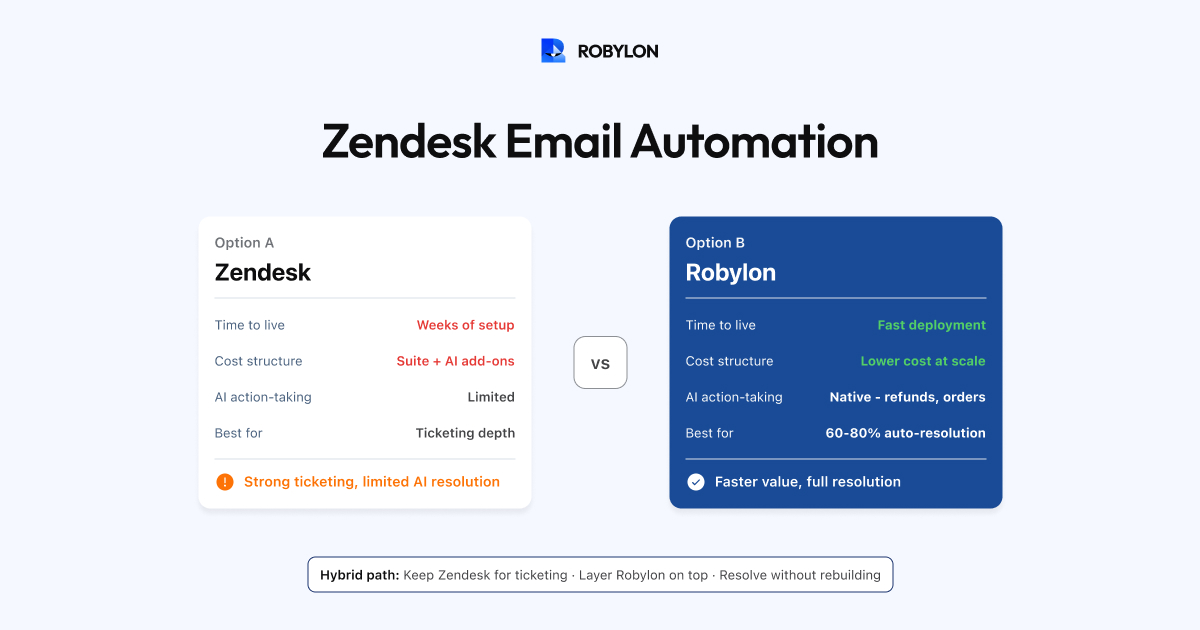
If your team uses Zendesk for email support, you have probably been pitched on their AI capabilities — intelligent triage, AI-generated responses, auto-resolution, agent copilot. The marketing is compelling. The question is whether the reality matches the pitch, specifically for email automation.
We reviewed Zendesk’s email AI capabilities in production environments, talked to teams who have deployed it, and compared the results to purpose-built AI email platforms. Here is an honest assessment: what works well, where Zendesk falls short, what it actually costs, and when you should consider an alternative.
What Zendesk Does Well for Email
Best-in-Class Ticketing
Let us start with the obvious: Zendesk’s core ticketing system for email is excellent. Email-to-ticket conversion is seamless. Views, macros, triggers, and automations give teams granular control over their email workflow. SLA management, collision detection, and agent workspaces are mature and reliable. If you need a robust email ticketing system without AI, Zendesk is hard to beat.
Intelligent Triage
Zendesk’s intelligent triage automatically classifies incoming email tickets by intent, language, and sentiment. For teams drowning in manual tagging and routing, this is a meaningful time saver. The pre-built intent models cover common support categories across industries, which accelerates setup. Triage accuracy typically reaches 85–92% for intent classification.
Agent Copilot Features
Zendesk’s AI assists agents with suggested responses, ticket summaries, tone adjustment, and macro recommendations. For email specifically, the response suggestions give agents a starting point they can edit rather than writing from scratch — reducing handle time by 30–45% per email ticket. The ticket summary feature is particularly useful for long email threads with multiple replies.
The Zendesk Ecosystem
With 1,500+ marketplace apps, Zendesk connects to virtually any tool in your stack. CRM, e-commerce, payments, analytics — if a tool exists, there is probably a Zendesk integration for it. This ecosystem reduces the friction of adding capabilities.
Where Zendesk Email Automation Falls Short
Limited Action-Taking for Email
This is the most significant limitation. Zendesk AI can answer questions from your help center content — “What is your return policy?” gets a solid, knowledge-based response. But when a customer emails “I want to return the blue hoodie from order #45721,” the AI cannot verify the order, check return eligibility, generate a shipping label, and process the return. That transactional workflow requires either custom API development or third-party apps.
Purpose-built AI email platforms resolve this natively — they connect to your OMS, payment system, and returns platform, and the AI executes the entire workflow. On Zendesk, you get the answer; on AI-native platforms, you get the resolution. The difference is 30–40% auto-resolution (answer-only) versus 60–80% (answer + action).
Pricing That Stacks Up Fast
Zendesk’s AI for email requires three cost layers:
- Suite plan: Professional ($89/agent/month) or Enterprise ($115+/agent/month). The AI features require Professional at minimum.
- Advanced AI add-on: Approximately $50/agent/month. This is where intelligent triage, AI-generated responses, and auto-resolution live.
- Auto-resolution charges: Per-resolution pricing for emails the AI resolves without agent involvement.
For a team of 10 agents: Suite Professional ($890) + Advanced AI ($500) + auto-resolution charges at scale. Monthly cost quickly exceeds $2,000–$4,000 before resolution fees — and the resolution fees grow as automation improves.
Configuration Complexity
Getting Zendesk’s email AI to perform well is not a quick setup. You need to restructure your help center content for AI consumption (articles written for humans often perform poorly for AI retrieval), configure intent taxonomies, set up conversation flows for different email types, tune confidence thresholds, and build routing logic. Teams commonly report 4–8 weeks of configuration before reaching satisfactory email automation rates.
AI-native platforms typically achieve comparable automation in 1–2 weeks because they are designed for rapid AI deployment, not adapted from a legacy ticketing architecture.
Email Threading and Multi-Issue Gaps
Zendesk handles basic email threading well, but the AI layer sometimes struggles with compound emails — a customer asking three questions in one email may get a response that only addresses the first. Multi-issue parsing is an area where purpose-built AI platforms have invested more deeply.
Lack of Native Voice AI
If your team handles email and phone support, you want AI that covers both. Zendesk Talk handles call routing and recording but does not offer AI voice agents that actually resolve phone conversations. For teams wanting to automate email and voice together, this requires adding another vendor.
Alternatives to Zendesk for AI Email Automation
Robylon AI — Best for Full Email Resolution at Lower Cost
Robylon is purpose-built for resolving support queries — email, chat, voice, and WhatsApp — with action-taking capabilities that Zendesk’s AI does not match natively. For email specifically:
- Action-taking: Connects to Shopify, Stripe, CRM, and returns systems to resolve transactional emails end-to-end.
- Multi-issue parsing: Handles compound emails with multiple intents and generates coherent combined responses.
- Thread-aware processing: Reads full email chains and responds to the current state, not just the latest message.
- Credits-based pricing: No per-seat surcharges for AI interactions. Significantly cheaper at high volumes.
- Zendesk integration: Works alongside Zendesk — AI processes emails, creates/updates tickets in Zendesk for human-handled cases. You keep Zendesk for ticketing, Robylon adds better AI.
- Deployment: Most teams go live in under a day versus weeks for Zendesk AI configuration.
Typical savings: 40–60% less than Zendesk + Advanced AI at equivalent email volumes, with higher auto-resolution rates.
Freshdesk (Freddy AI) — Best for Budget-Conscious Teams
- Plans from $15–$79/agent/month with Freddy AI included in higher tiers (no separate add-on fee).
- Solid email ticketing with auto-classification and response suggestions.
- Less mature AI than Zendesk for auto-resolution, but significantly cheaper.
- Good choice for teams that need a helpdesk with some AI, not an AI-first platform.
Intercom (Fin) — Best for SaaS Messenger-Centric Teams
- Fin AI now extends to email with help-center-based resolution.
- Beautiful UX, strong product tour and onboarding integrations.
- Per-resolution pricing ($0.99/resolution) creates similar cost scaling issues as Zendesk.
- Best if your primary channel is in-app messaging and email is secondary.
Decision Framework: Stay with Zendesk or Switch?
Keep Zendesk Email AI If:
- You have 20+ agents deeply embedded in Zendesk with complex routing, macros, and workflows that would be expensive to migrate.
- Your email automation needs are primarily triage and agent assistance (not full auto-resolution).
- You have a dedicated Zendesk admin who can invest weeks in AI configuration.
- Your email volume is moderate (under 3,000/month) so per-resolution costs stay manageable.
Add Robylon AI on Top If:
- You want to keep Zendesk for ticketing but need better AI email resolution than Zendesk’s native AI provides.
- You need action-taking — the AI must process refunds, check orders, update accounts, not just answer questions.
- Your email volume is high (5,000+/month) and Zendesk’s per-resolution pricing is unsustainable.
- You also need voice AI — Robylon handles phone support, Zendesk does not.
Switch Away from Zendesk If:
- Your Zendesk contract is up for renewal and the total cost (Suite + AI + resolution fees) exceeds your budget.
- You are a smaller team (under 10 agents) and do not need Zendesk’s enterprise ticketing depth.
- Email is your dominant channel and you want maximum AI resolution, not maximum ticketing features.
- Speed matters — you need email AI live in days, not weeks.
Bottom Line
Zendesk is the best email ticketing system in the market. It is not the best email AI resolution system. The distinction matters because the value of AI in 2026 is not in organizing tickets — it is in resolving them. If your primary goal is a well-organized inbox with some AI assistance, Zendesk delivers. If your goal is AI that resolves 60–80% of email tickets autonomously, you either need to layer a purpose-built AI platform on top of Zendesk, or move to an AI-native platform entirely.
Better AI for your Zendesk emails. Robylon AI works alongside Zendesk — resolving email tickets end-to-end while creating and updating Zendesk tickets for human-handled cases. Keep your helpdesk. Upgrade your AI. Start free at robylon.ai
Frequently asked questions
How good is Zendesk's AI for email automation?
Zendesk's email AI is strong for triage and agent assistance — intelligent triage classifies tickets by intent, language, and sentiment at 85–92% accuracy, and agent copilot features reduce handle time by 30–45%. For autonomous email resolution, it is more limited: Zendesk AI can auto-resolve simple knowledge-based questions but cannot natively take transactional actions (process refunds, check orders, update accounts). Typical auto-resolution rate: 35–55% for email, versus 60–80% on AI-native platforms with action-taking.
How much does Zendesk email AI actually cost?
Three cost layers stack up: 1) Suite Professional at $89/agent/month (minimum for AI features). 2) Advanced AI add-on at ~$50/agent/month. 3) Per-resolution charges for emails the AI resolves without agents. For a 10-agent team with 3,000 monthly auto-resolutions, total cost easily exceeds $4,000–$5,000/month. And the per-resolution charges grow as automation improves — you pay more the better your AI works. Credits-based alternatives like Robylon cost 40–60% less at equivalent volumes.
Can I use Robylon AI on top of my existing Zendesk setup?
Yes — this is the most common migration path. Robylon layers on top of Zendesk: the AI processes incoming emails, resolves 60–80% autonomously (with action-taking), and creates or updates Zendesk tickets for the 20–40% that need human handling. Your agents stay in Zendesk — they just see far fewer tickets. You keep Zendesk's ticketing, routing, and reporting while upgrading the AI resolution engine. No migration, no retraining agents on a new tool.
When should I stay with Zendesk vs switch for email AI?
Stay with Zendesk if: you have 20+ agents deeply embedded with complex macros and workflows, your email needs are primarily triage and agent assistance, and you have a dedicated Zendesk admin. Add Robylon on top if: you need action-taking resolution (order lookups, refunds, account updates), email volume exceeds 5,000/month and per-resolution pricing is unsustainable, or you also need voice AI. Switch away if: you are under 10 agents, Zendesk's total cost exceeds budget, or email AI resolution is your top priority over ticketing depth.
What is Zendesk's biggest limitation for email AI?
Limited action-taking. Zendesk AI can answer "What is your return policy?" from help center content. But when a customer emails "I want to return the blue hoodie from order #45721," the AI cannot verify the order, check return eligibility, generate a shipping label, and process the return. That requires custom API development or third-party apps. This gap means Zendesk achieves 35–55% auto-resolution (answer-only) versus 60–80% on platforms with native action-taking (answer + resolve).