Instagram Chatbot Automation in 2026: Sales, Support & Action-Taking on DMs
Instagram DMs are now a real revenue and support channel for D2C brands — but most chatbot tools only handle marketing flows, not actual order resolution. This guide covers what production-grade Instagram automation looks like in 2026, including the Instagram Messaging API mechanics most posts skip, when ManyChat is the right tool versus an omnichannel platform, and the specific architecture that resolves customer queries instead of just responding to them.
Instagram is now a primary channel for D2C and retail commerce, not just a marketing surface. Over 200 million businesses are on the platform, and DMs have become the default place customers ask product questions, request order updates, raise complaints, and respond to story content. For brands running ads, stories, and reels at scale, manual DM management stops working somewhere around 100 inbound DMs/day.
The chatbot tooling that emerged to solve this problem largely came from one direction: marketing automation. ManyChat, Chatfuel, and similar platforms started as Facebook Messenger marketing bots and extended to Instagram. They’re excellent at what they do — keyword triggers, comment-to-DM flows, lead magnets — but they were not built to resolve support queries. They respond.
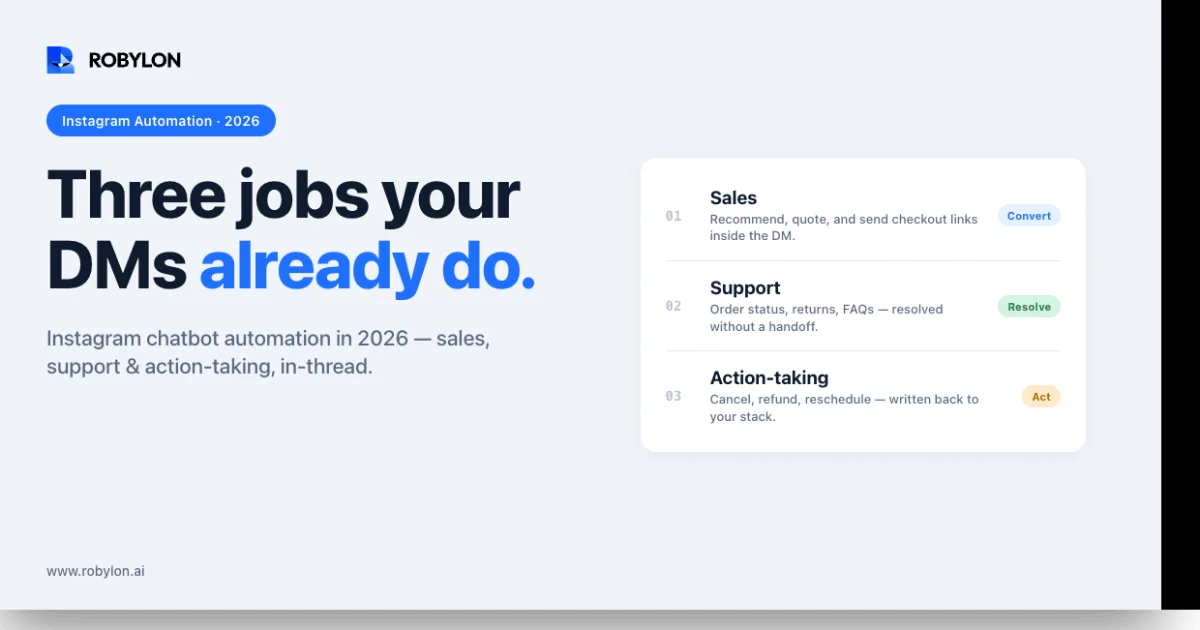
The shift in 2026 is that Instagram DMs increasingly carry post-purchase support load, not just pre-purchase marketing. “Where is my order?”, “This arrived damaged”, “How do I exchange this for a different size?” — these queries land in the same DM inbox as product inquiries, and they require backend system access (OMS, returns, payment), not flow builders. This guide is about what genuine Instagram chatbot automation looks like in 2026, where it actually pays off, and how to choose between two distinct categories of tooling that both call themselves “Instagram chatbots.”
The Instagram Messaging API: What Most Guides Skip
The capabilities of every Instagram chatbot are bounded by what Meta’s Instagram Messaging API allows. Understanding the constraints up front saves a lot of confusion when comparing tools.
Triggering events
An Instagram chatbot can only respond to specific user-initiated events. The four main triggers are:
- Direct message: a user sends a DM to your business account. Standard inbound message.
- Story reply: a user replies directly to one of your Stories. Lands in DMs but carries metadata about which Story was replied to — the chatbot can read this and respond contextually.
- Story mention: a user @mentions your account in their own Story. Different event from a story reply, with different rate limits and response patterns.
- Comment trigger: a user comments a specific keyword on one of your posts or reels. The chatbot can reply publicly to the comment AND send a private DM — this is the “comment-to-DM” flow that powers most lead-magnet automation.
The 24-hour messaging window
This is the constraint most beginner Instagram automation gets wrong. Instagram’s Messaging API enforces a 24-hour customer-care window: once a user messages your business, you have 24 hours to reply with any content. After 24 hours, you can only send tagged messages (account updates, post-purchase updates, human agent messages within specific tag categories) — you cannot send promotional or marketing content outside the window.
This is why proactive Instagram outreach is restricted. Tools that promise “automated follow-ups to all your DMs” are either operating within the 24-hour window or risking account restrictions.
Rate limits
The API enforces per-app and per-user rate limits. For high-volume brands, this means your chatbot platform’s architecture matters — throttling, queueing, and graceful degradation under spike load are not implementation details, they’re product capabilities. ManyChat, Robylon, and other established platforms handle this; newer or less mature tooling sometimes doesn’t.
Two Categories of Instagram Chatbot — Pick the Right One for Your Use Case
The reason “best Instagram chatbot” comparisons are so confusing is that they conflate two genuinely different product categories. Pick the wrong category and you’ll be unhappy with your tool regardless of which specific vendor you chose within it.
Category 1: Marketing flow automation
Examples: ManyChat, Chatfuel, Tidio (basic plan), SendPulse.
What they do well: Story-reply triggers, comment-to-DM flows for lead magnets, keyword-based response trees, drip sequences within the 24-hour window, ice-breaker buttons for new conversations, broadcast lists for segmented announcements, simple opt-in flows for collecting email/phone.
Where they fall short: No connection to backend order data, OMS, or CRM in real time. Limited or no AI — most flows are still keyword-triggered. No omnichannel context — a customer who DMs on Instagram and emails the same day is two separate conversations in two separate inboxes. Action-taking is limited to what the flow builder can do (send a discount code, capture an email) — they can’t process a return, check a real-time order status, or update an account.
Best for: creators, SMBs, brands whose Instagram presence is primarily marketing-driven, and teams who view DMs as top-of-funnel only.
Category 2: Omnichannel support automation with Instagram as one channel
Examples: Robylon AI, plus a small number of enterprise CX platforms that have added Instagram alongside their main channels.
What they do well: Real-time queries against your order system, returns processor, CRM, and product catalog. AI that understands natural language across long conversations rather than relying on keyword triggers. Single customer record — the same person reaching out on Instagram, WhatsApp, email, or chat is recognized and handled with consistent context. Action-taking: process refunds, generate return labels, update shipping addresses, modify subscriptions, escalate to a human agent with full DM thread + order history attached. Compliance and PII handling for regulated commerce categories.
Where they fall short (compared to Category 1): Less optimized for pure marketing flows like lead magnets and contest entries. Pricing is structured for support volume, not creator economics — wrong fit if you only have 50 DMs/month and just want to send discount codes.
Best for: D2C brands at scale, e-commerce teams treating Instagram as a real support channel, multi-channel CX organizations who want one engine across Instagram + WhatsApp + email + chat.
The boundary case: brands that need both
Many D2C brands actually have both needs. A common architecture is to use a marketing platform (ManyChat or similar) for top-of-funnel flows like contest entries, lead magnets, and story-reply marketing campaigns, and to use an omnichannel platform (Robylon or similar) for support resolution. This works as long as the tools are configured to hand off correctly — the marketing tool runs the campaign flow, and once a user enters a support intent (“my order hasn’t arrived”, “I want to return this”), the support platform takes over.
What Instagram Chatbot Automation Looks Like When Done Well
The difference between a chatbot that frustrates customers and one that resolves their problems is mostly architectural. The visible part — the messages users see — is downstream of how the system is connected.
Architecture pattern: AI + RAG + Action-Taking
A production Instagram chatbot for D2C support has three layers:
- AI understanding: An LLM-backed engine reads each incoming DM, extracts intent and entities (order number, product mentioned, sentiment), and decides which workflow to invoke. Critically, this is not keyword matching — “my package never came” and “order not received” both route to the same intent without anyone configuring keyword variants.
- Retrieval-Augmented Generation (RAG): Before responding, the AI pulls relevant content from your knowledge base, return policy, product catalog, and shipping FAQs. Responses are grounded in your actual policies, not the LLM’s training data. Hallucination rate stays under 2% with proper guardrails.
- Action-taking: For queries that require backend access — order status, refund processing, address change, subscription modification — the chatbot calls your OMS, payment processor, or CRM directly, completes the action, and reports back inside the DM. This is the layer that converts “AI that answers” into “AI that resolves.”
Story reply flow done right
A user replies to a Story showing a new product launch with: “Is this still in the small?”
A flow-builder chatbot answers: “Thanks for your message! Check our website at [link]” — missed conversion, frustrated customer.
A production chatbot reads the Story metadata to identify which product was featured, queries real-time inventory in Shopify, replies in seconds with: “Yes — we have 12 in small. They’re $89 with free shipping over $75. Want me to send the direct checkout link?” Engagement window captured, conversion likely.
Order support flow done right
A user DMs: “Order #4827 hasn’t arrived and tracking says delivered.”
A flow-builder chatbot answers: “Sorry to hear that! Please email support@… for help.” — channel switch, abandoned thread.
A production chatbot queries the OMS and shipping carrier API, confirms the marked-delivered status, recognizes the pattern (genuine non-delivery, common after holiday weekends), checks the customer’s order history (first incident or repeat?), files a delivery investigation with the carrier, and replies with: “I see #4827 was marked delivered Tuesday but you’re saying it didn’t arrive. I’ve opened a case with the carrier and you’ll have an update within 48 hours. If they confirm non-delivery, I’ll process a replacement automatically. Anything else?” Resolution without human involvement.
Handoff to human — the most underrated capability
The most important capability of a support chatbot isn’t what it resolves — it’s what it hands off cleanly. When a query exceeds AI confidence (complaint about quality, request for legal/compliance topic, account fraud signal), the chatbot escalates with the full DM thread context, the customer’s order history, the AI’s confidence assessment, and any actions already attempted. The human agent picks up where the AI left off, in seconds. This is the architectural pattern that determines whether customers feel served or trapped.
Performance Benchmarks for Instagram Chatbot Automation
Realistic numbers for D2C brands running Instagram automation at scale:
- DM response rate within 5 minutes: 95%+ achievable with automation; manual teams typically run 40-60%.
- Conversation-to-sale rate: 5-15% for well-architected product inquiry flows. Top quartile: 18-22%.
- Comment-to-DM conversion: 40-60% for properly-targeted keyword campaigns.
- Support resolution rate (no human involvement): 50-70% of order-related queries with action-taking enabled. 30-40% without action-taking.
- Lead capture rate: 20-35% of DM conversations for service businesses with qualification flows.
- Cost per resolution: $0.50-$2.00 for AI-resolved Instagram queries vs. $5-$15 for human-resolved.
- Escalation rate: Healthy is 20-40%; below 15% suggests overconfident AI; above 50% suggests undertrained AI or insufficient knowledge base coverage.
Common Mistakes That Tank Instagram Automation Projects
- Treating Instagram DMs like email tickets. Long, formal responses feel out of place. Keep messages 1-3 sentences, use line breaks, send images and quick-reply buttons. Match the platform’s energy.
- Generic story-reply responses. Replying “Thanks for your message!” to every story reply wastes the highest-engagement moment in Instagram. Use the Story metadata; respond to the specific product, offer, or content.
- No backend connection. A chatbot that says “Check our website for pricing” when asked about a product’s price is failing at its most basic job. Connect your catalog and OMS.
- Over-automation. Complaints, influencer outreach, partnership requests, and PR inquiries should route to humans immediately. Set up keyword and intent detection to bypass the bot for these categories.
- Ignoring the 24-hour window. Designing flows that depend on sending users content 30 hours after their last message will fail silently — the messages won’t deliver. Architect within the constraint.
- No omnichannel context. If a customer DMs you on Instagram, emails the same day, and gets two unrelated agents responding with conflicting information, your support quality will be judged by the worst interaction. Either use an omnichannel platform or accept that your channels don’t talk to each other.
- Choosing the wrong category of tool. Picking ManyChat for D2C support resolution, or picking an enterprise omnichannel platform for a creator’s lead-magnet campaign — both are common mistakes that lead to teams blaming the tool when the real issue was tool-to-use-case fit.
Decision Framework
Match the tool to your situation:
- Choose a marketing flow tool (ManyChat, Chatfuel, Tidio): Instagram is your primary marketing channel, you need lead magnets and contest flows, you don’t have an OMS or CRM to connect, support volume is low and manageable manually.
- Choose an omnichannel platform (Robylon AI): Instagram is one channel among several (chat, email, WhatsApp, voice), you have real support volume that requires backend system access, you want a single customer record across channels, you need genuine action-taking (refunds, returns, account updates) within DMs.
- Run both: You need top-of-funnel marketing automation AND scalable support resolution; configure handoff so marketing runs the campaign and support takes over once a user enters a support intent.
Bottom Line
Instagram DMs are no longer a side channel. For D2C brands, they’re a primary surface for both revenue and support — and the volume can hit hundreds or thousands of messages per day during launches, sales, and seasonal peaks. The right automation architecture turns this from a bottleneck into a scalable channel that responds in seconds, resolves 50-70% of inquiries without a human, and produces 5-15% conversion on product inquiry flows.
The wrong choice — picking a marketing-flow tool when you need support resolution, or vice versa — is the most common reason these projects underperform. Diagnose your real use case first, then choose the tool that’s built for it.
Robylon AI handles Instagram DMs alongside WhatsApp, email, chat, and voice from a single AI engine — with action-taking on Shopify, BigCommerce, WooCommerce, and 60+ other systems. 60-80% autonomous resolution. Start free at robylon.ai
Frequently asked questions
How do Instagram chatbots work?
Instagram chatbots use the Instagram Messaging API to automate DM conversations. They trigger on story replies, comment keywords, ice breakers, or welcome messages — then respond with AI-powered or rule-based flows. The chatbot can answer product questions, handle order support, capture leads, and send rich media (images, carousels, quick-reply buttons) — all within the Instagram DM interface.
What is a comment-to-DM flow on Instagram?
A comment-to-DM flow automatically sends a private DM to anyone who comments a specific keyword on your post. For example, a customer comments "PRICE" on a product post, and the chatbot DMs them pricing, availability, and a purchase link. This moves conversations from public comments to private DMs where you can qualify, sell, and support without cluttering your comments section.
What results can I expect from an Instagram chatbot?
Key benchmarks: DM response rate of 95%+ (vs. manual teams at 40–60%), conversation-to-sale rate of 5–15% for product inquiry flows, comment-to-DM conversion of 40–60%, support resolution rate of 50–70% for order-related queries, and lead capture rate of 20–35% for service businesses using qualification flows.
Do I need a business account for an Instagram chatbot?
Yes. Instagram chatbot automation requires an Instagram Business or Creator account (not personal) connected to a Facebook Page. You also need access to the Instagram Messaging API through a chatbot platform — most platforms like Robylon AI, ManyChat, and Tidio handle the API connection automatically during setup, typically taking 15–30 minutes.
Can Instagram chatbots handle order support?
Yes, when connected to your order management system (Shopify, BigCommerce, WooCommerce). The chatbot can check order status, provide tracking links, initiate returns, answer shipping timeline questions, and escalate complaints to your support team with full order context — all within Instagram DMs, keeping support on the platform where the customer is already active.
Related reading
- Chatbots
10 Best AI Chatbots for Customer Support in 2026
This article reviews the top 10 AI chatbots for customer support in 2025, including Zendesk, Freshworks, Intercom, Drift, and more. It highlights their strengths, limitations, and best-fit use cases. The clear winner is Robylon AI, which delivers autonomous agents with 97% accuracy, 85–95% query automation, and 30% cost savings: making it the best overall choice for enterprises seeking scalable, reliable, and cost-efficient customer support.
- Chatbots
10 Best AI Chatbots for E-Commerce in 2026
Explore the 10 best AI chatbots for E-Commerce in 2025. Compare platforms like Robylon, Tidio, Intercom, Gorgias, and Ada to see how chatbots improve customer support, reduce costs, and boost sales.
- Chatbots
AI Customer Service Chatbots in 2026: 5 Features That Separate Good from Great
Discover the best AI customer service chatbots for 2025. Compare top platforms like Robylon, Zendesk, Intercom, and more to automate support, cut costs, and deliver 24/7 customer experiences.