
How to Train an AI Chatbot on Your Own Data
Generic AI chatbots give generic answers. This guide shows you how to train a chatbot on your own business data so it answers like your best support agent — accurately, consistently, and on-brand.
A generic AI chatbot — one that only knows what is in its base training data — is about as useful as a new hire who has never read your documentation. It might sound articulate, but it will give wrong answers about your return policy, make up product features that do not exist, and confidently provide shipping timelines that have nothing to do with your actual operations.
The difference between a chatbot that impresses visitors and one that frustrates them comes down to one thing: whether it has been trained on your data.
This guide covers everything you need to know — what types of data to use, how modern AI chatbots learn from your content, the technical approaches behind the scenes (explained simply), and the practical steps to get your chatbot answering like your best support agent.
How Modern AI Chatbots Learn Your Data
Before diving into the practical steps, it helps to understand the two main approaches to making an AI chatbot “know” your business. You do not need to be technical to follow this — but understanding the basics will help you make better decisions.
Approach 1: Retrieval-Augmented Generation (RAG)
This is the most common approach in 2026, and the one used by most chatbot platforms. Here is how it works in plain language:
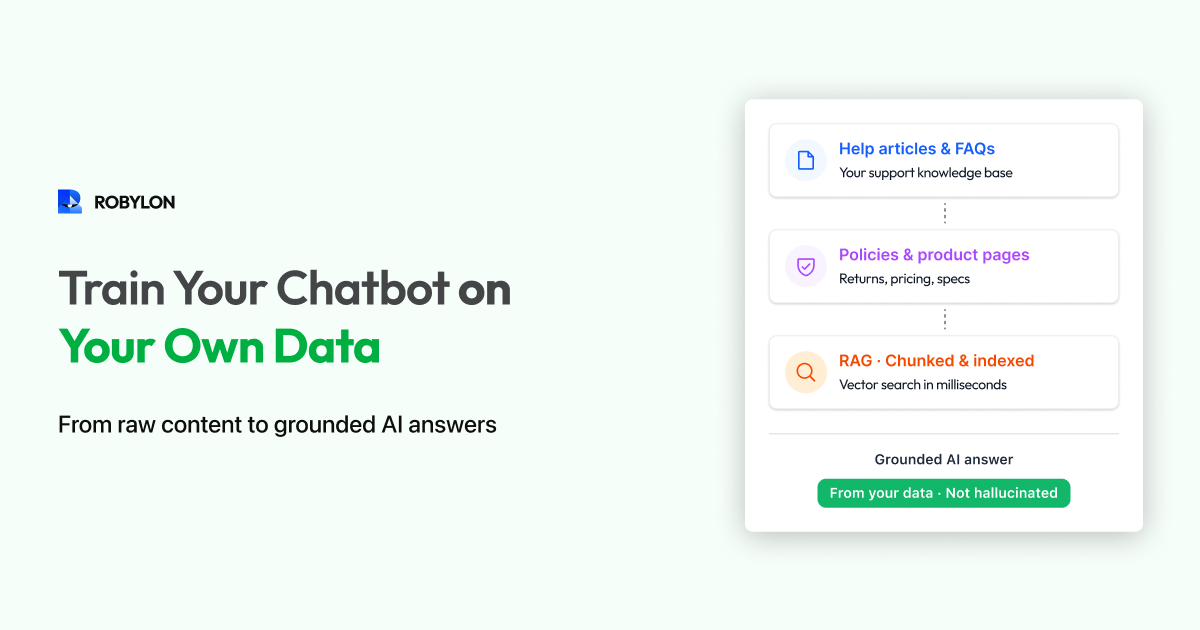
- You upload your content — help articles, PDFs, product pages, policy documents.
- The platform breaks it into chunks and creates a searchable index (using a technology called vector embeddings — think of it as converting your text into a format the AI can search through extremely quickly).
- When a customer asks a question, the system searches your indexed content for the most relevant chunks.
- Those relevant chunks are fed to the LLM along with the customer’s question, and the LLM generates a natural-language answer based specifically on your content.
The key advantage of RAG: the AI only answers based on what is in your knowledge base. It does not make things up from its general training. If the information is not in your data, a well-configured RAG system will say “I don’t have information about that” instead of hallucinating an answer.
Approach 2: Fine-Tuning
Fine-tuning involves actually retraining the AI model’s weights on your specific data. This is more expensive, more complex, and takes longer — but it can produce deeper understanding of your domain, terminology, and communication style.
In practice, fine-tuning is rarely necessary for customer support chatbots. RAG handles 95% of use cases better, faster, and more affordably. Fine-tuning is most relevant for highly specialized domains (medical, legal, scientific) where the AI needs deep domain expertise that goes beyond retrieving information.
Which Approach Should You Use?
For most businesses, RAG is the right choice. It is faster to set up (hours, not weeks), easier to update (change a document, the chatbot updates automatically), more controllable (you can see exactly which source it used for each answer), and far less expensive. Fine-tuning makes sense only when RAG consistently fails to capture the nuance your domain requires.
What Data Should You Train Your Chatbot On?
Not all data is equally useful. Here is a prioritized list of what to include, roughly ordered by impact.
Tier 1: Essential (Include from Day One)
- Help center and FAQ articles. This is your highest-value training data. Well-written help articles map directly to the questions customers ask. If your help center is well-maintained, your chatbot will be strong out of the gate.
- Product and service pages. Descriptions, specifications, features, pricing, and comparison information. Customers constantly ask about what your product does and how much it costs.
- Policy documents. Returns, refunds, shipping, warranty, cancellation, privacy. These are among the most frequently asked questions for any business.
Tier 2: High Value (Add Within First Week)
- Standard operating procedures (SOPs). The step-by-step instructions your support team follows for common scenarios. “If the customer’s order was damaged, do X. If it was lost in transit, do Y.” These give your chatbot the same decision logic your human agents use.
- Troubleshooting guides. If you have a technical product, include the diagnostic steps for common problems. “If the app won’t load, try clearing cache. If that doesn’t work, reinstall. If still not working, escalate to engineering.”
- Pricing and plan details. Feature comparisons, plan limits, upgrade paths, and billing FAQ. Sales-related questions drive a significant share of chatbot volume.
Tier 3: Valuable (Add During Optimization)
- Past support conversations. Real customer interactions show how questions are actually phrased (not how you think they are phrased). They also reveal edge cases you might not have documented.
- Blog posts and guides. Educational content that helps customers understand your product or industry. Useful for “how do I…” and “what is…” type queries.
- Release notes and changelog. For SaaS products, customers often ask about recent changes, new features, or deprecated functionality.
What NOT to Include
- Internal communications (Slack messages, internal memos, meeting notes) — these contain context that does not make sense to customers.
- Outdated content — old pricing, discontinued products, expired promotions. Stale data causes wrong answers.
- Sensitive data — customer PII, financial records, employee information. Your chatbot’s knowledge base should never contain data you would not want exposed.
- Marketing fluff — vague claims like “best-in-class” or “industry-leading” do not help the AI answer concrete questions.
Step-by-Step: Training Your Chatbot
Step 1: Audit and Organize Your Content
Before uploading anything, take inventory. Create a simple spreadsheet listing every document you plan to include: the source, the topic it covers, when it was last updated, and whether it needs cleanup. Flag anything older than six months for review — policies and product details change fast.
Step 2: Clean and Optimize for AI
Your existing content was written for humans reading a web page. AI retrieval works slightly differently. Optimize your content with these principles:
- One topic per section. If a single help article covers returns, exchanges, and warranty claims, consider splitting it into three. AI retrieval is more accurate when each chunk is tightly focused.
- State policies as rules, not suggestions. “Return requests must be submitted within 30 days of delivery” is clear to AI. “We generally allow returns within a reasonable timeframe” is not.
- Include the question, not just the answer. Start sections with the question customers actually ask: “How long does shipping take?” followed by the answer. This improves retrieval accuracy because the AI matches the customer’s question against your content.
- Add conditional logic explicitly. “If the order is under $50, no free returns. If over $50, free returns are included. International orders follow a separate process (see International Returns section).”
Step 3: Upload to Your Chatbot Platform
Most modern platforms support multiple ingestion methods:
- URL crawling: Point the platform at your help center URL. It will automatically crawl all pages and index them. This is the fastest method if your help center is comprehensive and up to date.
- Document upload: Upload PDFs, Word docs, or text files. Good for SOPs, policy documents, and guides that are not published on your website.
- Direct text entry: Paste or type content directly into the platform’s knowledge base editor. Useful for custom Q&A pairs, quick fixes, and information that does not exist in any document.
- Helpdesk sync: Some platforms can connect directly to Zendesk, Freshdesk, or Intercom and pull in your existing help articles automatically, with ongoing sync.
Robylon Tip: Robylon supports all four methods — URL scraping, document upload, manual entry, and helpdesk sync. The platform auto-chunks your content, creates vector embeddings, and makes the knowledge available to your AI agent within minutes. When you update content at the source, it re-syncs automatically.
Step 4: Test with Real Questions
After uploading, immediately test your chatbot with the real questions your customers ask. Use the exact phrasing from your support tickets — not the clean, perfect language from your help articles. Real customers type things like:
- “how do i return smthng”
- “order hasn’t arrived it’s been 2 weeks”
- “can i get my money back or nah”
- “does this work with samsung galaxy s24”
For each test, evaluate three things:
- Did it find the right content? (Retrieval accuracy)
- Did it answer correctly based on that content? (Generation accuracy)
- Did it admit uncertainty when it should have? (Hallucination control)
Step 5: Fill the Gaps
Testing will inevitably reveal gaps — questions the chatbot cannot answer because the information is not in your knowledge base. This is the most valuable output of the testing phase. Every gap you fill before launch is a potential customer frustration avoided.
Common gap categories:
- Competitive questions: “How are you different from [competitor]?” — you probably have not documented this in your help center.
- Pricing edge cases: “What happens if I want to downgrade mid-cycle?” — documented internally but not customer-facing.
- Recent changes: “Do you still offer [discontinued feature]?” — knowledge base not yet updated.
- Process questions: “How long does it take to process a refund?” — policy exists but timing is not specified.
Keeping Your Chatbot’s Knowledge Current
Training is not a one-time event. Your business changes constantly — new products launch, policies update, prices shift, seasonal promotions come and go. A chatbot trained on stale data gives stale answers.
Set Up Auto-Sync Where Possible
If your platform supports it, connect your chatbot’s knowledge base to your live help center so content syncs automatically when you publish updates. This eliminates the most common source of outdated answers.
Establish a Weekly Review Cadence
Every week, spend 15–30 minutes reviewing:
- Unanswered questions: What did customers ask that the chatbot could not answer? Add content to cover these topics.
- Low-confidence answers: Where did the AI respond but with low confidence? These often indicate content that is ambiguous or incomplete.
- Escalated conversations: Why did conversations get handed off to humans? Some escalations are legitimate, but many reveal training gaps.
Trigger Updates Around Business Events
Proactively update your knowledge base whenever:
- You launch a new product or feature.
- Pricing or plans change.
- A policy is updated (returns, shipping, warranty).
- A seasonal promotion starts or ends.
- A known issue or outage affects customers.
Advanced: Improving Answer Quality
Once the basics are covered, here are techniques to push your chatbot’s accuracy higher:
Use Custom Responses for Critical Topics
For your most sensitive or high-stakes questions (refund disputes, legal inquiries, pricing negotiations), write exact responses rather than relying on AI generation. Most platforms let you create “pinned” answers that override AI generation for specific intents. This gives you complete control over the language used in critical moments.
Add Negative Examples
If your chatbot keeps confusing two similar topics (e.g., “cancel my order” vs “cancel my subscription”), add clarifying content that explicitly distinguishes them. “Order cancellation applies to unshipped orders only. For subscription cancellation, see [subscription section].”
Structure for Follow-Up Questions
Customers rarely ask one question in isolation. Think about the natural follow-ups and make sure your content supports them. If your return policy says “30 days from delivery,” the next question is inevitably “how do I start a return?” and then “how long does the refund take?” All three answers should be easily retrievable.
Set Up Feedback Loops
Enable thumbs-up/thumbs-down feedback on chatbot answers if your platform supports it. This gives you a direct signal from customers about which answers are helpful and which need improvement. Review negative feedback weekly and use it to prioritize knowledge base updates.
Common Mistakes When Training AI Chatbots
- Uploading everything at once without cleanup. Quantity does not equal quality. 20 well-structured articles produce better results than 200 pages of unorganized content.
- Not testing with real customer language. Your help articles say “initiate a return request.” Your customers type “send it back.” Test with their words, not yours.
- Skipping the edge cases. The chatbot handles the happy path perfectly. It is the edge cases — international orders, discontinued products, expired promotions — that cause problems.
- Ignoring stale content. A chatbot that confidently provides last year’s pricing is worse than one that says “I’m not sure.” Audit your knowledge base regularly.
- No human fallback. Even the best-trained chatbot encounters questions it cannot answer. Without a clear escalation path, customers hit a dead end.
Bottom Line
Training an AI chatbot on your own data is what transforms it from a novelty into a genuine business tool. The process is not complicated — collect your content, clean it up, upload it, test it, and keep it current. The platforms available in 2026 handle the hard technical work (chunking, embedding, retrieval, generation) for you.
The biggest factor in chatbot quality is not the AI model — it is the quality and completeness of the data you give it. Invest your time there, and the results follow.
Train your chatbot in minutes, not months. Robylon AI lets you upload URLs, PDFs, and helpdesk articles — then auto-trains your AI agent with RAG-powered retrieval and continuous sync. Start free at robylon.ai
Frequently asked questions
Can I train a chatbot on my Zendesk or Freshdesk help articles?
Yes. Platforms like Robylon AI offer direct helpdesk sync — connect your Zendesk, Freshdesk, or Intercom account and the platform automatically pulls in your help articles, indexes them, and keeps them in sync when you publish updates. This is the fastest way to train a chatbot and ensures your bot always has current information.
What is the difference between RAG and fine-tuning for chatbots?
RAG (Retrieval-Augmented Generation) searches your uploaded documents in real time and feeds relevant content to the AI for each response. Fine-tuning retrains the AI model's weights on your data. RAG is faster to set up (hours vs. weeks), easier to update (change a document, the bot updates immediately), cheaper, and more controllable. Fine-tuning is only necessary for highly specialized domains. For customer support, RAG is the right choice 95% of the time.
How often should I update my chatbot's training data?
Set up auto-sync for your primary sources (help center, product pages) so updates happen automatically. Beyond that, do a weekly 15–30 minute review of unanswered questions and low-confidence responses to identify gaps. Additionally, proactively update whenever you launch a new product, change pricing, update a policy, or start/end a promotion.
What data should I NOT use to train my chatbot?
Avoid training on: internal communications (Slack messages, meeting notes — they contain context that confuses customer-facing responses), outdated content (old pricing, discontinued products), sensitive data (customer PII, financial records, employee information), and marketing fluff (vague claims like "best-in-class" that do not help answer concrete questions). Quality matters more than quantity.
How do I know if my chatbot is hallucinating answers?
Check for these signs: the chatbot states policies or features that do not exist, provides specific numbers (prices, timelines) that differ from your actual data, or sounds confident about topics not in your knowledge base. To prevent hallucinations, use a RAG-based platform with confidence scoring, set a minimum confidence threshold for responses, and configure the bot to say "I'm not sure" rather than guess when confidence is low.
Related reading
 Chatbots
10 Best AI Chatbots for Customer Support in 2026
This article reviews the top 10 AI chatbots for customer support in 2025, including Zendesk, Freshworks, Intercom, Drift, and more. It highlights their strengths, limitations, and best-fit use cases. The clear winner is Robylon AI, which delivers autonomous agents with 97% accuracy, 85–95% query automation, and 30% cost savings: making it the best overall choice for enterprises seeking scalable, reliable, and cost-efficient customer support.
 Chatbots
10 Best AI Chatbots for E-Commerce in 2026
Explore the 10 best AI chatbots for E-Commerce in 2025. Compare platforms like Robylon, Tidio, Intercom, Gorgias, and Ada to see how chatbots improve customer support, reduce costs, and boost sales.
 Chatbots
10 Best AI Chatbots for Ecommerce Customer Support in 2026
Discover the best AI chatbots for ecommerce in 2025. Compare top platforms like Robylon, Tidio, Zendesk, and more - automating order tracking, returns, refunds, and customer support to boost conversions and cut costs.