
How AI Handles Refund Request Emails: From Detection to Resolution
Refund emails are the #2 email category after WISMO. This article walks through exactly how AI reads a refund request, checks eligibility, queries your payment system, and resolves the issue — including 8 edge cases that trip up basic automation.
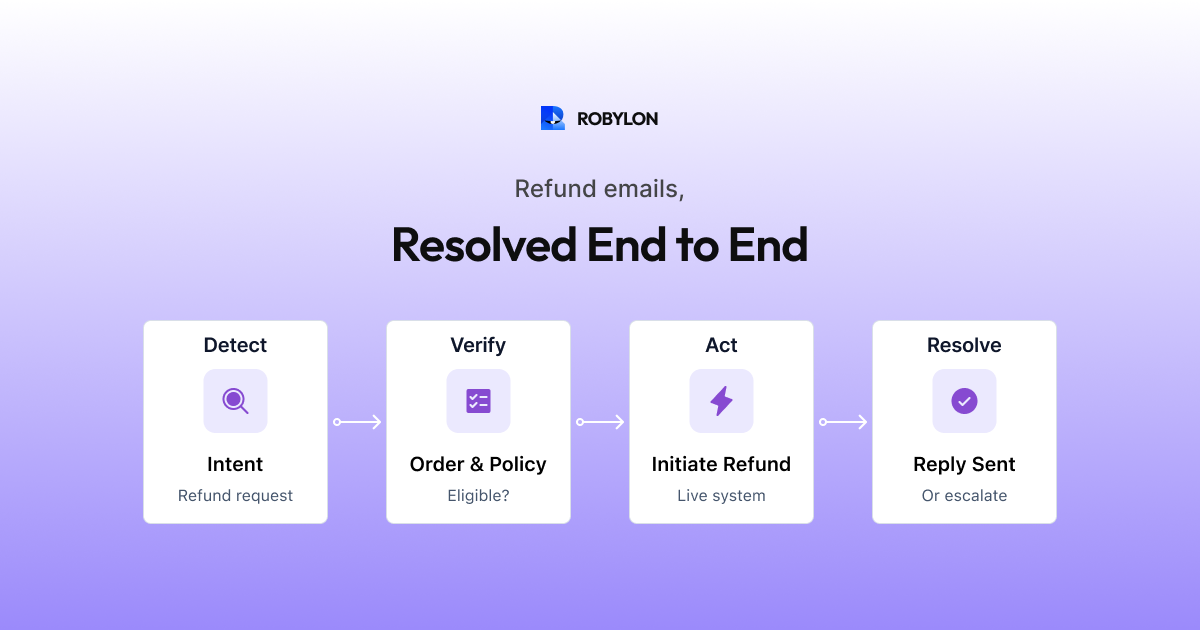
Refund requests are the second-highest volume email category for most businesses — and one of the most emotionally charged. A customer asking for their money back is often frustrated, disappointed, or both. They want speed, clarity, and fairness. Anything less — a slow response, an unclear process, or a denial without explanation — risks losing the customer permanently.
AI handles refund emails exceptionally well because the process is structured: detect the request, check eligibility against your policy, verify the order and payment data, take the appropriate action, and communicate the outcome clearly. Every step follows logic that can be codified. The AI just executes it faster, more consistently, and at scale.
This article walks through the complete AI workflow for refund emails — every decision point, every data lookup, and the edge cases that separate good automation from great automation.
The AI Refund Resolution Pipeline
Step 1: Detect Refund Intent
Customers request refunds in dozens of ways. The AI needs to recognize all of them:
- Direct: “I want a refund for order #45721”
- Indirect: “I’d like my money back” / “Can you reverse this charge?”
- Emotional: “This is unacceptable, I want a full refund immediately”
- Embedded: “The item arrived damaged. I don’t want a replacement, just refund me.”
- Inquiry vs request: “What’s your refund policy?” (information) vs “I need a refund” (action)
The AI distinguishes between refund inquiries (customer wants to understand the policy) and refund requests (customer wants their money back). For inquiries, it retrieves your refund policy from the knowledge base. For requests, it proceeds to the eligibility check.
Step 2: Identify the Customer and Order
The AI matches the sender’s email to your customer database and identifies the relevant order. If the customer mentions an order number, the lookup is direct. If not, the AI pulls their recent order history and either identifies the most likely order (if there is only one recent order) or asks which order the refund is for.
Step 3: Check Refund Eligibility
This is where your refund policy — documented in your knowledge base — drives the AI’s decision. The AI evaluates multiple conditions simultaneously:
- Return window: Is the request within your refund period (e.g., 30 days from delivery)?
- Item condition: Has the customer indicated the item was used, worn, or damaged by them? (For email, this is based on what they describe — physical inspection happens when the return arrives.)
- Item eligibility: Is the item refundable? Final sale items, customized products, and perishables often have different policies.
- Refund reason: Different reasons may trigger different paths — “item arrived damaged” might bypass normal eligibility rules.
- Customer history: Some businesses have policies for frequent returners — AI can check return frequency against thresholds.
Step 4: Determine the Refund Type
Based on eligibility and your policy, the AI determines what kind of refund to offer:
- Full refund to original payment method: The standard path for eligible, in-window returns.
- Partial refund: Minus restocking fee, or adjusted for use/wear.
- Store credit: For out-of-window returns where you offer goodwill credit.
- Exchange instead of refund: For customers who might prefer a replacement.
- Denial with explanation: For items that do not qualify, with a clear, empathetic explanation of why.
Step 5: Execute the Refund
For approved refunds, the AI calls your payment system API (Stripe, Razorpay, PayPal) to initiate the refund. It retrieves the refund confirmation — amount, reference number, estimated processing time — and includes these specifics in the response.
If a return shipment is required before the refund is processed, the AI generates or retrieves a prepaid shipping label and includes it in the response.
Step 6: Generate and Send the Response
The AI composes a response that covers every point the customer needs:
- Acknowledgment of their request and any frustration expressed.
- The refund decision (approved/partial/denied) with the reasoning.
- Specific details: refund amount, payment method, expected timeline.
- Next steps: return shipping instructions if applicable.
- An invitation to reply if they have questions.
The 8 Edge Cases That Matter
Basic refund automation handles the happy path. Great refund automation handles these edge cases:
1. Partial Refund with Explanation
Customer paid $79.99 but the refund is $72.99 after a restocking fee. The AI must explain the deduction clearly: “Your refund of $72.99 has been processed (original price $79.99 minus $7.00 restocking fee per our return policy). It will appear on your Visa ending in 4532 within 5–7 business days.”
2. Damaged Item — Policy Override
Your standard return window is 30 days, but the item arrived damaged. Most businesses accept returns for damaged items regardless of the window. The AI applies the damage policy path: approve the return, skip the window check, and often waive the return shipping requirement (“Keep the damaged item — we’ll process your full refund immediately”).
3. Refund Already Processed
Customer emails asking for a refund, but your system shows it was already processed 3 days ago. The AI detects this and responds: “Good news — your refund of $49.99 was already processed on March 15 and credited to your Mastercard ending in 7890. It may take 5–7 business days to appear on your statement.”
4. Multiple Items, Partial Return
An order with 4 items, but the customer only wants to return 2. The AI calculates the correct partial refund based on individual item prices, applies any order-level discounts proportionally, and processes the partial return.
5. Gift Purchase Refund
The buyer and the recipient are different people. The recipient emails wanting a refund. The AI verifies the original order (by order number or buyer’s email) and processes the refund to the original payment method — or offers store credit to the recipient if your policy supports it.
6. Subscription Refund vs Product Refund
In businesses that sell both products and subscriptions, “I want a refund” could mean either. The AI detects context: if the customer references an order number or product → product refund flow. If they reference a subscription or recurring charge → subscription cancellation and proration flow.
7. Refund Request During Promotion
Customer bought at full price, item is now on sale. They want a price match or refund of the difference. The AI applies your price adjustment policy — some brands offer it within a window, others do not. Either way, the AI responds with the specific policy rather than guessing.
8. Chargeback Threat
Customer writes “If you don’t refund me, I’ll dispute the charge with my bank.” This is a mandatory escalation trigger. The AI routes to a senior agent or disputes team immediately — chargebacks have financial and compliance implications that require human judgment.
Measuring Refund Email AI Performance
- Auto-resolution rate: Target 70–85% for standard refund emails.
- Processing accuracy: Refund amounts should match what the customer is owed 100% of the time. Any discrepancy is a critical error.
- Time to resolution: AI should process refund emails in under 5 minutes (including payment system confirmation). Compare to your previous average (often 24–48 hours).
- Escalation appropriateness: Are the right emails being escalated (damage claims, chargebacks, out-of-policy exceptions)? Are any simple refunds incorrectly escalating?
- CSAT for refund interactions: Refund CSAT is typically the lowest across all categories. AI can improve it through speed and transparency — customers who get a clear, fast refund response rate the interaction higher even though they had a problem.
Bottom Line
Refund emails are emotionally charged but structurally simple. The AI workflow — detect, identify, check eligibility, determine refund type, execute, respond — is a series of data lookups and policy applications that AI handles faster and more consistently than humans. The edge cases (partial refunds, damaged items, gift purchases, chargeback threats) are where thoughtful configuration separates mediocre automation from excellent automation. Get these right, and you turn your most stressful email category into your most efficiently resolved one.
Automate refund emails with precision. Robylon AI connects to your payment system, applies your refund policy automatically, and resolves 70–85% of refund emails end-to-end. Start free at robylon.ai
Frequently asked questions
How does AI handle refund emails for damaged items?
Damaged items follow a different policy path. Configure your AI with explicit rules: "If customer reports item arrived damaged, approve return under damaged goods policy — bypass the standard return window, waive return shipping, and optionally allow the customer to keep the damaged item." The AI detects damage-related language ("arrived broken," "package was crushed," "item was defective"), applies the damage policy, and processes the refund or replacement accordingly.
What is the AI workflow for processing refund emails?
Six steps: 1) Detect refund intent across dozens of phrasings. 2) Identify customer and order from email or CRM lookup. 3) Check eligibility — return window, item condition, item type. 4) Determine refund type — full, partial, store credit, or exchange. 5) Execute the refund via payment API (Stripe, Razorpay). 6) Generate and send response with specific amount, method, timeline, and reference number. Auto-resolution rate: 70–85% for standard refund requests.
How does AI calculate partial refunds?
AI pulls pricing data from your OMS and applies your refund policy rules. For restocking fees: "Refund of $72.99 (original $79.99 minus $7.00 restocking fee)." For multi-item partial returns: AI calculates per-item prices, applies proportional order-level discounts, and generates the correct partial refund amount. For prorated subscription refunds: AI queries the billing system for the exact proration. Every calculation is data-driven from your systems, not estimated.
What are the most important edge cases for refund email automation?
Eight critical edge cases: 1) Partial refunds with clear amount explanation. 2) Damaged items bypassing normal policy. 3) Refund already processed — tell the customer, do not re-process. 4) Multi-item partial returns. 5) Gift purchase refunds (buyer vs recipient). 6) Subscription vs product refund disambiguation. 7) Price-match requests during promotions. 8) Chargeback threats — mandatory human escalation.
What metrics should I track for AI refund email resolution?
Five metrics: 1) Auto-resolution rate (target 70–85%). 2) Processing accuracy — refund amounts must match 100% of the time. 3) Time to resolution — AI should process in under 5 minutes vs 24–48 hours manually. 4) Escalation appropriateness — are the right emails escalating (damage, chargebacks) and are simple refunds resolving automatically? 5) Refund CSAT — AI typically improves refund satisfaction through speed and transparency.