
AI Email Support for Multilingual Teams: Auto-Detect, Translate, Respond
Your customers email in Hindi, Spanish, Arabic, and Hinglish — and they expect a response in their language. This guide shows how AI auto-detects language, retrieves knowledge base content, responds natively, and handles the code-switching that breaks basic translation tools
If your business serves customers in India, you know this reality: an email comes in that mixes Hindi and English in the same sentence. “Mera order kab aayega? Tracking number toh mila tha but status nahi update ho raha.” This is Hinglish — the natural way hundreds of millions of people communicate. And it is just one example of the multilingual challenge. Spanish speakers in Latin America, Arabic speakers in the Gulf, French speakers in Africa — every market has its own language patterns, dialects, and code-switching habits.
Traditional support teams handle multilingual email one of two ways: hire native speakers for each language (expensive, hard to staff 24/7), or run emails through Google Translate and have agents write responses in English that get translated back (clunky, inaccurate, and painfully obvious to the customer). Neither approach scales.
AI changes the equation entirely. Modern LLMs natively understand 40+ languages, can detect the incoming language automatically, retrieve knowledge base content in any language, and generate fluent responses that match the customer’s language — including code-switching within the same message. Here is how to set it up.
How AI Handles Multilingual Email: The Pipeline
Step 1: Language Detection
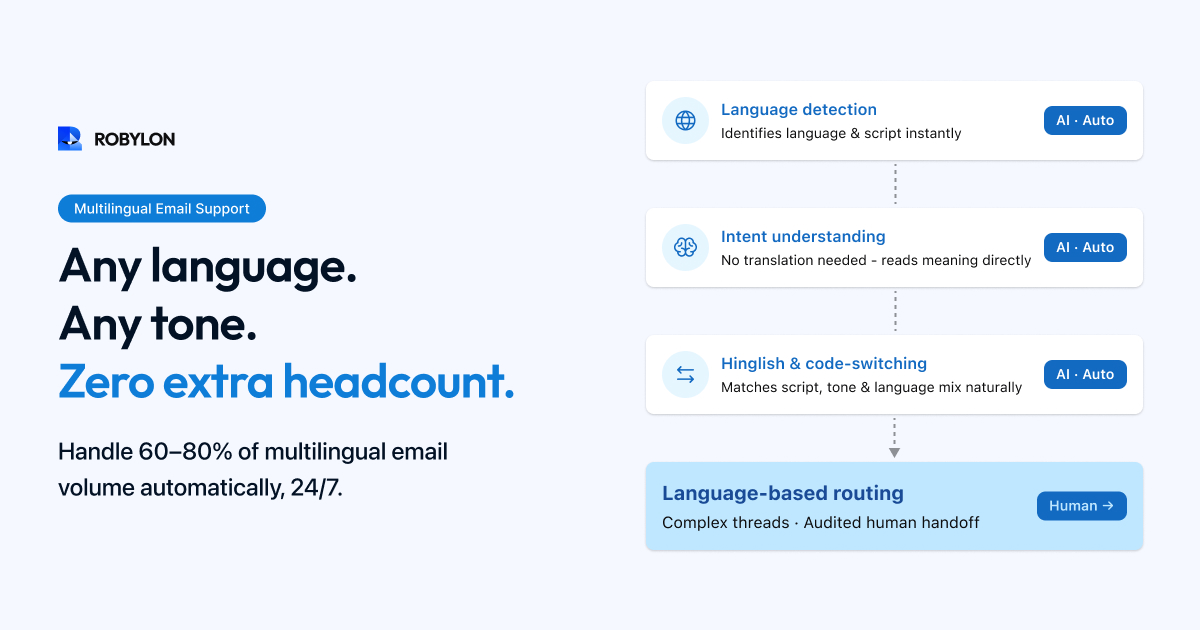
When an email arrives, the AI identifies the language — not from metadata or email headers, but from the actual text content. This is important because customers do not set language preferences in their email clients. The AI reads the text and determines: this email is in Hindi, this one is in Spanish, this one is in Hinglish (a mix of Hindi and English).
Modern LLMs handle language detection with 98%+ accuracy for major languages. The harder challenge — and the one that matters for India — is detecting code-switching: emails that mix two languages within the same paragraph or sentence. LLM-based detection handles this far better than traditional language detection tools (which would flag the email as “English” and miss the Hindi entirely).
Step 2: Intent Detection in Any Language
Once the language is identified, the AI detects intent the same way it would in English — but in the customer’s language. “Mera refund kab milega?” maps to the same “refund status” intent as “When will I get my refund?” The AI does not translate first and then classify — it understands intent directly in the original language, which is more accurate and preserves nuance.
Step 3: Knowledge Retrieval
There are two approaches to multilingual knowledge retrieval, and the one you choose depends on your knowledge base setup:
Approach A: English knowledge base + translated responses. Your KB is in English. The AI retrieves the relevant English content, understands it, and generates the response in the customer’s language. This is the most common approach because maintaining a single English KB is much easier than maintaining parallel content in multiple languages. Modern LLMs generate high-quality responses in any supported language from English source content.
Approach B: Multi-language knowledge base. You maintain KB content in multiple languages. The AI retrieves content in the language that matches the customer’s email. This produces the most accurate responses because the source content is already in the right language — but the maintenance burden is 3–10x higher depending on how many languages you support.
For most businesses, Approach A (English KB + AI-generated multilingual responses) is the right starting point. The AI’s translation quality is high enough that customers rarely notice the response was generated from English source content. Move to Approach B only for languages where translation quality is noticeably lower or where regulatory requirements mandate native-language documentation.
Step 4: Response Generation in the Customer’s Language
The AI generates the response in the same language the customer used. If they wrote in Hindi, the response is in Hindi. If they wrote in Hinglish, the response is in Hinglish — matching their code-switching pattern. If they wrote in formal Spanish, the response uses formal Spanish (usted, not tú).
This language matching extends to formatting norms: date formats, currency symbols, address conventions, and name order (first/last vs last/first) all adapt to the customer’s locale.
The Hinglish Challenge: India’s Unique Case
India is the most complex multilingual market for email support. Your inbox contains emails in English, Hindi, Hinglish (Hindi-English mix), Tamil, Telugu, Bengali, Marathi, and occasionally other regional languages. But the dominant pattern — and the hardest for basic AI systems — is Hinglish.
What Makes Hinglish Hard
Hinglish is not just “Hindi with some English words.” It is a fluid mix where the language can switch mid-sentence, English words are used with Hindi grammar, Hindi words are transliterated into Latin script (not Devanagari), and the same word might be spelled five different ways. “Kab aayega”, “kab ayega”, “kb ayga” — all mean the same thing.
Basic translation tools break on Hinglish because they try to classify the email as either Hindi or English and translate accordingly. LLM-powered AI understands Hinglish natively — it learned from millions of examples of exactly this kind of mixed-language text.
How to Configure AI for Hinglish
- System instruction: “When the customer writes in Hinglish (a mix of Hindi and English using Latin script), respond in the same Hinglish style. Match their level of Hindi usage. If they use mostly English with a few Hindi words, respond similarly. If they write primarily in Hindi with Latin script, respond in Hindi with Latin script.”
- Do not default to formal Hindi. Formal Hindi (Shudh Hindi) sounds unnatural in customer support contexts. Use conversational Hindi that matches how people actually communicate.
- Transliteration consistency: If the customer writes “aayega,” respond with “aayega” — not “आएगा” (Devanagari script). Match their script preference.
Language-Based Routing
For emails that the AI cannot auto-resolve, language-aware routing ensures the escalation goes to the right human agent:
- Language detection → agent matching: Hindi emails route to Hindi-speaking agents. Spanish to Spanish speakers. This is configured in your routing rules based on the AI’s language detection output.
- Fallback routing: If no agent for a specific language is available, the AI can auto-translate the email to English for the agent, and translate the agent’s response back to the customer’s language before sending. Not ideal for complex issues, but workable for simple escalations.
- Agent translation assist: For agents who speak the language but are faster in English, the AI can present the email in both the original language and an English translation side by side — and translate the agent’s English response back before sending.
Quality Assurance for Multilingual Responses
Multilingual AI responses need quality checks beyond what monolingual responses require:
- Native speaker review: Have a native speaker review a sample of AI responses in each language weekly. Look for unnatural phrasing, incorrect translations of product-specific terms, and cultural tone issues.
- Product terminology glossary: Create a glossary of product-specific terms and their correct translations in each supported language. “Return label” should translate to a specific term in Hindi, not a literal word-by-word translation. Feed this glossary into your AI’s knowledge base.
- CSAT by language: Track customer satisfaction separately for each language. If Hindi email CSAT is 4.5 but Tamil email CSAT is 3.8, there is a language-specific quality issue to investigate.
- Formality calibration: Different languages have different formality norms. Spanish has tú (informal) vs usted (formal). Hindi has tum (informal) vs aap (formal). Japanese has multiple politeness levels. Configure the AI’s formality level for each language based on your brand and customer expectations.
What This Means for Staffing
Multilingual AI email support fundamentally changes the staffing equation. Instead of hiring native speakers for every language you serve — or settling for Google Translate quality — you can:
- Auto-resolve 60–80% of multilingual emails without any agent involvement, in any supported language.
- Reduce language-specific agent requirements by 50–70% — you still need native speakers for complex escalations, but far fewer of them.
- Expand to new markets without hiring. Adding support for a new language does not require hiring new agents — it requires updating your AI’s knowledge base and testing the response quality in that language.
- Provide 24/7 multilingual support without staffing overnight shifts for every language. AI covers all hours in all languages; human agents cover business hours for escalations.
Implementation Checklist
- Identify your top 3–5 languages by email volume. Focus AI quality efforts on these first.
- Configure language-specific system instructions — formality level, script preference, code-switching handling.
- Create a product terminology glossary for each language.
- Test with real multilingual emails — including Hinglish, code-switching, and informal language.
- Set up language-based routing for escalations.
- Track CSAT by language separately.
- Weekly native-speaker quality review for each language.
Bottom Line
Multilingual email support used to be a staffing nightmare — hire native speakers for every language or accept poor translation quality. AI eliminates this trade-off. Modern LLMs understand and generate fluent text in 40+ languages, handle code-switching (Hinglish, Spanglish) naturally, and adapt formality and tone to cultural norms. The result: native-quality multilingual email support at a fraction of the cost, available 24/7, without hiring a single additional agent for each new language.
Multilingual email support, natively. Robylon AI auto-detects language, responds in 40+ languages including Hinglish, and handles code-switching that breaks basic translation tools. Start free at robylon.ai
Frequently asked questions
Do I need a separate knowledge base for each language?
Usually not. The recommended approach for most businesses: maintain a single English knowledge base and let the AI generate responses in the customer's language. Modern LLMs produce high-quality translations from English source content. Only invest in native-language KB content for languages where translation quality is noticeably lower or where regulations mandate native-language documentation. This approach keeps maintenance 3–10x simpler than parallel multi-language KBs.
Can AI handle Hinglish (Hindi-English mix) in email support?
Yes — this is where LLM-powered AI excels over translation tools. LLMs learned from millions of Hinglish examples and understand it natively. Configure the AI to: respond in Hinglish when the customer writes in Hinglish, match their Hindi-to-English ratio, use Latin script (not Devanagari) to match the customer's style, and avoid formal Hindi (Shudh Hindi) which sounds unnatural in support. Basic translation tools break on Hinglish because they try to classify it as one language.
How does AI detect the language of a customer email?
Modern LLMs detect language from the actual text content (not email headers or metadata) with 98%+ accuracy for major languages. The AI reads the text and determines: Hindi, Spanish, Hinglish, etc. For code-switching emails (mixing two languages in one message), LLM-based detection is far more accurate than traditional tools — it understands that "Mera order kab aayega?" is Hinglish, not broken English or pure Hindi.
How does multilingual AI email support reduce staffing costs?
Four ways: 1) Auto-resolve 60–80% of multilingual emails without any agent involvement. 2) Reduce language-specific agent headcount by 50–70% — fewer native speakers needed for escalations. 3) Expand to new markets without hiring — adding a language requires KB updates and testing, not new staff. 4) Provide 24/7 multilingual support without overnight shifts for every language — AI covers all hours, humans cover business hours for escalations.
How do I ensure quality for AI responses in non-English languages?
Four quality practices: 1) Weekly native-speaker review — sample 10–15 AI responses per language for natural phrasing and accuracy. 2) Product terminology glossary — create correct translations for product-specific terms (not literal word-by-word). 3) CSAT tracking by language — if Hindi CSAT is 4.5 but Tamil is 3.8, investigate the Tamil quality gap. 4) Formality calibration — configure the right politeness level for each language (tú vs usted in Spanish, tum vs aap in Hindi).