
AI Email Support for High-Volume Events: Black Friday, Product Launches, Outages
Volume spikes are predictable but devastating to unprepared support teams. Black Friday, product launches, service outages, and viral marketing moments can drive 5–10x normal email volume overnight. This guide covers how to prepare AI email support for surges — pre-loading knowledge, adjusting thresholds, and deploying event-specific automation.
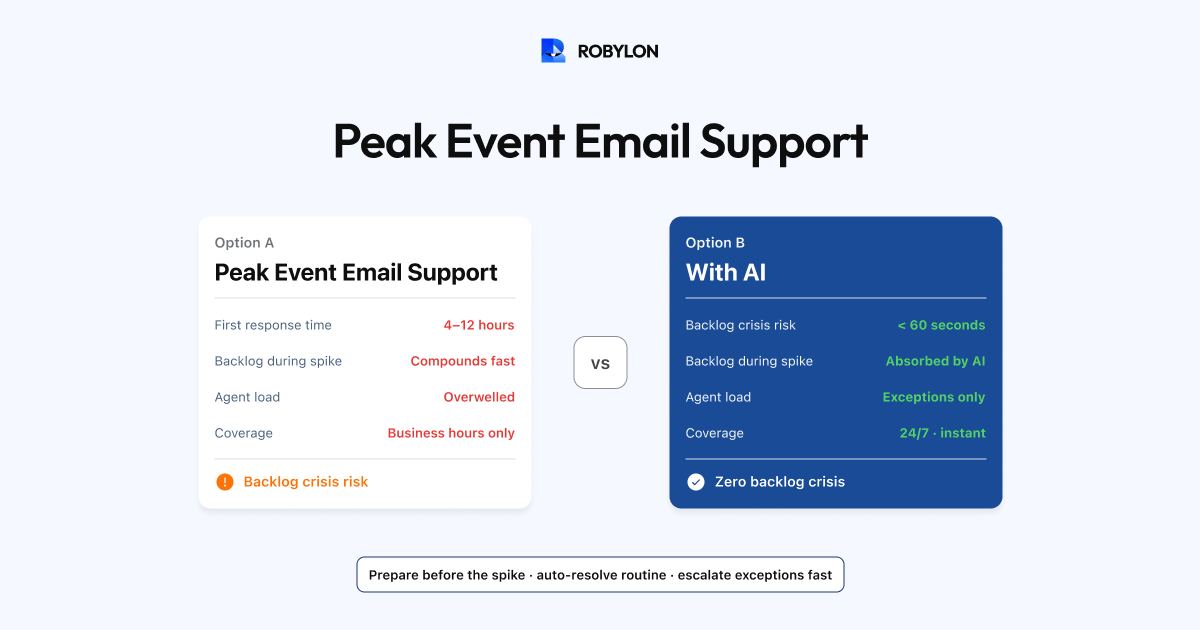
Your daily email volume is 500. Then Black Friday hits and it spikes to 3,000. A product launch drives 2,000 emails in 48 hours. A service outage triggers 1,500 angry emails in 4 hours. These events are predictable in nature (you know Black Friday is coming) but devastating in impact because human support teams cannot scale 5–10x overnight.
AI email support changes this equation. The AI processes 500 emails and 3,000 emails in the same way — instantly, without fatigue, without overtime, without temporary staffing. But getting the most from AI during volume spikes requires preparation. The knowledge base needs event-specific content, confidence thresholds may need adjustment, and escalation protocols need to account for the different email mix that events produce.
Predictable Spikes: Black Friday, Holiday Sales, Seasonal Events
What Changes During Sales Events
Email volume increases 3–10x. The email mix shifts dramatically: WISMO jumps from 35% to 50–60% (more orders = more tracking questions), pre-purchase questions spike (size guides, gift wrapping, delivery-by-date guarantees), promotion-related queries surge (“My discount code isn’t working,” “Is this item included in the sale?”), and payment issues increase (more transactions = more failures, incorrect charges, duplicate orders).
Preparation Checklist (2 Weeks Before)
Add event-specific knowledge base content: sale terms and conditions, promotion details, extended return policies for holiday purchases, shipping cutoff dates for guaranteed delivery, gift-specific FAQs (gift receipts, gift wrapping, gift messages). Update automated responses to reference current promotions — the AI should know about the 30% off sale, not respond as if prices are normal. Pre-load coupon code troubleshooting: the most common sale-period complaint is “my code doesn’t work” — document every active code, its conditions, and common failure reasons. Adjust escalation thresholds: during peak volume, consider lowering confidence thresholds by 3–5% to auto-resolve more and reduce the human queue. The trade-off (slightly lower accuracy) is usually worth the benefit (dramatically faster response times during the rush).
During the Event
Monitor BRR hourly instead of daily. If a new email pattern emerges (a specific product defect, a shipping carrier delay affecting multiple orders), add a KB article immediately — this single action can auto-resolve hundreds of incoming emails about the same issue. Increase agent availability for the reduced escalation queue — the human tickets during sales events tend to be more urgent (payment failures, delivery deadlines) and benefit from fast human response.
Product Launches
What Changes During a Launch
Email volume spikes 2–5x for 3–7 days. The mix shifts toward pre-order inquiries, product availability questions, comparison questions (new product vs previous model), compatibility questions, and early-adopter issues (setup problems, missing features, documentation gaps).
Preparation Checklist
Create comprehensive launch-day KB content: full product specs, setup guides, comparison with previous versions, known limitations, and FAQ anticipated from beta testing. Configure the AI to handle “when will it ship?” queries with launch-specific timelines. Prepare responses for common early-adopter issues identified during beta or QA. Set up a dedicated escalation queue for genuine product defects — these need fast routing to the product team, not standard support handling.
Service Outages
What Changes During an Outage
Unlike sales events (which are planned), outages are unexpected. Email volume spikes 3–8x within hours. Nearly all emails are about the same issue (“Is the service down?”, “I can’t access my account,” “When will this be fixed?”). Sentiment is overwhelmingly negative. And the support team often learns about the outage from the email spike before engineering confirms it.
Rapid Response Protocol
As soon as an outage is confirmed, immediately add a KB article: “We are aware of [specific issue]. Our engineering team is working on a fix. Current status: [investigating/identified/fix in progress]. Expected resolution: [ETA if known, or ‘we will update as soon as we have an ETA’]. We apologize for the inconvenience.”
This single article enables the AI to auto-resolve 70–90% of outage-related emails with a consistent, accurate, and empathetic response. Without it, the AI either escalates every email (overwhelming agents who also do not have answers) or sends responses from the normal KB that do not acknowledge the outage (infuriating customers).
Update the KB article every 30–60 minutes as the situation evolves. Each update immediately changes the AI’s responses — customers who email at 2 PM get a different (more current) response than those who emailed at 1 PM. This is faster and more consistent than briefing a team of agents on updates.
Post-Outage Follow-Up
After the outage is resolved, update the KB article with “resolved” status and estimated impact. Configure the AI to handle follow-up emails (“Was my data affected?”, “Will I be compensated?”) with post-outage-specific content. If you are offering credits or compensation, add the policy to the KB so the AI can process it automatically.
General High-Volume Best Practices
Real-Time KB Updates
The most powerful tool during any volume spike is the ability to add or update a single KB article and immediately change how the AI responds to hundreds or thousands of emails. This is fundamentally faster than briefing agents: one KB update takes 5 minutes and affects every AI response going forward. Briefing 10 agents takes 30 minutes and relies on each agent remembering and applying the information consistently.
Temporary Automation Rules
Create time-limited automation rules for specific events: auto-resolve all “discount code” emails during the sale period with a standardized troubleshooting response. Auto-resolve all “is the service down” emails during an outage with the status update. Auto-resolve all “when will my Black Friday order ship?” emails with the shipping timeline. Remove these rules after the event to prevent stale responses.
Post-Event Analysis
After every major volume spike, review: what was the peak email volume? What BRR did the AI achieve during the peak? What were the top email categories and how did they differ from normal? Were there knowledge gaps that caused unnecessary escalations? What could have been pre-loaded in the KB? Use this analysis to build a playbook for the next event — each successive spike should be handled better than the last.
Bottom Line
Volume spikes are when AI email support proves its value most dramatically. Human teams buckle under 5x volume — SLAs breach, backlogs form, agents burn out. AI handles the surge with the same speed and quality as a quiet Tuesday. The key is preparation: event-specific KB content, adjusted thresholds, and rapid-update protocols that let you change the AI’s responses in minutes as situations evolve.
Handle any volume spike without panic. Robylon AI scales instantly — processing 500 or 5,000 emails per day with the same speed and accuracy. No overtime, no temp staffing, no SLA breaches. Start free at robylon.ai
Frequently asked questions
How does AI handle 5–10x email volume spikes?
AI processes 500 emails and 5,000 emails with the same speed and quality — there is no capacity constraint. Each email is processed within seconds regardless of queue depth. Human teams buckle under 5x volume (SLAs breach, backlogs form, agents burn out), but AI scales instantly. The key is preparation: event-specific KB content (sale terms, outage status), adjusted confidence thresholds (lower by 3–5% during peaks to auto-resolve more), and rapid-update protocols for real-time KB changes.
How should I prepare AI email support for Black Friday?
Two weeks before: 1) Add event-specific KB content — sale terms, shipping cutoffs, extended return policies, gift FAQs, promotion details. 2) Update AI responses to reference current promotions. 3) Pre-load coupon code troubleshooting (document every active code and its conditions). 4) Consider lowering confidence thresholds by 3–5% to maximize auto-resolution during peak. 5) Ensure all OMS/payment integrations are stable. During the event: monitor BRR hourly and add KB articles immediately for emerging issues.
How does AI handle service outage email floods?
Immediately add a single KB article describing the outage: what is affected, current status, ETA for fix, apology. This enables the AI to auto-resolve 70–90% of outage emails with a consistent, accurate response. Update the article every 30–60 minutes as the situation evolves — each update instantly changes all AI responses. Post-outage: update with "resolved" status and handle follow-up queries (data impact, compensation). This is faster and more consistent than briefing a team of agents on evolving updates.
What email volume changes should I expect during a product launch?
Email volume spikes 2–5x for 3–7 days. The mix shifts toward: pre-order/availability questions, new product vs previous model comparisons, compatibility questions, setup and configuration issues, and early-adopter bug reports. Prepare by creating comprehensive launch-day KB content (specs, setup guides, comparisons, known limitations, FAQ from beta). Set up a dedicated escalation queue for genuine product defects that need fast routing to the product team.
How do I do a post-event analysis of AI email performance?
Review five questions after every volume spike: 1) What was peak email volume and how did it compare to forecasts? 2) What BRR did AI achieve during peak? (Should be within 5% of normal.) 3) What were the top email categories and how did they differ from normal operations? 4) Were there knowledge gaps that caused unnecessary escalations? 5) What could have been pre-loaded in the KB? Use this analysis to build a playbook for the next event — each successive spike should be handled better.