
10 Proven Ways to Improve Customer Support (Tactic #3 Boosts CSAT Fast)
An inaccurate chatbot is worse than no chatbot at all. This guide covers 10 actionable techniques to improve your AI chatbot's accuracy — with practical examples you can implement this week.
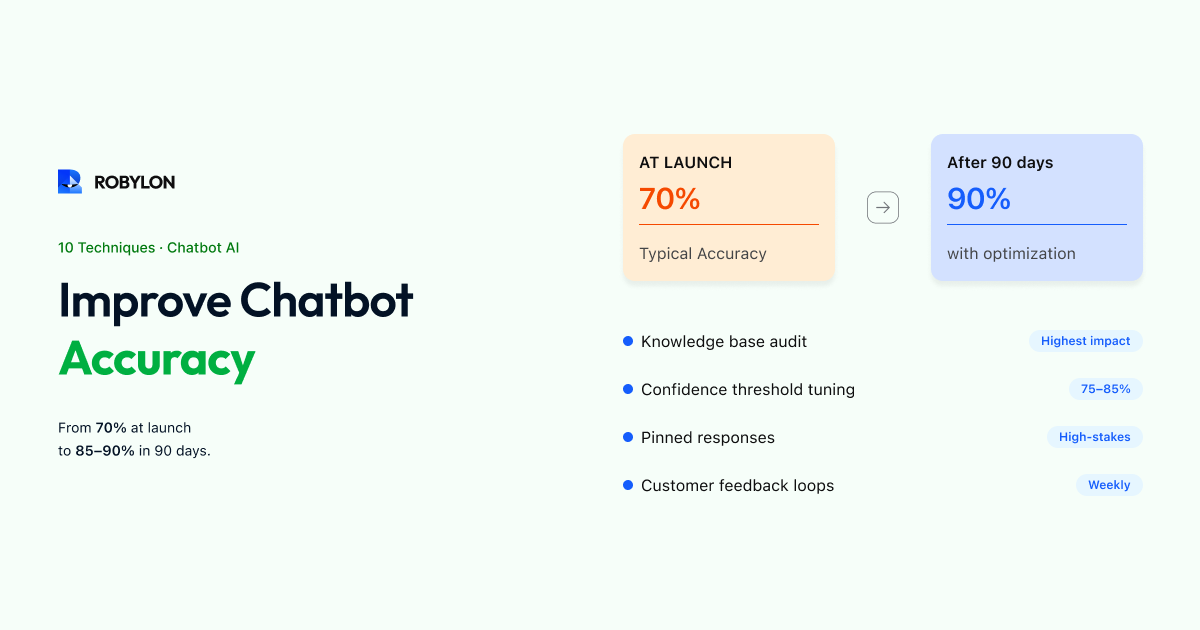
An AI chatbot that gives wrong answers is not just unhelpful — it is actively harmful. A wrong refund policy, an incorrect shipping timeline, or a fabricated product feature erodes customer trust faster than no answer at all. Customers forgive a chatbot that says “I’m not sure, let me connect you to someone who can help.” They do not forgive a chatbot that confidently provides incorrect information.
The good news: chatbot accuracy is not fixed. It is a tunable system that improves with deliberate effort. Most accuracy problems trace back to a small number of root causes — incomplete knowledge base content, poor retrieval, hallucination, and lack of ongoing maintenance. Fix these, and your chatbot goes from a liability to a genuine asset.
Here are 10 proven techniques, ordered from highest impact to advanced optimization. Each one is actionable this week.
1. Audit Your Knowledge Base for Gaps and Conflicts
The single most impactful thing you can do for accuracy is improve the data your chatbot learns from. Most accuracy issues are not AI model problems — they are data quality problems.
Start with an audit:
- Pull your chatbot’s unanswered questions log. Every question the AI could not answer confidently represents a gap in your knowledge base. Categorize these by topic and prioritize the most frequent ones.
- Check for conflicting information. If your FAQ page says “returns within 30 days” but your policy document says “returns within 14 days for sale items,” the AI will give inconsistent answers depending on which source it retrieves. Find and resolve all conflicts.
- Remove outdated content. Old pricing, discontinued products, expired promotions, and former policies cause confident-but-wrong answers. Audit every piece of content in your knowledge base and flag anything older than 6 months for review.
Do this audit once thoroughly, then schedule a 15-minute weekly check to catch new gaps. This single habit will improve accuracy more than any other technique on this list.
2. Write Content for AI Retrieval, Not Just Human Reading
Your help center articles were probably written for humans browsing a webpage. AI retrieval works differently — it searches for the most semantically relevant chunk of text for each question. Optimize your content for this process:
- One topic per section. A 2,000-word article covering returns, exchanges, refunds, and warranty claims is hard for AI to retrieve accurately. Break it into focused sections, each addressing a single question or process.
- Start with the question. Instead of jumping into the answer, begin each section with the question a customer would actually ask: “How long do I have to return an item?” followed by the answer. This improves retrieval matching because the AI matches the customer’s question against your content.
- Be explicit, not vague. “Return requests must be submitted within 30 days of delivery date for unused items in original packaging” is accurate and retrievable. “We offer flexible returns on most items” gives the AI nothing useful to work with.
- Include edge cases inline. Do not bury exceptions in footnotes or separate pages. If your return policy excludes final-sale items, state that right next to the policy: “All items except those marked Final Sale can be returned within 30 days.”
3. Set the Right Confidence Threshold
Every AI response comes with a confidence score — a measure of how sure the system is about its answer. Your platform lets you set a threshold: below this score, the AI does not answer and instead escalates or says it is not sure.
Setting this threshold is a balancing act:
- Too high (e.g., 95%): The chatbot escalates frequently, even for answers it would have gotten right. You lose automation and frustrate customers with unnecessary handoffs.
- Too low (e.g., 50%): The chatbot answers aggressively, including cases where it is not confident. More wrong answers reach customers.
- The sweet spot: Usually 75–85% for most businesses. Start at 80%, monitor for a week, then adjust based on your escalation rate and error rate.
Review the responses just above and just below your threshold regularly. Responses just below the threshold that would have been correct suggest you can lower it slightly. Responses just above the threshold that are wrong suggest you should raise it.
4. Create Pinned Responses for High-Stakes Topics
For your most sensitive or important topics — refund amounts, legal policies, health claims, pricing commitments — do not rely on AI generation. Instead, write exact responses that the chatbot delivers word-for-word when it detects these intents.
Most platforms call these “custom responses,” “pinned answers,” or “canned replies.” They override the AI’s generated response for specific, high-stakes questions. This gives you 100% control over language in moments that matter most — while letting the AI handle everything else dynamically.
Good candidates for pinned responses:
- Refund and cancellation policies (exact terms and timeframes).
- Legal disclaimers and compliance language.
- Pricing and plan details (exact amounts, no rounding or paraphrasing).
- Safety and health information.
- Competitive positioning statements (exactly how you want your product positioned).
5. Add Disambiguation for Confusing Intents
When customers ask ambiguous questions, accuracy drops. “I want to cancel” — do they mean cancel their order or cancel their subscription? “I need to change my plan” — upgrade, downgrade, or change payment method? “Where do I return this?” — online return or in-store return?
Identify the intent pairs that your chatbot confuses most often (check your analytics for conversations where the AI gave an answer but the customer immediately rephrased or escalated). Then add disambiguation:
- In your knowledge base: Add clarifying language. “Order cancellation applies to orders that have not yet shipped. For subscription cancellation, see the Subscription Management section.”
- In your chatbot flow: Configure the AI to ask a clarifying question when it detects an ambiguous intent: “Would you like to cancel a specific order, or cancel your subscription?”
A chatbot that asks one clarifying question before answering is far more accurate (and more trusted) than one that guesses and gets it wrong half the time.
6. Implement Customer Feedback Loops
The fastest path to accuracy is letting customers tell you when the chatbot is wrong. Enable thumbs-up/thumbs-down feedback on every AI response. This gives you a direct, real-time signal:
- Thumbs up: The answer was helpful and accurate. No action needed.
- Thumbs down: Something was wrong — inaccurate, incomplete, irrelevant, or unhelpful.
Review every thumbs-down response weekly. For each one, identify the root cause:
- Was the knowledge base missing the information? → Add it.
- Was the information there but the AI retrieved the wrong section? → Restructure the content for better retrieval.
- Did the AI hallucinate information not in the knowledge base? → Check your guardrails and confidence threshold.
- Was the answer technically correct but unhelpful in context? → Rewrite for clarity and actionability.
7. Use Conversation Analytics to Find Patterns
Individual thumbs-down signals are useful. Aggregated analytics are transformative. Look for these patterns in your chatbot data:
- Top escalation reasons: What topics most frequently result in human handoff? These are your biggest accuracy (or coverage) opportunities.
- Repeat-question conversations: When a customer asks the same question twice or three times in different ways, the first answer was not satisfactory. These conversations reveal phrasing gaps.
- Topic clusters with low CSAT: If your chatbot’s overall CSAT is 85% but the “billing questions” cluster scores 60%, you know exactly where to focus.
- Time-based patterns: Accuracy often drops after product launches, policy changes, or promotional events because the knowledge base has not been updated yet.
8. Test with Real Customer Language
The most common testing mistake is using clean, well-formed questions: “What is your return policy?” Real customers type very differently: “how do i send stuff back,” “return?”, “ordered wrong size what now,” “my package never came its been 3 weeks.”
Build a test set using actual customer messages from your support tickets. Include:
- Misspellings and typos: “refunf status,” “delivary update.”
- Incomplete sentences: “track order,” “cancel.”
- Multi-part questions: “Can I return the blue shirt and also where’s my other order?”
- Emotional language: “This is ridiculous, I’ve been waiting 3 weeks and nobody is helping me.”
- Code-switching (multilingual): “Mera order kab aayega?” (Hinglish for “When will my order arrive?”)
Run this test set after every significant knowledge base update. It is your regression test for chatbot accuracy.
9. Optimize Prompt Instructions
Most AI chatbot platforms let you provide system-level instructions that guide the AI’s behavior. These instructions significantly affect accuracy. Here are the principles that matter:
- Tell the AI what it should NOT do. “Do not make up information that is not in the knowledge base. If you are not confident, say you are not sure and offer to connect the customer with a human agent.”
- Define the scope. “You are a customer support agent for [Company Name]. Only answer questions related to our products, services, and policies. For anything outside your scope, politely decline.”
- Set the tone. “Respond in a friendly, concise manner. Use short paragraphs. Do not use corporate jargon.”
- Handle sensitive topics explicitly. “For any questions about legal matters, medical advice, or financial decisions, do not provide an answer. Instead, advise the customer to consult a professional.”
Small changes in these instructions can have outsized effects on accuracy. Test different versions and measure the impact.
10. Establish a Weekly Improvement Cadence
Accuracy is not something you achieve once — it is something you maintain. The most accurate chatbots are the ones with teams that review and improve them consistently. Here is a weekly routine that takes 30 minutes:
- Review thumbs-down responses (5 min) — identify the most common complaints.
- Check unanswered questions (5 min) — add content for the top gaps.
- Review low-confidence responses (5 min) — are there answers the AI is unsure about that it should handle? Update content or adjust thresholds.
- Check for stale content (5 min) — has anything changed this week (pricing, product availability, policy updates)?
- Run 10 test queries (10 min) — your standard test set from Technique #8. Verify nothing has regressed.
Teams that follow this cadence see accuracy improve by 2–5 percentage points per month. After three months, the compound effect is dramatic — a chatbot that started at 70% accuracy can reach 85–90%.
Bottom Line
AI chatbot accuracy is not a feature you buy — it is a result you build. The AI model matters, but the bigger factors are the quality of your knowledge base, the confidence thresholds you set, the feedback loops you maintain, and the consistency of your weekly review cadence.
Start with the knowledge base audit (Technique #1) — it solves more problems than everything else combined. Then set appropriate confidence thresholds (Technique #3), add pinned responses for high-stakes topics (Technique #4), and enable feedback loops (Technique #6). These four actions alone will materially improve your chatbot’s accuracy within a week.
Build an accurate AI chatbot from day one. Robylon AI gives you confidence scoring, KB gap analysis, thumbs-up/down feedback, and weekly optimization dashboards out of the box — so your chatbot gets smarter every week. Start free at robylon.ai
Frequently asked questions
What is a confidence threshold and how should I set it?
A confidence threshold is the minimum certainty score an AI needs before it delivers an answer to the customer. Set it too high (95%) and the bot escalates too often; too low (50%) and it gives more wrong answers. The sweet spot is 75–85% for most businesses. Start at 80%, monitor for one week, then adjust: lower it if you see too many unnecessary escalations, raise it if wrong answers are reaching customers.
What is a good accuracy rate for an AI chatbot?
A well-optimized AI chatbot should achieve 85–95% accuracy on questions within its knowledge base scope. When first deployed, 70–80% is typical. With weekly optimization — filling KB gaps, tuning confidence thresholds, and adding pinned responses for sensitive topics — most teams reach 85%+ within 4–8 weeks. The key metric is not just accuracy but also the chatbot's ability to admit uncertainty rather than guessing on questions it cannot answer.
How do I stop my chatbot from hallucinating answers?
Three key defenses: 1) Use a RAG-based platform that grounds answers in your knowledge base rather than generating from the model's general training. 2) Set a confidence threshold so the bot says "I'm not sure" when confidence is low instead of guessing. 3) Add explicit prompt instructions telling the AI to never fabricate information not found in the knowledge base. Combine these with weekly review of low-confidence responses to catch and fix any remaining issues.
How often should I optimize my chatbot's accuracy?
Set a weekly 30-minute cadence: review thumbs-down feedback (5 min), check unanswered questions and add missing content (5 min), review low-confidence responses (5 min), check for stale content after any business changes (5 min), and run 10 test queries from your regression test set (10 min). Teams that follow this routine see accuracy improve 2–5 percentage points per month, compounding to dramatic gains over a quarter.
Should I use pinned responses or let the AI generate all answers?
Use both strategically. Let the AI generate answers dynamically for the vast majority of topics — it handles phrasing variation, follow-ups, and context far better than static responses. But for high-stakes topics (exact refund policies, legal disclaimers, pricing commitments, safety information), create pinned word-for-word responses that override AI generation. This gives you 100% control where precision matters most while keeping the conversational flexibility of AI everywhere else.
Related reading
 Chatbots
10 Best AI Chatbots for Customer Support in 2026
This article reviews the top 10 AI chatbots for customer support in 2025, including Zendesk, Freshworks, Intercom, Drift, and more. It highlights their strengths, limitations, and best-fit use cases. The clear winner is Robylon AI, which delivers autonomous agents with 97% accuracy, 85–95% query automation, and 30% cost savings: making it the best overall choice for enterprises seeking scalable, reliable, and cost-efficient customer support.
 Chatbots
10 Best AI Chatbots for E-Commerce in 2026
Explore the 10 best AI chatbots for E-Commerce in 2025. Compare platforms like Robylon, Tidio, Intercom, Gorgias, and Ada to see how chatbots improve customer support, reduce costs, and boost sales.
 Chatbots
10 Best AI Chatbots for Ecommerce Customer Support in 2026
Discover the best AI chatbots for ecommerce in 2025. Compare top platforms like Robylon, Tidio, Zendesk, and more - automating order tracking, returns, refunds, and customer support to boost conversions and cut costs.