
Gmail-Based Email Ticketing: Limitations & Why Teams Move to AI
Thousands of support teams run customer service through a shared Gmail inbox. It works — until it doesn't. This guide covers the exact limitations that break Gmail-based ticketing, the tools teams typically move to, and why in 2026 the smartest upgrade path skips the traditional helpdesk and goes straight to an AI email agent.
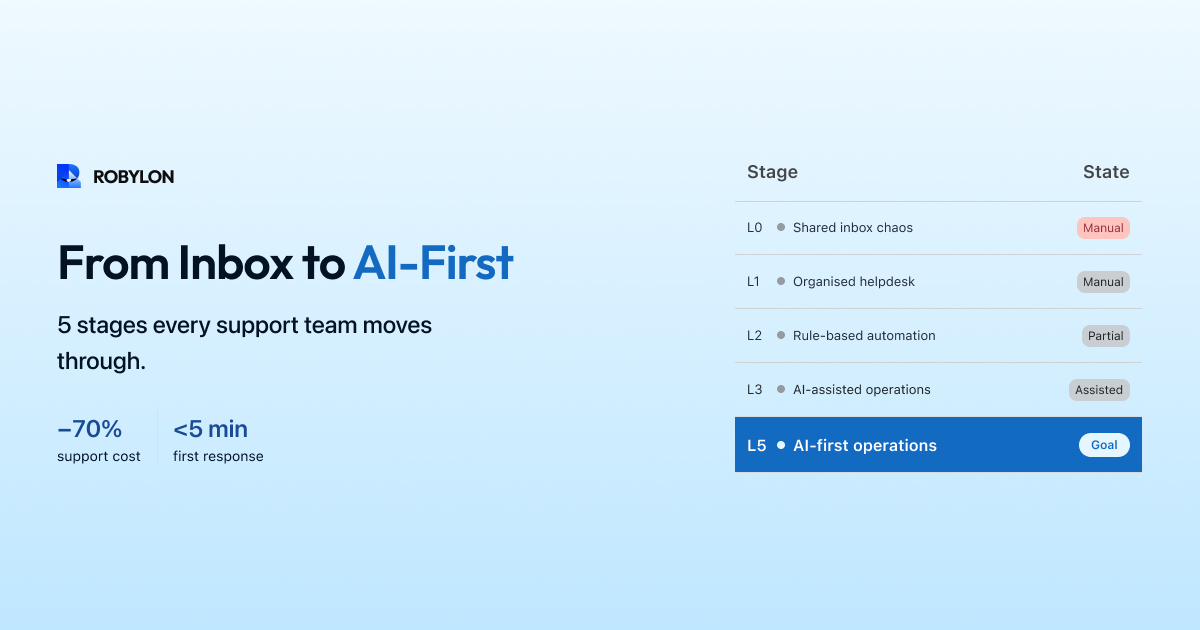
Gmail is the world’s most popular email platform — over 1.8 billion users. So when a startup or small team needs to handle customer support, the instinct is natural: create support@company.com on Google Workspace, share the credentials with the team, and start replying. It is free, everyone already knows how to use it, and for the first few months it works fine.
But Gmail was designed for personal and business communication, not customer support operations. There is no concept of ticket ownership, no SLA tracking, no collision detection, no reporting, and no automation. As email volume grows beyond 30–50 emails per day, the cracks become impossible to ignore.
This article covers the specific limitations that break Gmail-based ticketing, the options teams typically consider, and why in 2026 the best upgrade path is not a traditional helpdesk — it is an AI email agent.
How Gmail-Based Ticketing Typically Works
Most teams using Gmail for support follow a variation of this setup: a shared Google Workspace account (support@company.com) that 2–5 team members access simultaneously. Some teams use Google Groups to distribute emails to personal inboxes. A few use Gmail’s built-in delegation feature. The workflow is the same in all cases — agents manually scan the inbox, pick emails to respond to, and reply.
Some teams add lightweight structure with Gmail labels (urgent, billing, shipping), stars for priority, and filters to auto-label by keyword. A few create Google Sheets to manually log tickets. These workarounds help, but they are held together by discipline, not systems — and they fall apart the moment someone forgets to label an email or the sheet falls out of sync.
The 8 Limitations That Break Gmail Ticketing
1. No Ticket Ownership
Gmail has no concept of assignment. When an email arrives, there is no way to assign it to a specific agent. Teams resort to informal claims — “I’ll take this one” in Slack, or moving emails to personal labels. The result is duplicate responses (two agents reply to the same customer) and dropped emails (everyone assumes someone else is handling it). At 50+ emails per day, this becomes a daily occurrence, not an exception.
2. No Collision Detection
In a helpdesk, you see when another agent is viewing or replying to the same ticket. Gmail has no such feature. Two agents can simultaneously draft responses to the same customer email, both hit send, and the customer receives two contradictory replies. This is not a theoretical risk — teams using shared Gmail report it happening multiple times per week.
3. No SLA Tracking
Gmail does not track when an email arrived, how long it has been waiting, or whether it has breached a response time target. There is no way to set a 4-hour SLA and get alerted when emails approach the deadline. Managers have zero visibility into whether the team is meeting response time commitments — they only learn about SLA breaches when customers complain.
4. No Automation
Gmail filters can label and sort incoming emails, but they cannot auto-respond, auto-assign based on topic, trigger workflows, or escalate based on sentiment. Every email requires a human to read it, decide what to do, and act. There is no way to automatically handle the 60–80% of emails that are repetitive and predictable — order status checks, return policy questions, password resets.
5. No Analytics or Reporting
Gmail provides no metrics. You cannot see average response time, resolution rate, email volume by category, agent performance, or CSAT scores. Without data, you cannot identify bottlenecks, justify hiring, or prove that your support quality is improving. The only way to get metrics is to manually track them in a spreadsheet — which no team sustains beyond a few weeks.
6. No Knowledge Base Integration
When an agent responds to “What is your return policy?”, they either type the answer from memory, search for a saved template, or copy-paste from a document. There is no integrated knowledge base that surfaces the right answer based on the email content. This means response quality varies wildly between agents and shifts — and new agents take weeks to learn where to find answers.
7. No Customer Context
Gmail shows the email thread, but nothing else. The agent cannot see the customer’s order history, subscription status, previous tickets, or account details without switching to another tab and manually looking it up. This adds 2–5 minutes per email and means agents often respond without the context they need to resolve the issue on the first reply.
8. Search Breaks at Scale
Gmail’s search works well for personal email. For support — where you need to find a specific customer’s previous interactions, or all emails about a product defect, or unresolved tickets from last week — it is inadequate. There are no custom fields, no status filters, no resolution tracking. As volume grows, finding anything in a shared Gmail inbox becomes increasingly painful.
What Teams Typically Do Next
When Gmail breaks, teams generally consider three paths:
Path 1: Add a Gmail Plugin (Hiver, Drag, Gmelius)
Gmail-native tools like Hiver, Drag, and Gmelius add helpdesk features on top of Gmail — ticket assignment, collision detection, SLA tracking, and basic reporting. Agents stay in Gmail, which minimizes the learning curve. Pricing ranges from $15–$49 per agent per month.
The limitation: these tools organize manual work better but do not reduce it. Agents still read, classify, and respond to every email. There is minimal AI — Hiver’s Harvey AI can suggest templates, but it does not resolve tickets autonomously. You solve the organization problem but not the volume problem.
Path 2: Migrate to a Full Helpdesk (Freshdesk, Zendesk, Help Scout)
A traditional helpdesk gives you everything Gmail lacks — ticketing, assignment, SLA management, macros, knowledge base, multi-channel support, and robust reporting. It is a comprehensive solution that scales to large teams.
The trade-off: migration is disruptive (1–2 weeks of setup, agent retraining, workflow configuration), and the core problem remains — agents still handle every email manually. AI features exist in higher tiers (Zendesk Advanced AI, Freshdesk Freddy), but they add significant cost ($50–$100+ per agent per month) and focus on triage and draft assistance rather than full resolution.
Path 3: Move to an AI Email Agent (Robylon AI)
An AI email agent connects to your Gmail inbox (or replaces it) and processes incoming emails automatically. The AI reads the email, detects the intent, retrieves knowledge base content, queries your business systems (OMS, CRM, billing) for customer-specific data, generates a response, and either sends it automatically or queues it for agent review — depending on a confidence threshold you set.
This is the only path that solves both the organization problem and the volume problem simultaneously. The AI resolves 60–80% of emails without human involvement. Agents handle only the complex, escalated cases — with AI-generated context and suggested drafts to help them respond faster.
Why AI Email Agents Beat Gmail Plugins and Helpdesks
Gmail plugins fix the symptom (disorganization) without addressing the cause (manual handling of every email). Helpdesks do the same, just more comprehensively. Both paths still require linear agent scaling — 2x emails means you need roughly 2x agents.
AI email agents break this equation. They handle the predictable, repetitive 60–80% of email volume automatically, which means your team scales sub-linearly. Going from 1,000 to 5,000 emails per month does not require 5x agents — it requires tuning the AI to handle the increased volume while the same small team manages escalations.
The cost math reinforces this. A Gmail plugin (Hiver) for 5 agents costs $125–$245 per month — but you still need 5 agents at $3,000–$4,000 each, so the real cost is $15,125–$20,245 per month. An AI email agent (Robylon) at $1,500–$2,500 per month plus 1–2 agents for escalations costs $4,500–$10,500 per month — a 48–70% reduction with faster response times and zero dropped emails.
The Migration from Gmail to AI: A 2-Week Playbook
- Day 1: Connect your Gmail support inbox to Robylon AI. No migration needed — the AI reads from your existing inbox.
- Day 1–3: Upload your knowledge base content — help center articles, FAQs, policy documents, product information. Connect your OMS, CRM, and payment systems for action-taking.
- Day 3–5: Configure confidence thresholds, escalation rules, and brand voice. Set up your human review queue.
- Day 5–10: Run in shadow mode — the AI generates a draft response for every incoming email, but nothing sends to customers. Your team reviews drafts and flags inaccuracies.
- Day 10–14: Enable auto-send for the highest-confidence categories (typically WISMO, policy FAQs, and account questions first). Monitor accuracy and CSAT daily.
By week 3, you have AI handling 40–60% of your email volume with minimal human oversight. By week 6, most teams reach 60–80% auto-resolution. Your Gmail inbox is still there — the AI just reads from it and handles what it can.
Bottom Line
Gmail was never designed for customer support. The labels, filters, and workarounds that held your team together at 20 emails a day collapse at 100. The question is not whether to upgrade — it is what to upgrade to.
In 2026, the answer is not “add a Gmail plugin and keep doing everything manually, just more organized.” The answer is to let AI handle the 60–80% of emails that are repetitive, data-driven, and predictable — while your team focuses on the complex, high-value interactions that actually require human judgment.
Upgrade from Gmail without the migration pain. Robylon AI connects to your existing Gmail inbox and starts resolving email tickets automatically — no helpdesk migration required. Start free at robylon.ai
Frequently asked questions
Should I add a Gmail plugin like Hiver or switch to a helpdesk?
Gmail plugins like Hiver ($15–$49/agent/month) add ticket assignment, collision detection, SLA tracking, and reporting on top of Gmail — agents stay in the familiar interface. Helpdesks like Freshdesk and Zendesk offer all of that plus macros, knowledge base, multi-channel support, and richer reporting, but require agents to learn a new interface. The key limitation of both: neither reduces email volume. Agents still manually handle every email. For teams that want to actually resolve emails automatically (not just organize them), an AI email agent is the better upgrade path.
At what volume should I stop using Gmail for support?
The tipping point is typically 30–50 emails per day (roughly 700–1,200 per month) with 3 or more people handling email. Below this, Gmail workarounds (labels, filters, informal claims) are manageable. Above this, dropped emails, duplicate responses, and zero visibility into performance become weekly occurrences. Other warning signs: customers complaining about response time or inconsistency, team spending time coordinating who handles what instead of actually responding, and managers unable to report on support performance.
How much does it cost to upgrade from Gmail to an AI email agent?
An AI email agent like Robylon costs $1,500–$3,000/month depending on volume — but it resolves 60–80% of emails automatically, reducing the number of agents you need. Compared to the Gmail alternative (no tool cost but 4–5 full-time agents at $3,000–$5,000/month each = $12,000–$25,000/month), the total cost with AI is often 40–60% lower: 1–2 agents for escalations ($3,000–$10,000) plus the AI platform ($1,500–$3,000) = $4,500–$13,000/month. Migration takes 2 weeks with no downtime.
Can I use an AI email agent without leaving Gmail?
Yes. AI email agents like Robylon connect directly to your Gmail inbox via API. The AI reads incoming emails, resolves 60–80% automatically, and routes the rest to your team — either in Gmail or in a connected helpdesk. You do not need to migrate away from Gmail. Your support@ address stays the same, your email history stays intact, and agents who prefer Gmail can continue using it for the escalated emails that reach them.
What are the biggest limitations of using Gmail for customer support?
Gmail lacks 8 critical capabilities for support operations: 1) No ticket ownership or assignment. 2) No collision detection — two agents can reply to the same email simultaneously. 3) No SLA tracking or alerts. 4) No automation beyond basic filters. 5) No analytics or reporting. 6) No integrated knowledge base. 7) No customer context (order history, account data). 8) Search breaks at high volume. These limitations become painful once you exceed 30–50 support emails per day or have more than 3 people handling email.