
Best AI Chatbot for Website: How to Choose (2026)
Not all website chatbots are equal. This guide breaks down the 10 features that matter, compares the top platforms, and gives you a decision framework to pick the right AI chatbot for your site.
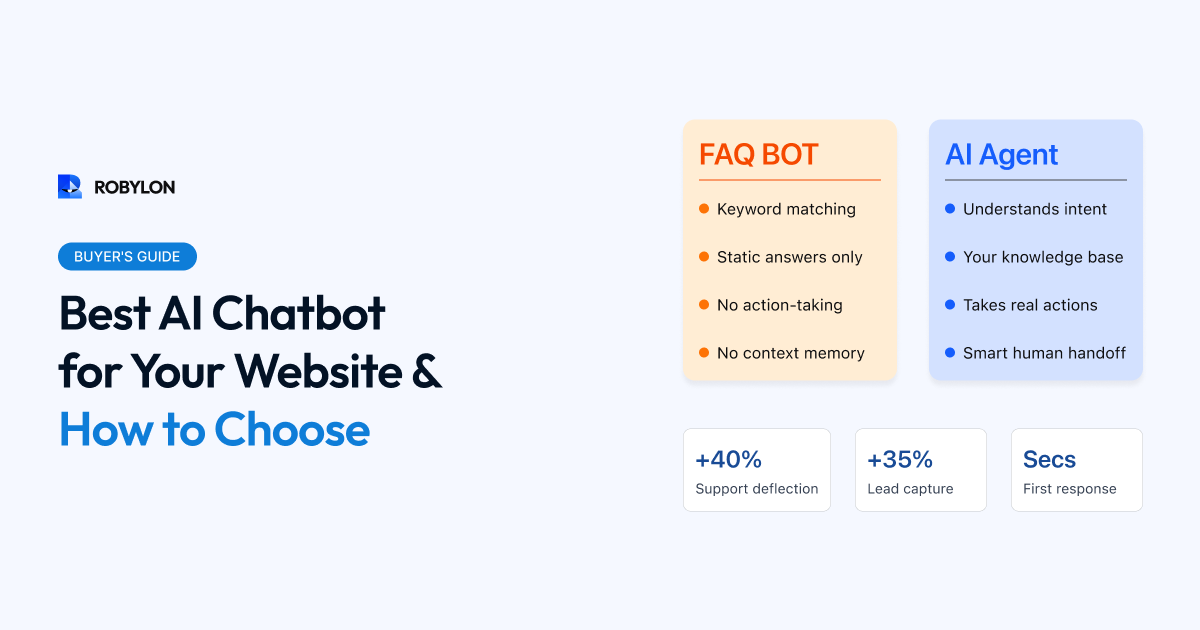
Adding an AI chatbot to your website is one of the highest-ROI investments a business can make in 2026. A well-deployed chatbot answers visitor questions instantly, captures leads around the clock, deflects support tickets, and guides buyers toward conversion — all without adding headcount.
But the market is overwhelming. There are hundreds of chatbot tools, ranging from simple FAQ widgets to full-stack AI agent platforms. Pick the wrong one and you end up with a glorified search bar that frustrates visitors. Pick the right one and you unlock 24/7 automation that genuinely moves revenue and satisfaction metrics.
This guide cuts through the noise. We will walk through the features that actually matter, the questions to ask during evaluation, and a comparison of the leading platforms — so you can make a confident choice.
Why Your Website Needs an AI Chatbot in 2026
Customer expectations have shifted permanently. Visitors landing on your website expect answers in seconds, not hours. They are not going to browse your help center, fill out a contact form, and wait for an email reply. If they do not get what they need quickly, they leave — and they probably do not come back.
An AI chatbot changes this dynamic fundamentally. Here is what the data shows:
- Response time drops from hours to seconds. AI chatbots respond instantly, 24 hours a day. No queues, no business-hours limitations, no “we’ll get back to you within 24 hours.”
- Lead capture increases 30–50%. A chatbot that engages visitors proactively — asking what they are looking for, qualifying their needs, offering to book a demo — captures leads that would otherwise bounce.
- Support costs decrease 40–60%. When AI handles the repetitive questions (pricing, shipping, returns, account issues), your human team focuses on high-value conversations.
- Conversion rates improve 10–25%. Chatbots that recommend products, answer objections, and guide visitors through checkout directly impact revenue.
The question is not whether you need a chatbot — it is which one will actually deliver these results for your specific business.
10 Features That Separate Great Chatbots from Mediocre Ones
Not every chatbot is built the same way. Here are the ten capabilities you should evaluate before committing to any platform.
1. AI That Actually Understands Context
The most important differentiator in 2026 is whether the chatbot uses large language models (LLMs) for true natural language understanding, or relies on older keyword-matching and decision-tree logic. LLM-powered chatbots handle misspellings, slang, multi-part questions, and context switches gracefully. Keyword-based bots break the moment a visitor phrases something in an unexpected way.
Ask the vendor: “If a customer asks ‘can I return the blue shoes I bought last Tuesday,’ does the bot understand this is a return request, not a product inquiry?” If the answer involves building intent rules manually, you are looking at an older system.
2. Knowledge Base Training on Your Data
A chatbot that only knows generic information is useless. You need to train it on your specific content — help articles, product pages, FAQs, policy documents, past support tickets. The best platforms let you point at a URL, upload PDFs, or sync directly with your helpdesk, and the AI learns your business within minutes.
Look for platforms that support auto-sync so your chatbot stays current when you update content, rather than requiring manual retraining.
3. Action-Taking, Not Just Answer-Giving
A chatbot that only answers questions is a step up from a static FAQ page, but the real value comes from chatbots that can take actions — check order status by querying your OMS, initiate a return, update account details, book a meeting on your calendar, or create a support ticket in Zendesk. These action-capable bots (sometimes called “AI agents”) deliver 3–5x more value than answer-only chatbots.
4. Omnichannel from Day One
Your website chatbot should be one node in a broader support ecosystem, not a silo. The best platforms deploy the same AI agent across web chat, WhatsApp, email, voice, Instagram DMs, and in-app messaging — from a single configuration. This means a customer who starts on your website and later reaches out on WhatsApp gets consistent answers with shared conversation history.
5. Smart Human Handoff
Every chatbot needs a clear path to a human agent for complex or sensitive issues. What matters is how the handoff happens. The best platforms pass the full conversation history, customer data, detected intent, and sentiment score to the human agent — so the customer never has to repeat themselves. Bad handoffs (where the agent says “how can I help you?” after the customer just spent five minutes explaining the issue to the bot) destroy trust instantly.
6. Customizable Appearance and Persona
The chatbot widget should match your brand — colors, fonts, avatar, greeting message, and tone of voice. Beyond cosmetics, the AI persona itself matters: how formal or casual it speaks, whether it uses emojis, how it handles frustration. A chatbot that sounds robotic or generic undermines the professional experience you have built across the rest of your site.
7. Analytics and Visibility
You cannot improve what you cannot measure. Look for dashboards that show conversation volume, resolution rate, escalation rate, CSAT scores, popular topics, unanswered questions (knowledge gaps), and response confidence. These metrics tell you exactly where the chatbot is succeeding and where it needs attention.
8. Integrations with Your Stack
Check for native integrations with the tools you already use — CRM (Salesforce, HubSpot), helpdesk (Zendesk, Freshdesk, Zoho Desk), e-commerce (Shopify, WooCommerce), payment processors, and calendar booking tools. Every missing integration means custom API work, which adds weeks and cost to your deployment.
9. Security and Compliance
If you operate in fintech, healthcare, or serve enterprise customers, security is non-negotiable. Look for SOC 2 Type II certification, GDPR compliance, data encryption in transit and at rest, PII redaction capabilities, and data residency options. Ask where conversation data is stored and who has access to it.
10. Deployment Speed and Ease
How quickly can you go from “signed up” to “live on my website”? The best platforms offer same-day deployment — upload your knowledge base, configure the widget, embed a script tag, and you are live. Platforms that require weeks of professional services or complex training pipelines should justify that timeline with proportionally better results.
Top AI Chatbots for Websites in 2026
Here is how the leading platforms stack up across the criteria above. This is not an exhaustive list — it is a focused comparison of the tools most commonly evaluated by businesses deploying website chatbots today.
Robylon AI
Best for: Businesses that want full-stack AI agents (not just chat widgets) with action-taking capabilities across chat, email, voice, and WhatsApp.
- AI engine: LLM-powered with RAG (retrieval-augmented generation) from your knowledge base. Handles nuanced, multi-turn conversations.
- Action capabilities: Connects to OMS, CRM, helpdesk, and billing systems to resolve queries end-to-end — not just answer questions.
- Channels: Web chat, email, voice, WhatsApp, in-app — all from one configuration.
- Integrations: 40+ pre-built connectors including Zendesk, Freshdesk, Shopify, Zoho, Salesforce, and more.
- Deployment: Most teams go live within a day. No-code setup with guided onboarding.
- Analytics: Resolution rate, CSAT, confidence scores, KB gap analysis, handle time dashboards.
- Security: SOC 2 compliant, GDPR-ready, PII handling guardrails.
- Pricing: Credits-based model — you pay for what you use. Free tier available to start.
Intercom Fin
Best for: SaaS companies already on Intercom looking to add AI to their existing messenger.
- LLM-powered, trained on your Intercom help center content.
- Strong product tour and onboarding integrations.
- Pricing can escalate quickly — Fin charges per resolution on top of Intercom seat costs.
- Limited outside of the Intercom ecosystem (not ideal if you use Zendesk or Freshdesk).
Zendesk AI Agents
Best for: Enterprise teams already deep in the Zendesk ecosystem.
- Integrated with Zendesk’s ticketing, help center, and agent workspace.
- Auto-resolution capabilities for common ticket types.
- Complex pricing — AI features require higher-tier plans. Total cost can be surprising.
- Setup and configuration can be lengthy compared to newer AI-native platforms.
Tidio
Best for: Small businesses and solo operators who need a simple, affordable chatbot quickly.
- Easy drag-and-drop builder with pre-made templates.
- Live chat + AI chatbot in one tool.
- AI capabilities are more limited — better for scripted flows than complex conversations.
- Good starting point but teams often outgrow it as volume increases.
Chatbase
Best for: Teams that want to quickly prototype a ChatGPT-style bot trained on their docs.
- Upload PDFs or point to a URL and get a working chatbot in minutes.
- Clean, simple interface for non-technical users.
- More limited on integrations and action-taking compared to full-stack platforms.
- Good for content-based Q&A, less suited for transactional workflows (orders, refunds, account changes).
Drift (Salesloft)
Best for: B2B sales teams focused on lead qualification and meeting booking.
- Purpose-built for B2B buyer journeys — ABM routing, pipeline acceleration.
- Strong Salesforce and HubSpot integrations.
- Less suited for customer support use cases.
- Pricing is enterprise-focused — not practical for smaller teams.
How to Choose: A Decision Framework
With so many options, here is a practical framework to narrow your decision:
Start with Your Primary Use Case
- Customer support automation: Prioritize platforms with action-taking capabilities, helpdesk integrations, and omnichannel support. Robylon, Zendesk AI, and Intercom Fin are the strongest here.
- Lead generation and sales: Look for proactive engagement features, CRM integration, and meeting booking. Drift and Robylon are well-suited.
- Simple FAQ/information: If you just need a knowledge base chatbot with no transactional logic, Chatbase or Tidio can work.
Match to Your Scale
- Under 500 conversations/month: Start with a free tier (Robylon, Tidio, or Chatbase). Test before you commit.
- 500–10,000 conversations/month: You need robust analytics, integrations, and human handoff. This is where mid-tier platforms shine.
- 10,000+ conversations/month: Enterprise features become critical — SSO, RBAC, data residency, SLA guarantees, dedicated support.
Run a Realistic Pilot
Never choose a chatbot based on a demo alone. Deploy it on a low-traffic page for two weeks. Feed it your actual knowledge base. Measure how often it resolves queries correctly versus escalating or giving wrong answers. A chatbot that looks impressive in a controlled demo may struggle with the messy, ambiguous way real customers actually type.
Installation: Getting a Chatbot on Your Website
Once you have chosen a platform, installation is typically straightforward:
- Sign up and configure: Create your account, upload your knowledge base, set your brand colors and greeting message.
- Embed the script: Most platforms give you a small JavaScript snippet to paste into your website’s
<head>or before</body>. If you use WordPress, Shopify, Webflow, or Wix, there are usually one-click plugins or integrations. - Test on staging: Verify the widget loads correctly, conversations flow as expected, and handoff to your team works.
- Go live: Push to production. Monitor the first 48 hours closely for any unexpected behavior or knowledge gaps.
The entire process — from account creation to live chatbot — should take hours, not weeks, with a modern platform.
Common Pitfalls When Choosing a Website Chatbot
- Choosing based on price alone. A cheap chatbot that cannot resolve conversations costs more in the long run — through lost leads, frustrated customers, and agent time spent cleaning up bad interactions.
- Ignoring the handoff experience. The moment a chatbot fails and hands off to a human is the highest-stakes moment in the customer journey. Test this flow thoroughly.
- Overbuying for your needs. If you are a 10-person company with 200 monthly conversations, you do not need an enterprise platform with a six-month implementation. Start simple, upgrade when you outgrow it.
- Not feeding it enough data. A chatbot with a thin knowledge base gives thin answers. Invest time in building comprehensive, well-structured content before launch.
- Set-and-forget mentality. Even the best chatbot needs weekly attention — reviewing unanswered questions, updating content, tuning escalation thresholds.
Bottom Line
The best AI chatbot for your website is the one that matches your use case, integrates with your existing tools, and delivers measurable results within weeks — not months. In 2026, the bar has moved well beyond scripted FAQ bots. Customers expect AI that understands their questions, takes real actions, and hands off gracefully when needed.
If you are deploying for customer support across multiple channels, look for a platform that acts as an AI agent, not just a chat widget. If you need simple Q&A, start lightweight and upgrade as you grow. Either way, pilot before you commit, and optimize continuously after launch.
Ready to add AI to your website? Robylon AI agents deploy in under a day across web chat, email, voice, and WhatsApp — with 40+ integrations, action-taking capabilities, and 97% accuracy. Start free at robylon.ai
Frequently asked questions
What is the best free AI chatbot for a website?
Several platforms offer functional free tiers: Robylon AI (free tier with LLM-powered chat, WhatsApp, and email), Tidio (free plan with limited conversations), and Chatbase (free with basic features). For most businesses, the best free option is one that lets you train the chatbot on your own data and offers a clear upgrade path as you grow.
Can a website chatbot take actions like processing refunds?
Yes — but only if the platform supports action-taking AI agents (not just answer-giving chatbots). Platforms like Robylon AI connect to your OMS, payment processor, and CRM via APIs, allowing the chatbot to check order status, initiate returns, process refunds, update account details, and book meetings. This capability delivers 3–5x more automation than answer-only bots.
How do I measure if my website chatbot is working?
Track these five metrics: Resolution rate (% of conversations fully resolved by AI), Escalation rate (% handed to humans), CSAT score (customer satisfaction after chatbot interactions), Response time (should be under 5 seconds), and Knowledge gaps (questions the bot could not answer). Review these weekly and use gaps to improve your knowledge base.
How do I add an AI chatbot to my Shopify store?
Most AI chatbot platforms provide a JavaScript embed code. For Shopify: go to Online Store → Themes → Edit Code, open your theme.liquid file, and paste the snippet just before the closing </body> tag. Some platforms also offer dedicated Shopify apps for one-click installation. The chatbot will appear on all pages of your store within minutes.
What is the difference between a rule-based chatbot and an AI chatbot?
Rule-based chatbots follow pre-scripted decision trees — they can only respond to inputs you have explicitly programmed. AI chatbots use large language models (LLMs) to understand natural language, handle unexpected phrasing, maintain conversation context, and generate human-like responses. In 2026, AI chatbots are the standard for any business handling more than basic FAQ queries.
Related reading
 Chatbots
10 Best AI Chatbots for Customer Support in 2026
This article reviews the top 10 AI chatbots for customer support in 2025, including Zendesk, Freshworks, Intercom, Drift, and more. It highlights their strengths, limitations, and best-fit use cases. The clear winner is Robylon AI, which delivers autonomous agents with 97% accuracy, 85–95% query automation, and 30% cost savings: making it the best overall choice for enterprises seeking scalable, reliable, and cost-efficient customer support.
 Chatbots
10 Best AI Chatbots for E-Commerce in 2026
Explore the 10 best AI chatbots for E-Commerce in 2025. Compare platforms like Robylon, Tidio, Intercom, Gorgias, and Ada to see how chatbots improve customer support, reduce costs, and boost sales.
 Chatbots
10 Best AI Chatbots for Ecommerce Customer Support in 2026
Discover the best AI chatbots for ecommerce in 2025. Compare top platforms like Robylon, Tidio, Zendesk, and more - automating order tracking, returns, refunds, and customer support to boost conversions and cut costs.