
How to Set Up AI Auto-Responses for Support Emails (Without Annoying Customers)
Auto-responding to support emails with AI is powerful — but getting it wrong erodes customer trust faster than getting it right builds it. This practical guide covers when to auto-respond immediately versus acknowledge and queue, confidence threshold calibration, tone engineering, and handling opt-out requests.
There is a fine line between an AI auto-response that delights a customer (“Wow, they responded in 2 minutes with my exact tracking info!”) and one that infuriates them (“This generic robot response completely ignored my actual question”). The difference is not whether you use AI — it is how you configure it.
This guide covers the practical decisions: which emails should receive instant AI responses, which should get an acknowledgment while the AI or a human works on the answer, and which should go straight to a human with no AI involvement. Plus the tone, personalization, and confidence settings that make the difference between helpful and annoying.
The Three Response Modes
Mode 1: Instant Resolution (Auto-Send)
The AI processes the email, generates a complete resolution, and sends it to the customer — all within minutes of the email arriving. The customer experiences an almost-instant, personalized response that answers their question or resolves their issue.
Use this for: WISMO queries (answer includes live tracking data), FAQ and policy questions (answer is definitively in the knowledge base), simple account inquiries (answer comes from CRM data), and status checks (refund status, return status, subscription status).
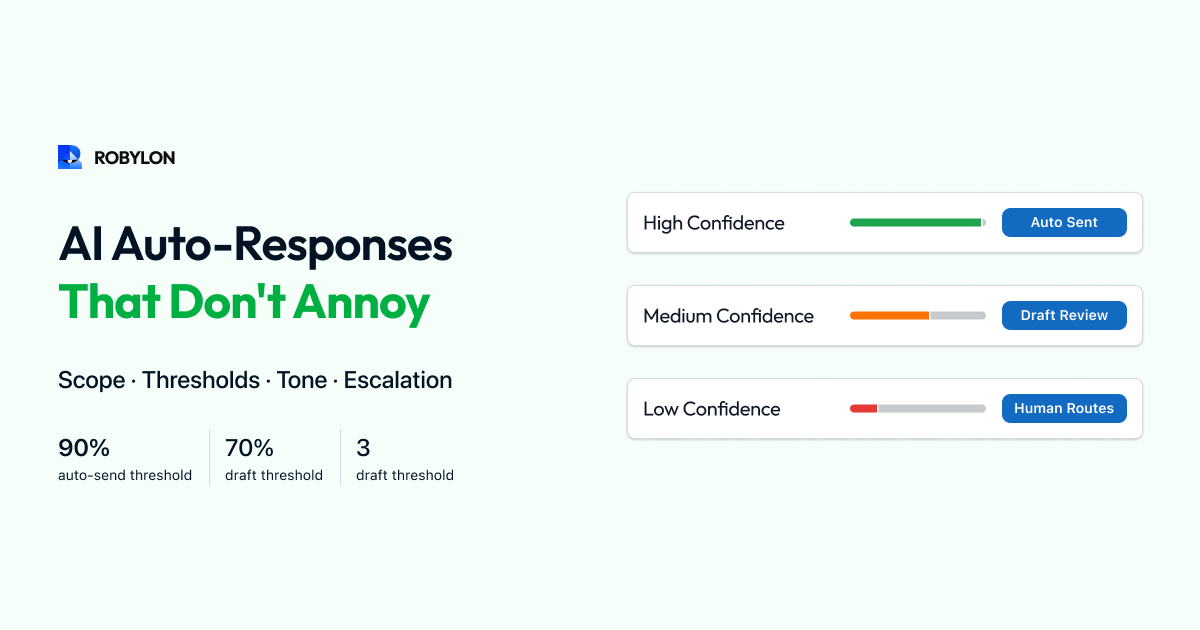
Requirements: confidence score above your auto-send threshold (start at 90%, lower to 85% as accuracy proves out), a complete answer that addresses the customer’s full question, and personalization with customer-specific data (not a generic template).
Mode 2: Acknowledge and Draft (Agent-Assisted)
The AI sends an immediate acknowledgment (“Thanks for reaching out — I’m looking into this and will have an answer for you shortly”), then generates a draft response for agent review. The agent reviews the draft, makes any adjustments, and sends. The customer receives a fast acknowledgment (under 5 minutes) and a complete response (within 1–4 hours).
Use this for: refund and return requests (where you want human verification before processing money), billing disputes (sensitive, potential for errors), complex product questions (where the AI has a good answer but not full confidence), and any category where your AI confidence is 70–89%.
This mode is the ideal transition step for categories you plan to fully automate later. Run in draft mode for 2–4 weeks, monitor accuracy, and promote to auto-send once the data confirms consistent quality.
Mode 3: Acknowledge and Escalate (Human-Only)
The AI sends an acknowledgment and routes the email directly to a human agent with context and a suggested approach — but does not generate a customer-facing response.
Use this for: complaints and emotionally charged emails (negative sentiment detected), legal or regulatory matters (compliance flags), VIP or high-value customer emails (relationship sensitivity), multi-system investigations (complex issues requiring cross-functional coordination), and any topic where AI errors would have outsized consequences.
Confidence Threshold Calibration
The confidence threshold is the most important configuration decision. Set it too high and the AI barely auto-resolves anything — most emails go to draft or escalation, and you are paying for AI that mostly queues work for humans. Set it too low and inaccurate responses slip through, eroding customer trust.
The right approach is category-specific thresholds. WISMO emails pull data directly from your OMS — accuracy is inherently high, so an 82% threshold is appropriate. Refund processing involves money — set a 92% threshold. Policy FAQs have a stable knowledge base — 85% works well. Product questions vary in complexity — start at 88%.
Calibrate empirically: for each category, review 50 AI responses at your chosen threshold. If accuracy is 95%+, you can lower the threshold. If accuracy is below 92%, raise it. Re-calibrate monthly as the knowledge base improves.
Tone Engineering: How to Not Sound Like a Robot
The #1 customer complaint about AI email responses is that they sound robotic, generic, or formulaic. The fix is tone engineering — configuring the AI’s language model to match your brand voice consistently.
Personalization Rules
Always use the customer’s name (extracted from the email signature or CRM). Reference their specific order, product, or account details — never respond generically when specific data is available. Mirror the customer’s formality level: if they write casually (“hey, quick question”), respond casually. If they write formally (“Dear Customer Service”), match the formality.
Empathy Calibration
For positive or neutral emails, empathy signals should be light — a brief acknowledgment, then straight to the answer. For negative sentiment, the response should lead with empathy: acknowledge the frustration, apologize for the inconvenience (if warranted), then provide the resolution. For urgent emails, skip extended empathy and lead with the resolution — the customer wants the answer, not condolences.
Length Calibration
Match response length to question complexity. A simple “Where is my order?” does not need 4 paragraphs. A multi-issue email with a complaint does need a thorough, well-structured response. Configure the AI to vary response length based on the number of issues detected and the complexity of the resolution.
Avoid AI Tells
Certain phrases immediately signal “this was written by AI” to customers: “I understand your concern” (used identically regardless of the concern), “I’d be happy to help” (overused to the point of being meaningless), “Is there anything else I can assist you with?” (filler closing). Configure your AI to avoid these phrases and use natural, varied language instead.
Handling Edge Cases
Customer Replies to AI Resolution
When a customer replies to an AI-resolved email — “Thanks, but I also wanted to ask about…” — the AI should process this as a continuation of the thread, not a new ticket. If the follow-up is within the AI’s capability, resolve it. If not, escalate to a human with full thread context. Never make the customer repeat information they already provided.
Customer Asks to Speak to a Human
If the customer says anything like “Can I talk to a real person?” or “I want to speak to a human,” immediately route to a human agent — do not attempt another AI response. The AI should respond with: “Of course — I’m connecting you with a team member now. They’ll have the full context of our conversation.” Trying to convince a customer to keep interacting with AI after they have requested a human is the fastest way to destroy trust.
Incorrect AI Response Discovered After Sending
If your QA system or a customer flags an incorrect AI response, have a correction protocol: a human agent sends a follow-up email correcting the error, apologizing for the inaccuracy, and providing the correct resolution. Log the error, identify the root cause (outdated KB article, entity extraction failure, wrong system data), and fix it to prevent recurrence.
Bottom Line
AI auto-responses are not a binary switch — they are a spectrum of response modes, confidence levels, and tone configurations that should be calibrated per email category and refined over time. Start conservative (high thresholds, more draft mode, fewer auto-sends), build confidence with data, and expand gradually. The goal is not to auto-respond to everything — it is to auto-respond to the right emails, with the right answers, in the right tone.
Auto-respond without annoying customers. Robylon AI lets you configure confidence thresholds, response modes, and brand voice per email category — so the right emails get instant resolutions and the sensitive ones get human attention. Start free at robylon.ai
Frequently asked questions
What are the three response modes for AI email support?
Mode 1: Instant resolution (auto-send) — AI resolves and sends within minutes. For WISMO, FAQs, status checks. Requires confidence above auto-send threshold (start at 90%). Mode 2: Acknowledge and draft — AI sends immediate acknowledgment, generates a draft for agent one-click approval. For refunds, billing, medium-confidence queries. Mode 3: Acknowledge and escalate — AI sends acknowledgment and routes to human. For complaints, legal matters, VIP customers, and any topic where AI errors would have outsized consequences.
How do I prevent AI email responses from sounding robotic?
Four techniques: 1) Personalization — always use the customer's name, reference their specific order/product/account. 2) Formality matching — mirror the customer's register (casual email gets casual reply). 3) Empathy calibration — light for neutral emails, lead with acknowledgment for negative sentiment, skip for urgent (get to the answer). 4) Avoid AI tells — configure the AI to avoid overused phrases like "I understand your concern," "I'd be happy to help," and "Is there anything else I can assist you with?" Use natural, varied language instead.
What should happen when a customer asks to speak to a human?
Immediately route to a human agent. Do not attempt another AI response. The AI should respond: "Of course — I'm connecting you with a team member now. They'll have the full context of our conversation." Trying to convince a customer to keep interacting with AI after they request a human is the fastest way to destroy trust. Configure this as a hard escalation rule triggered by phrases like "real person," "human agent," "speak to someone," and "not a bot."
How should confidence thresholds vary by email category?
Set thresholds based on category accuracy and risk: WISMO (data from OMS, inherently accurate): 82%. FAQ/policy (stable KB content): 85%. Product questions (variable complexity): 88%. Refund processing (involves money): 92%. Billing disputes (sensitive, error-prone): 92%. Calibrate empirically: review 50 AI responses per category, and if accuracy is 95%+ at current threshold, lower by 3–5 points. If below 92%, raise it. Re-calibrate monthly.
What is the right acknowledgment to send before an AI draft is reviewed?
Keep it brief, honest, and timeline-specific: "Thanks for reaching out, [Name]. I'm looking into this and will have an answer for you within [X hours]." The timeline should reflect your actual draft review SLA (not a vague "shortly"). Avoid claiming a human is looking into it if the AI is doing the work — dishonesty erodes trust if discovered. Do not include generic filler ("We value your business"). The acknowledgment's only job is to confirm receipt and set a response timeline.