
AI Email Responder for Customer Support: Build vs Buy
Your team wants AI to handle email support - but should you build a custom solution with LLM APIs or buy a purpose-built platform? This guide compares both approaches honestly across cost, speed, capabilities, and maintenance.
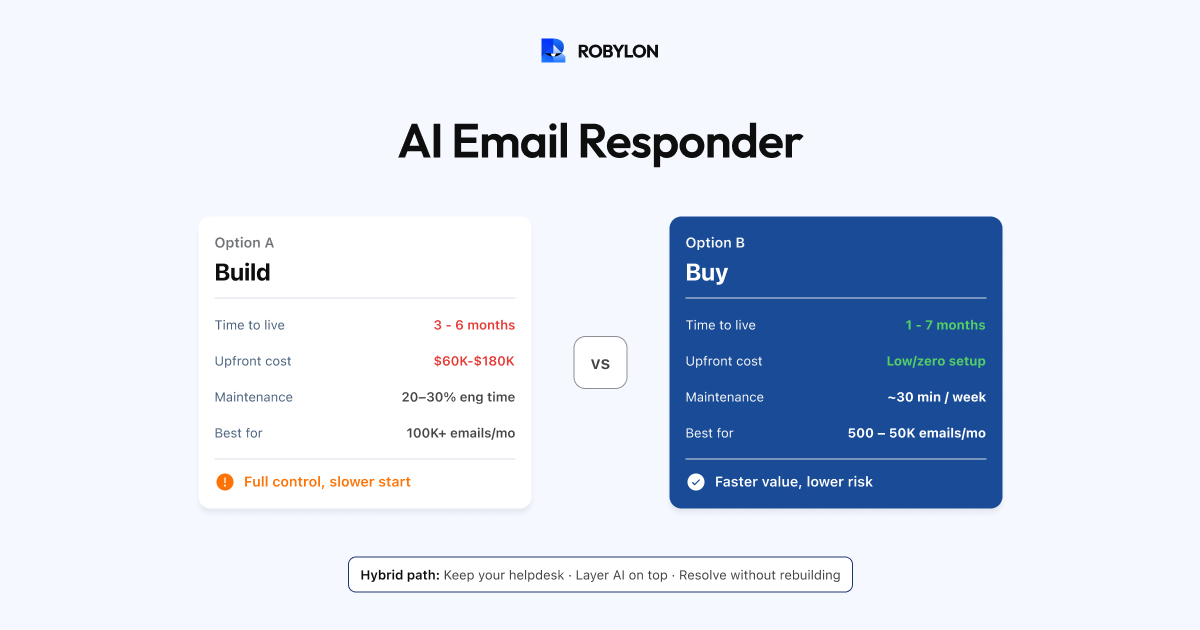
Your support team is drowning in email tickets. You have seen the demos — AI that reads customer emails and responds in seconds with accurate, personalized answers. You are ready to move forward. But now comes the hard question: do you build your own AI email responder, or do you buy a platform that does it for you?
This is not a hypothetical dilemma. Engineering teams argue for building (more control, no vendor lock-in, customized to our exact workflows). Support leaders push for buying (we need this live in weeks, not months, and we do not have ML engineers on staff). Both sides have valid points.
This guide walks through both approaches honestly — covering the real costs, timelines, capabilities, ongoing maintenance burden, and the scenarios where each makes sense. By the end, you will have a clear framework for deciding which path fits your situation.
Option 1: Build Your Own AI Email Responder
What “Building” Actually Means
Building an AI email responder from scratch involves stitching together several components:
- Email ingestion pipeline: Connect to your inbox or helpdesk API to receive incoming emails in real time. Parse the email structure — subject, body, thread history, sender metadata, attachments.
- Intent classification: Use an LLM (GPT-4, Claude, Gemini) or a fine-tuned classifier to determine what the customer is asking. Map to your internal ticket categories.
- Knowledge retrieval (RAG): Build a vector database (Pinecone, Weaviate, Qdrant) of your help articles, policies, and product information. Implement a retrieval pipeline that finds the most relevant chunks for each query.
- System integrations: Build API connections to your OMS, CRM, payment system, and returns platform so the AI can look up live data (order status, refund state, account details).
- Response generation: Prompt-engineer the LLM to generate natural, accurate, brand-consistent email responses grounded in the retrieved knowledge and live data.
- Confidence scoring: Build a mechanism to evaluate how confident the AI is in its response. Route low-confidence emails to humans.
- Sending and tracking: Deliver the AI’s response via email (handling threading, formatting, signatures) and log it in your helpdesk for tracking.
- Feedback and retraining: Build a feedback loop where human corrections improve the system over time.
The Real Cost of Building
Development time: A competent engineering team (1 backend engineer + 1 ML/AI engineer) typically needs 3–6 months to build, test, and deploy a production-grade email AI system. That is 6–12 person-months of engineering time.
Engineering cost: At $10K–$15K/month per engineer (salary + overhead), you are looking at $60K–$180K in development costs before the system handles its first real customer email.
Infrastructure: Vector database hosting ($100–$500/month), LLM API costs ($500–$5,000/month depending on volume), compute for the pipeline ($200–$1,000/month), monitoring tools ($100–$300/month).
Ongoing maintenance: This is the hidden cost. Someone needs to maintain the retrieval pipeline, update the vector database when content changes, monitor accuracy, debug edge cases, handle LLM provider changes (model deprecations, API updates, pricing changes), and manage uptime. Expect 20–30% of an engineer’s time indefinitely.
Where Building Makes Sense
- You have ML engineers already on staff who have bandwidth and experience with production LLM systems.
- Your use case is highly specialized — you need custom model fine-tuning, proprietary data processing, or regulatory requirements that no off-the-shelf platform can meet.
- You process 100K+ emails/month and the per-resolution cost of a platform becomes uneconomical compared to a fixed-cost in-house system.
- Email AI is a core product differentiator — you are building a support platform yourself, and the email AI is your competitive moat.
Option 2: Buy a Purpose-Built Platform
What “Buying” Means Today
Purpose-built AI email support platforms handle the entire pipeline described above out of the box. You configure rather than code — upload your knowledge base, connect your helpdesk and data systems, set confidence thresholds, and go live.
The leading platforms in 2026 — including Robylon AI, Zendesk AI Agents, Freshdesk Freddy, and others — offer progressively capable email automation, from simple triage and draft assistance to full end-to-end resolution with action-taking.
The Real Cost of Buying
Setup time: Most platforms go from signup to live email automation in 1–7 days. Knowledge base upload, helpdesk connection, and configuration take hours, not months.
Implementation cost: Typically $0 for self-serve setups. Some enterprise deployments include professional services at $2K–$10K for complex integrations.
Ongoing cost: Varies by pricing model:
- Per-resolution: $0.50–$2 per AI-resolved email (Zendesk, Intercom model). Cost scales linearly with volume — which means better automation = higher bills.
- Credits-based: Pay for a bundle of credits that cover AI processing across channels (Robylon model). More predictable, better unit economics at scale.
- Per-seat + add-on: Base per-agent fee plus an AI add-on (Zendesk, Freshdesk model). Can be expensive when layered together.
Maintenance: The platform handles model updates, infrastructure, uptime, and feature development. Your team’s responsibility is limited to knowledge base maintenance and weekly optimization — about 30 minutes per week.
Where Buying Makes Sense
- You do not have ML engineers on staff, or they are needed for core product work.
- Speed matters: You need email automation live in days or weeks, not months.
- Your volume is 500–50,000 emails/month — the sweet spot where platform pricing is cost-effective and the scale does not justify a custom build.
- You want to focus on your core business — maintaining AI infrastructure is not your competitive advantage.
- You need omnichannel: The same AI that handles email can handle chat, voice, and WhatsApp on a platform. Building multi-channel from scratch multiplies complexity.
Head-to-Head Comparison
Time to live: Build takes 3–6 months. Buy takes 1–7 days. If email backlog is a current pain, waiting months is costly.
Upfront cost: Build costs $60K–$180K in engineering time. Buy costs $0–$10K depending on setup complexity.
Monthly cost at 5,000 emails/month: Build runs $1,500–$6,000/month (infra + LLM APIs + partial engineer time). Buy runs $2,500–$7,500/month (platform fees). Comparable at this volume.
Monthly cost at 50,000 emails/month: Build runs $5,000–$15,000/month (scales with API costs). Buy varies widely — per-resolution models ($25K–$50K at $0.99/resolution) can be very expensive; credits-based models ($8K–$15K) are more competitive. At very high volume, the build option can be cheaper if you have the engineering capacity to maintain it.
Accuracy out of the gate: Build starts from zero — you have to build, tune, and validate everything. Buy starts with pre-trained models, established RAG pipelines, and confidence calibration that has been refined across thousands of deployments.
Ongoing maintenance: Build requires continuous engineering attention (20–30% of an engineer’s time). Buy requires 30 minutes/week of knowledge base maintenance.
Multi-channel expansion: Build requires rebuilding the pipeline for each new channel (chat, voice, WhatsApp). Buy typically supports multiple channels from the same platform with shared knowledge and configuration.
Vendor dependency: Build gives you full control. Buy creates vendor dependency — switching platforms requires migration effort.
The Hybrid Approach
There is a third option that many mature teams adopt: use a platform for the AI layer while keeping your own helpdesk and data infrastructure.
In this model, you keep Zendesk (or Freshdesk, or Zoho) as your helpdesk and source of truth for tickets. You layer an AI platform like Robylon on top as the email resolution engine. The AI processes incoming emails, resolves what it can, and creates or updates tickets in your helpdesk for anything that requires human attention.
This gives you the speed and sophistication of a purpose-built AI platform without abandoning your existing helpdesk investment. It also keeps the door open for a custom build later — if and when the volume and use case justify it, you can replace the platform with an in-house system while keeping the same helpdesk and integrations.
Decision Framework
Answer these five questions to decide:
- Do you have ML engineers with production LLM experience available? If no → buy.
- Do you need this live in less than 30 days? If yes → buy.
- Is your monthly email volume over 100,000? If yes → seriously evaluate building or a hybrid approach for cost optimization.
- Is email AI a core product differentiator for your business? If yes → build (or acquire the capability). If it is a support operational tool → buy.
- Do you need multi-channel (email + chat + voice + WhatsApp)? If yes → buy a platform that supports all channels. Building multi-channel from scratch is 3–4x the complexity of email alone.
For most businesses — including e-commerce, SaaS, fintech, and service companies processing 1,000–50,000 emails per month — buying is the right answer. The speed-to-value, lower risk, and maintenance-free operation outweigh the control benefits of building. Reserve the build option for teams with dedicated AI engineering capacity and genuinely unique requirements.
Bottom Line
Building gives you control. Buying gives you speed. For 90% of businesses, the right answer is to buy a purpose-built platform, go live in days, and use the 3–6 months you would have spent building to optimize and expand your AI email automation. If you ever outgrow the platform, you can migrate to a custom build — but you will have been resolving email tickets automatically the entire time instead of waiting for a build to finish.
Go live on AI email support in under a day. Robylon AI resolves email tickets end-to-end with credits-based pricing — no per-resolution surcharges, no ML engineers required. Connect your helpdesk, upload your KB, and start automating. Start free at robylon.ai
Frequently asked questions
Should I build my own AI email responder or buy a platform?
For 90% of businesses, buying is the right answer. Building requires 3–6 months of engineering time ($60K–$180K upfront), ML engineers on staff, and ongoing maintenance (20–30% of an engineer's time indefinitely). Buying deploys in 1–7 days, costs $0–$10K to set up, and requires only 30 minutes/week of maintenance. Build only if you have dedicated ML engineers, process 100K+ emails/month, or need email AI as a core product differentiator.
How much does it cost to build a custom AI email responder?
Upfront: $60K–$180K in engineering time (1 backend + 1 ML engineer for 3–6 months). Monthly infrastructure: $1,000–$7,000 (vector database hosting, LLM API calls, compute, monitoring). Ongoing maintenance: 20–30% of an engineer's time indefinitely for model updates, pipeline debugging, accuracy monitoring, and LLM provider changes. Total first-year cost typically exceeds $150K–$300K — versus $10K–$50K/year for a purpose-built platform at moderate volume.
When does building an AI email system make more financial sense than buying?
Building becomes cost-competitive at very high volumes (100K+ emails/month) where per-resolution platform fees become expensive. At 5,000 emails/month, build and buy costs are comparable ($1,500–$6,000 vs $2,500–$7,500/month). At 50,000/month, credits-based platforms ($8K–$15K) are still competitive with build costs ($5K–$15K). Per-resolution platforms ($25K–$50K at $0.99/resolution) are where building clearly wins at scale. The break-even also depends on having ML engineers already on staff — hiring them specifically for this adds $150K+/year in salary alone.
What components are needed to build an AI email responder from scratch?
Eight components: 1) Email ingestion pipeline (inbox/helpdesk API connection). 2) Intent classification (LLM or fine-tuned model). 3) Knowledge retrieval via RAG (vector database + embedding pipeline). 4) System integrations (OMS, CRM, billing APIs). 5) Response generation (LLM with prompt engineering). 6) Confidence scoring mechanism. 7) Email sending and threading (formatting, signatures, reply chains). 8) Feedback and retraining loop. Each component requires development, testing, and ongoing maintenance.
What is the hybrid approach to AI email support?
The hybrid approach means keeping your existing helpdesk (Zendesk, Freshdesk) for ticketing and agent workflows, while layering an AI platform like Robylon on top as the email resolution engine. The AI processes incoming emails, resolves what it can, and creates or updates tickets in your helpdesk for anything requiring human attention. This gives you the speed of a purpose-built AI without abandoning your helpdesk investment — and keeps the door open for a custom build later if volume justifies it.