
Email Ticket Automation: From Manual Inbox to AI-First Operations
Most teams automate email in fragments - a rule here, a macro there. This guide presents the complete maturity framework from Level 0 (shared inbox chaos) to Level 4 (AI-first operations), with a practical migration plan for each stage.
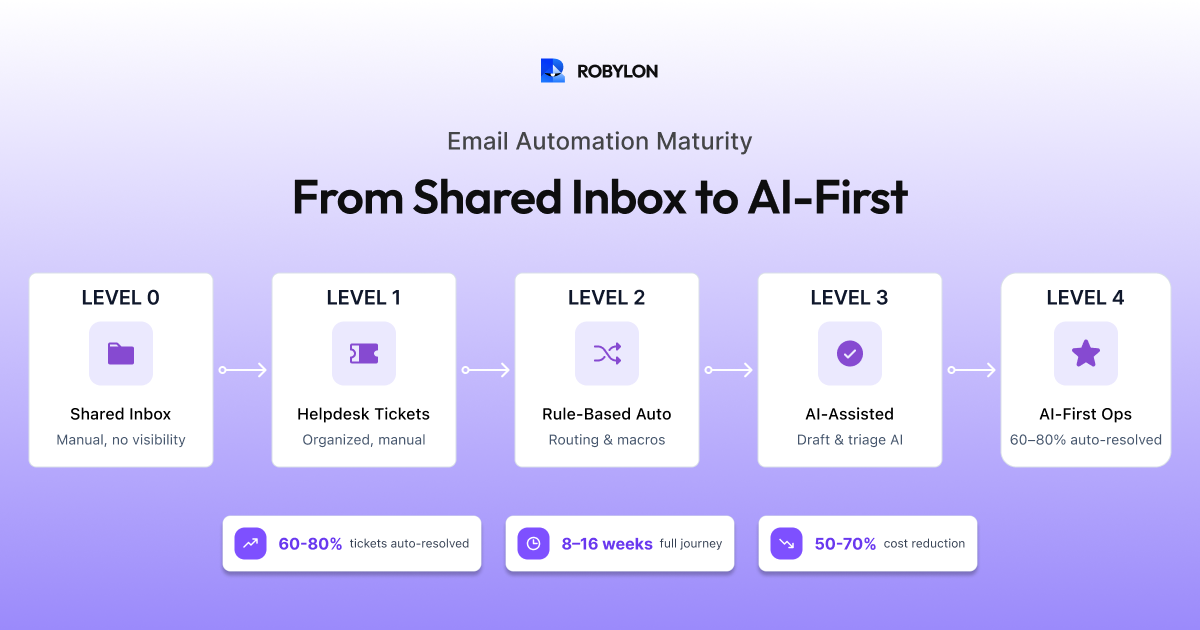
Every support team’s email automation journey follows a predictable path. Some teams are at the beginning — managing a shared Gmail inbox with no tagging, no assignment, and no accountability. Others have a helpdesk with basic rules and macros. A few have deployed AI for triage and draft assistance. And the most advanced teams have AI resolving the majority of their email tickets end-to-end without human involvement.
The problem is that most teams automate in fragments. They add a canned response here, a trigger rule there, maybe try an AI chatbot on web but leave email untouched. There is no cohesive strategy for progressing from one stage to the next.
This guide provides that strategy. We define the five maturity stages of email ticket automation, show you where you are today, and give you a concrete plan to reach the next level — and eventually, AI-first operations.
The 5 Maturity Stages of Email Ticket Automation
Level 0: Shared Inbox Chaos
How it works: The team shares a single email account (support@company.com) through Gmail, Outlook, or a Google Group. Agents manually check the inbox, claim emails informally, and reply from the shared account. There is no tracking, no assignment, no SLA management, and no visibility into who is handling what.
Typical problems: Duplicate responses (two agents reply to the same email), dropped emails (nobody claims them), no response-time tracking, no accountability, and impossible to report on performance. Works for teams handling under 50 emails per week but breaks immediately beyond that.
Automation level: Zero. Everything is manual.
How to move to Level 1: Deploy a basic helpdesk or shared inbox tool that converts emails into tickets, assigns ownership, and tracks status. This takes a day and is the single most impactful upgrade a small team can make.
Level 1: Organized Helpdesk with Manual Handling
How it works: Emails are converted into tickets in a helpdesk (Freshdesk, Zendesk, Zoho Desk, Help Scout). Each ticket has an owner, a status, and SLA tracking. Agents work from a queue rather than an inbox. Managers can see response times and backlog.
Typical problems: Agents still manually read, classify, and respond to every ticket. Canned responses exist but are underused because finding the right one takes as long as typing a custom reply. Triage is manual — someone reads each email and decides who should handle it. Volume increases strain the team linearly.
Automation level: Minimal — maybe auto-acknowledgment emails and basic SLA alerts.
How to move to Level 2: Implement rule-based automation: triggers for routing (billing keywords → billing team), macros for frequent responses, auto-tags based on subject line keywords, and escalation rules for overdue tickets.
Level 2: Rule-Based Automation
How it works: The helpdesk is configured with triggers, macros, and routing rules. Common patterns are automated: refund-related keywords route to the billing team, VIP customer domains trigger priority flags, overdue tickets auto-escalate to managers. Agents use canned responses and macros to reply faster.
Typical problems: Rules are fragile — they depend on keywords that customers do not always use. “I want a refund” triggers the rule, but “I’d like my money back” does not. Maintenance is burdensome: every new product, policy change, or team restructure requires updating dozens of rules. Multi-intent emails break the routing logic entirely. And agents still write most responses manually.
Automation level: Moderate for routing and tagging (50–60% accuracy), low for actual resolution (0–10% of emails resolved without human writing a response).
How to move to Level 3: Deploy AI for triage and agent assistance. Replace keyword rules with LLM-powered intent classification. Add AI draft suggestions so agents can approve or edit rather than writing from scratch.
Level 3: AI-Assisted Operations
How it works: AI handles triage (classification, routing, prioritization) and assists agents with drafts, summaries, and context. When an email arrives, the AI classifies its intent with 93–97% accuracy, detects sentiment and urgency, routes it to the right team, and generates a suggested response. Agents review the draft, make edits if needed, and send.
Typical problems: This is a significant improvement — agents handle tickets 40–60% faster because the triage and drafting work is done for them. But agents are still in the loop for every email. The AI assists, it does not resolve. You have reduced handle time but not headcount. Cost savings are real but incremental, not transformative.
Automation level: High for triage (90–95%), moderate for resolution (AI drafts are used in 60–70% of responses, but humans always review and send).
How to move to Level 4: Enable AI auto-resolution for high-confidence email categories. Connect the AI to live business systems (OMS, CRM, billing) so it can take actions — not just draft answers. Set confidence thresholds for auto-send. Begin the shift from “AI assists agents” to “agents assist AI.”
Level 4: AI-First Operations
How it works: AI is the first responder for every email. For 60–80% of tickets, the AI fully resolves the issue — classifying intent, retrieving knowledge, querying live systems, taking actions (processing refunds, checking orders, updating accounts), generating the response, and sending it. Human agents handle the 20–40% of emails that require judgment, empathy, or complex investigation. But even those emails benefit from AI: the agent receives the AI’s analysis, context, and draft recommendation.
What changes at this level: The role of the support team fundamentally shifts. Agents become AI supervisors, escalation specialists, and knowledge base curators rather than email processors. The team’s capacity scales with AI, not headcount. Adding 10,000 more monthly emails does not require hiring more agents — it requires tuning the AI.
Automation level: High for both triage (95%+) and resolution (60–80%). Handle time for human-handled emails is reduced 40–60% by AI copilot. Total email support cost is 50–70% lower than Level 1.
Where Are You Today?
A quick diagnostic:
- Do you use a helpdesk or shared inbox? Shared inbox = Level 0. Helpdesk = at least Level 1.
- Do you have routing rules and macros? No = Level 1. Yes, keyword-based = Level 2.
- Does AI classify your email tickets and suggest responses? No = Level 2 or below. Yes = Level 3.
- Does AI send responses to customers without agent review? No = Level 3 or below. Yes = Level 4.
Most teams in 2026 are at Level 1 or Level 2. The jump to Level 3 (AI-assisted) is relatively quick — 2–4 weeks. The jump to Level 4 (AI-first) requires system integrations and confidence calibration but is achievable within 6–10 weeks.
The Migration Playbook: Moving Up One Level
Level 0 → Level 1 (1–3 days)
- Choose a helpdesk: Freshdesk (best value for small teams), Zendesk (enterprise), Zoho Desk (if you are in the Zoho ecosystem), or Robylon (if you want to move fast toward AI).
- Connect your support email. Emails start appearing as tickets automatically.
- Set up basic views: unassigned, my tickets, overdue, by priority.
- Create 5–10 canned responses for your most common reply patterns.
- Define SLA targets: first response time, resolution time.
Level 1 → Level 2 (1–2 weeks)
- Identify your top 5 email categories from ticket data.
- Create routing rules: intent keywords → team assignment.
- Build macros for the 10 most frequent responses.
- Set up auto-acknowledgment: every new email gets an instant “We received your message, we will respond within [SLA]” reply.
- Configure escalation triggers: overdue tickets, repeat contacts, negative keywords.
Level 2 → Level 3 (2–4 weeks)
- Deploy an AI platform with email triage capabilities (Robylon, Zendesk AI, Freshdesk Freddy).
- Upload your knowledge base: help articles, policies, SOPs, product docs.
- Enable AI classification to replace keyword-based routing rules.
- Enable AI draft suggestions for agents.
- Run for 2 weeks, measure: classification accuracy (target 93%+), draft acceptance rate (target 70%+), handle time reduction.
Level 3 → Level 4 (4–8 weeks)
- Connect your OMS, CRM, and payment systems so the AI can take actions.
- Build resolution workflows for your top 3 auto-resolvable email categories (usually: order tracking, policy questions, refund status).
- Enable auto-send for high-confidence responses (start threshold at 90%).
- Run shadow mode for 1–2 weeks to validate auto-resolution accuracy.
- Go live with auto-resolution. Expand categories weekly as accuracy proves out.
- Establish the weekly optimization cadence: KB gap review, confidence threshold tuning, escalation analysis.
If Salesforce is in your stack, our guide on connecting AI email support to Salesforce CRM covers the OAuth setup, case management architecture, and integration layers needed to reach Level 4.
What Each Level Costs and Saves
At 3,000 emails per month, with an average fully-loaded agent cost of $3,000/month:
- Level 0: 3–4 agents handling everything manually. Cost: $9,000–$12,000/month. Average FRT: 12–24 hours.
- Level 1: 3 agents with better organization. Cost: $9,000/month + helpdesk ($50–$300/month). Average FRT: 4–8 hours.
- Level 2: 2.5 agents with rules handling routing. Cost: $7,500/month + helpdesk. Average FRT: 2–4 hours.
- Level 3: 2 agents with AI handling triage and drafts. Cost: $6,000/month + AI platform ($500–$1,500/month). Average FRT: 1–2 hours.
- Level 4: 1 agent supervising AI that resolves 70% automatically. Cost: $3,000/month + AI platform ($500–$2,000/month). Average FRT: under 5 minutes for AI-resolved, 1–2 hours for human-handled.
The jump from Level 0 to Level 4 represents a 60–70% cost reduction and a 99% improvement in first response time for the majority of emails. And customer satisfaction typically improves because of the speed and consistency of AI responses.
Common Blockers and How to Overcome Them
- “Our email is too complex for AI.” It is not — 60–80% of it is repetitive and data-driven. AI handles that portion; humans handle the rest. You do not need 100% automation to transform your economics.
- “We do not trust AI to email customers.” Start with shadow mode and draft assistance (Level 3). Let agents review every AI response for 2–4 weeks. Trust builds from evidence, not from promises.
- “Our helpdesk does not support AI.” AI platforms like Robylon work alongside any helpdesk — they process emails and create/update tickets in your existing system. No migration required.
- “We cannot connect our OMS/CRM to AI.” Start with knowledge-based resolution (Level 3+) — policy questions, FAQ responses, and general guidance do not need system integrations. Add integrations later for transactional resolution.
- “We do not have the budget.” AI email support pays for itself within 30–60 days. The question is not whether you can afford AI — it is whether you can afford not to, when competitors are responding to emails in seconds while your team takes hours.
Bottom Line
Email ticket automation is not a single technology decision — it is a maturity journey with clear stages. The most important step is the next one: from wherever you are today to the level above. Each upgrade is achievable in days to weeks, not months, and each one delivers measurable improvements in cost, speed, and quality.
The end state — AI-first operations where AI resolves the majority of emails and humans handle the exceptions — is not theoretical. It is how the most efficient support teams operate in 2026. The question is not whether you will get there, but how quickly.
Ready to move up a level? Robylon AI takes your email support from wherever you are today to AI-first operations — with same-day deployment, helpdesk integration, and action-taking resolution. Start free at robylon.ai
Frequently asked questions
How long does it take to go from manual email support to AI-first?
The full journey from Level 0 (shared inbox) to Level 4 (AI-first) takes 8–16 weeks if done sequentially: Level 0→1 in 1–3 days (deploy a helpdesk), Level 1→2 in 1–2 weeks (add rules and macros), Level 2→3 in 2–4 weeks (deploy AI triage and drafts), Level 3→4 in 4–8 weeks (enable auto-resolution with system integrations). You can skip intermediate levels — going directly from Level 1 to Level 3 or 4 with an AI-native platform like Robylon is common and faster.
What are the maturity levels of email ticket automation?
Five levels: Level 0 — shared inbox chaos (no tracking, no assignment). Level 1 — organized helpdesk with manual handling. Level 2 — rule-based automation (keyword routing, macros, triggers). Level 3 — AI-assisted operations (AI triage + agent draft suggestions, humans still review everything). Level 4 — AI-first operations (AI resolves 60–80% of emails autonomously, humans handle the rest with AI copilot assistance). Most teams are at Level 1 or 2 in 2026.
How much money can I save by moving to AI-first email operations?
At 3,000 emails/month: Level 0 costs ~$10,500/month (3.5 agents). Level 4 costs ~$4,500/month (1 agent + AI platform). That is a 57% reduction — saving ~$72,000/year. First response time drops from 12–24 hours to under 5 minutes for AI-resolved emails. The savings scale linearly — at 10,000 emails/month, Level 4 saves $150K–$200K/year compared to manual handling.
What is the biggest blocker to email automation and how do I overcome it?
Trust. Teams worry about AI sending wrong answers to customers. The fix is not to argue — it is to show evidence. Deploy in shadow mode first (AI generates drafts, humans review for 1–2 weeks). Measure accuracy. When agents see the AI getting 85%+ right — and doing it in seconds — trust builds from data, not promises. Start with your safest email category (usually policy questions or order tracking), prove it works, then expand.
Can I skip directly to AI-first without going through the intermediate levels?
Yes, with the right platform. If you use an AI-native platform like Robylon, you can go from a shared inbox or basic helpdesk directly to Level 3 or 4 — because the platform bundles triage, AI drafts, auto-resolution, and helpdesk integration in one setup. You skip the rule-building phase entirely (AI replaces rules). The key requirements are a prepared knowledge base and connected data systems (OMS, CRM). Expect 4–6 weeks from zero to 60%+ auto-resolution.