
How to Connect AI Email Support to Freshdesk (Integration Guide)
Freshdesk is the most popular helpdesk for mid-market teams. This guide shows how to layer Robylon AI on top of your existing Freshdesk setup — adding autonomous email resolution while keeping your agents, automations, and reporting exactly where they are.
Freshdesk is the helpdesk of choice for tens of thousands of mid-market support teams — offering strong ticketing, solid automation rules, and Freddy AI for basic triage and agent assistance. If you are on Freshdesk, you probably like it. You do not want to leave. You just want more from your email AI than Freddy currently delivers.
This is exactly what the Robylon-Freshdesk integration provides: autonomous email resolution that sits on top of your existing Freshdesk setup, processing incoming email tickets and resolving 60–80% without human involvement — while your agents, automations, and reporting continue working in Freshdesk unchanged.
How the Integration Works
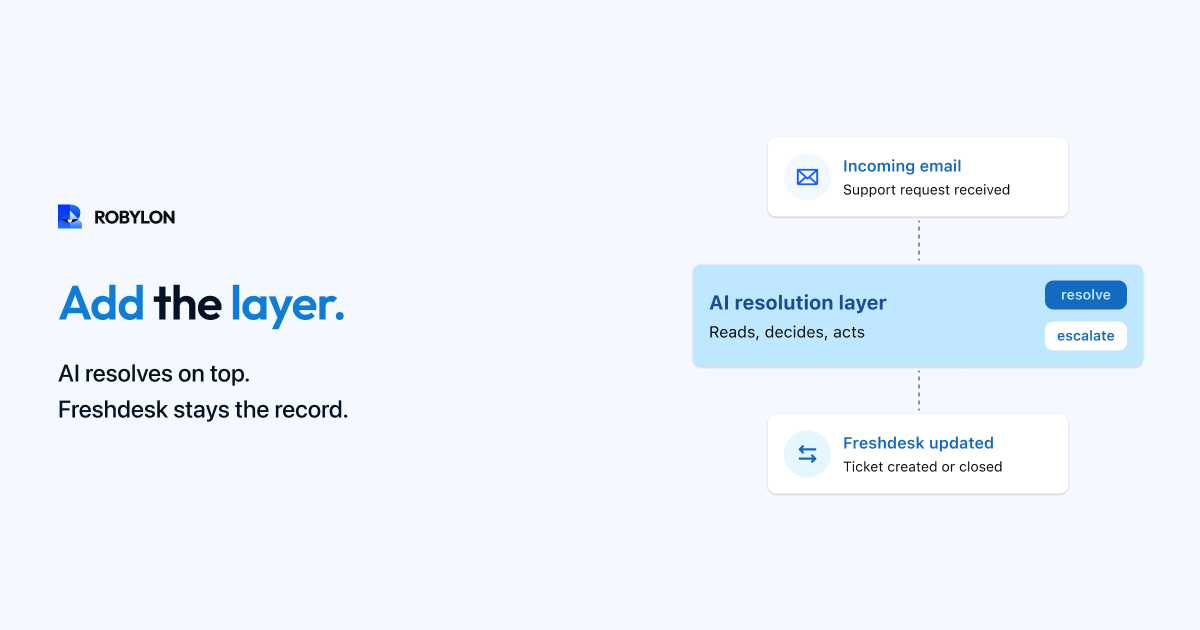
The architecture mirrors the Zendesk integration: email arrives → Freshdesk creates a ticket → Robylon receives the ticket via Freshdesk API → the AI processes the email through its full resolution pipeline (intent detection, knowledge retrieval, system queries, response generation, confidence scoring) → high-confidence resolutions are posted as public replies and the ticket is closed → lower-confidence emails get an internal note with a suggested response for agent review.
Everything syncs back to Freshdesk: the AI’s response (public reply or private note), ticket tags (ai_resolved, ai_drafted, ai_escalated), custom fields (confidence score, detected intent), and status updates. Your Freshdesk dashboard, reporting, and SLA tracking reflect all AI activity as if it were another team member working tickets.
Setup Guide
Step 1: Generate Freshdesk API Key (15 Minutes)
Navigate to your Freshdesk profile → API Key. Copy the key and enter it in Robylon’s integration settings with your Freshdesk domain. The API provides read/write access to tickets, which is all the integration needs.
Step 2: Configure Ticket Scope (30 Minutes)
Choose which tickets the AI processes: all email channel tickets (recommended), tickets from specific groups, or tickets matching specific filters. Exclude internal tickets, tickets from specific email addresses (e.g., vendor communications), and any categories you want to keep fully manual initially.
Step 3: Sync Knowledge Base (1–3 Hours)
If you use Freshdesk’s Solutions (built-in KB), Robylon syncs directly — importing all published articles and keeping them updated automatically. If your KB is in Confluence, Notion, or standalone documents, upload through Robylon’s content interface. Ensure your top 20 most-referenced articles are accurate, complete, and written in clear language (not marketing copy).
Step 4: Connect Business Systems (1–2 Hours)
Connect your OMS, CRM, payment processor, and other systems agents use for lookups. Each integration adds a category of emails the AI can resolve autonomously. Without integrations, the AI answers questions from your KB. With integrations, it processes refunds, checks orders, updates accounts, and takes the actions that close tickets.
Step 5: Shadow Mode (1–2 Weeks)
The AI adds private notes with proposed responses on every email ticket — visible to agents but not customers. Agents review, flag errors, and build confidence. Track accuracy daily; target 85%+ before enabling auto-resolution.
Step 6: Gradual Go-Live
Start with auto-resolution on WISMO, policy FAQs, and simple account queries. Expand weekly to refunds, billing, and subscription management as accuracy data confirms performance. Within 4–6 weeks, the AI handles 60–80% of email volume.
Freshdesk-Specific Configuration Tips
Automations and Dispatch Rules
Freshdesk’s dispatch rules (auto-assign tickets based on keywords or properties) continue working. Add a rule to route ai_drafted tickets to a dedicated “AI Review” group where agents process one-click approvals. Modify your auto-responder to exclude ai_resolved tickets — you do not want customers receiving both an AI resolution and a “We received your email” acknowledgment.
Freddy AI Coexistence
If you are currently using Freddy AI features (auto-triage, canned response suggestions, thank-you detector), they can coexist with Robylon. Freddy handles triage classification in Freshdesk’s interface, while Robylon handles autonomous resolution. Most teams eventually disable Freddy’s email features because Robylon covers the same ground with higher resolution rates, but there is no technical conflict — both can run simultaneously during transition.
Freshdesk Plan Considerations
The API is available on Freshdesk Growth ($15/agent/month) and above. If you are on Growth and getting basic Freddy AI, adding Robylon gives you enterprise-grade AI resolution at a fraction of the cost of upgrading to Freshdesk Pro ($49/agent) or Enterprise ($79/agent) + Freddy add-ons. For teams already on Pro or Enterprise, Robylon replaces the need for Freddy’s email AI features — potentially allowing a plan downgrade that offsets the Robylon cost.
What Changes for Agents
Nothing in the day-to-day workflow changes. Agents open Freshdesk, see their ticket queue, and start working. The queue is shorter because the AI has resolved the simple tickets. Tickets that remain are either complex (requiring human judgment) or AI-drafted (requiring a quick review and one-click send). The agent experience improves — less repetitive work, more interesting problems, and AI-provided context on every ticket.
Bottom Line
Freshdesk is a strong helpdesk with good email management. What it lacks is the depth of AI-powered autonomous resolution — Freddy AI assists agents but rarely resolves tickets end-to-end. Robylon fills this gap without requiring a platform change, adding true email resolution on top of the Freshdesk infrastructure you already trust.
Add AI resolution to Freshdesk in days. Robylon AI integrates with your Freshdesk account via API — resolving 60–80% of email tickets automatically while your agents and workflows stay exactly where they are. Start free at robylon.ai
Frequently asked questions
How does Robylon AI integrate with Freshdesk?
Via the Freshdesk API: email arrives → Freshdesk creates a ticket → Robylon receives it via API → AI processes the email → high-confidence responses are posted as public replies and the ticket is closed → lower-confidence responses are added as private notes for agent review. Everything syncs back: responses, tags (ai_resolved, ai_drafted, ai_escalated), custom fields, and status. Setup: generate API key (15 minutes), configure scope (30 minutes), sync KB (1–3 hours), shadow mode (1–2 weeks), gradual go-live.
Can Robylon work alongside Freshdesk Freddy AI?
Yes — there is no technical conflict. Freddy handles triage classification in Freshdesk's interface, while Robylon handles autonomous resolution. Most teams eventually disable Freddy's email features because Robylon covers the same ground with higher resolution rates (60–80% vs 25–40%). During transition, both can run simultaneously. Adding Robylon also means you may not need Freshdesk Pro or Enterprise tiers for AI features — potentially allowing a plan downgrade that offsets the Robylon cost.
What Freshdesk plan do I need for the integration?
The Freshdesk API is available on Growth ($15/agent/month) and above. If you are on Growth with basic Freddy AI, adding Robylon gives you enterprise-grade resolution at a fraction of upgrading to Pro ($49/agent) or Enterprise ($79/agent). For teams already on higher tiers, Robylon replaces the need for Freddy's email AI — potentially allowing a plan downgrade from Pro to Growth that saves $34/agent/month.
How do I configure Freshdesk automations to work with AI?
Three key adjustments: 1) Create a Freshdesk view for ai_drafted tickets so agents can process one-click draft approvals. 2) Add a dispatch rule routing ai_escalated tickets to your senior agent group. 3) Modify your auto-responder to exclude ai_resolved tickets (condition: tags does not contain ai_resolved) to avoid sending both an AI resolution and a "We received your email" acknowledgment. All other triggers, macros, and automations continue working unchanged.
Will my Freshdesk SLA tracking work with AI-resolved tickets?
Yes — AI-resolved tickets follow the same Freshdesk SLA lifecycle as any other ticket. The AI responds within minutes of ticket creation, so SLA compliance on AI-resolved tickets is effectively 100%. Your Freshdesk SLA reports will show dramatically improved compliance rates (from 75–85% to 95–99% blended) because the majority of tickets are resolved well within any SLA window. No SLA configuration changes required.