50+ Live Chat Scripts for Customer Support (Free 2026 Templates)
50+ live customer service chat script examples & free templates to improve support in 2026. Use ready-to-go scripts for greetings, refunds, upselling & more.
Key takeaways
- Scripts are scaffolding for judgement, not lines to read verbatim. The article covers where they stop working as well as where they help.
- Over 50 examples span greetings, proactive messages, holding, verification, troubleshooting, refunds and upsell.
- Most chat scripts fail for the same reason: they are written for the ideal path and offer nothing for the conversation that leaves it.
What will you find in this guide?
This guide gives you 54 ready-to-use live chat scripts you can copy today: 46 organized by the situation you are actually in, plus 8 industry-specific lines for ecommerce, SaaS, healthcare, and finance. The scenarios cover greetings, proactive messages, buying time, information gathering, troubleshooting, apologies, escalation, orders and refunds, upselling, after-hours, and closing. Every script is written to be pasted and lightly edited, not read.
The whole set is free, and it works as a starter playbook for new agents as well as a benchmark for teams that already have a library.
One thing most script roundups skip: the scripts are the floor, not the ceiling. Past a certain chat volume, copy-pasting templates stops scaling and starts slowing your team down. We cover where that line is, and what to do when you hit it.
Why do support teams use chat scripts?
Support teams use chat scripts so every agent opens, holds, and closes a conversation well, no matter how experienced they are. Open a chat window and the clock starts. Customers judge a support team in the first 30 seconds, and a new agent staring at a blank text box rarely phrases things well under that pressure. Scripts solve the blank-box problem. They give every agent a reliable opening, a calm way to buy time, and a consistent close, so tone doesn’t swing wildly between your week-one hire and your five-year veteran.
That consistency is the real reason scripts matter. Not speed alone, though they help there too. A well-built script library is also the fastest training tool you have: drop a new agent into real conversations on day one with a playbook instead of a panic.
But scripts have a ceiling, and it is worth naming up front. A library of 50 templates works beautifully at 200 chats a week. At 2,000, agents spend more time hunting for the right script than writing a fresh reply would take, and customers start to feel the copy-paste. The last section of this guide covers what replaces scripts at that point.
Want to see how AI can personalize these scripts for your brand? Book a free demo.
What is a live chat script?
A live chat script is a pre-written customer service response that gives an agent a starting point for a common situation. Think of them as live chat templates, not word-for-word scripts an actor reads. The agent keeps the structure and swaps in the customer’s name, order number, or specific issue.
Done well, they cut response time and keep your brand voice steady without sounding robotic. Done badly, they sound like a robot reading a card. The difference is almost always personalization: a good agent treats the script as scaffolding and builds the actual reply on top of it.
 A good script is scaffolding, not a finished reply.
Why do most chat scripts fail in practice?
Most script libraries underperform because of how they get used, not because the wording is bad. This is the part the typical “50 best scripts” article leaves out.
- Agents paste them raw. A script with the customer’s name still showing as [Customer’s Name] is worse than no script. It signals the agent didn’t read the message.
- The library grows faster than anyone can find anything. Once you pass 60 or 70 templates, search becomes the bottleneck. Agents default to a generic catch-all because finding the precise one costs more than typing.
- They go stale. Refund windows change, plans get renamed, a policy shifts, and the scripts don’t. Now agents are quoting outdated terms with full confidence.
- They replace judgment instead of supporting it. A frustrated customer can tell when they are being handed a canned line. The script becomes a wall between them and a real solution.
The fix isn’t fewer scripts. It is treating the library as a living thing: short, well-tagged, reviewed quarterly, and paired with clear rules on when to abandon the template and just talk to the person. We have written more on this in our guide to ways to improve customer support.
How should you use these scripts?
Find the scenario you are in, copy the closest script, and edit it with the customer’s details before sending. The scripts below are grouped by real scenarios: greetings, proactive messages, buying-time responses, information gathering, troubleshooting, apologies, escalations, orders and refunds, upsells, after-hours, and closing. Each block is copy-paste ready and flexible enough to adapt to your industry, whether you run support for ecommerce, SaaS, healthcare, or finance.
For a new team, treat this as a starter playbook. For an experienced one, use it to pressure-test and refine what you already have.
What are the best live chat scripts for each scenario?
The best script for any chat is the one written for the exact moment the customer is in. Here are 46 scripts across 11 common scenarios.
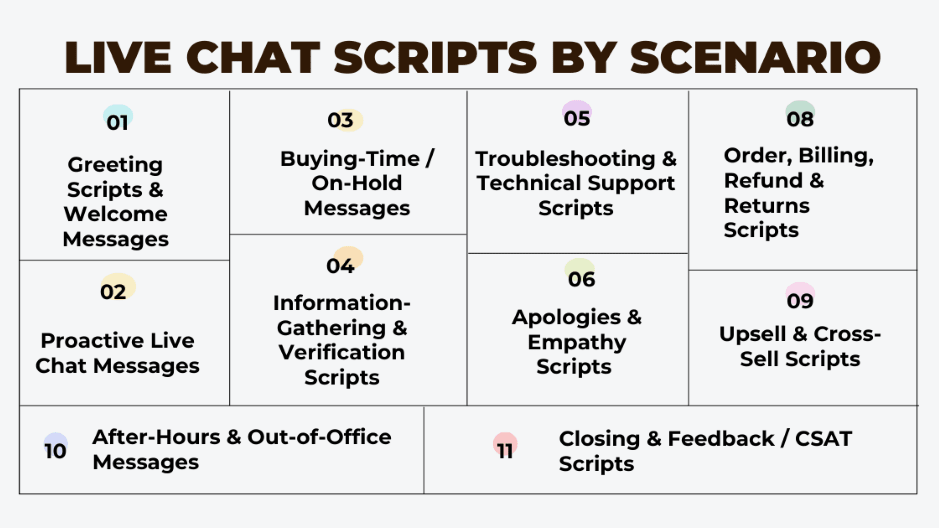 Different live chat scripts tailored for every customer support scenario.
1. Greeting scripts and welcome messages
A strong first message sets the tone for everything after it. Greeting scripts should feel warm, professional, and on-brand. They tell visitors that help is here and that they matter from the first line. Consistent greetings also help new agents start a chat without freezing.
Examples
- First-time visitor: “Hi there! Welcome to [Brand Name]. I’m here if you need product guidance or have any questions.”
- Returning customer: “Welcome back, [Customer’s Name]! Good to see you again. Want to pick up where you left off last time?”
- Checkout visitor: “Saw you’re at checkout. Can I answer any last-minute questions or help with payment options?”
- General welcome: “Thanks for stopping by [Brand Name]. Ask me anything and I’ll get you answers right away.”
Adapted with a name or a little context, these greetings pull visitors into a real conversation instead of a one-line exchange.
2. Proactive live chat messages
Customers don’t always reach out, even when they’re stuck deciding. Proactive messages let your team open the conversation based on behavior: lingering on the pricing page, abandoning a cart, or studying a product. Used well, they recover sales that would otherwise quietly leave. If cart recovery is a big part of your volume, our piece on cart abandonment recovery goes deeper on the automation side.
Examples
- Homepage assistance: “Welcome to [Brand Name]! Want a quick tour of our bestsellers?”
- Pricing page clarification: “Looking at our pricing? I can walk you through what’s in each plan and suggest the right fit for your goals.”
- Product page prompt: “Need more detail on this one? I can pull up reviews, specs, or answer anything you’re wondering about.”
These nudges reduce drop-offs and drive conversions by showing up at the moment of hesitation. For the strategy behind timing them well, see our take on proactive customer service.
3. Buying-time and on-hold messages

Even great agents need a minute to check a policy or ask a colleague. Don’t leave the customer staring at silence. A short, honest holding message keeps the conversation alive and the frustration low.
Examples
- Checking details: “Thanks for waiting, [Customer’s Name]. I’m confirming this with our team, just a moment.”
- System lookup: “One moment while I pull up your information. I’ll update you the second I have it.”
- Investigating an issue: “I’m checking the best fix so I give you the right answer, not a guess. Thanks for your patience.”
- Delay acknowledgment: “Appreciate you hanging on. I want to make sure I get this right for you.”
These short messages prevent awkward gaps and show you respect the customer’s time.
4. Information-gathering and verification scripts
To fix an issue, agents often need details. Asking clearly and politely keeps it from feeling like an interrogation. These scripts collect order IDs, account info, or verification data without breaking the flow.
Examples
- Order details: “Could you share your order ID? I’ll look into this for you right away.”
- Account verification: “To keep your account secure, can I confirm the email linked to your profile?”
- Clarifying the issue: “What happens on your screen when you try to log in? A screenshot would help a lot.”
- Verification (KYC): “For verification, may I have the last four digits of your ID number? This keeps your account safe.”
- Appointment: “Can you confirm the date and time of your appointment so I can pull the right details?”
Scripts like these save time and keep you accurate and compliant, which matters most in regulated industries.
5. Troubleshooting and technical support scripts
When something breaks, customers want a clear path, not jargon. Step-by-step troubleshooting scripts lower frustration and help agents resolve faster. They’re especially useful for SaaS, ecommerce, and healthcare teams handling technical queries.
Examples
- SaaS login issue: “Sorry you’re locked out. Could you try resetting your password with this [reset link]? If it still won’t work, I’ll walk you through the next step.”
- Ecommerce order tracking: “Your package is in transit. Track it here [link], and it should reach you by [date].”
- Healthcare test results: “Your report is live in the patient portal. I can point you to the exact section so it’s easy to download.”
- Generic troubleshooting: “Let’s fix this together. Could you refresh the page and tell me if it’s still happening?”
Clear instructions plus a little empathy make even messy problems feel manageable, and they improve both resolution time and satisfaction.
6. Apologies and empathy scripts for difficult customers
Not every chat is calm. Sometimes people are upset, and prepared apology scripts help agents steady the situation and show they’re listening. These acknowledge the problem, show understanding, and keep things moving toward a fix. For longer, more heated conversations, see our guide on how to deal with angry customers.
Examples
- Delayed response: “Sorry it took longer than expected to get back to you, [Customer’s Name]. Thanks for your patience while I sorted this out.”
- Service outage: “I understand how disruptive this is. We’re dealing with a temporary outage and the team is on it. I’ll share updates the moment I have them.”
- Wrong order delivered: “I’m sorry about the mix-up. I’ve already arranged a replacement, and I’ll confirm the tracking as soon as it ships.”
- Dealing with anger: “I get the frustration, and I want this resolved for you as fast as possible. Let’s work through it together.”
- Abusive behavior: “I’m here to help, and I’d ask for respectful communication so we can get your issue resolved.”
Handled well, these turn high-stress moments into a show of accountability and care.
7. Transfer and escalation scripts
Some issues need a specialist, a supervisor, or another team. A clean handoff keeps customers from feeling passed around. Good transfer scripts set expectations and keep things professional through the switch. For the logic of what to resolve versus route, see our guide to smarter support escalations.
Examples
- General escalation: “To get you the most accurate answer, I’ll transfer you to a specialist. Just a moment.”
- Refund escalation: “I’ll connect you with our billing team. They can review and issue your refund directly.”
- Technical escalation: “Our technical team is best placed to fix this. Let me transfer you for a detailed check.”
- Supervisor handoff: “I’m bringing in my supervisor, who can approve the next step for you. I’ll stay in the chat until they join.”
Transfer scripts keep customers informed and reassured instead of startled by a silent handoff.
8. Order, billing, refund, and returns scripts

Order and billing questions usually make up the bulk of support volume. Consistent scripts here let teams respond quickly and avoid the small wording slips that turn a refund chat into a complaint.
Examples
- Order status: “Your order is on its way. Tracking number is [XXXX], and it should arrive by [date].”
- Shipping delay: “Sorry for the holdup. Your order is running a little late but should reach you by [new date].”
- Refund request: “Happy to help with that. Can you confirm your order ID so I can start the refund?”
- Billing error: “Looks like a double charge. I’ve flagged it, and your refund should land within 5 to 7 business days.”
- Subscription renewal reminder: “Quick heads-up: your subscription renews on [date]. Want to continue, upgrade, or cancel?”
These keep money conversations clear and calm, which is exactly where small ambiguities cause the most damage.
Curious how AI agents handle ecommerce support end to end? Read Smarter AI Customer Support for E-Commerce.
9. Upsell and cross-sell scripts
Live chat isn’t only for problems. With the right timing, an upsell feels like help instead of a pitch. The trick is relevance: suggest the thing that solves a problem the customer already has.
Examples
- Upsell (SaaS): “I see you’re on the basic plan. Pro adds advanced analytics and faster support. Want to see how it’d work for your team?”
- Cross-sell (ecommerce): “To go with your laptop, a protective case is a smart add. Want to see a couple of options before checkout?”
- Insurance upsell: “With your renewal, a lot of pet parents add accident coverage for peace of mind. Want the details?”
- Demo request: “Our premium features could save you real time. Open to a short demo to see if it fits?”
Timed thoughtfully, these lift conversions while keeping a service-first tone.
Want to see AI upsell naturally inside live chats? Book a demo.
10. After-hours and out-of-office messages

Customers expect round-the-clock availability, but few teams can staff chat 24/7. After-hours messages reassure visitors that their question landed and won’t be lost. This is also where an always-on AI live chat layer earns its keep, covering the overnight gap your team can’t.
Examples
- General after-hours: “Thanks for reaching out! The team is offline right now, but we’ll reply first thing tomorrow.”
- Provide a time frame: “We’re away at the moment but will respond within [timeframe]. Thanks for your patience!”
- Redirect to resources: “We’re offline, but you might find a quick answer here: [knowledge base link]. We’ll follow up too.”
- Holiday closure: “We’re out for the holidays until [date]. Your message is noted, and we’ll reply as soon as we’re back.”
Clear after-hours scripts set expectations and stop silence from turning into frustration.
11. Closing and feedback (CSAT) scripts
Ending well matters as much as opening well. Closing scripts wrap the chat professionally and invite feedback, which is how you actually improve over time. If you’re tracking the right numbers, our breakdown of customer service metrics shows what to watch beyond CSAT.
Examples
- Polite close: “Glad I could help today. Anything else before we wrap up the chat?”
- Feedback request: “Thanks for chatting! Could you rate your experience on a quick 1 to 5 scale?”
- CSAT prompt: “Help us improve by sharing feedback here [link]. Takes just a few seconds.”
- Future assurance: “We’re always a message away. Reach out anytime you need a hand.”
These prompts boost engagement and signal that the customer’s opinion counts. Book a demo to see how Robylon turns these into human-like, scalable conversations.
How should chat scripts change by industry?
The core structure stays the same, but tone and priorities shift by sector: speed in ecommerce, clarity in SaaS, empathy in healthcare, and compliance in finance. A core library helps every team, but the scripts that perform best are tuned to your sector.
Ecommerce
In ecommerce, speed and clarity on orders, shipping, and returns are everything. A line like “Your order shipped and should arrive by [date]. Here’s your tracking link.” reassures instantly.
Refunds come up constantly: “Sorry the product didn’t work out. I’ve started your refund, and it’ll reflect within 5 to 7 business days.”
SaaS
SaaS users hit technical snags or pricing confusion. A useful line: “Looks like you’re on the pricing page. Want me to walk through which plan fits your team?”
Or for troubleshooting: “Could you log out and back in? If that doesn’t do it, I’ll guide you through a reset.”
Healthcare
Healthcare needs empathy and precision. Patients want reassurance and clear next steps: “Your test results are in your patient portal. Want me to point you to the right section to download them?”
For appointments: “Can you confirm your preferred date and time? I’ll book it right away.”
Finance
In finance, trust and compliance lead. Scripts balance professionalism with clarity: “For verification, can you confirm the last four digits of your account number? This keeps your data secure.”
Or for loan applications: “Your loan application is approved. Next step is signing the digital form. Want me to send the secure link?”
Industry-tuned scripts make support feel personal and trustworthy. To see how teams in these sectors already use AI chat to scale, browse our case studies.
When should you move from scripts to automation?
Move to automation when agents spend more time finding the right script than writing a reply, or when the same routine questions fill most of the queue.
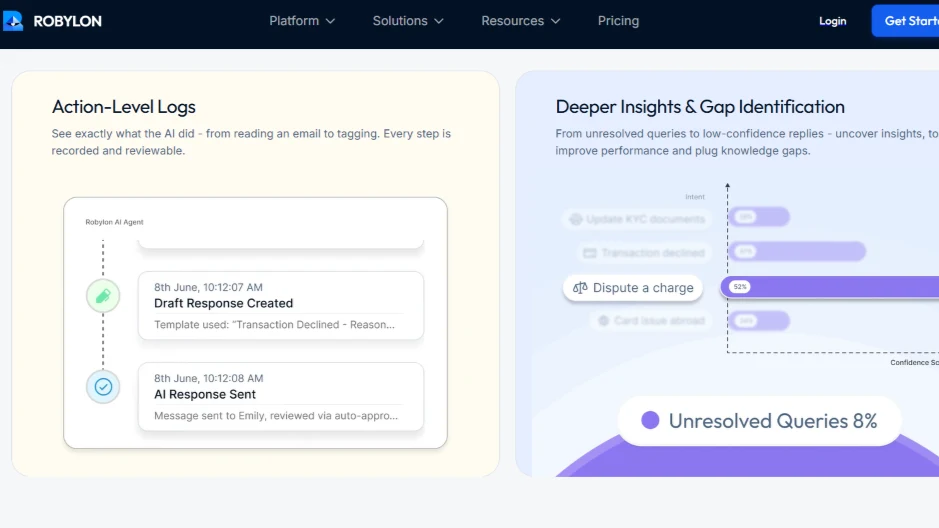 Robylon tracks conversations, logs actions, and identifies gaps.
Scripts and automation aren’t rivals. Automation is what a great script library becomes once volume outgrows manual paste-and-edit. The same patterns that made your scripts good (consistent tone, the right answer for each scenario, a clean escalation path) are exactly what an AI agent learns from.
The shift tends to happen for a few clear reasons:
- Volume outruns the team. When agents spend more time finding the right script than writing a reply, the library has become friction. That’s the signal.
- The same 20 questions fill the queue. If a fifth of your chats are order status, password resets, and refund timing, those don’t need a human reaching for a template. They need a resolution.
- Coverage gaps hurt. Nights, weekends, and spikes are where scripts can’t help because no one is there to paste them.
Once teams reach this point, AI customer support software like Kayako can move beyond canned responses and automate repetitive support conversations. They are much more agile for teams that are looking to scale support with AI without adding the bloat of enterprise tools like Zendesk.
Robylon is built for this shift. Instead of an agent hunting for the right script, an AI agent resolves the routine chats outright, personalizing each reply, holding your brand tone, and pulling real customer context in the moment. Robylon resolves 60 to 80 percent of routine customer conversations on its own, with a human-in-the-loop handoff the instant a chat needs judgment or the customer’s tone shifts. It runs across email, chat, voice, and WhatsApp in 40-plus languages, with 60-plus write-access integrations so the agent can actually take action, not just answer.
The scripts in this guide are still the foundation. They define what good looks like. Automation just lets that “good” run at a scale no paste-and-edit workflow can match, so your team spends its time on the conversations that genuinely need a person.
Ready to turn your chat scripts into conversations that resolve themselves? Robylon AI handles 60 to 80 percent of routine customer chats autonomously, with AI agents that take action across Shopify, Zendesk, Stripe, and 60-plus other integrations. See Robylon in action.
Frequently asked questions
What is a live chat script?
A live chat script is a pre-written response agents use as a starting point for a common support situation, like a greeting, a refund request, or a troubleshooting step. It isn't read word for word. The agent keeps the structure and personalizes it with the customer's name, order details, or specific issue, which keeps replies fast and consistent without sounding robotic.
Why should businesses use canned responses for live chat?
They save time, reduce handling errors, and ensure all agents deliver replies in the same professional brand tone. They also help new agents gain confidence when handling real-time chats.
How many chat scripts does a support team need?
Most teams do well with 40 to 60 well-organized scripts covering their highest-volume scenarios. Beyond about 70, finding the right one starts to cost more time than writing a fresh reply, so the better move is tighter tagging and quarterly cleanup rather than endless additions. Quality and findability matter far more than the size of the library.
Can live chat script examples be customized for my industry?
Yes, scripts can be adapted for e-commerce, SaaS, healthcare, finance, and other industries to reflect specific customer needs. Customization ensures your replies align with compliance, tone, and customer expectations.
Which industries benefit most from live chat script examples?
Industries like e-commerce, SaaS, healthcare, and finance use them heavily to resolve routine queries while maintaining compliance and trust. Any customer-facing industry with high query volumes can benefit from them.
Do canned chat scripts hurt the customer experience?
Only when they're pasted raw. A script that still shows [Customer's Name] or quotes an outdated policy reads as careless and damages trust. Used as scaffolding rather than a finished reply, scripts improve experience by keeping tone steady and responses quick. The risk isn't the script itself, it's skipping the personalization step that makes it feel human.
When should a team move from chat scripts to AI automation?
The clearest signal is when agents spend more time searching for the right script than writing a reply, or when a large share of chats are the same routine questions. At that point automation resolves the repetitive volume directly and frees agents for conversations that need judgment. Coverage gaps like nights and weekends are another common trigger for making the jump.
How do AI-powered agents use live chat templates?
AI integrates scripts into real-time conversations, personalizes responses based on context, and scales support without losing empathy. This makes interactions faster, more consistent, and tailored to each customer.
Can AI personalize chat scripts automatically?
Yes. An AI support agent reads the customer's message, pulls relevant account and order context, and generates a reply in your brand voice rather than pasting a fixed template. It handles routine chats on its own and escalates to a human when the situation calls for it. This removes the manual paste-and-edit step that makes traditional scripts slow at scale.
How does Robylon improve on live chat scripts?
Robylon is an AI customer support platform that resolves tickets across email, chat, voice and WhatsApp. Instead of an agent pasting a template, Robylon writes each reply from the customer's own context and resolves 60 to 80 percent of routine conversations on its own, in 40+ languages. It uses 60+ write-access integrations to take actions like refunds and order lookups, and hands the chat to a human when it needs judgment.
Related reading
- Customer Support
11 SaaS Help Desk Tools Ranked for 2026 (3 Are Completely Free)
The 11 best SaaS support tools for 2026, ranked with real pricing and an honest take on which charging model (per-agent, per-resolution, or credits) actually fits your team.
- Customer Support
11 Customer Service Trends in 2026 Every Support Leader Must Know
Top 11 customer service trends for 2026: from AI copilots to autonomous agents, voice AI, omnichannel, GenAI, and human+AI partnerships.
- Customer Support
9 Free Help Desk Tools in 2026 That Don't Feel Free (Full Breakdown)
From lightweight tools for startups to advanced systems with AI and automation, explore the top free and freemium help desk software of 2026.